

U0269 on 2017-2018 GMC Acadia: Lost Communication With Long Range Radar Fixes
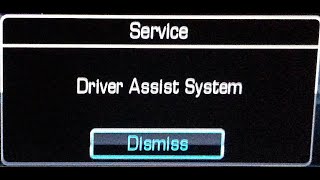
This code means the vehicle has lost communication with the long-range radar sensor, which controls the Adaptive Cruise Control. This will disable the system and trigger a "Service Driver Assist" message. Common causes include wiring issues at the sensor connector, a faulty radar module, or a problem with the diagnostic tool itself. A professional diagnosis is recommended as module replacement requires calibration.
- U0269 means the Adaptive Cruise Control radar has stopped communicating and the feature will not work, usually displaying a 'Service Driver Assist' message.
- Diagnosis should start with checking wiring and fuses at the sensor in the front grille, but the radar module itself is a common point of failure.
- A GM Technical Service Bulletin (PIT5441C) warns that the technician's own diagnostic tool can sometimes cause this code to appear by mistake.
- Replacing the radar module is a job for a professional, as it requires special programming and a dynamic driving calibration to function correctly.
What's Unique About the 2017-2018 Gmc ACADIA
The 2017-2018 Acadia belongs to the second generation, built on the GM C1XX platform, which introduced more complex ADAS features. The communication for these systems, including the long-range radar, runs on a dedicated 'object detection bus' network that uses pins 3 and 11 in the Data Link Connector (DLC). A unique issue highlighted by GM is that the technician's diagnostic tool (MDI) or its cable can sometimes be the cause of the fault code during a scan, leading to a misdiagnosis. This means the problem might not be with the vehicle at all, but with the equipment used to test it.
Diagnostic Flowchart
Tap your situation to follow the diagnostic path that matches what you're seeing on this vehicle.
Symptoms You May Notice
- Adaptive Cruise Control is unavailable or not working.
- "Service Driver Assist" or similar message on the instrument cluster.
- Check Engine Light or other service light is illuminated.
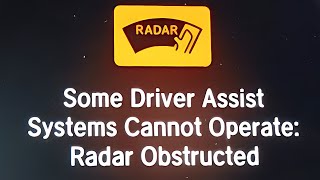
- Adaptive Cruise Control icon on the instrument display is white or has a line through it.
- Replacing the radar module when the actual fault is in the wiring or a connector.
- Performing vehicle repairs when the fault code was falsely generated by the technician's own diagnostic equipment, as described in TSB PIT5441C.
Most Likely Causes
- Faulty Long-Range Radar Sensor Module 🔴 High Probability The module is located at the front of the vehicle, typically in the lower grille area, making it susceptible to damage from minor front-end impacts, road debris, and weather exposure. Internal failure is also possible.
How to confirm: After confirming power, ground, and communication wiring are intact, a professional scan tool (like GM's GDS2) will show no communication with the module. Attempting to access the module's data stream will fail. The module may have an asterisk next to its calibration status in the scan tool, indicating it has been replaced but not programmed.
Typical fix: Replace the long-range radar sensor module. The new module must be programmed and calibrated to the vehicle using a factory-level scan tool and a specific driving procedure.
Est. part cost: $300-$600 - Wiring Harness or Connector Issue 🟡 Medium Probability The wiring to the front-mounted radar is exposed to the elements, potential road debris, and physical stress, which can lead to corrosion, chafing, or loose connections right at the module connector. This is a common failure point for exposed sensors on many vehicles.
How to confirm: Visually inspect the wiring harness leading to the radar module for any signs of damage, especially at the connector. Use a multimeter to check for proper voltage (11.8–12.6 V) and a clean ground (less than 0.1 Ω resistance) at the module's connector with the ignition on.
Typical fix: Repair the damaged section of the wiring harness or clean/replace the faulty connector. Applying dielectric grease to the connector pins can help prevent future moisture intrusion.
Est. part cost: $20-$150 - Diagnostic Tool (MDI) Interface Issue ⚪ Low Probability As per GM TSB PIT5441C, the object detection bus uses specific pins (3 and 11) in the DLC. If the technician's diagnostic cable has an internal fault on these circuits, it can create false 'Lost Communication' codes for the radar and other ADAS modules. This can lead to an incorrect diagnosis that a vehicle component has failed.
How to confirm: A technician can test their diagnostic MDI tool on a known-good vehicle with the same ADAS features. If the same codes appear, the tool is faulty. Alternatively, using a different, verified MDI tool on the original vehicle will show no codes if the tool was the issue.
Typical fix: The technician needs to repair or replace their Multiple Diagnostic Interface (MDI) cable or unit. No repair is needed on the vehicle itself.
Est. part cost: $0 for the vehicle owner
Rare But Worth Checking
- Blown Fuse: A simple but often overlooked cause. The ADAS modules are powered by fuses, and a blown fuse will cut all power, resulting in a communication loss code.
- Low Battery Voltage: A weak or failing battery can cause momentary voltage drops during engine start-up, which can be enough for control modules to register a temporary loss of communication and set a history code. A Reddit user noted persistent communication faults after a battery change on a 2018 Acadia that required more than a simple code clear to resolve.
Diagnosis Steps
- Connect a professional-grade scan tool (e.g., GM MDI 2) capable of communicating with ADAS modules.
- Attempt to communicate directly with the Long-Range Radar Sensor Module (K114B). If there is no communication, proceed with physical checks.
- Note: If multiple 'U' codes for various safety modules (U0265, U0268, U0269, etc.) are present, consider the possibility of a faulty diagnostic tool as per TSB PIT5441C before proceeding.
- Locate the long-range radar module, mounted in the lower grille area or behind the front bumper cover.
- Visually inspect the module and its 12-pin connector for any signs of physical damage, corrosion, or water intrusion.
- Inspect the wiring harness leading to the module for any cuts, chafing, or pinch points.
- Using a wiring diagram, check for proper battery voltage and a clean ground at the module's electrical connector.
- If power and ground are good, check the communication network (CAN bus) wires on pins 3 and 11 for proper resistance and voltage to ensure the network itself is intact.
- If all wiring and network connections are confirmed to be good, the long-range radar module itself is the most likely culprit.
- After replacement, the new module must be programmed and then calibrated. Calibration is a dynamic process that requires driving the vehicle above 35 mph on a straight road with traffic and roadside objects until the scan tool indicates the 'learn' procedure is complete.
Parts You'll Likely Need
- Long Range Radar Sensor Module
(OEM #84836171 (supercedes multiple previous numbers including 13442495, 23435752, etc.))— This module is the brain for the Adaptive Cruise Control system. It can fail internally or from physical damage, causing a loss of communication.
Trusted brands: ACDelco (GM Genuine)
OEM price range: $400-$600
Aftermarket price range: $300-$500
Related Codes That Often Appear With This One
- U0265 — Lost Communication with Front Camera Module. These systems often work together, share the same 'object detection bus' network, and can be affected by the same diagnostic tool issue described in TSB PIT5441C.
- U0268 — Lost Communication with another radar sensor (e.g., side blind zone alert). On some GM vehicles, multiple radar sensors are used, and a network-wide issue can cause several communication codes at once.
Technical Service Bulletins (TSBs) & Recalls
- PIT5441C: Mentions that U0269 and other codes can be falsely set by a faulty Multiple Diagnostic Interface (MDI) cable used by technicians, leading to misdiagnosis of the active safety module or front camera. It specifically calls out the object detection bus on pins 3 and 11 of the DLC.
Platform-Specific Known Issues
- Vulnerability to Minor Impacts: Due to its location in the front lower grille, the long-range radar sensor is highly susceptible to damage from parking blocks, curbs, road debris, and even minor fender benders, which can break the connector or damage the module itself.
Mechanic-Grade Diagnostic Values
- Long-Range Radar Sensor Module Supply Voltage — expected: 11.8–12.6 V with ignition ON. Failure: A reading below 11.8V indicates a power supply issue that must be fixed before condemning the module.
- Long-Range Radar Sensor Module Ground Circuit Resistance — expected: Less than 0.1 Ω. Failure: A reading higher than 0.1 Ω indicates a poor ground connection, which can cause communication faults.
Hidden / Shadow Codes Worth Checking
- Symptom Byte (e.g., '71'): GM uses a two-digit hex symptom byte after the DTC. A '71' indicates 'Invalid Data Received', meaning the module is online but getting nonsensical data from another source. This directs the technician to find the source of the bad data rather than replacing the module reporting the code. (see via A professional scan tool like the GM GDS2 will display the DTC followed by the symptom byte (e.g., U0269 71).)
Scan Tool Commands That Help
- GM GDS2 (Global Diagnostic System 2): SPS (Service Programming System) Programming — This function is required to load the correct software and VIN into a new Long-Range Radar Sensor Module after it has been physically installed.
- GM GDS2: Long Range Sensor Module Learn — After a new module is programmed via SPS, this calibration function must be initiated. It requires a specific 10-30 minute drive cycle to allow the sensor to learn its position and environment.
- GM GDS2: Calibration History / Learn Status — This data display screen shows the current state of the calibration (e.g., 'In Progress', 'Complete', 'Error'). It can be used to monitor the learn procedure during the drive cycle. An asterisk (*) next to the calibration data can indicate a module has been replaced but not yet programmed.
- GM GDS2: Reset — If a learn procedure fails or times out, a 'Reset' button is available in GDS2. With the vehicle below 6 mph, this can be used to restart the learn process without having to cycle the ignition.
Wiring & Ground Locations
- DLC Pins 3 and 11 — The vehicle's Data Link Connector (OBD-II port) under the driver's side dashboard.. This is the specific physical location of the 'Object Detection Bus' network. A fault in the technician's diagnostic cable on these pins can induce a false U0269 code, as noted in TSB PIT5441C.
- K114B — Behind the front grille or in the lower fascia area.. This is the official GM designator for the Long-Range Radar Sensor Module itself.
Real Owner Repair Stories
- YouTube - L1 Automotive Training (2017 Cadillac XT5 (GM C1XX Platform sibling to the Acadia)) — Service Driver Assist System message after front-end collision and module replacement.
❌ Tried (didn't work) Replacing and programming the long-range radar module., Attempting the dynamic calibration (learn) procedure, which failed with a 'mounting incorrect' error.
✅ What actually fixed it After the calibration repeatedly failed, the technician removed the front bumper and discovered the metal bracket holding the radar module was slightly bent from the original impact. Replacing the bent bracket allowed the new module to be mounted correctly, after which the calibration procedure completed successfully in under 10 minutes.
"I Checked Everything" — The Actual Cause
- The most notable pattern for this code is when all vehicle wiring and the module itself test perfectly fine, but the code was actually induced by a faulty MDI diagnostic tool cable used by the technician. TSB PIT5441C specifically warns of this, as a fault in the tool's connection to DLC pins 3 and 11 can create false communication codes.
OEM Part Supersession History
13442495, 23435752→84836171— Standard part evolution for design updates, reliability improvements, or manufacturing changes.
Heads up: No known incompatibilities; the newest part number is generally the correct service replacement for all previous versions on this platform.
Model Year Variations Within This Range
- 2017-2018: There are no significant differences in the ADAS hardware, including the long-range radar module, between the 2017 and 2018 GMC Acadia. Diagnostic procedures and common causes are identical for both years.
Helpful Videos

We Have This Part in Stock


The information in this article is provided for general reference and educational purposes only. Vehicle specifications, procedures, and part compatibility can vary by production date, trim level, and region. Always consult your vehicle's factory service manual and verify part numbers before purchasing or performing repairs. Safety-critical components such as airbags, seat belts, and braking systems should be installed by a qualified professional.
- Gmc ACADIA:
- 🎬 Helpful Videos
- 🛍️ Shop This Part
- What's Unique About the 2017-2018 Gmc ACADIA
- Diagnostic Flowchart
- Symptoms You May Notice
- Most Likely Causes
- Rare But Worth Checking
- Diagnosis Steps
- Parts You'll Likely Need
- Related Codes That Often Appear With This One
- Technical Service Bulletins (TSBs) & Recalls
- Platform-Specific Known Issues
- Mechanic-Grade Diagnostic Values
- Hidden / Shadow Codes Worth Checking
- Scan Tool Commands That Help
- Wiring & Ground Locations
- Real Owner Repair Stories
- "I Checked Everything" — The Actual Cause
- OEM Part Supersession History
- Model Year Variations Within This Range
- 🎟️ Get 5% Off