

U0269 on 2016-2018 Buick Envision: Lost Communication Causes and Fixes
U0269 on a 2016-2018 Envision means a communication failure with a safety system sensor, like a blind spot radar. However, a GM service bulletin confirms this code is often falsely triggered by a technician's faulty diagnostic cable. If the fault is real, expect to replace a damaged wire or the sensor module itself, which requires professional programming.
- U0269 means a safety system sensor has stopped communicating.
- Before any repair, you MUST rule out that the code was falsely set by the diagnostic tool itself, as per GM TSB PIT5441C.
- If the code is real, the most common causes are a bad sensor module in the bumper or damaged wiring.
- The vehicle is safe to drive, but the disabled safety features require extra driver vigilance.
- Replacing the sensor module is not a DIY job; it requires professional programming to link it to your vehicle.
What's Unique About the 2016-2018 Buick ENVISION
For this generation of Buick and other GM vehicles, the U0269 code has a highly unusual characteristic. GM issued Technical Service Bulletin #PIT5441C, which specifically includes the 2016-2018 Envision, warning that this code can be falsely set by a technician's own faulty diagnostic tool cable. The data bus for these safety modules, known as the object detection bus, uses specific pins in the diagnostic port (pins 3 and 11) that may have been rarely used, revealing a previously unknown fault in the technician's MDI (Multiple Diagnostic Interface) equipment. This means the appearance of U0269 doesn't automatically condemn a part on the car and requires careful diagnosis to avoid unnecessary repairs.
Diagnostic Flowchart
Tap your situation to follow the diagnostic path that matches what you're seeing on this vehicle.
Symptoms You May Notice
- "Service Driver Assist" or "Service Active Safety" message on the dashboard.
- Blind-spot monitoring system is inoperative.
- Indicator light on the side mirror for the blind spot system may stay on or not light up at all.
- Adaptive Cruise Control is unavailable.
- Lane Keep Assist or Lane Departure Warning system is disabled.
- Warning light on the instrument cluster.
- Replacing a sensor module without first confirming the diagnostic tool is not the cause, as per TSB PIT5441C.
- Replacing a sensor module when the actual fault is a simple wiring or connector issue.
- Assuming the fault lies with the rear sensor module when a known issue on other GM platforms is a chafed wiring harness in the *front* bumper 🎬 Watch: How to repair a damaged object detection harness causing the code.
Most Likely Causes
- False Code Set by Diagnostic Tool 🔴 High Probability As per TSB PIT5441C, the object detection bus uses specific DLC pins (3 and 11) that can reveal latent faults in a technician's MDI diagnostic cable, creating false communication codes. This is a well-documented issue across many GM models from this era.
How to confirm: A technician should test their diagnostic cable on a known-good vehicle with the same system or use a self-test loopback adapter (P/N EL-47955-1) to verify the tool before proceeding with vehicle diagnosis. If the tool sets the same false codes on a good vehicle, the tool's cable is the problem.
Typical fix: No repair is needed on the vehicle. The technician must replace their faulty diagnostic cable. After confirming the tool was the cause, all DTCs should be cleared.
Est. part cost: $0 - Failed Side Object Detection Module (Blind Spot Radar) 🟡 Medium Probability The radar sensor modules, especially those in the rear bumper, are susceptible to failure from water intrusion or internal electronic faults over time. Cracks in the module housing can allow moisture to short the internal circuit board.
How to confirm: If the wiring, connectors, and fuses are confirmed to be good, and the code is not tool-induced, the module itself is the likely point of failure. This is confirmed by attempting to communicate with the specific module (e.g., Side Object Detection Module - Left) using a professional scan tool like GDS2 and seeing a 'Not Communicating' status.
Typical fix: Replace the failed object detection module. The new module MUST be programmed and calibrated by a dealer or qualified shop with GM-specific software (GDS2 and SPS/Techline Connect). It is sometimes recommended to apply a bead of automotive sealant around the seams of the new module before installation as a preventative measure.
Est. part cost: $150-$400 - Damaged Wiring or Corroded Connector 🟡 Medium Probability Sensor modules are located in the bumpers, exposing the wiring harnesses to moisture, road salt, and potential impact damage, leading to corrosion or breaks in the wires. On some GM platforms, wiring harnesses are known to chafe against bumper support bars, causing shorts.
How to confirm: Visually inspect the wiring harness and connector pins for the affected module (e.g., in the rear bumper for blind spot radar) for any signs of green corrosion, chafing, or broken wires. Test for power (11.8–12.6 V), ground (< 0.1 Ω), and data signal continuity with a multimeter.
Typical fix: Repair the damaged section of the wiring harness or replace the connector pigtail. Apply dielectric grease to the connector pins to protect against future moisture intrusion.
Est. part cost: $25-$70
Rare But Worth Checking
- Failed Active Safety Control Module: While much less common than a sensor or wiring fault, the main control module that orchestrates the safety systems can fail, causing communication codes with one or more sensors. This would typically be suspected if communication is lost with multiple sensors simultaneously. This module also requires programming upon replacement.
- Improper Module Mounting: The radar modules are mounted on brackets that are often heat-staked to the bumper fascia. If a previous repair was done incorrectly or an impact broke the mounts, the module can be misaligned or vibrate excessively, potentially leading to internal damage or communication faults over time.
Diagnosis Steps
- CRITICAL FIRST STEP: If you are a technician, verify your MDI diagnostic cable is not the cause, per TSB PIT5441C. Test it on a known-good vehicle or use a loopback adapter (EL-47955-1).
- Scan the Active Safety Control Module for U0269 and any other related codes using a professional tool like GM GDS2.
- Use the scan tool's network communication status function to identify which specific module has lost communication (e.g., Side Object Detection Module B / Right).
- Check all fuses related to the Active Safety and Driver Assist systems in the vehicle's fuse panels.
- Locate the suspect module. For blind spot sensors, this is typically inside the rear bumper cover. For adaptive cruise, it's in the front grille.
- Carefully inspect the module's electrical connector and the nearby wiring harness for any signs of corrosion, water damage, physical impact, or chafing against vehicle structures.
- If wiring appears intact, use a multimeter to test for proper power (11.8-12.6V) and ground (less than 0.1 Ω resistance) at the module connector with the ignition on.
- If power and ground are good, test the resistance of the CAN bus network at the connector; it should be approximately 60 Ω.
- If all wiring and power inputs are good, the module itself is the most likely cause of the failure.
- After replacing the module, it must be programmed using the GM Service Programming System (SPS) and may require a calibration procedure. 🎬 Watch: Step-by-step guide to programming new side object modules
Parts You'll Likely Need
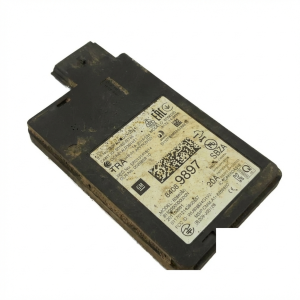
- Side Obstacle Detection Control Module
(OEM #84402183 (Supersedes 23299993))— This radar sensor is the most common part to fail if the code is legitimate, often due to its location in the bumper leading to water intrusion. Note that part numbers can be superseded; always verify with a dealer using your VIN.
Trusted brands: ACDelco, GM Genuine Parts
OEM price range: $225-$385
Aftermarket price range: $150-$250 - Module Connector Pigtail — If the connector itself is damaged by corrosion, it must be replaced to ensure a reliable connection to the new module.
Trusted brands: ACDelco, Dorman
OEM price range: $40-$70
Aftermarket price range: $25-$50
Related Codes That Often Appear With This One
- U0075 — This is another general network communication code often listed alongside U0269 in TSB PIT5441C as being potentially triggered by a faulty diagnostic tool.
- U026A, U026B, U026C, U0265, U0268 — These are all communication codes for various object detection sensors. They are part of the same family of codes and are also mentioned in TSB PIT5441C as being susceptible to the same false-code issue from a faulty MDI cable.
Technical Service Bulletins (TSBs) & Recalls
- PIT5441C: Warns that DTCs U0269, U0075, U026A, U026B, U026C, U0265, and U0268 can be falsely set by a faulty MDI (Multiple Diagnostic Interface) cable during diagnosis. It details how the object detection bus on DLC pins 3 and 11 can expose this tool fault.
Platform-Specific Known Issues
- The primary vehicle-specific issue is the high probability of a false code being set by a technician's diagnostic tool, as documented in GM TSB #PIT5441C.
- Water intrusion into the side object detection modules located in the rear bumper is a common failure point leading to legitimate instances of this code.
Mechanic-Grade Diagnostic Values
- Object Detection CAN Bus Resistance — expected: Approximately 60 Ω. Failure: A reading of 120 Ω indicates an open circuit or one of the terminating resistors is offline. A reading near 0 Ω indicates a short between the CAN High and CAN Low wires.
- Module Power Supply Voltage — expected: 11.8–12.6 V. Failure: A voltage reading below 11.8V indicates a problem with the power supply circuit or a low vehicle battery.
- Module Ground Circuit Resistance — expected: < 0.1 Ω. Failure: A resistance reading higher than 0.1 Ω (or less than 2 Ω per some service docs) indicates a poor ground connection, which can cause communication issues.
- Object Detection Bus Voltage (at DLC) — expected: CAN High (Pin 3) should be ~2.6V and CAN Low (Pin 11) should be ~2.4V with key on.. Failure: Voltages that are the same, stuck high, stuck low, or fluctuating wildly indicate a bus fault like a short to power, short to ground, or module interference.
Scan Tool Commands That Help
- GM GDS2: Module Diagnostics > Active Safety Control Module > Data Display — Use this to view the communication status of all modules on the object detection bus. A module that is not communicating will be flagged here, confirming the source of the U-code.
- GM GDS2: Control Functions / Bi-directional Controls — While specific bidirectional tests for the radar module are limited, this function in GDS2 allows a technician to command other related systems on and off to verify the Active Safety Control Module itself is functioning correctly.
- GM SPS (Service Programming System): Programming and Setup — This is required after replacing either the Side Object Detection Module or the Active Safety Control Module. The new module must be programmed with the vehicle's VIN and specific configuration data to function.
Wiring & Ground Locations
- Active Safety Control Module — In the front of the vehicle, though exact location can vary. On some GM platforms, it is found under the dash or behind trim panels. On the related 2016-2019 Envision, the Body Control Module (BCM), which it communicates with, is located in the center console behind the passenger side lower panel.. This is the primary module that sets the U0269 code when it loses communication with a sensor. All communication from the object sensors routes through this module.
- Side Object Detection Modules — Located behind the rear bumper cover, one on the left side and one on the right side. Access requires removing the rear bumper fascia.. These are the sensors that typically lose communication, triggering the U0269 code. Their location makes them vulnerable to water intrusion and impact damage.
- Object Detection Bus at DLC — Pins 3 (CAN High) and 11 (CAN Low) of the Data Link Connector (DLC) under the driver's side dashboard.. This is the direct access point for a scan tool to communicate with the object detection modules. As noted in TSB PIT5441C, a fault in the diagnostic tool's cable related to these specific pins can cause a false U0269 code.
Real Owner Repair Stories
- Forum post on a platform-mate vehicle (2017 Cadillac XT5 (shares platform and ADAS components)) — Service Driver Assist message, blind spot indicators in mirrors staying on, intermittent infotainment/camera system errors.
❌ Tried (didn't work) Wiggling the wiring harness connector in the rear bumper, which made the problem intermittent but did not resolve it.
✅ What actually fixed it The owner removed the rear bumper and found a crack in the housing of the side object detection module. Moisture had entered and corroded the internal circuit board. Replacing the module with a used part resolved all symptoms.
OEM Part Supersession History
23453703→23497732— Standard part revision by the manufacturer.
Heads up: This is for the main Active Safety Control Module, not the side sensor. Always verify the correct part number for your vehicle's specific VIN and options before ordering.23299993→84402183— Standard part revision by the manufacturer for the Side Object Detection Module.
Model Year Variations Within This Range
- 2016-2018: The 2017 model year introduced a base 2.5L non-turbo engine, while the 2.0L turbo was standard in 2016 and optional on higher trims in 2017-2018. ADAS features like blind-spot monitoring were standard on Essence and higher trims, while more advanced features like adaptive cruise control and forward collision mitigation were only available on the top Premium II trim.
Helpful Videos
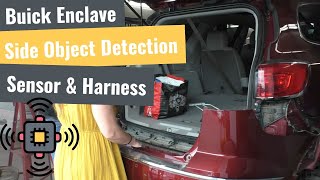
We Have This Part in Stock



The information in this article is provided for general reference and educational purposes only. Vehicle specifications, procedures, and part compatibility can vary by production date, trim level, and region. Always consult your vehicle's factory service manual and verify part numbers before purchasing or performing repairs. Safety-critical components such as airbags, seat belts, and braking systems should be installed by a qualified professional.
- Buick ENVISION:
- 🎬 Helpful Videos
- 🛍️ Shop This Part
- What's Unique About the 2016-2018 Buick ENVISION
- Diagnostic Flowchart
- Symptoms You May Notice
- Most Likely Causes
- Rare But Worth Checking
- Diagnosis Steps
- Parts You'll Likely Need
- Related Codes That Often Appear With This One
- Technical Service Bulletins (TSBs) & Recalls
- Platform-Specific Known Issues
- Mechanic-Grade Diagnostic Values
- Scan Tool Commands That Help
- Wiring & Ground Locations
- Real Owner Repair Stories
- OEM Part Supersession History
- Model Year Variations Within This Range
- 🎟️ Get 5% Off