

U0265 on 2017-2018 Cadillac XT5: Lost Communication With Front Camera Fixes
This code means your XT5 has lost communication with the front camera module for the advanced safety systems. The most common fixes are a software update performed by the dealer or checking for simple wiring issues. Less often, the camera module itself needs replacement.
- U0265 on your XT5 means the front safety camera has stopped communicating, disabling features like collision alert.
- Before replacing any parts, have a dealer check for a simple software update, which is a very common fix for this code on GM vehicles.
- If software is not the issue, the problem is most likely a wiring connection issue at the camera or a failed camera module itself.
- Driving is possible, but not recommended for long periods as key safety systems will be offline.
What's Unique About the 2017-2018 Cadillac XT5
For the 2017-2018 XT5, this code is specifically called out in General Motors Technical Service Bulletin (TSB) #PIT5441C. Uniquely, this TSB suggests that the code can sometimes be triggered by a damaged diagnostic tool cable (the MDI or Multiple Diagnostic Interface) during service, a rare scenario not typically considered. Additionally, numerous GM service bulletins for various models, including those on the same platform, confirm a high tendency for this code to be caused by software glitches that require a simple re-program at the dealership, rather than a hardware replacement.
Diagnostic Flowchart
Tap your situation to follow the diagnostic path that matches what you're seeing on this vehicle.
Symptoms You May Notice
- Warning message on the dashboard like 'Service Driver Assist', 'Service Active Safety', or 'Service Front Camera System'.
- Disabling of safety features like Forward Collision Alert, Lane Keep Assist, and Automatic Emergency Braking.
- An amber warning light for the Automatic Emergency Braking system may illuminate and then extinguish on its own.
- The vehicle's engine and transmission performance will be unaffected.
- In some related cases on other GM vehicles, a malfunctioning front camera module can cause a parasitic battery drain, leading to a weak or dead battery.
- Replacing the camera module when only a software update was needed. Always check for available TSBs and software updates first to avoid unnecessary expense.
- Beginning diagnostics on the camera module itself when the code was falsely set by a faulty technician scan tool, as described in TSB PIT5441C.
Most Likely Causes
- Front Camera Module Software Anomaly 🔴 High Probability GM has issued several service bulletins for the XT5 and its platform mates indicating that software glitches can cause the module to stop communicating intermittently. TSB N202305180 for 2020 Cadillacs and 25-NA-050 for 2024 Corvettes both cite U0265 as being resolved with a software re-flash, showing a pattern of this being the primary fix.
How to confirm: A GM dealer or qualified shop with access to GM's Service Programming System (SPS) can check the current software calibration against the latest available version for your vehicle's VIN.
Typical fix: Reprogramming the Front Camera Module (FCM) with the latest software. This is a dealer-only or specialty shop repair that does not require new parts.
Est. part cost: $0 - Damaged Wiring or Loose Connector 🟡 Medium Probability The camera is located near the windshield, and its wiring harness can be disturbed during windshield replacement or be subject to vibrations. The connector pins can also suffer from corrosion due to moisture, especially if the windshield seal is compromised.
How to confirm: Visually inspect the wiring harness and connector at the back of the front camera module. Check for any signs of damage, chafing, loose pins, or corrosion. This requires removing the plastic trim around the rearview mirror.
Typical fix: Repairing the damaged section of the wire harness or cleaning/re-seating the connector. Applying dielectric grease to the connector pins can help prevent future moisture intrusion.
Est. part cost: $10-$50 - Faulty Front Camera Module ⚪ Low Probability Electronic modules can fail due to internal component issues, thermal stress from sun exposure, or physical damage (e.g., from an impact or a car wash in extreme temperatures).
How to confirm: After confirming power, ground, and communication wiring are all intact and that the latest software is installed, the module itself is the likely culprit. This is a process-of-elimination diagnosis.
Typical fix: Replacing the front camera module. The new module will require programming and calibration by a dealer or specialist to learn its position and function with the vehicle.
Est. part cost: $300-$600
Rare But Worth Checking
- Faulty Diagnostic Tool Cable: TSB #PIT5441C specifically mentions that a technician's damaged Multiple Diagnostic Interface (MDI) cable can induce code U0265 on a 2017 XT5. If this code only appeared after a recent service visit, this is a possibility that the technician should investigate with a known-good cable.
- Blown Fuse or Power Supply Issue: The module cannot communicate if it has no power. Check the vehicle's fuse box for any fuses related to the ADAS or front camera systems before proceeding with more complex diagnostics. A low vehicle battery can also cause various electronic module communication errors.
- OnStar-Initiated Glitch: TSB 23-NA-095, while for newer trucks, describes a scenario where a task from the OnStar system can cause the camera module to malfunction on the next startup. This reinforces the software-glitch-prone nature of these modules.
Diagnosis Steps
- Check for TSBs: Ask a dealer to check for any open recalls or Technical Service Bulletins related to your VIN and code U0265. Specifically mention PIT5441C and any software update bulletins.
- Scan All Modules: Use a professional-grade scan tool to read codes from all vehicle modules, not just the engine computer. Note any other communication codes.
- Check for Software Updates: Have a dealer or qualified shop with a GM subscription determine if a software update is available for the Front Camera Module (FCM) or Active Safety Module. This is the most common fix.
- Inspect the Camera Connector: Carefully remove the plastic trim around the front camera on the windshield. Visually inspect the electrical connector and harness for any signs of damage, looseness, or water intrusion.
- Verify Power and Ground: Using a multimeter, confirm that the camera module is receiving proper voltage (typically 12V with ignition on) and has a solid ground connection (resistance under 5 Ω) at its connector.
- Check Communication Lines: If power and ground are good, a more advanced technician can check the CAN bus wiring between the camera and the vehicle's gateway module for continuity and resistance.
- Replace Module & Calibrate: If all wiring and software are confirmed to be good, the Front Camera Module is the most likely failed component. After replacement, a camera learn/calibration procedure must be performed with a GM diagnostic tool. 🎬 See how technicians perform a dynamic camera calibration on GM vehicles.
Parts You'll Likely Need
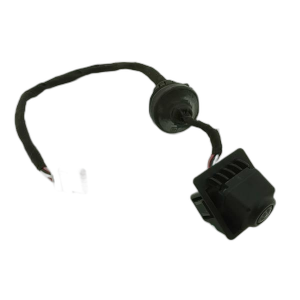
- Front View Camera Module
(OEM #84504750, 84306948)— This is the module that has lost communication. If it has failed internally and software/wiring are good, it must be replaced. Part number can vary by specific options.
Trusted brands: ACDelco (Genuine GM)
OEM price range: $300-$600
Aftermarket price range: $200-$450
Related Codes That Often Appear With This One
- U0075 — Mentioned in the same TSB for the XT5 (PIT5441C), indicating a general communication bus issue within the active safety system.
- U026A, U026B, U026C — Also listed in TSB #PIT5441C, these codes relate to lost communication with other specific object or camera detection modules, suggesting a shared network problem.
- U3000 — Mentioned in TSB 23-NA-095 for other GM vehicles, this code can be set in the Front View Camera Module and indicates an internal control module malfunction, often solvable by a re-flash.
Technical Service Bulletins (TSBs) & Recalls
- PIT5441C: Mentions U0265 for the 2017 XT5 and suggests inspecting the diagnostic cable as a first step for diagnosing object detection system messages.
- N202305180: Although for 2020 models, it shows GM's pattern of fixing U0265 on Cadillacs with a front camera module reprogram, reinforcing the high probability of a software fix.
- 25-NA-050: A TSB for the 2024 Corvette that also lists U0265 as a code fixed by reprogramming the front camera module, further confirming the software-first approach.
- 23-NA-095: Details how an OnStar task can cause the front camera to malfunction and potentially drain the battery on some GM vehicles, highlighting the module's sensitivity to software commands.
Platform-Specific Known Issues
- A known TSB for the 2017 XT5, #PIT5441C, directly addresses code U0265 in the context of the Active Safety Module. It advises technicians to first inspect their own diagnostic equipment for faults, indicating a potential for the code to be falsely set during diagnosis.
- The 2017 model year, being the first for the XT5, is generally noted to have more complaints than later years, particularly with electrical and transmission issues, which could potentially be related to module communication problems.
Mechanic-Grade Diagnostic Values
- CAN Bus Network Resistance — expected: Approximately 60 Ω when measured between CAN High and CAN Low pins at a connector with the battery disconnected.. Failure: A reading of 120 Ω suggests an open circuit or a missing termination resistor on one end of the bus. A reading significantly less than 60 Ω suggests a short between the CAN wires or an extra termination resistor.
- CAN High Voltage to Ground — expected: Approximately 2.5V to 3.5V with the key on, engine off (recessive state to dominant state).. Failure: Voltage that is stuck at 0V, 5V, or battery voltage indicates a short or open circuit.
- CAN Low Voltage to Ground — expected: Approximately 2.5V to 1.5V with the key on, engine off (recessive state to dominant state).. Failure: Voltage that is stuck at 0V or a higher, steady voltage indicates a short or open circuit.
Hidden / Shadow Codes Worth Checking
- Symptom Byte (e.g., U0265 00): GM vehicles use a 2-digit hexadecimal 'symptom byte' that provides more specific information about the nature of a fault. For a 'U' code, this can differentiate between 'No Communication' and other states. For example, TSB 23-NA-095 notes that code U3000 can set with symptom bytes 44, 49, 54, or 57 in the front camera module, each pointing to a different internal logic failure. (see via This is visible on the GM dealer-level scan tool, GDS2 (Global Diagnostic System 2), in the detailed DTC display screen.)
Scan Tool Commands That Help
- GDS2 (GM Global Diagnostic System 2): Front View Camera Module Learn — This procedure is required after replacing or reprogramming the K175 Front View Camera Module. It calibrates the camera's position relative to the vehicle so ADAS features can function correctly. The process is often dynamic, requiring the vehicle to be driven under specific conditions (e.g., 35-56 mph on a well-marked road) until the calibration completes.
- GDS2: Configuration/Reset Functions — This is the menu path within GDS2 to access the camera learn procedure. The specific path is: Module Diagnostics > Frontview Camera Module > Configuration/Reset Functions.
- GDS2: Build vehicle as a different model year — According to TSB PIT5874, for some vehicles, a software issue within GDS2 may prevent communication with the front camera module. The official workaround is to manually build the vehicle in GDS2 as a newer model year (e.g., build a 2021 as a 2022) to gain access to the module's data and functions.
Wiring & Ground Locations
- DLC (Data Link Connector) Pins 3 & 11 — Under the driver's side dashboard.. These are the specific pins for the Object Detection Bus on some GM vehicles. TSB PIT5441C notes that a faulty diagnostic tool or cable can have issues with these specific pins, inducing code U0265 and others, leading to a misdiagnosis.
- Fuse F11DR — Located in the X51R Right Instrument Panel Fuse block on some GM models.. TSB 23-NA-095 identifies this as the power supply fuse for the B174W Front View Camera. In the case of a module lock-up, pulling this fuse for one minute can perform a hard reset of the camera module, potentially restoring communication without requiring a scan tool.
"I Checked Everything" — The Actual Cause
- A technician could verify all wiring, power, and grounds for the front camera module are perfect, and confirm the module has the latest software, yet the U0265 code persists. The root cause could be external to the vehicle: a faulty MDI diagnostic cable used by the technician, as specifically warned about in TSB PIT5441C.
- A technician may be unable to communicate with the front camera module at all, leading them to believe the module is completely dead. However, the actual cause could be a software bug in the GDS2 diagnostic tool itself, which requires a workaround (building the vehicle as a newer model year) to establish communication, as detailed in TSB PIT5874.
Helpful Videos


We Have This Part in Stock





The information in this article is provided for general reference and educational purposes only. Vehicle specifications, procedures, and part compatibility can vary by production date, trim level, and region. Always consult your vehicle's factory service manual and verify part numbers before purchasing or performing repairs. Safety-critical components such as airbags, seat belts, and braking systems should be installed by a qualified professional.
- Cadillac XT5:
- 🎬 Helpful Videos
- 🛍️ Shop This Part
- What's Unique About the 2017-2018 Cadillac XT5
- Diagnostic Flowchart
- Symptoms You May Notice
- Most Likely Causes
- Rare But Worth Checking
- Diagnosis Steps
- Parts You'll Likely Need
- Related Codes That Often Appear With This One
- Technical Service Bulletins (TSBs) & Recalls
- Platform-Specific Known Issues
- Mechanic-Grade Diagnostic Values
- Hidden / Shadow Codes Worth Checking
- Scan Tool Commands That Help
- Wiring & Ground Locations
- "I Checked Everything" — The Actual Cause
- 🎟️ Get 5% Off