

U0265 on 2014-2018 Cadillac CTS: Causes and Fixes for Front Camera Communication Loss
This code indicates a communication failure with the Front Camera Module, disabling safety features like collision alert. The most common fix is a software update performed by a dealer, not a part replacement. Wiring issues are the next most likely cause, followed by the rare chance of a faulty diagnostic tool inducing the code during a scan.
- U0265 means your Cadillac's front camera has stopped communicating, which disables important safety features.
- Do not immediately assume a part has failed. The most common fix is a software update for the Front Camera Module, which must be done by a dealer or qualified shop.
- Before any expensive repairs, have the wiring and connector to the camera (behind the rearview mirror) inspected for damage or corrosion.
- This code can be tricky to diagnose; a GM-specific TSB warns that the technician's own scan tool can sometimes be the cause of the code.
- You can continue to drive the car, but be aware that your forward collision and lane departure systems will not work.
What's Unique About the 2014-2018 Cadillac CTS
On this generation of Cadillac CTS, code U0265 is frequently caused by a software anomaly rather than a hardware failure. General Motors has issued several bulletins advising technicians to reprogram the Front Camera Module (B174W) with the latest software before considering replacement. Uniquely, GM also warns in TSB PIT5441C that the technician's diagnostic tool itself (the MDI or its cable) can sometimes induce this and other false communication codes by having a fault on the specific pins (3 and 11) used by the object detection bus, leading to a potential misdiagnosis.
Diagnostic Flowchart
Tap your situation to follow the diagnostic path that matches what you're seeing on this vehicle.
Symptoms You May Notice
- Warning message on the driver information center (DIC) such as 'Service Driver Assist', 'Service Active Safety', or 'Service Front Camera System'.
- Advanced safety features are disabled, including Forward Collision Alert, Lane Departure Warning, and Adaptive Cruise Control.
- An amber warning lamp for the driver assistance system may be illuminated on the instrument panel.
- The warning messages and loss of function may be intermittent, disappearing and reappearing on subsequent drives.
- Replacing the Front Camera Module when only a software update was needed. GM bulletins specifically advise reprogramming as the first step.
- Replacing other unrelated modules on the CAN bus before isolating the fault to the FCM or its wiring.
- A forum user with a related GM vehicle reported a dealer replaced the front camera, but the 'Service Driver Assist' error returned the next day, highlighting how hardware replacement often fails to fix this software-centric issue.
Most Likely Causes
- Front Camera Module (FCM) Software Anomaly 🔴 High Probability GM has released multiple service bulletins (e.g., 25-NA-050, N202305180) across various models indicating that software glitches can cause the B174W module to stop communicating intermittently.
How to confirm: A technician with access to GM's service programming system (SPS) can check the current software calibration in the B174W Front Camera Module and see if an update is available. This is the first step recommended by the manufacturer.
Typical fix: Reprogram the Front Camera Module with the latest software. This is a dealer or qualified independent shop repair that does not involve replacing parts.
Est. part cost: $0 - Wiring Harness or Connector Issue 🟡 Medium Probability The front camera is located on the windshield, and its wiring can be subject to stress or damage during windshield replacement or from vibration. Connectors can also develop corrosion, moisture, or loose pins.
How to confirm: Visually inspect the wiring harness going to the front camera module (behind the rearview mirror). 🎬 Watch: How to locate and clean your Cadillac's camera sensors. Disconnect the connector and check for corrosion, moisture, or bent/damaged pins. Using a multimeter, check for 12V power and good ground at the connector. A more advanced check is to measure the CAN bus resistance between the appropriate pins (e.g., CANH and CANL) at the module connector with the battery disconnected; it should be between 54 and 69 Ω.
Typical fix: Repair the damaged section of the wiring harness or clean/replace the connector. Applying dielectric grease to the connector pins can help prevent future moisture intrusion.
Est. part cost: $10-$100 - Faulty Front Camera Module (FCM) ⚪ Low Probability While less common than software issues, the internal electronics of the camera module can fail due to thermal stress or age. However, this should be the last diagnosis after ruling out software and wiring.
How to confirm: If reprogramming the module does not resolve the code and the wiring, power, and ground have been confirmed to be good, the module itself is the likely culprit. This is a process of elimination.
Typical fix: Replace the Front Camera Module (component B174W). The new module will require programming and calibration by a professional to function correctly with the vehicle's safety systems.
Est. part cost: $300-$600
Rare But Worth Checking
- Faulty Diagnostic Interface (MDI/MDI2): Per TSB #PIT5441C, the technician's own diagnostic tool or cable can have a fault on the specific pins (3 and 11) used by the object detection bus, causing false communication codes like U0265 to be set during diagnosis. The problem may not be with the car at all, but with the tool used to scan it.
- Intermittent Fuse or Power Connection: Some GM owners on forums have reported temporarily fixing 'Service Driver Assist' errors by simply pulling and re-seating the fuse related to the ADAS system. While not a permanent fix, it suggests that a simple power cycle can sometimes restore communication, pointing towards an intermittent connection or module glitch.
Diagnosis Steps
- Scan all vehicle modules for any other DTCs. Address other codes first, especially if they are not communication-related.
- As a simple preliminary check, consider locating the fuse for the front camera/ADAS system, removing it for a few minutes, and re-seating it. This can sometimes reset a module in a fault state, though it may not be a permanent fix.
- If U0265 is the primary code, the first professional step is to check for available software updates for the Front Camera Module (B174W). If an update is available, perform the reprogramming using GM's Service Programming System (SPS).
- If the code persists after a software update, perform a thorough visual inspection of the wiring harness and connector at the front camera module, located behind the rearview mirror. Check for any signs of damage, especially if the windshield has ever been replaced.
- Using a multimeter, verify that the module is receiving correct battery voltage and has a solid ground connection. Check the resistance of the communication bus lines at the connector to ensure they are within spec (typically 54-69 Ω).
- If multiple object detection communication codes are present (e.g., U026A, U026B), consider the possibility that the diagnostic scan tool (MDI) or its cable is faulty, as described in TSB #PIT5441C. Test with a different known-good diagnostic tool if possible.
- If software, wiring, and the diagnostic tool are all confirmed to be good, the final step is to replace the Front Camera Module. The new module must be programmed and calibrated to the vehicle.
Parts You'll Likely Need
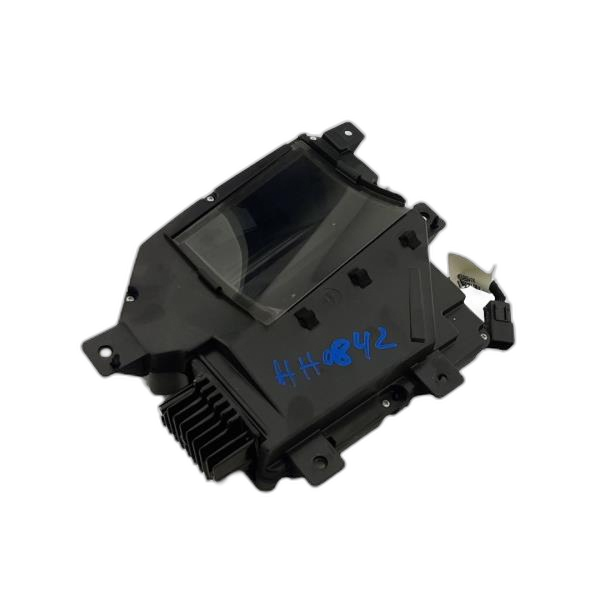
- Front Camera Module (Windshield Mounted)
(OEM #23407721 (example, verify by VIN))— This is the B174W module that has lost communication. It is only replaced after software and wiring issues have been ruled out. Note: Other numbers like 23372268 often refer to the front *grille* camera for parking assist, which is not related to code U0265.
Trusted brands: ACDelco, GM Genuine
OEM price range: $300-$600
Aftermarket price range: $200-$450
Related Codes That Often Appear With This One
- U0075 — This is another communication code often listed alongside U0265 in TSBs related to the object detection system and potential diagnostic tool issues.
- U026A, U026B, U026C, U0268, U0269 — These are all communication codes for the various radar and camera sensors in the active safety system. Seeing them together with U0265 strongly points to a systemic issue, like the MDI tool fault mentioned in TSB #PIT5441C.
Technical Service Bulletins (TSBs) & Recalls
- PIT5441C: Addresses multiple object detection system DTCs (including U0265) that can be falsely set by a faulty MDI diagnostic tool or cable.
- 25-NA-050: Confirms U0265 on other GM models is often due to software anomalies in the B174W Front Camera Module, requiring a reprogram, not replacement.
- PIT6436C: A more recent bulletin for newer GM models where engineering is investigating U0265 and advises technicians to clear the code and not replace any parts, showing this is an ongoing software-related issue for GM.
Platform-Specific Known Issues
- TSB #PIT5441C notes that a faulty Multiple Diagnostic Interface (MDI) cable used by technicians can cause false U-codes, including U0265, to be stored. This can lead to misdiagnosis, where the fault lies with the diagnostic equipment, not the vehicle.
- A recent windshield replacement is a common trigger for this issue, as the camera's wiring harness may be stressed, damaged, or not reconnected properly during the service.
Mechanic-Grade Diagnostic Values
- CAN Bus Resistance at Module Connector — expected: 54 to 69 Ω. Failure: A reading of ~120 Ω indicates an open circuit or a missing terminating resistor. A reading below 54 Ω suggests a short between the CAN lines.
- Front Camera Module Power Supply Voltage — expected: 12.0 ± 0.5 V. Failure: Voltage below this range indicates a power supply issue (fuse, wiring), while significantly higher voltage is not expected.
- Front Camera Module Ground Resistance — expected: Below 1 Ω. Failure: Resistance higher than 1 Ω indicates a poor ground connection, which can cause intermittent module operation.
Scan Tool Commands That Help
- GDS2 (GM Global Diagnostic System 2): Front View Camera Module Programming and Setup — This function is used to load the latest software into the B174W module, which is the primary fix recommended by GM TSBs. It is also required after installing a new module.
- GDS2 (GM Global Diagnostic System 2): Front View Camera Learn / Calibration — After replacing the Front Camera Module or the windshield, a dynamic calibration is required. This procedure involves driving the vehicle on well-marked roads at speeds above 35-38 MPH for 5-30 minutes until the scan tool indicates the calibration is 100% complete.
Wiring & Ground Locations
- B174W Front Camera Module Connector — Located on the front windshield, behind the rearview mirror assembly.. This is the primary connection point for the module. It should be inspected for damage, moisture, and proper seating, especially after a windshield replacement.
- G303 — On the right side rear pillar (C-pillar).. While wiring diagrams for the 2014-2018 CTS are not publicly available in the search results, diagrams for an earlier generation CTS show G303 as a major passenger compartment ground. A poor ground connection at a shared point could potentially affect the camera module's stability, though a more direct ground is likely closer to the module.
OEM Part Supersession History
23346137, 23366913→23407721— Standard part evolution and revision.
Heads up: While these part numbers are listed as interchangeable for other GM vehicles, it is critical to verify the correct part number by VIN for the specific Cadillac CTS, as different option packages (e.g., UGN, UFL) may require different cameras.
Helpful Videos
Used OEM Parts in Stock



New Aftermarket Parts Available



The information in this article is provided for general reference and educational purposes only. Vehicle specifications, procedures, and part compatibility can vary by production date, trim level, and region. Always consult your vehicle's factory service manual and verify part numbers before purchasing or performing repairs. Safety-critical components such as airbags, seat belts, and braking systems should be installed by a qualified professional.
- Cadillac CTS:
- 🎬 Helpful Videos
- 🛍️ Shop This Part
- What's Unique About the 2014-2018 Cadillac CTS
- Diagnostic Flowchart
- Symptoms You May Notice
- Most Likely Causes
- Rare But Worth Checking
- Diagnosis Steps
- Parts You'll Likely Need
- Related Codes That Often Appear With This One
- Technical Service Bulletins (TSBs) & Recalls
- Platform-Specific Known Issues
- Mechanic-Grade Diagnostic Values
- Scan Tool Commands That Help
- Wiring & Ground Locations
- OEM Part Supersession History
- 🎟️ Get 5% Off