

U0264 on 2019-2020 Ram 3500: Lost Communication With Rear Camera Fixes
This code means your truck's computer has lost communication with the rear camera. The most common causes are a faulty rear camera module or damaged wiring in the tailgate harness. Expect to pay $150-$300 for a new camera or around $80-$180 for a new wiring harness.
- U0264 means the rear camera has stopped communicating with the truck's vision control module.
- Before buying parts, thoroughly inspect the wiring harness inside the tailgate and the main connector under the truck for damage or corrosion.
- The two most likely fixes are replacing the tailgate wiring harness or replacing the rear camera module itself.
- A simple first step is to try cleaning the connectors and performing a soft reset of the Uconnect radio.
- Using an OEM Mopar replacement camera is recommended to avoid compatibility issues.
What's Unique About the 2019-2020 Ram 3500

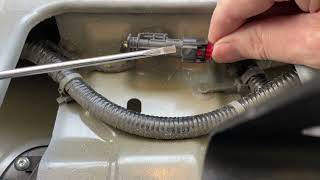
On the 5th generation Ram HD trucks, the U0264 code is specifically set by the Central Vision Processing Module (CVPM) and is often accompanied by code B217A-92 for rear camera performance. The wiring harness that runs through the tailgate is a known weak point; the constant flexing from opening and closing the tailgate can cause wires to break internally over time, leading to communication loss. This makes a thorough wiring inspection a critical first step before replacing the camera itself. Many owners report that wiggling the main harness connector under the truck near the spare tire can temporarily restore 🎬 See this quick fix for cleaning and securing the main connector. camera function, confirming a connection issue.
Diagnostic Flowchart
Tap your situation to follow the diagnostic path that matches what you're seeing on this vehicle.
Generation note: This issue is extremely common across the entire 4th (2009-2018) and 5th (2019+) generation of Ram trucks, including the 1500, 2500, and 3500 models, as they share similar tailgate, camera, and harness designs.
Symptoms You May Notice

- Black, blue, or frozen image on the infotainment screen when in reverse.
- "Check Entire Surroundings" or "Rear Camera Unavailable" error message on the display.
- Backup assist guide lines disappear, even if the camera image still works intermittently.
- Intermittent or flickering camera video, sometimes with green or distorted lines.
- In some cases, issues with the tailgate power lock may occur simultaneously due to a shared harness and connector.
- The issue may be intermittent, often triggered by temperature changes, humidity, or opening/closing the tailgate.
- Replacing the radio/head unit. This is an expensive part and is rarely the cause of a single camera communication failure. One owner reported a dealer replaced the radio and it did not fix the problem.
Most Likely Causes

- Damaged Tailgate Wiring Harness 🔴 High Probability The harness flexes every time the tailgate is opened and closed, leading to internal wire fatigue and breakage. Corrosion at the main connector under the bed (near the spare tire) is also a very common failure point due to water intrusion.
How to confirm: Visually inspect the harness for pinches, frays, or breaks, especially where it passes from the truck bed into the tailgate. Unplug the main connector under the truck near the spare tire and the connectors inside the tailgate to check for green or white corrosion, or bent/broken pins. Wiggling this main connector while the camera is on can often reproduce or temporarily fix the issue, confirming a bad connection.
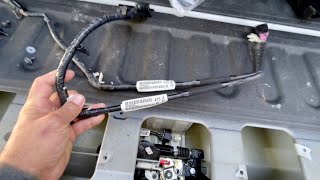
Typical fix: Replace the affected section of the tailgate wiring harness. There are typically two harnesses within the tailgate: a smaller one from the camera to the lock/handle area, and a larger one that runs from the handle area out to the main body connector. The larger harness is the more common failure point.
Est. part cost: $80-$180 - Faulty Rear Camera Module 🔴 High Probability The camera is exposed to weather, and internal components can fail from moisture intrusion or thermal stress, causing the internal circuit board to fail and stop communicating.
How to confirm: After confirming the wiring has good power, ground, and continuity, the camera is the most likely remaining cause. The TSB suggests disconnecting and reconnecting the camera to see if the fault remains. If wiring and connections are perfect, the camera itself has likely failed internally.
Typical fix: Replace the rear camera module. It is highly recommended to use an OEM Mopar part. Many owners report significant issues with aftermarket cameras, including poor image quality, lack of guide lines, and immediate failure.
Est. part cost: $150-$300 - Poor Connection at Camera or Body Harness 🟡 Medium Probability Vibrations and moisture can lead to loose or corroded connections at the camera itself or where the tailgate harness connects to the main body harness under the truck.
How to confirm: Disconnect the connectors, inspect for corrosion or damage, clean with electrical contact cleaner, apply dielectric grease, and securely reconnect. Some owners have zip-tied the main connector under the truck to ensure it stays seated.
Typical fix: Clean and secure the electrical connectors. Applying dielectric grease is a crucial step to prevent future moisture intrusion.
Est. part cost: $5-$10 - Software Glitch in Radio or CVPM ⚪ Low Probability Complex electronic modules can occasionally experience software-related issues that cause a temporary loss of communication.
How to confirm: Try a soft reset of the Uconnect system by holding the volume and tuner knobs for 10-20 seconds until the screen reboots. If this temporarily fixes it, a software update may be needed.
Typical fix: Perform a radio soft reset. If the problem persists, a dealer may need to perform a software update on the radio or related modules.
Est. part cost: $0
Rare But Worth Checking
- Faulty Central Vision Processing Module (CVPM): The CVPM is the module that sets this code. While it's possible for the module itself to fail, it is uncommon and should only be considered after all wiring and the camera have been ruled out.
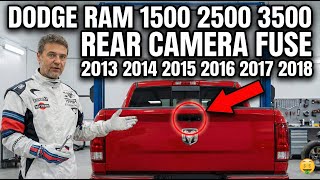
- Blown Fuse: While less common for a communication code, it's a simple check. On similar Ram trucks, the camera fuse is often F95 in the under-hood fuse box. Always verify the correct fuse location for your specific vehicle's owner's manual.
Diagnosis Steps
- Scan for all DTCs in all modules. Note if B217A-92 is present with U0264.
- Check the infotainment screen. When shifting to reverse, do you see a black screen, blue screen, or distorted image?
- Perform a soft reset of the Uconnect radio by pressing and holding the power and tuner knobs for 10-20 seconds until it reboots.
- Locate the main tailgate harness connector under the truck bed, near the spare tire and behind the driver's side rear tire. Disconnect it and inspect for water intrusion, corrosion (green/white powder), or bent/broken pins. Clean with contact cleaner, apply dielectric grease, and reconnect securely.
- Remove the access panel on the inside of the tailgate using a T30 Torx driver.
- Inspect the wiring harness connection directly at the back of the camera. Disconnect it, check for corrosion, apply dielectric grease, and reconnect it securely.
- Visually inspect the entire length of the tailgate harness for any signs of pinching, chafing, or broken wires, especially near the tailgate hinge area and where it is held by plastic clips.
- If wiring appears intact, use a multimeter to test for power (12V), ground (near 0Ω to chassis), and signal continuity on the LIN bus wire from the main body connector to the camera connector. An open circuit (high resistance) on any wire indicates a break in the harness.
- If all wiring and connections test good, the fault is most likely an internally failed rear camera module.
Parts You'll Likely Need

- Rear View Camera
(OEM #68417514AA (supersedes 68442521AA))— Internal failure of the camera module due to moisture or thermal stress is a primary cause of communication loss. Strongly advised to use OEM as aftermarket versions are known to have poor image quality and compatibility issues.
Trusted brands: Mopar
OEM price range: $240-$360
Aftermarket price range: $50-$150 - Tailgate Wiring Harness (Main)
(OEM #68096415AD)— This is the larger harness that runs from the tailgate handle area to the main body connector under the truck. It is the most common failure point due to flexing and corrosion at the connector.
Trusted brands: Mopar
OEM price range: $80-$180
Aftermarket price range: $50-$100 - Tailgate Wiring Harness (Camera/Handle)
(OEM #68189124AC (supersedes 68189124AB))— This is the smaller, internal harness that connects the camera and power lock actuator to the main tailgate harness. It fails less often but can still be a cause.
Trusted brands: Mopar
OEM price range: $50-$80
Aftermarket price range: $20-$40
Related Codes That Often Appear With This One
- B217A-92 — This code for 'Rear Camera-Performance or Incorrect Operation' is often set by the CVPM along with U0264, as noted in manufacturer TSB 9004369.
Technical Service Bulletins (TSBs) & Recalls
- 9004369: Addresses DTCs U0264-00 and B217A-92 related to rear camera performance and communication loss, instructing technicians to check connections at the camera and gather data for FCA. It confirms the CVPM as the source module and lists camera part number 68417514A$.
Platform-Specific Known Issues
- NHTSA Technical Service Bulletin #9004369 explicitly links U0264 with rear camera failure on 2019-2020 Ram trucks, pointing to either the camera or its connection as the likely problem.
- The main harness connector located near the spare tire is not well-sealed from the factory, allowing water and road salt to enter, causing severe corrosion on the pins. This is a primary point of failure.
- Owners swapping tailgates between trucks with different camera systems (e.g., standard vs. 360-surround view) will trigger this code, as the cameras and harnesses are not interchangeable.
Mechanic-Grade Diagnostic Values
- LIN Bus Voltage — expected: A properly operating LIN bus should show voltage toggling between approximately 1V and system voltage (e.g., 12V). A steady 12V may indicate the bus is at rest or has a short to power.. Failure: No voltage, or voltage that is stuck high (steady 12V) or low (0V) when it should be toggling, indicates a fault on the bus.
- Wiring Harness Continuity — expected: Near 0 Ω. Failure: Any reading greater than 10 Ω indicates a broken wire or high resistance in the circuit.
Scan Tool Commands That Help
- AlfaOBD: CVPM Service Calibration — After replacing a camera in a surround-view system, this function is used to calibrate the new camera so it integrates correctly with the others.
- AlfaOBD / wiTECH: Read Faults from Body Control Module / CVPM — To confirm that the U0264 code is being set specifically by the Central Vision Processing Module (CVPM) or Body Control Module (BCM), which helps isolate the fault from a general radio issue.
- wiTECH 2.0: Flash ECU / Clear All DTCs — After a module replacement (like the CVPM or camera) or to apply a software update that may resolve communication issues. This is a dealer-level function.
Wiring & Ground Locations

- Central Vision Processing Module (CVPM) — Under the driver's seat. It is located beneath a black plastic cover, near the left seat rail. The driver's seat may need to be moved all the way forward to access it.. The CVPM is the module that sets the U0264 code. All camera communication is routed through it. A failure of this module, though rare, is a possible cause.
- Main Tailgate Harness Connector (i550) — Under the truck bed, located behind the driver's side rear tire, near the spare tire.. This is the primary connection point between the tailgate wiring and the main body harness. It is highly susceptible to corrosion from water and road salt, making it a top failure point for this code.
- LIN Bus Wire (at i550 Connector) — Pin 2 of the 8-pin i550 main tailgate harness connector.. This specific wire carries the communication signal between the BCM/CVPM and the rear camera. A break or short on this wire will directly cause the U0264 code.
- Chassis Ground (G905A / G906A) — There are several key grounds. A primary body ground is located on the sheet metal below the driver's side battery. Other grounds are located near the rear of the truck frame, which provide the ground path for the tailgate harness.. A poor or corroded ground connection for the camera circuit can cause intermittent communication and trigger a U0264 code, even if the power and signal wires are intact.
Real Owner Repair Stories
- YouTube user 'TunedRAMS' (4th Gen Ram (similar design)) — Squiggly lines on the backup camera screen, which eventually went black. Also had issues with the power tailgate lock.
❌ Tried (didn't work) Initially bought the wrong (smaller) harness inside the tailgate.
✅ What actually fixed it Replacing the main tailgate wiring harness (Part No. 68096415AD, which superseded 68096415AC). The pins on the old connector were found to be severely corroded and one had broken off. - RamForum.com user 'Hugybearr' (4th Gen Ram) — Blue screen in reverse and U0264 code present.
❌ Tried (didn't work) Replacing both tailgate wiring harnesses., Attempting to use a cheap aftermarket camera from eBay, which had poor image quality and failed., Swapping internal components between the OEM and aftermarket cameras.
✅ What actually fixed it After confirming good power, ground, and 12V on the LIN bus line, the problem was solved by installing a used OEM camera from eBay. The user strongly advises against non-OEM cameras. - 5thGenRams.com user 'jjk' (2019 Ram 1500 Laramie with surround view) — Intermittent issue where a portion of the backup camera image was covered in black square pixels. Occurred on cold mornings and would resolve itself later in the day.
❌ Tried (didn't work) Waiting for it to self-resolve, cleaning tailgate connector.
✅ What actually fixed it The dealer replaced the rear camera module, which permanently fixed the issue. - 5thGenRams.com user 'Ram1500Owner' (2021 Ram 1500 with Trailer Reverse Steering Control) — Dead backup camera.
❌ Tried (didn't work) Multiple dealer visits where they suspected a cable issue. A 'test cable' would make the system work, confusing the diagnosis.
✅ What actually fixed it The final fix was replacing the 'Park Assist Camera Control Module' (Mopar P/N 04672915AD). This module is part of the Trailer Reverse Steering Control system.
When the Usual Fixes Don't Work
- While a faulty camera or harness is the most common cause, several owners have fixed camera issues with no parts. One owner with a working camera but no guidelines (and a U0264 code) found that a simple soft reboot of the Uconnect radio (holding the power and tuner knobs) restored the guidelines after checking the setting. Another owner fixed a completely black screen by performing a battery disconnect for a few minutes to reset the system. These software-level resets should be attempted before ordering parts.
OEM Part Supersession History
68442521AA→68417514AA— Standard part revision and update by the manufacturer.
Heads up: These parts are generally interchangeable for their intended application, but note that this part number may be used for side and CHMSL cameras as well, so ensure the correct camera is ordered for the tailgate.68096415AC→68096415AD— Standard part revision. The updated harness is the recommended replacement for a corroded or broken original.
Heads up: A user confirmed the 'AD' version successfully replaced a failed 'AC' version with identical connectors.
Helpful Videos
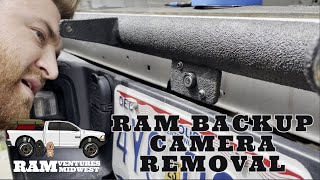

The information in this article is provided for general reference and educational purposes only. Vehicle specifications, procedures, and part compatibility can vary by production date, trim level, and region. Always consult your vehicle's factory service manual and verify part numbers before purchasing or performing repairs. Safety-critical components such as airbags, seat belts, and braking systems should be installed by a qualified professional.
- Ram 3500:
- 🎬 Helpful Videos
- What's Unique About the 2019-2020 Ram 3500
- Diagnostic Flowchart
- Symptoms You May Notice
- Most Likely Causes
- Rare But Worth Checking
- Diagnosis Steps
- Parts You'll Likely Need
- Related Codes That Often Appear With This One
- Technical Service Bulletins (TSBs) & Recalls
- Platform-Specific Known Issues
- Mechanic-Grade Diagnostic Values
- Scan Tool Commands That Help
- Wiring & Ground Locations
- Real Owner Repair Stories
- When the Usual Fixes Don't Work
- OEM Part Supersession History
- 🎟️ Get 5% Off