

U0198 on 2017-2019 Ford Escape: Fix for Lost Communication With Telematics Control Unit
This code almost always means the FordPass app (remote start/lock) has stopped working due to a software glitch in the Telematics Control Unit (TCU). Before buying parts, try the simple fix from Ford's service bulletin: find the TCU fuse (often F10 or F11 in the passenger compartment fuse box), remove it for 5 minutes, and reinstall it to reset the module.
- U0198 on a 2017-2019 Escape almost always points to a problem with the FordPass remote features.
- The most likely fix is completely free and takes 10 minutes: find the TCU fuse (often F10 or F11 in the passenger-side fuse box), pull it out for 5 minutes, and put it back in.
- Do not replace the Telematics Control Unit (TCU) until you have tried the fuse reset and checked with a dealer for any available software updates.
- This code does not affect the vehicle's safety or drivability and is common on other Fords from this era, like the F-150 and Fusion.
What's Unique About the 2017-2019 Ford ESCAPE

On this generation of Ford Escape and its platform-mates (like the Fusion and F-150), the U0198 code is very frequently caused by a software issue, not a failed hardware component. Ford has released Technical Service Bulletins (TSBs) acknowledging this. The most common fix is a simple module reset by pulling a fuse, or having a dealer perform a software update. This is different from many other communication codes that more commonly point to wiring failures or expensive module replacement.
🎬 Watch: A quick explanation of the U0198 communication code.Diagnostic Flowchart

Tap your situation to follow the diagnostic path that matches what you're seeing on this vehicle.
Symptoms You May Notice

- FordPass / Lincoln Way mobile app features do not work (e.g., remote start, lock/unlock, vehicle location).
- In the SYNC settings, the modem Electronic Serial Number (ESN) may be missing or blank.
- A 'Telematics System Fault' or 'Communication Error' message may appear on the infotainment screen.
- Emergency-call (e-Call) or SOS system may show a warning light or be disabled.
- The app may show a spinning circle that eventually times out when trying to send a command to the vehicle.
- Replacing the APIM (SYNC module). The APIM is reporting the problem, but is rarely the cause of it.
- Replacing the vehicle battery. While low battery voltage can cause various electrical issues, it is not a primary cause for this specific, isolated code on this platform.
Most Likely Causes

- Telematics Control Unit (TCU) Software Lock-up 🔴 High Probability This is a widely known issue documented by Ford in TSB SSM 48267. The TCU module, like any computer, can freeze or enter a non-responsive state that a simple power cycle (reboot) can fix.
How to confirm: Performing the fuse pull reset is both the confirmation and the fix. If the remote features start working after the reset, this was the cause. This is the first step recommended by Ford for this specific issue.
Typical fix: Remove the TCU fuse for 5 minutes to power cycle the module, then reinstall it. On the 2017-2019 Escape, this fuse is typically F10 or F11 (a 5A fuse) located in the passenger compartment fuse box, which is below the glove box. Always verify the exact fuse number and location in your owner's manual.
Est. part cost: $0 - Outdated TCU Software 🔴 High Probability Ford released software updates to address bugs causing this communication loss, as noted in TSB SSM 47471. These updates improve the stability of the TCU module.
How to confirm: A Ford dealer or a shop with a Ford-specific scan tool (like IDS or FDRS) can check for and apply any open Field Service Actions (FSAs) or software updates for the TCU.
Typical fix: Have a dealer update the TCU module to the latest software version. The TSB specifies using IDS release 110.05 or higher.
Est. part cost: $0 (if covered by warranty/FSA) or $100-$250 for labor. - Wiring or Connector Issue ⚪ Low Probability While less common for this specific code, any vehicle can experience wiring issues due to vibration, moisture, or damage. The TCU is often located behind the glove box, an area that is generally well-protected.
How to confirm: Visually inspect the wiring and connector at the TCU for any signs of damage, corrosion, or looseness. A multimeter can be used to check for stable power and ground at the TCU connector. A resistance reading above 0.2 Ω on the ground circuit indicates a problem.
Typical fix: Repair the damaged section of the wiring harness or clean/re-seat the connector. Applying dielectric grease can help prevent future corrosion.
Est. part cost: $5-$50 - Failed Telematics Control Unit (TCU) ⚪ Low Probability
How to confirm: This is diagnosed by exclusion. If the fuse reset and software updates do not work, and the wiring has been confirmed to be good with proper power and ground, the module itself is the likely culprit.
Typical fix: Replace the TCU. The new module will require programming by a dealer or qualified technician using a tool like Ford's IDS/FDRS to work with the vehicle's specific VIN and features.
Est. part cost: $200-$500
Diagnosis Steps
- Verify the symptoms: Confirm that FordPass remote features (remote start, lock/unlock) are not working from the mobile app.
- Scan for DTCs: Use an OBD-II scanner to confirm U0198 is present. The code is usually stored in the Accessory Protocol Interface Module (APIM). A tool like FORScan can provide more detailed, Ford-specific information.
- Perform TCU Reset (Fuse Pull): Locate the fuse for the Telematics Control Unit (TCU). In the 2017-2019 Escape, this is often fuse F10 or F11 (5A) in the passenger compartment fuse box below the glove box. Remove this fuse for at least 5 minutes, then reinstall it. This is the primary fix suggested by Ford TSB SSM 48267.
- Test Functionality: After reinstalling the fuse, turn the vehicle on, wait a few minutes for the TCU to boot and connect to the cellular network, then test the FordPass app features. If they work, the problem is solved.
- Check for Software Updates: If the reset fails, contact a Ford dealer to see if there are any open Field Service Actions (FSAs) or available software updates for the TCU, as recommended by TSB SSM 47471.
- Inspect Wiring: If software fixes don't work, inspect the wiring and connector at the TCU. The TCU is located behind the passenger glove box. Check for any visible damage, corrosion, or loose connections.
- Test Power and Ground: Use a multimeter to verify the TCU is receiving consistent power and has a solid ground connection at its electrical connector.
- Suspect TCU Module: If all previous steps fail, the TCU module itself has likely failed and requires replacement and programming.
Parts You'll Likely Need
- Telematics Control Unit (TCU)
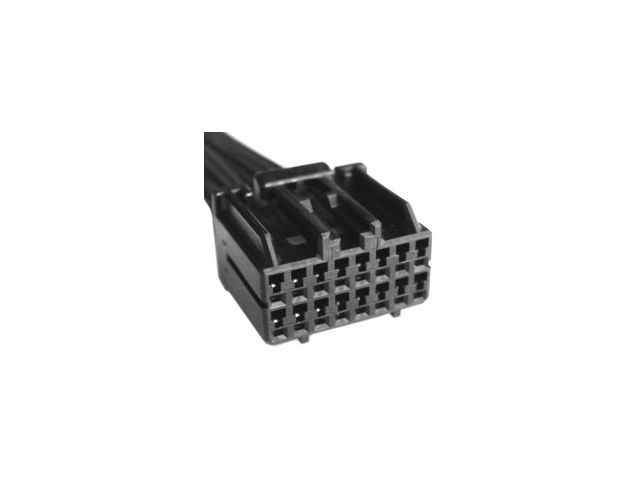
(OEM #JL3T-14G087-CF (example, verify by VIN))— This is the module that fails, but it should only be replaced after performing the fuse reset and checking for software updates, as it is often not the root cause. Part numbers are interchangeable for base numbers 14G087 and 14G229. Always confirm the exact part number with a dealer using your vehicle's VIN.
Trusted brands: Motorcraft
OEM price range: $300-$500
Aftermarket price range: $200-$400
Technical Service Bulletins (TSBs) & Recalls
- SSM 48267: Notes that inoperative remote features and DTC U0198 can be corrected by removing the TCU fuse for 5 minutes and reinstalling it. This applies to Escape, Fusion, and F-150 models.
- SSM 47471: Advises technicians to perform any open TCU field service actions (software updates) to correct this condition before other diagnostics.
Platform-Specific Known Issues
- A software lock-up is a very common cause for this code on the 2017-2019 Escape. Ford issued TSB SSM 48267, which explicitly advises technicians to perform a simple fuse pull to reset the TCU before attempting any other repairs.
- Outdated software is another common trigger. TSB SSM 47471 instructs dealers to check for and apply any available software updates (Field Service Actions) to the TCU to resolve communication issues.
- The TCU is located behind the passenger glove box, making access for wiring inspection or replacement relatively straightforward.
Mechanic-Grade Diagnostic Values
- TCU Power Supply Voltage — expected: 11 to 14 Volts. Failure: Voltage less than 10V indicates a problem with the power supply circuit or fuse.
- TCU Ground Circuit Resistance — expected: Below 5 Ohms. Failure: Resistance greater than 5 Ohms indicates a poor ground connection (corrosion, looseness). A reading above 0.2 Ohms is often cited as a practical limit.
- CAN Bus Resistance (at module connector) — expected: 54 to 69 Ω. Failure: Resistance outside this range indicates an issue with the CAN bus wiring or a terminating resistor.
- CAN Bus Voltage (oscilloscope) — expected: CAN High (pin 6 at DLC) and CAN Low (pin 14 at DLC) should show mirror-image square wave patterns, toggling between approximately 2.5V and 3.5V (High) and 2.5V and 1.5V (Low).. Failure: A flat line, especially one at battery voltage, indicates a short to power on the CAN bus.
Scan Tool Commands That Help
- FORScan: TCU Module Reset — This service procedure can be used as an alternative to pulling the fuse to command a software-level reboot of the Telematics Control Unit. It is found under the 'Service Functions' (wrench icon) menu. This can be useful if the fuse pull does not resolve the issue or for logging purposes.
- Ford IDS/FDRS: Reprogram the TCU — As stated in TSB SSM 47161, if a fuse pull does not resolve the U0198 DTC, the next step is to reprogram the TCU to the latest calibration using the dealer diagnostic tool. This updates the module's firmware to fix known bugs.
Wiring & Ground Locations
- TCU (Telematics Control Unit) — Located behind the passenger side glove box.. This is the module that is offline. Access is required for visual inspection, connector check, power/ground testing, and replacement.
- G303 — A ground point located on the passenger side back wall, behind the dash/trim panels.. This is a potential ground point for the TCU. A poor connection at this stud can cause a loss of power to the module, leading to code U0198. Verifying this ground is clean and tight is a key diagnostic step.
Real Owner Repair Stories
- Ford Focus Electric Forum user 'lfhoward' (2016 Ford Focus Electric (experiencing battery drain)) — The user's 12V battery was going dead, a symptom associated with a faulty 3G TCU that fails to shut down properly.
❌ Tried (didn't work) Living with the defunct 3G TCU.
✅ What actually fixed it The user upgraded to a 4G TCU sourced from a 2017 Escape and flashed it with the most recent firmware. This solved the battery drain problem, demonstrating the cross-compatibility and effectiveness of using an Escape TCU as a replacement part.
OEM Part Supersession History
HS7T-14G087-EH (3G)→JL3T-14G087-Cx / JL3T-14G229-Cx (4G)— Upgrade from the 3G cellular network to the 4G LTE network. The 3G network was shut down, rendering older modules obsolete.
Heads up: A 4G TCU (like a J-series or K-series) is required to restore functionality on vehicles with an original 3G modem. The new module may require firmware programming via FORScan or IDS to be compatible with the vehicle's specific CAN bus architecture (e.g., HS3-CAN vs I-CAN).
Model Year Variations Within This Range
- 2017-2018: Early production vehicles within this range may have been equipped with a 3G TCU, while later models came standard with a 4G TCU. The sunset of the 3G network means that for some 2017 vehicles, the U0198 code is not a fixable software glitch but an indication that the hardware is obsolete and must be upgraded to a 4G-capable TCU to restore FordPass functionality.
Helpful Videos
We Have This Part in Stock

The information in this article is provided for general reference and educational purposes only. Vehicle specifications, procedures, and part compatibility can vary by production date, trim level, and region. Always consult your vehicle's factory service manual and verify part numbers before purchasing or performing repairs. Safety-critical components such as airbags, seat belts, and braking systems should be installed by a qualified professional.
- Ford ESCAPE:
- 🎬 Helpful Videos
- 🛍️ Shop This Part
- What's Unique About the 2017-2019 Ford ESCAPE
- Diagnostic Flowchart
- Symptoms You May Notice
- Most Likely Causes
- Diagnosis Steps
- Parts You'll Likely Need
- Technical Service Bulletins (TSBs) & Recalls
- Platform-Specific Known Issues
- Mechanic-Grade Diagnostic Values
- Scan Tool Commands That Help
- Wiring & Ground Locations
- Real Owner Repair Stories
- OEM Part Supersession History
- Model Year Variations Within This Range
- 🎟️ Get 5% Off