

U0197 on 2013-2016 Jeep Compass: Causes and Fixes for Bluetooth Communication Loss
On a 2013-2016 Jeep Compass, code U0197 almost always means the Hands-Free Module (HFM) for the Bluetooth system needs a software update, as specified in a manufacturer TSB. If that doesn't work, the module itself has likely failed and needs replacement. This is a common issue also seen in the Jeep Patriot, its platform mate.
- Code U0197 on a 2013-2016 Jeep Compass means the Hands-Free (Bluetooth) Module has stopped communicating.
- The most common symptom is the complete inability to use the hands-free phone system.
- The most probable cause is a software glitch, which can be fixed by a dealer software update as per TSB 08-115-15.
- If a software update doesn't work, the Hands-Free Module itself has likely failed and needs to be replaced.
- This is not a safety-critical issue, and the vehicle remains perfectly safe to drive.
- The Jeep Patriot from the same years shares this exact problem and fix.
What's Unique About the 2013-2016 Jeep COMPASS
For this generation of Jeep Compass and its platform-mate, the Jeep Patriot, the U0197 code is a well-documented pattern failure. Jeep issued a Technical Service Bulletin (TSB #08-115-15) that directly attributes this code and the loss of Bluetooth functionality to a software glitch within the Hands-Free Module (HFM). This makes it a known issue with a specific fix, often saving owners from a lengthy and expensive diagnosis of wiring problems. The TSB outlines a procedure to update the HFM software to version 63.03.08 or higher to resolve the condition.
Diagnostic Flowchart
Tap your situation to follow the diagnostic path that matches what you're seeing on this vehicle.
Symptoms You May Notice
- Hands-free (Bluetooth) feature does not work.
- Phone is unable to pair or connect to the vehicle's Uconnect system.
- The radio display may show a message like "Hands-Free Module Loading" or be unresponsive to phone-related commands.
- The Uconnect system may be slow, seem to freeze, or be completely unresponsive to user input.
- Pressing the phone button on the steering wheel results in no response or beep.
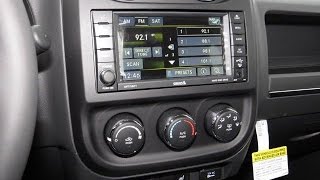
- Replacing the radio/head unit. The Hands-Free Module is a separate component from the main radio unit. Replacing the radio will not fix a problem with a separate, non-communicating HFM. TSB Z5091195A for the related Jeep Patriot explicitly warns: "For issues with Bluetooth, Hands-Free Calling, and/or Voice Commands, DO NOT replace the radio. 🎬 Watch: How to properly install a factory radio upgrade. Diagnose the Hands-Free Module system."
Most Likely Causes
- Hands-Free Module (HFM) Software Glitch 🔴 High Probability This is a known issue documented by Jeep in TSB #08-115-15, which specifically calls out a software problem causing this DTC and symptom on Compass and Patriot models.
How to confirm: A Jeep dealer or a well-equipped independent shop can use a wiTECH scan tool to check the current software version of the HFM. If the version is lower than 63.03.08, the update is required.
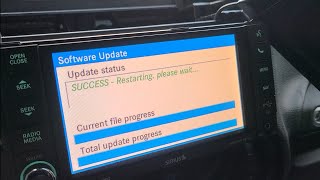
Typical fix: Reprogramming (flashing) the Hands-Free Module with the latest software version via a USB update procedure outlined in the TSB.
Est. part cost: $0 - Failed Hands-Free Module (HFM) 🟡 Medium Probability Electronic modules can fail over time due to heat cycles and internal component degradation. The HFM is located under the dashboard, often to the left of the steering column, where it can be subject to temperature fluctuations. If the module is completely unresponsive and cannot be reprogrammed, it has likely failed.
How to confirm: If a software flash fails or if a scan tool cannot communicate with the HFM at all (and power/ground are confirmed good), the module is condemned. The TSB procedure explicitly states to perform normal diagnostics and consider replacement if the update fails and the module remains unresponsive.
Typical fix: Replace the Hands-Free Module. A replacement may require a "Proxy Alignment" procedure to integrate it with the vehicle's other computers, which prevents issues like a flashing odometer.
Est. part cost: $100-$250 - Blown Fuse or Power/Ground Issue ⚪ Low Probability
How to confirm: Check the vehicle's fuse boxes for fuses related to the radio, telematics, or Uconnect system. Use a multimeter to verify power and ground at the HFM connector. The module requires a stable voltage between 10 and 16 volts to operate.
Typical fix: Replace the blown fuse or repair the compromised wiring.
Est. part cost: $1-$20
Rare But Worth Checking
- CAN Bus Wiring Fault: While less common than a module or software issue for this specific code, a damaged wire or corroded connector between the HFM and the rest of the vehicle can interrupt communication. This is more likely if the vehicle has had recent interior work or water intrusion.
Diagnosis Steps
- Confirm the symptom: Attempt to pair a phone via Bluetooth. Press the phone button on the steering wheel and note if the system responds with a beep or message. If it fails, the symptom is confirmed.
- Scan for codes: Use an OBD-II scanner to confirm U0197 is the primary code. Note if any other modules are also reporting communication loss.
- Check for TSBs: Confirm that TSB #08-115-15 applies to your vehicle's year and build date. This TSB is the primary diagnostic path for this specific issue.
- Attempt Temporary Reset: Before proceeding, 🎬 Watch: Troubleshooting tips for lost Bluetooth and UConnect functions. some owners have temporary success by disconnecting the battery for one minute to reset all modules. If communication returns, it strongly points to a software lock-up that the TSB addresses permanently.
- Check fuses: Inspect fuses related to the radio and telematics systems in the interior and under-hood fuse panels. For the Compass, this includes fuse #19 (Amplifier, 20A) and #20 (Radio, 15A) in the under-hood fuse box.
- Attempt HFM Software Update: This is the most likely fix and should be performed by a dealer or qualified shop with a wiTECH scan tool, following the procedure in TSB 08-115-15. The process involves loading the update file onto a USB drive and initiating the update via voice commands.
- Verify Module Communication: If the update fails, a technician should use a scan tool to see if the HFM is active on the network. If it's not responsive and its power and ground are good, the module has failed.
- Inspect Wiring: If the module is powered but still won't communicate, inspect the wiring and connectors leading to the HFM for any visible damage, corrosion, or loose pins. The HFM is typically located to the left of the brake pedal, mounted to the dash support structure.
- Replace the Hands-Free Module: If all other steps fail, replace the HFM. This may require a proxy alignment procedure afterward to ensure all vehicle features work correctly.
Parts You'll Likely Need
- Hands-Free Module (HFM)
(OEM #68222632AC (Note: Part numbers can supersede; always verify with VIN))— This module is the source of the communication loss. It either requires a software update or has failed internally.
Trusted brands: Mopar
OEM price range: $150-$300
Aftermarket price range: $100-$250
Technical Service Bulletins (TSBs) & Recalls
- 08-115-15 REV. A: The definitive TSB for this issue. It supersedes older versions and applies to 2013-2016 Compass/Patriot models. It identifies the U0197 code and inoperative Bluetooth as symptoms of a software problem and provides a detailed procedure for updating the HFM software to version 63.03.08 or higher.
- Z5091195A: A related TSB for the Jeep Patriot that explicitly warns technicians not to replace the radio for Bluetooth issues, but to diagnose the Hands-Free Module instead, reinforcing that the HFM is the source of the problem.
Platform-Specific Known Issues
- A widely acknowledged software issue covered by TSB 08-115-15 is the primary cause of U0197 on these vehicles.
- The Hands-Free Module is located under the driver's side dashboard, to the left of the brake pedal, making it relatively accessible for replacement if needed.
Mechanic-Grade Diagnostic Values
- CAN Bus Voltage (CAN High to Ground) — expected: ~2.5V (recessive state) to ~3.5V (dominant state). Failure: Voltage stuck at 0V, 2.5V, or battery voltage. No fluctuation with network activity.
- CAN Bus Voltage (CAN Low to Ground) — expected: ~2.5V (recessive state) to ~1.5V (dominant state). Failure: Voltage stuck at 0V, 2.5V, or battery voltage. No fluctuation with network activity.
- CAN Bus Network Resistance — expected: ~60 Ohms (measured between CAN High and CAN Low pins at the DLC with battery disconnected). Failure: 120 Ohms (indicates one terminating resistor is offline), 0 Ohms (short between CAN lines), or open circuit (OL).
- HFM Operating Voltage — expected: 10V to 16V. Failure: Voltage below 10V or above 16V can cause the module to shut down or malfunction.
Scan Tool Commands That Help
- wiTECH: Proxy Configuration Alignment — This procedure is required after replacing the Hands-Free Module (or many other modules) to synchronize it with the Body Control Module (BCM) and other ECUs on the network. Failure to perform a proxy alignment can result in a flashing odometer and other functional issues.
- wiTECH: Restore BCM Proxi Configuration — Used before a Proxy Alignment if the BCM configuration needs to be restored from a saved file. This is typically part of a larger module replacement workflow.
- wiTECH: HFM Software Update/Reflash — This is the primary repair step outlined in TSB 08-115-15 to resolve the U0197 code. The function is initiated through the wiTECH application, which prepares a USB drive with the update file.
- AlfaOBD: Proxy Alignment — A capable aftermarket tool that can perform the Proxy Alignment procedure on FCA vehicles, often used by advanced DIYers and independent shops as an alternative to the dealership's wiTECH tool.
Wiring & Ground Locations
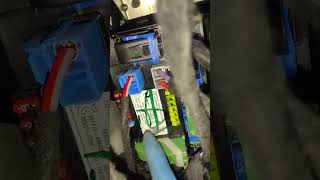
- Hands-Free Module (HFM) — Under the driver's side dashboard, mounted to the dash support structure to the left of the brake pedal.. This is the module that is offline. Physical access is required for voltage/ground checks at its connector or for replacement.
- G305 — Left kick panel.. This is a primary ground point for several instrument panel components, including the Hands Free Module on the Jeep Patriot platform mate. A poor connection at this ground could cause the HFM to lose power and stop communicating.
- Fuse #19 (20A) and #20 (15A) — In the main fuse box (Totally Integrated Power Module - TIPM) located under the front hood.. Fuse #19 powers the amplifier and Fuse #20 powers the radio. While the HFM is separate, its power is often interlinked with the radio circuit. Checking these fuses is a basic step in diagnosing any power-related issue with the infotainment system.
- CAN Bus Wires — Twisted pair of wires running to the HFM connector. On the main DLC, CAN-C High is Pin 6 and CAN-C Low is Pin 14.. These are the specific data lines the HFM uses to communicate. Technicians can test voltage and resistance on these wires to verify the integrity of the network backbone.
Real Owner Repair Stories
- jeeppatriot.com forum user (2014 Jeep Patriot (platform mate to Compass)) — UConnect Bluetooth stopped working, phone would not pair. Code U0197 was present.
❌ Tried (didn't work) Disconnecting the battery., Pulling radio/UConnect related fuses.
✅ What actually fixed it The user took the vehicle to the dealership. The dealer performed the software update flash as specified in the TSB (08-115-15). This resolved the issue and restored Bluetooth functionality. The cost was approximately $125 for the labor.
Model Year Variations Within This Range
- 2013-2017: The relevant Technical Service Bulletin (08-115-15 REV. A) was updated to include the 2017 model year for the Jeep Compass/Patriot, extending the known software issue beyond the original 2013-2016 range.
Helpful Videos

We Have This Part in Stock




The information in this article is provided for general reference and educational purposes only. Vehicle specifications, procedures, and part compatibility can vary by production date, trim level, and region. Always consult your vehicle's factory service manual and verify part numbers before purchasing or performing repairs. Safety-critical components such as airbags, seat belts, and braking systems should be installed by a qualified professional.
- Jeep COMPASS:
- 🎬 Helpful Videos
- 🛍️ Shop This Part
- What's Unique About the 2013-2016 Jeep COMPASS
- Diagnostic Flowchart
- Symptoms You May Notice
- Most Likely Causes
- Rare But Worth Checking
- Diagnosis Steps
- Parts You'll Likely Need
- Technical Service Bulletins (TSBs) & Recalls
- Platform-Specific Known Issues
- Mechanic-Grade Diagnostic Values
- Scan Tool Commands That Help
- Wiring & Ground Locations
- Real Owner Repair Stories
- Model Year Variations Within This Range
- 🎟️ Get 5% Off