

U0197 on 2012-2017 Dodge Charger: Bluetooth Loss, Flashing Odometer, and Battery Drain
On a 2012-2017 Dodge Charger, code U0197 means the Hands-Free Module (HFM) for Bluetooth has stopped communicating. This commonly causes a "Hands Free System Loading..." message, but can also lead to a flashing odometer and a parasitic battery drain. The first recommended fix is a dealer-installed software update, as specified in multiple TSBs. If that fails or isn't applicable, the HFM hardware has likely failed. While dealers charge a significant amount for replacement, many owners report succ
- U0197 on your Charger means the Bluetooth module has stopped working.
- Before replacing any parts, check with a Dodge dealer for a software update, as this is a very common, manufacturer-documented fix.
- Look for other symptoms like a flashing odometer or a dead battery, which strongly point to a failed HFM module itself.
- A temporary reset can sometimes be achieved by pulling the 20A fuse labeled 'HFM' or 'Telematics' in the trunk fuse box.
- If the module needs replacement, it is a DIY-friendly job located under the driver's side dash that many owners do themselves to save money.
What's Unique About the 2012-2017 Dodge CHARGER
For this generation of Dodge Charger and its platform mates (Chrysler 300, Dodge Journey), the U0197 code is very frequently tied to software issues within the Hands-Free Module (HFM) itself, not just hardware failure. FCA (Chrysler/Dodge) has released multiple Technical Service Bulletins (TSBs) over the years that call for reprogramming the HFM with updated software to resolve communication dropouts and a wide array of Bluetooth glitches. This makes a dealer visit for a software flash a primary diagnostic step. Additionally, a complete failure of this specific module is known to cause other strange electrical issues, such as a flashing odometer and a parasitic battery drain that can leave the vehicle with a dead battery.
Diagnostic Flowchart
Tap your situation to follow the diagnostic path that matches what you're seeing on this vehicle.
Symptoms You May Notice
- Check Engine Light (Malfunction Indicator Lamp) is on.
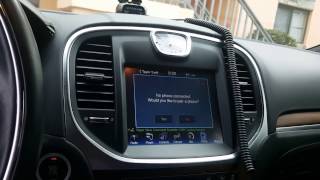
- Radio screen may be stuck on "Hands Free System Loading Please Wait...".
- Bluetooth phone and audio features are inoperative.
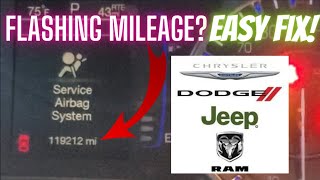
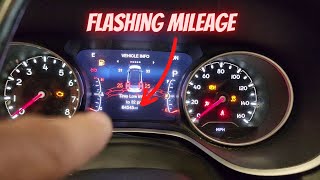
- Flashing mileage on the odometer.
- Parasitic battery drain leading to a dead battery.
- The steering wheel Voice Recognition (VR) button does not respond.
- Unable to select the 'Phone' or 'Bluetooth' screen on the radio.
- Loss of audio during a Bluetooth phone call.
- The HFM is unresponsive and appears 'off the bus' to a wiTECH scan tool.
- Inaccurate foreign language translations or sluggish VR after changing languages.
- Replacing the radio/head unit. While the radio is part of the system, the U0197 code specifically points to a loss of communication *from* the separate Hands-Free Module. Replacing the radio will not fix a faulty HFM.
- Assuming a TIPM (fuse box) failure. While TIPM issues are common on Chrysler products, the specific symptoms of U0197, a loading screen, and a flashing odometer are classic signs of a failed HFM on this platform.
Most Likely Causes
- Hands-Free Module (HFM) Software Glitch 🔴 High Probability Manufacturer has issued multiple TSBs (e.g., 08-083-19, 08-055-17 REV. A) to fix this exact code with software updates, indicating it's a widespread issue across several platforms.
How to confirm: A Dodge dealer must use a wiTECH scan tool to check the current software version of the HFM against the latest available version cited in service bulletins.
Typical fix: Reprogramming (flashing) the HFM with the latest software version. Dealer cost for this service is often reported between $150-$250.
Est. part cost: $0 - Failed Hands-Free Module (HFM) 🔴 High Probability This specific electronic module is a very common failure point on this platform, leading not only to U0197 but also to parasitic battery drain and a flashing odometer. The failure is internal to the module.
How to confirm: If a software update doesn't work, is not possible, or if symptoms like a flashing odometer or battery drain are present, the module hardware is the likely culprit. If the module will not communicate with the scan tool even after checking power/ground, it is condemned.
Typical fix: Replacement of the Hands-Free Module. Many owners report this is a plug-and-play repair that does not require dealer programming.
Est. part cost: $150-$400 - Blown Fuse ⚪ Low Probability
How to confirm: Check the fuse for the HFM/Telematics/Uconnect system. On many Chargers, this is fuse F37 (20A) located in the trunk fuse box. However, TSBs for software flashing reference pulling fuse F23 in the trunk to power cycle the module.
Typical fix: Replace the blown fuse. If it blows again, investigate for a short circuit in the HFM or its wiring.
Est. part cost: $1-$5 - Wiring or Connector Issue ⚪ Low Probability
How to confirm: Visually inspect the wiring harness and connector at the HFM (located under the driver's side dash) for damage or loose pins. Test for proper power, ground, and CAN bus network signals at the connector with a multimeter.
Typical fix: Repair the damaged wire or re-seat the connector.
Est. part cost: $5-$50
Diagnosis Steps
- Scan for Diagnostic Trouble Codes (DTCs). Confirm U0197 is the primary code. Note if other modules have also logged communication codes against the HFM.
- Check for Key Symptoms. Note if the radio is stuck on the 'Hands Free System Loading' screen or if the odometer is flashing. A flashing odometer strongly suggests a failed HFM module.
- Perform a Hard Reset. Before further diagnosis, attempt a simple reset. 🎬 See this quick video on resetting your Bluetooth system. Disconnect the negative battery terminal for 30 minutes or pull the HFM fuse (often F37 in the trunk) for a few minutes. This can sometimes temporarily restore function.
- Verify HFM Fuse. Check the 20A fuse F37 in the trunk fuse box to ensure it's not blown. Also be aware that TSBs reference fuse F23 for power cycling the module.
- Check for Software Updates (Dealer Step). This is a critical step. A Dodge dealer must check if TSB 08-083-19 or 08-055-17 REV. A applies and if a software update is available for the HFM. This is the manufacturer's primary recommended fix.
- Perform Software Update. If an update is available, have the dealer flash the module. This often resolves the problem without replacing parts.
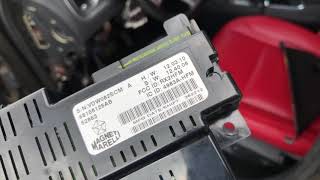
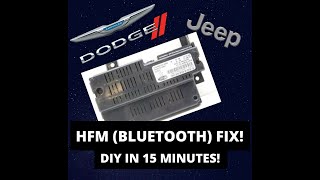
- Inspect HFM and Connector. If software updates fail, access the HFM. It is located under the driver's side dashboard, below the steering column. 🎬 Watch: Step-by-step guide to replacing the Hands-Free Module. Inspect its two connectors for corrosion or loose pins and ensure they're secure.
- Test Power and Ground. Using a multimeter, verify that the HFM connector has proper battery voltage and a good ground connection.
- Replace the Hands-Free Module. If all previous steps fail, the HFM has failed internally and requires replacement. This is a common DIY repair. Owners have sourced used parts from junkyards for as little as $20 or new parts for around $200-$400.
Parts You'll Likely Need
- Hands-Free Module (HFM)
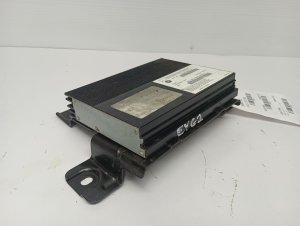
(OEM #68158126AC, 05064986, 82212159 (kit). Note: Part numbers vary. Always confirm with VIN.)— This module is the source of the communication loss. It either requires a software update or has failed internally, making it the primary part to address for this code. A failed module is also the cause of related symptoms like a flashing odometer and battery drain.
Trusted brands: Mopar
OEM price range: $250-$450
Aftermarket price range: $20-$300 (Used/Remanufactured)
Technical Service Bulletins (TSBs) & Recalls
- 08-083-19: Flash: Hands Free Module (HFM) Software Enhancements for U0197.
- 08-055-17 REV. A: Flash: Hands Free Module Software Enhancements for U0197 and other VR/phone screen issues.
Platform-Specific Known Issues
- Software Glitches Addressed by TSBs: TSB 08-083-19 and TSB 08-055-17 REV. A were released by FCA to address U0197 and a long list of symptoms including the HFM not booting, VR button not working, inaccurate language translations, and loss of audio during calls. The fix is a dealer-performed software flash.
- Flashing Odometer and Battery Drain: A well-documented symptom of a failed HFM on this platform (including the Chrysler 300 and Dodge Journey) is a flashing odometer display and a parasitic battery drain that occurs when the module fails internally and disrupts CAN bus communication.
Mechanic-Grade Diagnostic Values
- CAN Bus Voltage (IHS Bus) — expected: With key on, CAN H should be ~2.6V and CAN L should be ~2.4V, measured to a known good ground.. Failure: Voltages that are stuck high, low, or at 0V indicate a short or open on the bus wiring.
- Module Supply Voltage — expected: 10V to 16V at the HFM power supply pin with the ignition on.. Failure: Voltage below 10V can cause the module to drop off the network and set communication codes.
- Communication Timeout Threshold — expected: The HFM is expected to send messages continuously. This code sets when messages are not received for a specific duration.. Failure: Code U0197 sets after approximately 2 to 5 seconds of no communication from the HFM.
Hidden / Shadow Codes Worth Checking
- U0197-00: The '-00' is a Failure Type Code (FTC) indicating 'No Subtype Information'. This is the most generic form of the code and suggests a general communication loss or internal module fault, rather than a specific circuit high/low/open fault which would have a different FTC. (see via This is the standard format displayed on the dealer's wiTECH scan tool and some advanced aftermarket scanners.)
Scan Tool Commands That Help
- wiTECH + PC Application: Hands Free Module (HFM) Reprogramming/Flash — This is the manufacturer's primary recommended repair for U0197 when symptoms like 'Hands Free System Loading' are present. It updates the module's internal software to fix communication bugs. As of June 2017, this is a multi-step process: a technician must download the update file from the Uconnect dealer portal, use a separate PC application, and connect a special USB cable (orange cable for Charger/300) directly to the HFM's USB port under the dash.
- wiTECH: Module Reset (Manual Procedure) — If a software flash is interrupted or fails, TSBs instruct the technician to perform a hard reset of the module. For the Charger (LD/LX platform), this involves either pulling fuse F23 from the trunk fuse panel or physically disconnecting the C1 connector from the HFM to cycle its power before re-attempting the flash.
Wiring & Ground Locations
- Hands-Free Module (HFM) — Located under the driver's side of the instrument panel, generally above or near the steering column and brake pedal assembly. It is a small black plastic box held in by two screws.. This is the module that has lost communication. Physical access is required for inspection, testing power/ground at its connectors, connecting a special USB cable for software updates, or replacement.
- Fuse F23 (Trunk) — Located in the rear fuse box (Power Distribution Center) in the trunk, typically on the passenger side behind a panel.. While Pass 2 data correctly identifies F37 as a potential power source, TSB 08-083-19 specifically instructs technicians to pull fuse F23 to power cycle the HFM during the software flash procedure. A technician needs to be aware of both fuse locations.
- HFM Connectors — On the module itself. There is a larger, multi-pin main electrical connector (C1) and a smaller, separate USB connector used for direct flashing with a special cable.. Testing for power, ground, and CAN signals must be done at the main C1 connector. The USB port is critical for performing the dealer software update.
Real Owner Repair Stories
- Reddit user comments in r/Charger (2012 Dodge Charger R/T) — Bluetooth stopped working.
❌ Tried (didn't work) Replacing the Hands-Free Module twice with used parts.
✅ What actually fixed it The original poster did not find a fix, but a commenter with the same issue stated the solution was to buy a firmware-updated Bluetooth module from an eBay seller for $175, which worked. Another commenter noted that a dealer reflash is required and may need to be attempted multiple times to be successful.
OEM Part Supersession History
Part numbers ending in 'AB' or lower→Part numbers ending in 'AC' or higher— Software enhancements to fix communication bugs, per multiple TSBs.
Heads up: Installing an older, non-updated module (even a new-old-stock or used one) will likely result in the same U0197 code returning. The software version is critical. TSB 08-011-14 explicitly instructs to update modules with part numbers ending in 'AB' or lower to a new version ending in 'AC'.
Model Year Variations Within This Range
- 2015-2017 (with Navigation Radios): For some models within this range, particularly those equipped with the factory navigation radios (e.g., Uconnect 8.4 NAV), the Hands-Free/Telematics module functionality is integrated directly into the radio head unit itself. In these cases, there is no separate, replaceable HFM under the dashboard for Bluetooth functions. Diagnosis would shift to the radio unit.
- 2012-2014: For these earlier years, the HFM is almost always a separate, discrete module located under the driver's side dash. The dealer software update procedure also requires a specific 'orange' USB cable and a PC application, a process that was implemented around 2017 for flashing these older modules.
Helpful Videos
We Have This Part in Stock



The information in this article is provided for general reference and educational purposes only. Vehicle specifications, procedures, and part compatibility can vary by production date, trim level, and region. Always consult your vehicle's factory service manual and verify part numbers before purchasing or performing repairs. Safety-critical components such as airbags, seat belts, and braking systems should be installed by a qualified professional.
- Dodge CHARGER:
- 🎬 Helpful Videos
- 🛍️ Shop This Part
- What's Unique About the 2012-2017 Dodge CHARGER
- Diagnostic Flowchart
- Symptoms You May Notice
- Most Likely Causes
- Diagnosis Steps
- Parts You'll Likely Need
- Technical Service Bulletins (TSBs) & Recalls
- Platform-Specific Known Issues
- Mechanic-Grade Diagnostic Values
- Hidden / Shadow Codes Worth Checking
- Scan Tool Commands That Help
- Wiring & Ground Locations
- Real Owner Repair Stories
- OEM Part Supersession History
- Model Year Variations Within This Range
- 🎟️ Get 5% Off