

U0184 on 2014-2016 Chevrolet Impala: Radio Communication Loss Causes and Fixes
On a 2014-2016 Impala, code U0184 almost always indicates a software glitch in the radio module. The most common fix is a software update performed by a dealer, as specified in multiple GM Technical Service Bulletins (TSBs 16-NA-107, 16-NA-115). This service typically costs between $150 and $300. Before seeking professional repair, a temporary fix of disconnecting the battery for 10-15 minutes often restores functionality, confirming the software lock-up.
- U0184 on a 2014-2016 Impala means the radio has lost communication, usually due to a software glitch.
- Before considering any expensive repairs, try a 'hard reset' by disconnecting the battery for 15-30 minutes.
- The official and most common permanent fix is to have a GM dealer reprogram the radio module with updated software per TSB #16-NA-107 or #16-NA-115.
- Do not replace the radio module, which can cost over $500, unless a software update has been attempted and has failed to fix the problem.
- Driving with this code is safe, but infotainment and backup camera functions will be lost.
What's Unique About the 2014-2016 Chevrolet IMPALA

For the 10th generation Impala (2014+), this issue is exceptionally common and well-documented by General Motors. Unlike many other vehicles where this code might point to wiring or hardware failure, on this specific platform, the root cause is overwhelmingly a software anomaly within the MyLink infotainment system. GM released several Technical Service Bulletins (TSBs) advising dealers to reprogram the radio module with updated software as the primary fix, rather than replacing expensive hardware. Preliminary bulletins like PIT5401E even instructed dealers to simply power cycle the radio by pulling the fuse and, if function returned, to inform the customer that a permanent software fix was being developed.
Diagnostic Flowchart
Tap your situation to follow the diagnostic path that matches what you're seeing on this vehicle.
Symptoms You May Notice

- Radio is inoperative (black or blue screen).
- No audio from the speakers.
- Infotainment screen is frozen or unresponsive to touch.
- Backup camera display does not appear or has issues. [Bulletin #16-NA-115]
- OnStar hands-free calling is inoperative. [Bulletin #16-NA-115]
- Loss of audible chimes for turn signals or warnings.
- AM radio has a 'clipping' noise on talk stations. [Bulletin #16-NA-107]
- GPS compass points North only (on navigation-equipped models). [Bulletin #16-NA-107]
- XM radio fails to start up or presets are lost. [Bulletin #16-NA-115]
- Replacing the infotainment screen. The screen is often just a display, while the radio module (the 'brain') is a separate component. If the screen is black, the fault is usually with the module, not the screen itself.
- Replacing the speakers or amplifier. U0184 is a communication code. While a symptom is 'no audio', the root cause is the radio module being offline, not a failure of the audio output components.
Most Likely Causes
- Radio Software Corruption 🔴 High Probability A known software anomaly in the MyLink system for this generation of Impala is well-documented by GM. Multiple TSBs were released specifically to address this software glitch causing the radio to lock up and stop communicating.
How to confirm: A temporary fix by power-cycling the radio (pulling its fuse or disconnecting the negative battery terminal for 15 minutes) 🎬 Watch: How to perform a hard reset on your radio strongly suggests a software lock-up. [Bulletin #PIT5401D, 17, 18] If function returns, it's almost certainly the software issue. Permanent diagnosis requires a dealer to check the software calibration version against the latest available updates in the TIS2WEB system.
Typical fix: Reprogram the radio module with the latest software calibration using GM's Service Programming System (SPS), as instructed in TSBs #16-NA-107 (for 2015-2016 models) and #16-NA-115 (for 2014 models).
Est. part cost: $0 - Radio Module Hardware Failure ⚪ Low Probability
How to confirm: If reprogramming the radio with the latest software fails to resolve the issue, and power/ground connections to the unit are verified as good, the module itself (often the HMI module located behind the glovebox) is likely faulty. 🎬 See this walkthrough for accessing and replacing the HMI module Tapping on the radio/HMI module and seeing it flicker to life is another sign of internal failure.
Typical fix: Replace the radio receiver or Human Machine Interface (HMI) module. The replacement unit will require VIN-specific programming by a dealer or specialist to function.
Est. part cost: $400-$600 - Wiring or Connector Issue ⚪ Low Probability
How to confirm: Visually inspect the main connector at the back of the radio module for loose pins, corrosion, or physical damage. Use a multimeter to check for 12V+ power and good ground at the connector. Specifically, check the low-speed GMLAN data line (Circuit 5060) for proper voltage.
Typical fix: Repair the damaged section of the wiring harness or clean/replace the faulty connector.
Est. part cost: $10-$50
Rare But Worth Checking
- Aftermarket Radio Installation:
Diagnosis Steps

- Verify the symptoms: Confirm the radio is inoperative, screen is black/blue, and there is no audio.
- Scan all vehicle modules for DTCs. Note if U0184 is present in multiple modules, which is common and expected.
- Attempt a 'hard reset' as a primary diagnostic step. Disconnect the negative battery terminal for 15-30 minutes. The battery is located in the trunk under the floor cover. Reconnect and check if radio function returns temporarily. If it does, this strongly points to a software glitch.
- If the reset works, be prepared to perform a window re-learn procedure. After reconnecting the battery, you may need to roll each window fully down, then fully up and hold the switch for a few seconds to restore auto up/down functionality.
- If the reset does not work, check the radio fuses. For the 2014+ Impala, there is an interior fuse panel on the driver's side of the dash and an under-hood fuse box. Check the fuses labeled 'Radio', 'Display', or 'Infotainment'.
- Consult a GM dealer or qualified shop to check for open TSBs related to your VIN, specifically #16-NA-107 (2015-16) and #16-NA-115 (2014).
- Have the shop attempt to reprogram the radio module with the latest GM software calibrations. This is the most likely permanent fix.
- If reprogramming fails or is not possible because the scan tool cannot communicate with the radio, the wiring and connectors to the radio module should be inspected for 12V+ power, ground, and integrity of the low-speed GMLAN data wire (Circuit 5060).
- If all the above steps fail, the radio/HMI module itself is the likely point of failure and requires replacement and programming.
Parts You'll Likely Need
- Radio Reprogramming Service — This is not a physical part, but a service. It is the most common, official fix from GM to resolve the software glitches that cause the U0184 code.
Trusted brands: GM Dealer Service
OEM price range: $150-$300 - Human Machine Interface (HMI) Module
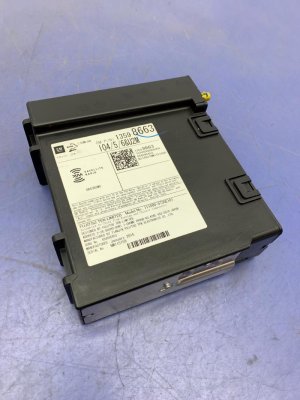
(OEM #23415899 (superseded by 84089011))— If reprogramming fails, this module, which acts as the 'brain' for the infotainment system, has likely failed. This part requires dealer programming after installation.
Trusted brands: ACDelco
OEM price range: $400-$600
Aftermarket price range: $250-$450
Technical Service Bulletins (TSBs) & Recalls

- 16-NA-107: Advises reprogramming the radio for DTC U0184, an inoperative radio, blue screen, and no audio on 2015-2016 models.
- 16-NA-115: Provides a procedure to reprogram the radio to correct an inoperative radio with DTC U0184 and rear view camera issues on 2014 models.
- PIT5401D: Advised technicians to remove power from the radio as a diagnostic step if it is inoperative with a U0184 code.
- PIT5401E: Notes an inoperative radio with no communication and DTC U0184 and states GM is working on a permanent s
Platform-Specific Known Issues
- Owner Experience: The Battery Disconnect Fix: Numerous owners on forums and YouTube have documented a successful temporary fix by performing a 'hard reset'. This involves disconnecting the negative terminal of the battery (located in the trunk) for 10-30 minutes. Upon reconnection, the MyLink system often reboots and functions normally, confirming the issue is a software lock-up rather than a hard failure. However, this fix is usually temporary, and the problem may return until the official software update is applied by a dealer. After the reset, the car will require you to re-index the windows by rolling each 🎬 Watch: A quick demonstration of the battery disconnect fix one down and then up completely.
- GM Technical Service Bulletins: GM issued multiple TSBs for this exact problem. TSB #16-NA-115 (for 2014 models) and #16-NA-107 (for 2015-2016 models) specifically call for reprogramming the radio to fix conditions including a U0184 code, inoperative radio, blue screen, and backup camera issues. An earlier bulletin, PIT5401F, acknowledged the widespread issue across many GM models and confirmed that new software via these TSBs was the intended permanent solution.
Mechanic-Grade Diagnostic Values
- Low-Speed GMLAN Data Line Voltage (Circuit 5060) — expected: Variable voltage, fluctuating between 0V and 5V during communication. A wake-up pulse may reach 10V.. Failure: A static, unchanging voltage (stuck at 0V or a constant high voltage) indicates a bus fault or a module pulling the bus down.
- Radio Power Pin Voltage — expected: 12.0 - 12.6 VDC with key on.. Failure: Low or no voltage indicates a power supply issue (fuse, wiring) rather than a module failure.
- Radio Ground Pin Resistance to Chassis — expected: Near 0 Ohms.. Failure: High resistance indicates a poor or corroded ground connection.
Scan Tool Commands That Help
- GDS2 (GM Diagnostic Software): Radio > Programming (via SPS) — This is the primary function used to execute the software update specified in TSBs 16-NA-107 and 16-NA-115. It loads the new calibration file onto the radio module to fix the software lock-up condition.
- GDS2 (GM Diagnostic Software): Clear Secured High Voltage DTCs — While not directly for U0184, this function demonstrates a category of commands in GDS2 that are required to clear specific types of codes that a standard 'Clear All DTCs' command won't erase, highlighting the need for dealer-level tools for certain network-related faults.
- GDS2 (GM Diagnostic Software): Module Diagnostics > Radio — Used to attempt to establish communication with the radio module. If the module responds, a technician can view identification information (like software version) and check for module-specific DTCs before attempting to reprogram it.
Wiring & Ground Locations

- Radio Ground — At the radio's gray 20-pin connector, pin 11, the wire is Black.. A poor ground at this specific pin can cause the radio module to malfunction or fail to power on, leading to a loss of communication and setting code U0184.
- Low-Speed GMLAN (Circuit 5060) — This is a single Dark Green wire that connects to the radio module and other low-speed modules. Its pin position varies by connector.. This is the specific data wire the radio uses to communicate. A short or open on this wire will directly cause code U0184. TSB PIT5401E specifically instructs technicians to check the voltage on this circuit if a power cycle doesn't fix the issue.
- HMI Module — Located behind/under the glove box.. This is the physical location of the Human Machine Interface module, which is often the component that requires reprogramming or replacement. A loose 20-pin connector at this module can also cause the issue.
Real Owner Repair Stories
- Reddit user in r/MechanicAdvice (2014 Chevrolet Impala) — Radio has a black screen, no audio options.
❌ Tried (didn't work) A dealership quoted $1,000 to try a new radio.
✅ What actually fixed it Disconnecting the negative battery cable and reattaching it would restore radio function for a single key cycle. The radio would go black again the next time the car was started. This confirms a temporary software lock-up, for which the permanent fix is the dealer software update per the TSBs. - CarComplaints.com user report (2014 Impala LS) — Radio display stayed black after starting the car. The next morning, it worked normally.
❌ Tried (didn't work) Restarting the car did not immediately fix the issue.
✅ What actually fixed it The owner took the vehicle to the dealership service department. They were told a 'software upgrade was needed' which would fix the issue. This aligns directly with the fix specified in GM's Technical Service Bulletins.
OEM Part Supersession History
23415899→84089011— Standard part evolution for hardware revisions and bug fixes.
Heads up: Part number 84089011 replaces several older numbers, including 23212442, 23364950, and 23415899. While it is the correct service replacement, any new HMI module must be programmed by a dealer to match the vehicle's VIN and RPO codes (e.g., IO5, IO6) to function.
Model Year Variations Within This Range
- 2014 vs. 2015-2016: The specific software update required is different. TSB #16-NA-115 is for 2014 models, while TSB #16-NA-107 is for 2015-2016 models, indicating different underlying software calibrations.
- 2014-2016: Symptoms can vary based on the radio's RPO code. For example, TSB #16-NA-107 notes that the 'GPS compass is pointed to North only' symptom is specific to radios with RPO codes IO5 or IO6, while a 'blue screen' is associated with RPO IO3.
Helpful Videos

We Have This Part in Stock



The information in this article is provided for general reference and educational purposes only. Vehicle specifications, procedures, and part compatibility can vary by production date, trim level, and region. Always consult your vehicle's factory service manual and verify part numbers before purchasing or performing repairs. Safety-critical components such as airbags, seat belts, and braking systems should be installed by a qualified professional.
- Chevrolet IMPALA:
- 🎬 Helpful Videos
- 🛍️ Shop This Part
- What's Unique About the 2014-2016 Chevrolet IMPALA
- Diagnostic Flowchart
- Symptoms You May Notice
- Most Likely Causes
- Rare But Worth Checking
- Diagnosis Steps
- Parts You'll Likely Need
- Technical Service Bulletins (TSBs) & Recalls
- Platform-Specific Known Issues
- Mechanic-Grade Diagnostic Values
- Scan Tool Commands That Help
- Wiring & Ground Locations
- Real Owner Repair Stories
- OEM Part Supersession History
- Model Year Variations Within This Range
- 🎟️ Get 5% Off