

U0184 on 2014-2016 Cadillac XTS: Radio Communication Loss Causes and Fixes
This code means the radio has lost communication with the vehicle's other computers. On the 2014-2016 XTS, this is almost always caused by a software glitch in the Cadillac User Experience (CUE) system. The official fix, outlined in GM Technical Service Bulletins, is to have a dealer reprogram the radio module (HMI). If reprogramming fails, the HMI module itself requires replacement.
- U0184 on a 2014-2016 XTS means the radio/CUE system has stopped communicating on the vehicle's network.
- The most probable cause is a software glitch, which GM has acknowledged in service bulletins. The official fix is a dealer software update.
- Before going to a shop, try a simple 'hard reset' by disconnecting the car battery for 15-30 minutes, as this can temporarily resolve the issue.
- If a reset doesn't work, the radio/HMI module may have failed and will need to be replaced and programmed by a professional.
- Do not mistake this issue for a bad touchscreen; a faulty screen alone will not typically set a U0184 communication code.
What's Unique About the 2014-2016 Cadillac XTS

The 2014-2016 Cadillac XTS is equipped with the early generation of the Cadillac User Experience (CUE) system, which was known to have software-related problems leading to this specific code. General Motors issued multiple Technical Service Bulletins (TSBs) acknowledging that conditions like a blank screen, inoperative radio, and the U0184 code could be caused by software calibration issues. Unlike a simple component failure, the most common problem on this specific platform is a software fault that requires dealer-level tools to correct by reprogramming the HMI module. A weak battery or jump-start can sometimes trigger this software corruption.
Diagnostic Flowchart

Tap your situation to follow the diagnostic path that matches what you're seeing on this vehicle.
Symptoms You May Notice

- Radio is completely inoperative (no sound, no power).
- Infotainment screen is blank, black, or blue.
- Touchscreen is frozen or unresponsive.
- Loss of audio for radio, navigation, and vehicle warning chimes.
- Backup camera display does not appear or is distorted.
- OnStar and hands-free calling features are unavailable.
- System randomly reboots while driving.
- GPS compass is stuck pointing North.
- HVAC pop-up display on the screen is blank when adjusting climate controls.
- Replacing the CUE touchscreen. While screen delamination ('spider-webbing') and 'ghost touch' are very common issues on these cars, they are failures of the digitizer layer itself and do not typically cause a total communication loss that sets code U0184. A bad screen usually won't cause a completely black display or prevent the system from booting.
Most Likely Causes

- Radio Module Software Corruption 🔴 High Probability As documented in multiple GM TSBs (#16-NA-107, #16-NA-115, PIT5401D), the original software calibration in the radio (HMI) module was prone to glitches that cause it to stop communicating, often triggered by voltage fluctuations.
How to confirm: A temporary fix after a power cycle (disconnecting the battery or pulling the 'Radio' fuse for a few minutes) strongly suggests a software issue. This is a key diagnostic step mentioned in GM bulletins. If power cycling temporarily restores function, a software update is needed.
Typical fix: Reprogramming the HMI module with the latest software calibration using GM's Service Programming System (SPS). This must be done by a dealer or a qualified independent shop.
Est. part cost: $0 - Failing Radio/HMI Module 🟡 Medium Probability The Human-Machine Interface (HMI) module, the brain of the CUE system located behind the glove box, can suffer from internal hardware failure over time, mimicking a software glitch.
How to confirm: If reprogramming the module fails, if the module will not communicate with the scan tool even after a power cycle, or if the screen displays a 'Waiting for Update Media' message, the module itself has likely failed.
Typical fix: Replacement of the radio/HMI module. The new module must be programmed to the vehicle's VIN to disable the anti-theft feature and function correctly.
Est. part cost: $250-$600 (Used/Remanufactured) - Blown Fuse or Power Supply Issue ⚪ Low Probability While not specific to the XTS, any vehicle can experience a blown fuse. A weak or failing battery can also cause low voltage, triggering communication faults.
How to confirm: Check the fuses related to the 'Radio', 'Display', and 'HMI' in the vehicle's fuse panels. Use a multimeter to verify a stable 12V+ at the module's power connector.
Typical fix: Replace the blown fuse. If the fuse blows again, further diagnosis is needed to find a short circuit. Replace a weak battery.
Est. part cost: $1-$5 - Loose or Damaged Wiring ⚪ Low Probability Previous dashboard repairs can leave connectors loose. It's less common for wiring to fail on its own without outside influence. The HMI module is located behind the glove box, an area sometimes disturbed during cabin air filter replacement. 🎬 See this walkthrough on how to access and remove the module
How to confirm: Visually inspect the connectors and wiring harness at the back of the HMI module. Check for pinched wires or loose pins on the GMLAN circuit.
Typical fix: Repair the damaged wire or securely reseat the connector.
Est. part cost: $5-$50
Diagnosis Steps
- Perform a 'soft reset': Turn the car off. Open the driver's door and leave it open for at least 60 seconds. Close the door and restart the vehicle. This allows all modules to fully power down and can resolve temporary glitches.
- Check for blown fuses: Inspect the fuses for the 'Radio', 'Display', and 'HMI' in the interior fuse panel (often on the passenger side) and/or engine bay fuse panels. Replace if necessary.
- Perform a 'hard reset' (Fuse Pull): A more effective method recommended by GM is to pull the specific fuse for the Radio/Tuner for several minutes, then reinstall it. This forces a power cycle of the module. Alternatively, disconnect the negative terminal 🎬 Watch: How to perform a hard reset on your CUE system of the vehicle's battery for 15-30 minutes.
- Scan for codes: Use an OBD-II scanner to confirm U0184 is the primary code and if it is 'current' or 'history'. Note any other 'U' codes, as multiple communication codes could point to a wider network issue.
- Consult a professional: If the radio remains inoperative or the fix is temporary, the next step is to visit a GM dealer or a repair shop with GM diagnostic software (GDS2/SPS). They will attempt to communicate with the radio module.
- Reprogram the module: If communication is established (or re-established after a power cycle), the technician will reprogram the radio with the latest software update as prescribed by TSB #16-NA-107 (for 2015-16 models) or #16-NA-115 (for 2014 models).
- Replace the module: If reprogramming is unsuccessful, communication cannot be established, or the screen shows 'Waiting for Update Media', the radio/HMI module needs to be replaced and programmed to your vehicle's VIN.
Parts You'll Likely Need
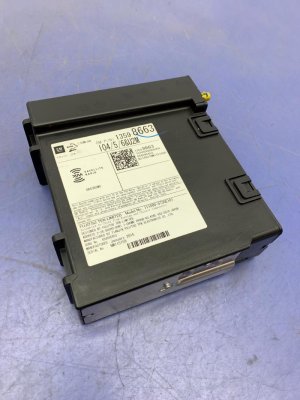
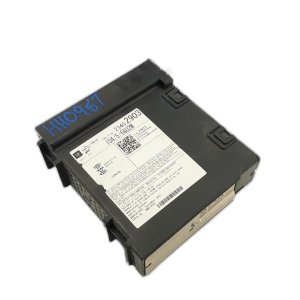
- Radio / Human-Machine Interface (HMI) Module
(OEM #22953967 (2013-2015), 23150270 (superseded))— This is the computer that controls the CUE infotainment system. It is the component that fails internally or requires the software update that corrects the U0184 code. A replacement, new or used, must be programmed to the vehicle's VIN.
Trusted brands: ACDelco (OEM)
OEM price range: $400-$700
Aftermarket price range: $250-$500 (Remanufactured/Used)
Related Codes That Often Appear With This One
- U0214 (Lost Communication With Remote Function Actuation)
Technical Service Bulletins (TSBs) & Recalls
- 16-NA-107: Advises reprogramming the radio to fix U0184, inoperative radio, blue screen, and other software-related glitches for 2015-2016 models.
- 16-NA-115: Recommends reprogramming the radio to fix U0184 and concerns like no XM on start-up or backup camera issues for 2013-2014 models.
- PIT5401F: Supersedes earlier versions and directs technicians to use TSBs 16-NA-107 or 16-NA-115 as the permanent software fix.
- PIT5401E: Instructs technicians on diagnosing U0184 with an inoperative radio, suggesting a power cycle via the fuse as a key diagnostic step before module replacement.
Platform-Specific Known Issues
- GM Technical Service Bulletin #16-NA-107 directly addresses DTC U0184 on the 2015-2016 XTS, noting that an inoperative radio or blue screen can be fixed by reprogramming the radio module with updated software.
- GM Technical Service Bulletin #16-NA-115 provides the same reprogramming fix for the 2014 XTS model year.
- GM Preliminary Information Bulletin #PIT5401E (and its successor PIT5401F) covers the 2014-2016 XTS for an inoperative radio with code U0184. It advises technicians to first try cycling power via the fuse. If that temporarily works, it confirms a known software issue for which updates (16-NA-107/115) were released.
Mechanic-Grade Diagnostic Values
- High-Speed GMLAN Bus Resistance — expected: ~60 Ohms. Failure: A reading of ~120 Ohms indicates an open circuit or a missing termination resistor in one of the main modules. A reading near 0 Ohms indicates the CAN High and CAN Low wires are shorted together.
- High-Speed GMLAN High Voltage (Key On) — expected: ~2.6V (average). Failure: Significant deviation from 2.6V, or a steady 0V or 5V, indicates a bus fault (short to ground, short to power, or open circuit). The signal toggles between 2.5V and 3.5V during communication.
- High-Speed GMLAN Low Voltage (Key On) — expected: ~2.3V (average). Failure: Significant deviation from 2.3V indicates a bus fault. The signal toggles between 2.5V and 1.5V during communication.
- Low-Speed GMLAN Voltage (Key On) — expected: Toggles between ~0.2V (recessive) and ~4.0V+ (dominant).. Failure: A stuck high or low voltage indicates a fault on the single-wire low-speed network.
- HMI Module Power Supply — expected: 12.0 - 12.6V. Failure: Low or no voltage indicates a problem with the fuse, wiring, or power source, not the module itself.
Scan Tool Commands That Help
- GDS2 (GM Dealer Scan Tool): HMI Data List Display — Used to view live data from the HMI module. However, a known software issue can cause the HMI to lose communication with the GDS2 scan tool after 5-60 seconds of viewing this data list, which can be misdiagnosed as a failed module. If this occurs, a power cycle of the HMI (pulling the fuse) is required to re-establish communication.
- TIS2Web / SPS (Service Programming System): K74 Human Machine Interface Control Module - Programming — This is the function used to perform the software update specified in TSBs 16-NA-107 and 16-NA-115. It reprograms the HMI module with updated, corrected software to resolve the communication loss. A stable power supply (battery maintainer) is critical during this process.
- TIS2Web / SPS (Service Programming System): Module Setup / VIN Programming — When a new or used HMI module is installed, it must be programmed to the vehicle's VIN. This process removes the 'THEFT LOCK' message and configures the module for the specific options in the vehicle.
Wiring & Ground Locations
- K74 Human Machine Interface (HMI) Control Module — Located behind the vehicle's glove box. The glove box must be removed for access.. This is the radio module itself. All power, ground, and data lines connect here. Checking for secure connections at this module is a primary diagnostic step.
- G302 — Located at the base of the right kick panel, near the passenger's feet.. This is a potential ground point for the radio and audio amplifier systems. A loose or corroded ground here can cause intermittent power and communication issues.
- G203 — Located at the base of the left kick panel, near the driver's feet.. This ground point serves the Body Control Module (BCM) and Data Link Connector (DLC). A fault here could cause widespread communication issues, including U0184.
- Data Link Connector (DLC) — Lower left side of the driver's dashboard.. This is the primary access point for diagnostics. Pins 6 (CAN High) and 14 (CAN Low) are used for high-speed communication with the HMI module, and Pin 1 is for low-speed communication.
Real Owner Repair Stories
- Reddit r/Cadillac user comment (2016 ATS (shares CUE architecture with XTS)) — Believed HMI module had failed.
❌ Tried (didn't work) Initial diagnosis pointed to a bad HMI module.
✅ What actually fixed it The user disconnected the battery for 30 minutes. After reconnecting, the CUE system rebooted and began working perfectly again, indicating a software glitch that was resolved by a hard reset.
OEM Part Supersession History
22953967→23150270— Software and potential hardware revisions to improve stability and address known issues like the U0184 communication fault.
Heads up: While the modules are physically interchangeable, they require VIN-specific programming to function. A used module must be unlocked and reprogrammed. The software update TSBs are specific to certain model years, indicating different base software between early and late parts.
Model Year Variations Within This Range
- 2014: Uses software addressed by TSB #16-NA-115. These earlier systems may have slightly different hardware or base software calibrations compared to later models.
- 2015-2016: Uses software addressed by TSB #16-NA-107. This indicates a different software branch or update path than the 2014 models.
Helpful Videos

![[2013-2020 XTS] Cadillac CUE Complete HD Module Removal *Easy Method* 20 mins](https://img.youtube.com/vi/fTJDA_RQvi0/mqdefault.jpg)
![[2013-2020 XTS] Cadillac CUE Complete HD Module Removal *Easy Method* 20 mins](https://img.youtube.com/vi/1QqqbI6ce2k/mqdefault.jpg)
We Have This Part in Stock



The information in this article is provided for general reference and educational purposes only. Vehicle specifications, procedures, and part compatibility can vary by production date, trim level, and region. Always consult your vehicle's factory service manual and verify part numbers before purchasing or performing repairs. Safety-critical components such as airbags, seat belts, and braking systems should be installed by a qualified professional.
- Cadillac XTS:
- 🎬 Helpful Videos
- 🛍️ Shop This Part
- What's Unique About the 2014-2016 Cadillac XTS
- Diagnostic Flowchart
- Symptoms You May Notice
- Most Likely Causes
- Diagnosis Steps
- Parts You'll Likely Need
- Related Codes That Often Appear With This One
- Technical Service Bulletins (TSBs) & Recalls
- Platform-Specific Known Issues
- Mechanic-Grade Diagnostic Values
- Scan Tool Commands That Help
- Wiring & Ground Locations
- Real Owner Repair Stories
- OEM Part Supersession History
- Model Year Variations Within This Range
- 🎟️ Get 5% Off