

U0184 on 2014-2016 Cadillac SRX: Radio Communication Loss Causes and Fixes
On a 2014-2016 Cadillac SRX, U0184 almost always means the radio (CUE system) has a software glitch, causing it to freeze or go blank. The official fix is a software reprogram by a dealer, but a temporary fix of disconnecting the battery or pulling the radio fuse for several minutes often restores function.
- U0184 on a 2014-2016 SRX is almost certainly a software problem with the CUE radio, as documented by GM in multiple service bulletins.
- Before going to a shop, try a 'hard reset' by disconnecting the car battery for 30 minutes or pulling the 'RDO' fuse; this often provides a temporary fix.
- The permanent solution is a software update (reprogram) performed by a Cadillac dealer or a qualified independent shop with GM programming tools, as specified in TSB 16-NA-107 or 16-NA-115.
- If a reprogram fails, the radio/HMI module itself needs to be replaced and programmed to the vehicle's VIN.
What's Unique About the 2014-2016 Cadillac SRX
The 2014-2016 Cadillac SRX uses the Cadillac User Experience (CUE) system, which was known to have software stability issues in this era, particularly with the IO5 and IO6 RPO codes. General Motors issued multiple Technical Service Bulletins (TSBs) specifically to address radio software that could cause it to become inoperative, go to a blue screen, or simply fail to communicate, setting a U0184 code. This makes the problem a well-documented software issue rather than a random hardware failure, with a clear, albeit dealer-dependent, solution outlined in TSB 16-NA-107.
Diagnostic Flowchart
Tap your situation to follow the diagnostic path that matches what you're seeing on this vehicle.
Symptoms You May Notice
- Radio is inoperative (blank or frozen screen).
- No sound from the audio system.
- Blue screen on the display.
- Backup camera display does not appear or has a time lag.
- OnStar and hands-free calling features are unavailable.
- AM radio has a clipping noise.
- The system is slow or lags when transitioning between screens.
- GPS compass is stuck pointing North.
- Loss of Bluetooth or USB media playback.
- Replacing the display screen. The U0184 code is related to the radio *module* losing communication, not a faulty touchscreen. While touchscreen delamination/failure is also a very common CUE system issue, it typically does not set a U0184 code and is a separate repair. 🎬 See what you need to know about touchscreen failure.
Most Likely Causes
- Radio Module Software Corruption 🔴 High Probability This is a widely documented issue for this platform, with GM issuing multiple TSBs (16-NA-107, PIT5401 series) to address it. The software can enter a 'lock-up' or 'sleep' state, causing it to stop communicating on the GMLAN.
How to confirm: Attempt a hard reset by disconnecting the battery for 30 minutes or pulling the radio fuse ('RDO' in the passenger compartment fuse box) for several minutes. If function returns temporarily, it confirms a software glitch. The permanent fix is confirming with a dealer if TSB #16-NA-107 (for 2015-16 models) or #16-NA-115 (for 2014 models) applies.
Typical fix: Reprogram the radio module with the latest software calibration using GM's Service Programming System (SPS). This must be done at a dealership or a qualified shop with J2534 programming tools. The dealer labor charge for this reprogram is typically 1-1.5 hours.
Est. part cost: $0 - Radio Module (CUE System) Internal Failure 🟡 Medium Probability If the software reprogram does not resolve the issue or the module fails to respond to the programming tool, the hardware of the radio module itself has likely failed. These modules are complex and can fail internally.
How to confirm: The code returns immediately after a reprogram attempt, or the module remains unresponsive to the programming tool even after a power cycle. A technician would verify stable 12V power and ground at the module before condemning it.
Typical fix: Replace the radio module (also called the tuner or HMI module). The replacement unit, new or used, MUST be programmed to the vehicle's VIN to disable the 'Theft Lock' feature.
Est. part cost: $400-$800 - Blown Fuse or Power Supply Issue ⚪ Low Probability While less common than software issues, a simple blown fuse can cause the module to lose power and stop communicating. A weak or failing battery can also cause intermittent electronic issues across the vehicle.
How to confirm: Check the fuse for the radio, labeled 'RDO' or 'AMP/RDO', in the instrument panel fuse box located in the passenger side of the center console. Also, check for stable battery voltage (should be 12.0-12.6V with engine off).
Typical fix: Replace the blown fuse. If the fuse blows repeatedly, there is a short circuit that needs to be diagnosed. If the battery is weak, recharge or replace it.
Est. part cost: $1-$5
Rare But Worth Checking
- Damaged GMLAN Bus Wiring or Connectors: While TSBs point to software, a communication code can always be caused by a physical wiring problem. This should be investigated if software and module replacement do not solve the issue. A technician would check the single data wire (circuit 5060) for shorts or opens between the radio and the data link connector. Look for corrosion or loose pins on the radio connector.
Diagnosis Steps
- Verify the symptoms, such as a blank or frozen radio screen and no audio.
- Scan all vehicle modules with a professional scan tool. Note that multiple modules (BCM, Instrument Cluster, etc.) may store U0184 because they are all expecting a signal from the radio.
- Attempt a 'hard reset' as a first step. Disconnect the negative terminal of the vehicle's battery for at least 30 minutes. Alternatively, pull the 'RDO' fuse from the passenger-side console fuse box for a few minutes and then reinstall it.
- Another user-documented reset involves turning the ignition on (engine off), opening the CUE faceplate, turning the ignition off, opening the driver's door for 60 seconds, closing the door, and restarting the vehicle.
- If the radio begins working after a reset, the issue is confirmed to be a software glitch. Contact a dealer to have the radio reprogrammed per TSB #16-NA-107 (2015-16) or #16-NA-115 (2014).
- If the reset does not work, check the fuse labeled for the radio/infotainment system ('RDO'). Replace if blown.
- If the fuse is good and the reset failed, the vehicle needs professional diagnosis. A technician will verify B+ power, ground, and the GMLAN data signal at the radio module connector before attempting a reprogram.
- If signals are present, the technician will attempt to reprogram the module. If this fails or the module won't communicate, the radio module itself is faulty and requires replacement and VIN programming.
Parts You'll Likely Need
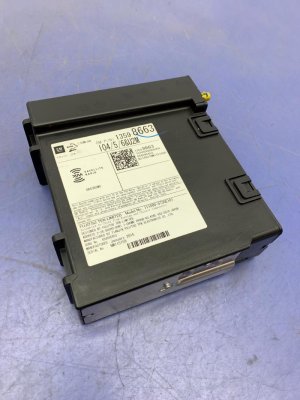
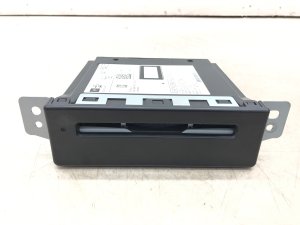
- Radio / CUE Infotainment Module / HMI Module
(OEM #23442634 (Superseded by other numbers, always verify by VIN))— This is the central computer for the infotainment system, often referred to as the Human Machine Interface (HMI) module or tuner. It is replaced when software reprogramming fails to fix the communication issue. It is located behind the glove box. 🎬 Watch: Easy 10-minute guide to removing the radio module.
Trusted brands: ACDelco (OEM)
OEM price range: $600-$1000
Aftermarket price range: $250-$600 (Remanufactured/Used)
Technical Service Bulletins (TSBs) & Recalls
- 16-NA-107: DTC U0184 Set, Radio Inoperative, Blue Screen...
- 16-NA-115: Radio inoperative with no communication and DTC U0184...
- PIT5401F: Radio Inoperative with No Communication and DTC U0184
- PIT5401E: Radio Inoperative with No Communication and DTC U0184
- PIT5401D: Inoperative radio with Diagnostic Trouble Code U0184 set...
- PIT5401C: Inoperative radio... Diagnostic Trouble Code U0184 stored in multiple modules.
Platform-Specific Known Issues
- Bulletin #16-NA-107: Explicitly mentions DTC U0184 along with symptoms like an inoperative radio and blue screen, recommending a software reprogram as the fix for 2015-2016 models.
- Bulletin #16-NA-115: The equivalent of 16-NA-107 but specified for 2013-2014 models, addressing U0184 and other radio concerns with a software update.
- Bulletin #PIT5401 (A through F): This was a Preliminary Information bulletin series where GM acknowledged the U0184/inoperative radio issue. Early versions told technicians to simply power cycle the radio and wait for a permanent fix, which was later delivered via TSBs 16-NA-107/115.
- The CUE system in this generation is known for multiple failure points, including the touchscreen digitizer delaminating which causes 'ghost touches' or unresponsiveness. However, U0184 specifically points to a communication/module problem, not just a bad screen.
Helpful Videos

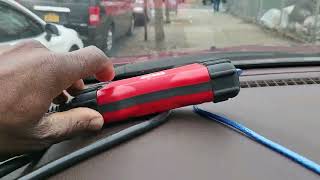
![[2013-2016 SRX] Cadillac CUE Complete HD Module Removal *Easy Method* 10 mins](https://img.youtube.com/vi/ec3cIh6Bm6c/mqdefault.jpg)
We Have This Part in Stock



The information in this article is provided for general reference and educational purposes only. Vehicle specifications, procedures, and part compatibility can vary by production date, trim level, and region. Always consult your vehicle's factory service manual and verify part numbers before purchasing or performing repairs. Safety-critical components such as airbags, seat belts, and braking systems should be installed by a qualified professional.
- Cadillac SRX:
- 🎬 Helpful Videos
- 🛍️ Shop This Part
- What's Unique About the 2014-2016 Cadillac SRX
- Diagnostic Flowchart
- Symptoms You May Notice
- Most Likely Causes
- Rare But Worth Checking
- Diagnosis Steps
- Parts You'll Likely Need
- Technical Service Bulletins (TSBs) & Recalls
- Platform-Specific Known Issues
- 🎟️ Get 5% Off