

U0029 on 2015-2019 Chevy Silverado 2500: Causes and Fixes for Communication Faults
This code indicates a communication problem on the truck's internal network, often the MOST bus for the infotainment system. The most likely cause is a pinched wiring harness behind the left side of the instrument panel, as noted in GM service bulletins. Other common causes include a failed CD player or HMI module, which can take down the entire fiber-optic communication ring.
- U0029 on a 2015-2019 Silverado 2500 points to a serious communication network failure.
- Before buying any parts, thoroughly inspect the wiring harness behind the driver's side of the dash for pinching, as this is a very common, documented problem.
- If the infotainment system is dead, the fault is likely on the fiber-optic MOST bus ring.
- A failed CD player is a surprisingly common cause for this code and can be diagnosed using a special fiber optic bypass loop.
- Due to the complexity of network diagnostics, professional service is highly recommended.
What's Unique About the 2015-2019 Chevrolet SILVERADO 2500

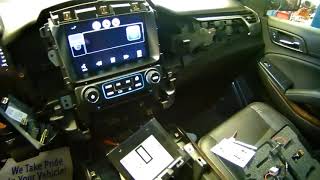
On this generation of Silverado and its K2XX platform mates, the U0029 code is frequently linked to two specific, well-documented issues. First is a factory assembly flaw where a wiring harness gets pinched by a dash support bracket near the parking brake pedal, a fault GM has issued multiple service bulletins for (PIT5288 series). Second, the infotainment system uses a fiber-optic 'MOST' network ring; if any single module on that ring fails (like the commonly faulty CD player), it breaks the communication loop for the entire system 🎬 Watch: How to diagnose a MOST bus communication fault, triggering this code.
Diagnostic Flowchart

Tap your situation to follow the diagnostic path that matches what you're seeing on this vehicle.
Symptoms You May Notice

- Radio or infotainment screen is blank or inoperative.
- No audio from speakers, including turn signal clicks and warning chimes.
- HVAC (climate) controls do not work or display on screen.
- Instrument panel gauges act erratically or go blank.
- Steering wheel controls are inoperative.
- Warning messages like 'Communication Error' on the display.
- Dead battery due to modules not shutting down properly.
- Backup camera may still work on the blank screen when in reverse.
- Replacing the infotainment screen when the actual fault is the HMI module, CD player, or wiring. The screen itself is often just a display and not the cause of a communication code.
- Replacing the BCM (Body Control Module) without first checking for the common pinched harness issue or MOST bus faults, which are far more likely causes for this specific code on this platform.
Most Likely Causes

- Pinched Wiring Harness 🔴 High Probability A known factory assembly issue documented in GM Technical Service Bulletin #PIT5288H. The dash harness is pinched by a metal I/P (Instrument Panel) mounting bracket to the left of the steering column, near the parking brake pedal assembly.
How to confirm: Visually inspect the wiring harness from underneath the dashboard, to the left of the steering column. Check if the harness is caught, crushed, or chafed by the sharp edge of a metal bracket where it meets the body. The damage may not be immediately obvious without moving the harness.
Typical fix: Loosen the bracket bolts, free the harness, and carefully open the loom to inspect for damaged wires. Repair any chafed, broken, or shorted wires using appropriate splicing techniques. Reroute the harness to prevent future damage and secure it with zip ties.
Est. part cost: $5-$50 for wiring repair supplies. - Failed CD Player Module 🟡 Medium Probability The CD player is a node on the fiber-optic MOST bus ring. An internal electronic failure of the module breaks the entire communication ring, a very common failure point discussed widely in owner forums and by professional technicians.
How to confirm: Use a MOST bus fiber optic bypass loop (a small diagnostic tool with a female connector) to jump the connection at the CD player. Unplug the fiber optic connector from the back of the CD player and plug it into the loop. If the radio and screen turn on, the CD player module is faulty.
Typical fix: Replace the CD player module. The bypass loop is for diagnosis only, though some owners leave it in place if they don't use the CD player. The replacement part may need to be programmed to the vehicle.
Est. part cost: $150-$400 - Failed Human Machine Interface (HMI) Module ⚪ Low Probability The HMI module is the central brain for the infotainment system and another critical node on the MOST bus. Like the CD player, its internal failure can bring down the network, causing a blank screen and setting the U0029 code.
How to confirm: Use a MOST bus fiber optic bypass loop at the HMI module connector, which is typically located behind the glove box. If other systems (like audio) resume function after bypassing it, the HMI module is the culprit.
Typical fix: Replace the HMI module. This part MUST be programmed to your vehicle's VIN and specific options (RPO codes like IO5 or IO6 for navigation). You can buy pre-programmed modules online or have a dealer/shop perform the programming.
Est. part cost: $300-$700
Rare But Worth Checking
- Failed Radio Module: The radio (silver box, separate from the screen) is the 'master' of the MOST bus. While less common than the CD or HMI module failure, a fault here can cause the U0029 code. Diagnosis involves bypassing other modules first.
- Aftermarket Electronics: Improperly installed remote start systems, alarms, or audio equipment can interfere with the vehicle's communication networks by tapping into the wrong wires or introducing electrical noise.
- Corroded Connector or Damaged Fiber Optic Cable: Less common than module failure, but a damaged fiber optic cable or a corroded connector at one of the MOST bus modules can break the ring and cause the same symptoms.
Diagnosis Steps
- Perform a full vehicle scan to see which other communication codes are present in various modules. Note which modules are not communicating.
- Based on TSB #PIT5288H, the first physical check should be inspecting the wiring harness behind the left side of the instrument panel for pinching or damage near the dash support bracket.
- If the infotainment system is dead (blank screen, no audio), the next step is to diagnose the MOST fiber-optic ring.
- Access the CD player in the center stack. Disconnect its electrical connector, which contains the two fiber optic lines. Install a MOST fiber optic bypass loop onto this connector. If the radio and screen power on, the CD player has failed and must be replaced.
- If the CD player is not the fault, remove the bypass loop and reconnect it. Access the HMI module, typically behind the glove box. Repeat the bypass process on the HMI module's fiber optic connector. If function returns, the HMI module is faulty.
- Before ordering an HMI module, identify your truck's infotainment RPO code (e.g., IO5, IO6) from the sticker in the glove box to ensure you get the correct, compatible part.
- If no fault is found on the MOST bus, the issue may be on the traditional copper CAN bus. This requires checking for 60 ohms of resistance across pins 6 and 14 of the OBD-II port (with the battery disconnected) to verify the network's terminating resistors are intact.
- If resistance is incorrect or the problem persists, an advanced technician would use an oscilloscope to check for a clean data signal on the network lines to identify sources of electrical noise or interference.
Parts You'll Likely Need
- MOST Fiber Optic Bypass Loop
(OEM #EL-51578 (GM Essential Tool))— A diagnostic tool required to isolate which module on the fiber optic ring has failed. Inexpensive aftermarket versions are widely available.
Trusted brands: ACDelco, Aftermarket
OEM price range: $20-$40
Aftermarket price range: $10-$20 - CD Player / Single Disc Player
(OEM #23437385 (Example, verify by VIN))— An internal failure in the CD player is a frequent cause for breaking the MOST bus communication ring, triggering the U0029 code.
Trusted brands: ACDelco
OEM price range: $250-$400
Aftermarket price range: $150-$300 - Human Machine Interface (HMI) Module
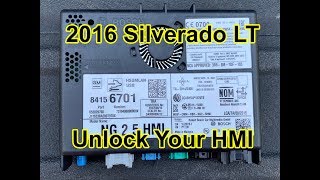
(OEM #84156701, 84028492, 84331776 (Examples for IO6 Nav, MUST verify by VIN))— This module controls the infotainment system and is another common point of failure on the MOST bus network. It must be programmed for the specific vehicle.
Trusted brands: ACDelco
OEM price range: $400-$700
Aftermarket price range: $300-$550
Related Codes That Often Appear With This One
- U0028 — This code also relates to Vehicle Communication Bus A, and the two are almost always set together, indicating a significant fault on the MOST bus.
- U0140 — Lost Communication With Body Control Module. This often appears when a network-wide issue, like the pinched harness, prevents various modules from talking to the BCM.
- U0184 — Lost Communication With Radio. This is a direct result of the network fault that triggers U0029, as the radio is a primary module on the MOST bus.
- U0155 — Lost Communication With Instrument Panel Cluster (IPC) Control Module. This occurs when the instrument cluster, another node on the MOST ring, can't communicate.
Technical Service Bulletins (TSBs) & Recalls
- PIT5288H: Details the issue of a pinched wire harness in the left instrument panel causing U0029 and other communication codes.
- PIT5586E: Lists U0029 as a possible DTC when experiencing various electrical issues like inoperative HVAC controls.
- PIT5405A: Mentions U0029 in a list of codes that can set when the infotainment and HVAC screens go blank.
- PI1149A: Provides diagnostic guidance for blank infotainment screens caused by MOST bus failures (U0028/U0029) and recommends using bypass loop tool EL-51578.
Platform-Specific Known Issues
- TSB #PIT5288H and its predecessors identify a pinched dash harness behind the left side of the instrument panel as a primary cause for this code and related symptoms.
- TSB #PIT5586E lists U0029 as one of many potential communication codes that can appear when network issues cause symptoms like inoperative HVAC controls and no audible feedback from chimes or turn signals.
- The K2XX platform's reliance on a MOST fiber-optic ring means a single module failure (like the CD player) can disable the entire system, a common diagnostic path for this code on GM trucks and SUVs of this era.
- GM Bulletin PI1149A specifically addresses diagnosing blank screens and no audio related to MOST bus failures, pointing to codes U0028/U0029 and recommending the use of a bypass loop for diagnosis.
Mechanic-Grade Diagnostic Values
- CAN Bus Network Resistance — expected: Approximately 60 Ohms. Failure: A reading of 120 Ohms indicates a missing terminating resistor or an open in the circuit. A reading of 0 Ohms indicates a short between CAN High and CAN Low wires. An 'OL' or infinite reading indicates an open circuit.
- CAN Bus Voltage (Key On, Engine Off) — expected: CAN High (Pin 6 to Ground) should be ~2.5-3.5V. CAN Low (Pin 14 to Ground) should be ~1.5-2.5V.. Failure: Voltages outside these ranges, or a CAN Low voltage higher than CAN High, indicates a wiring fault or module failure.
Hidden / Shadow Codes Worth Checking
- U0029 with zero 'MOST Communication Breaks': In GM's GDS2 scan tool, seeing code U0029 while the 'Number of MOST Communication Breaks' data parameter is zero is highly significant. It indicates the fiber optic ring has integrity, but a specific module is failing to process data correctly, rather than a complete break in the loop (which would typically set U0028 and increment the break counter). (see via GM GDS2 scan tool, viewing live data for the Radio module.)
Scan Tool Commands That Help
- GDS2 (GM Global Diagnostic System 2): Radio > Data Display > MOST Bus Data — This function is critical for diagnosing U0029. It allows a technician to view the 'Number of MOST Communication Breaks' and the 'Surrogate MOST Master Node Upstream Position'. A high number of breaks indicates a ring integrity issue (U0028), while zero breaks with a U0029 code points to a faulty module that is still on the network but not communicating correctly.
- GDS2 (GM Global Diagnostic System 2): Data Bus Diagnostic Tool — This is a specific application within GDS2 used to query all modules on the various data buses and display which ones are not responding. It helps quickly identify which modules are offline, providing a starting point for physical checks.
Wiring & Ground Locations
- G103 — Located at the left rear of the engine compartment on the cowl, above the brake booster.. This ground serves the Body Control Module (BCM), Instrument Panel Cluster (IPC), and Radio. A poor connection here can cause widespread communication issues and codes like U0029.
- G200 — Located to the right of the instrument cluster, behind the instrument panel, below the radio area.. This is a primary ground for many dash components, including steering wheel controls. While not directly on the MOST bus, a fault here can cause related symptoms.
- Passenger Side Block Ground — A ground wire that runs from the main harness on the passenger side down to the side of the engine block.. Owners have reported that corrosion or looseness at this ground point can cause a host of electrical issues, including flickering dash lights and radio problems, which are symptoms often seen with U0029.
- HMI Module Connector — Behind the upper and lower glove box compartments.. This is the main connection point for the HMI module. It contains power, ground, GMLAN, and the MOST bus fiber optic lines. It must be accessed to perform a bypass loop test on the HMI.
Real Owner Repair Stories
- YouTube video by a technician (2015 Chevrolet Silverado) — Blank infotainment screen, no radio sound, no response from controls. Backup camera worked. Codes U0028 and U0029 were present.
❌ Tried (didn't work) The owner had already replaced the screen itself, which did not solve the problem.
✅ What actually fixed it The technician identified the MOST bus was down. He unplugged the fiber optic connector from the CD player and installed a bypass loop. This restored the network connection, and the radio and screen began working immediately. The CD player module was faulty and the customer opted to leave it bypassed. - iATN (International Automotive Technicians Network) post (2015 Chevrolet Silverado) — MyLink display was dark, radio would not play, all control buttons were non-functional. Codes U0028 (in radio) and U0029 (in HMI) were current.
❌ Tried (didn't work) Initial thought was a power/ground issue, but this was ruled out due to the multiple module failures.
✅ What actually fixed it Using a GDS2 scan tool, the technician noted the 'Number of MOST Communication Breaks' was zero, but U0029 was set. This pointed to a module failure, not a wiring break. He determined the fault was likely before the HMI module in the ring sequence (Radio -> CD Player -> HMI -> IPC). He could not communicate with the CD player. After removing the CD player and installing a fiber optic jumper, the display and radio functioned normally. The internal failure of the CD player was the root cause.
OEM Part Supersession History
84156701→84296482— Standard part revision by the manufacturer.
Heads up: When replacing an HMI module, the new part must be programmed for the vehicle's specific VIN and RPO codes (e.g., IO5, IO6). While part numbers may be superseded, the key is ensuring the replacement is for the correct system (Navigation or Non-Navigation) and is properly programmed.
Model Year Variations Within This Range
- 2013-2015.5: For earlier models in the K2XX generation, some vendors suggest that instead of replacing a failed HMI 2.0 module, it can be more cost-effective to purchase a complete upgrade kit to the newer HMI 2.5 system, which includes a new radio and HMI module, offering additional features like Android Auto/CarPlay.
Helpful Videos
We Have This Part in Stock





The information in this article is provided for general reference and educational purposes only. Vehicle specifications, procedures, and part compatibility can vary by production date, trim level, and region. Always consult your vehicle's factory service manual and verify part numbers before purchasing or performing repairs. Safety-critical components such as airbags, seat belts, and braking systems should be installed by a qualified professional.
- Chevrolet SILVERADO 2500:
- 🎬 Helpful Videos
- 🛍️ Shop This Part
- What's Unique About the 2015-2019 Chevrolet SILVERADO 2500
- Diagnostic Flowchart
- Symptoms You May Notice
- Most Likely Causes
- Rare But Worth Checking
- Diagnosis Steps
- Parts You'll Likely Need
- Related Codes That Often Appear With This One
- Technical Service Bulletins (TSBs) & Recalls
- Platform-Specific Known Issues
- Mechanic-Grade Diagnostic Values
- Hidden / Shadow Codes Worth Checking
- Scan Tool Commands That Help
- Wiring & Ground Locations
- Real Owner Repair Stories
- OEM Part Supersession History
- Model Year Variations Within This Range
- 🎟️ Get 5% Off