

U0029 on 2015-2020 Cadillac Escalade: Network Fault Causes and Fixes
On a 2015-2020 Cadillac Escalade, code U0029 typically points to a communication performance failure on the MOST network, often caused by a faulty HMI module, radio/CD player, or a pinched wiring harness behind the driver's side dash. The fix usually involves replacing the failed module or repairing the specific wiring issue.
- U0029 on a 2015-2020 Escalade is a network code, usually pointing to a problem on the infotainment (MOST) bus.
- The most common causes are a faulty module (like the HMI or CD player) or a specific pinched wiring harness behind the dashboard.
- Symptoms are obvious: black screen, no radio, and no chimes.
- Diagnosis is complex and best left to a professional with GM-specific tools to avoid replacing the wrong, expensive parts.
- Always check for the pinched wiring harness (TSB #PIT5288G) first, as it is a known issue and a relatively simple fix if it is the cause.
What's Unique About the 2015-2020 Cadillac ESCALADE
The 2015-2020 Escalade, built on the K2XX platform, relies heavily on the MOST bus for its sophisticated CUE (Cadillac User Experience) infotainment and driver information systems. Unlike a generic network code, U0029 on this vehicle is frequently tied to specific, known failure points. Cadillac has issued Technical Service Bulletins (TSBs) that point directly to issues like pinched wiring harnesses behind the dashboard (PIT5288G) and logic locks or connection problems with the Serial Data Gateway Module (PIT5586 series), providing a clear diagnostic path that is unique to this and related GM trucks and SUVs.
Diagnostic Flowchart
Tap your situation to follow the diagnostic path that matches what you're seeing on this vehicle.
Symptoms You May Notice
- Infotainment screen is black or unresponsive ('CUE screen black out')
- Radio, navigation, or other media functions do not work
- HVAC controls are inoperative or stuck on last setting
- No audible feedback from turn signals, chimes, or alerts
- Instrument cluster gauges may act erratically or display 'Audio Off' message
- Dead battery, due to a module not shutting down correctly and causing a parasitic drain
- Steering wheel controls for audio are inoperative
- System is stuck in a reboot loop or shows a "Waiting for HMI" error
- Replacing the battery. While a dead battery can be a symptom, it's usually caused by the network fault keeping a module awake, not the other way around. However, a failing battery can cause low voltage issues that may trigger communication codes.
- Replacing the CUE touchscreen itself. A black screen is almost never caused by the touch-sensitive digitizer layer. The black screen indicates a loss of video signal from the HMI module, which is a separate issue from a cracked or unresponsive-to-touch screen.
Most Likely Causes
- Pinched or Damaged Wiring Harness 🔴 High Probability A specific TSB (#PIT5288G) identifies a known issue where the main instrument panel wire harness can become pinched between the left I/P dash mounting bracket and the body, causing shorts and communication failures. This happens during assembly or subsequent dash work.
How to confirm: Visually inspect the wiring harness located behind the driver's side left instrument panel trim, near the parking brake assembly. Look for any signs of pinching, chafing, or damage. The TSB advises to check if the harness can be moved freely away from the bracket.
Typical fix: Loosen the left I/P dash mounting bracket bolts, pull the harness free, open the loom to inspect and repair any damaged wires (splicing or replacing sections), and then reroute the harness to prevent future pinching, as instructed by the TSB.
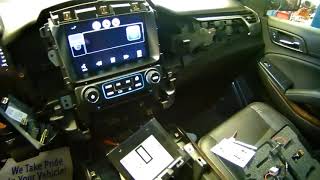
Est. part cost: $5-$50 - Faulty Human Machine Interface (HMI) Module 🟡 Medium Probability The HMI module, the 'brain' of the CUE system located behind the glove box, 🎬 See how to locate and remove the HMI module is a complex component and a common point of failure. Failures can be triggered by internal component degradation, software corruption, or even voltage spikes during a battery replacement or jump-start.
How to confirm: Using a diagnostic bypass loop on the HMI module's MOST network connector. If bypassing it restores communication to other modules (e.g., the radio starts playing, chimes return), the HMI module is faulty. A scan tool may also show no communication with the HMI module.
Typical fix: Replacement of the HMI module, which requires programming to the vehicle's VIN. Some companies offer repair services for the original module.
Est. part cost: $300-$800 - Faulty Radio or CD Player Module 🟡 Medium Probability Like the HMI module, the radio and CD player are nodes on the MOST network ring. An internal failure in one of these units can halt communication for all other devices on the ring. The CD player is a particularly common failure point, as documented in technician forums.
How to confirm: Use a diagnostic bypass loop on the module's network connector. If bypassing the CD player (or radio) restores the rest of the system (e.g., screen works), the bypassed module is the cause of the fault.
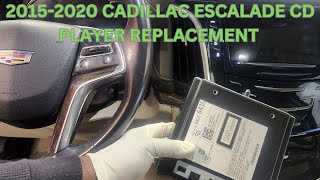
Typical fix: Replace the faulty radio or CD player unit. A common and cost-effective fix is to simply bypass the CD player permanently with a MOST loop if it's not used, which restores the rest of the infotainment system. 🎬 Watch: Step-by-step CD player replacement walkthrough
Est. part cost: $200-$700 - Poor Connection or Logic Lock at Serial Data Gateway Module (SDGM) ⚪ Low Probability TSB #PIT5586B/G instructs technicians to check connections at the Serial Data Gateway Module, which acts as a bridge between different communication networks. The module can get into a 'logic lock' state where it stops communicating, or terminals in its connectors can become loose or bent.
How to confirm: Locate the SDGM and inspect its X1 and X2 connectors for looseness, corrosion, or pushed-out pins. For a logic lock, a temporary fix is to perform a hard reset by disconnecting the battery or pulling the SDGM fuse.
Typical fix: Clean and secure the electrical connectors, or repair affected terminals. If the module is in a logic lock state, a hard reset may temporarily fix it, but a software update or module replacement might be needed for a permanent solution. Do not replace the module for a logic lock unless instructed by GM.
Est. part cost: $0-$350
Rare But Worth Checking
- Faulty Instrument Panel Cluster (IPC):
Diagnosis Steps
- Connect a professional scan tool capable of reading GM-specific codes and viewing network data from all modules.
- Check for all present DTCs. Note any 'U' (network) codes, especially U0028 and U0029, and in which modules they are set (e.g., Radio, HMI).
- Perform a visual inspection of the wire harness behind the left side of the instrument panel near the parking brake assembly, as per TSB #PIT5288G. Look for any signs of it being pinched, chafed, or damaged.
- If wiring appears okay, access the vehicle's MOST bus diagnostic data. A scan tool can show the status of the MOST ring and which modules are on it (e.g., Radio, CD Player, HMI, IPC).
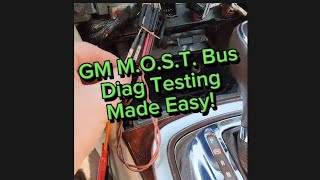
- Systematically bypass each module on the MOST network using the appropriate loop connector (e.g., GM tool EL-51578). Start with the most common failure points like the CD player or HMI module.
- After bypassing a module, cycle the ignition and check if communication is restored (e.g., if the screen turns on or radio plays).
- The module that, when bypassed, allows the rest of the system to function is the faulty component.
- If bypassing modules does not identify the issue, inspect the X1 and X2 connectors at the Serial Data Gateway Module (SDGM) for loose or damaged pins as per TSB #PIT5586B/G.
- If the cause is still not found, a more in-depth diagnosis of the network wiring for shorts, opens, or high resistance will be necessary, which may require an oscilloscope.
Parts You'll Likely Need
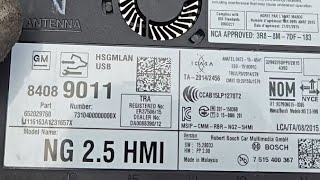
- Human Machine Interface (HMI) Module
(OEM #84331776, 23493430, 84513027 (Varies by year and options, verify with VIN))— This module controls the infotainment screen and is a frequent failure point on the MOST network. It is located behind the glove box.
Trusted brands: ACDelco (OEM)
Related Codes That Often Appear With This One
- U0028 — U0028 indicates a general MOST bus fault, often a complete ring break. U0029 often accompanies it or appears on its own to specify that the ring integrity is okay but a module is not performing correctly.
- U0140 — Loss of Communication with Body Control Module (BCM). This often appears alongside other U-codes when a network issue is present, especially when the SDGM is involved.
- U0155 — Loss of Communication with Instrument Panel Cluster (IPC). The IPC is on the MOST network, so a fault can cause this code to set if the IPC is the failing module or if communication to it is disrupted.
- B1011 — This code relates to the ECU and can be triggered by the network communication failure described in TSB #PIT5586B and #PIT5586G, which points to the SDGM.
Technical Service Bulletins (TSBs) & Recalls
- PIT5288G: Notes that U0029 can be caused by a pinched wire harness behind the left instrument panel, between the dash mounting bracket and the body.
- PIT5586B: Recommends checking the Serial Data Gateway Module (SDGM) connectors for bent, backed out, or loose terminals when U0029 is found with a host of other symptoms.
- PIT5586G: Similar to PIT5586B, advises checking for a logic lock condition in the SDGM. A hard reset (disconnecting power to the module) is the suggested fix, with a note not to replace the module for this specific condition.
- PI1149A: A diagnostic aid for blank radio displays, which specifically mentions checking for U0028/U0029 and using a bypass loop (EL-51578) to find the faulty module on the MOST bus.
Platform-Specific Known Issues
- A known issue documented in TSB #PIT5288G involves the instrument panel wire harness getting pinched on the left side of the dash by the parking brake assembly, which can set code U0029 along with many others.
- TSBs #PIT5586B and #PIT5586G point towards checking the Serial Data Gateway Module for logic locks or connection issues when U0029 is present with symptoms like inoperative HVAC controls and no audible feedback.
- The CD player module is a very common failure point on the MOST ring for these vehicles. A technician on the iATN network shared a detailed case study of a 2015 Silverado where bypassing the CD player resolved the U0029 code and restored all infotainment functions.
Hidden / Shadow Codes Worth Checking
- U0029 with U0028: U0029 indicates a performance issue where the MOST ring integrity is still present, while U0028 often indicates a complete ring break. When seen together, U0029 helps refine the diagnosis, pointing to a failing module rather than a wiring break. A scan tool may show the 'NUMBER OF MOST COMMUNICATION BREAKS' as zero when U0029 is present, even with a fault. (see via GM-specific scan tool (like GDS2) looking at MOST bus data in the Radio module.)
Scan Tool Commands That Help
- GDS2 (GM Techline Connect): Module Diagnostics -> Radio -> Data Display -> MOST Bus — This is the primary screen for diagnosing MOST bus issues. It shows the 'Number of MOST Communication Breaks' and the 'SURROGATE MOST MASTER NODE UPSTREAM POSITION'. If breaks are zero but a fault exists (U0029), it points to a module performance issue, not a ring break.
- GDS2 (GM Techline Connect): Ring Configuration — Used to view the order of modules on the MOST ring (e.g., Node 1: Radio, Node 2: CD Player, Node 3: HMI, Node 4: IPC). This is critical for knowing which module to bypass next in the diagnostic sequence.
- GDS2 (GM Techline Connect): HMI Module Setup and Configuration — This function is required after replacing the HMI module. The new module must be programmed to the vehicle's VIN and configuration to restore full functionality.
Real Owner Repair Stories
- iATN (International Automotive Technicians Network) post (2015 Chevrolet Silverado (K2XX Platform sibling)) — MyLink display was dark, radio would not play, all control buttons non-functional.
❌ Tried (didn't work) Initial code scan showed U0028 in the radio and U0029 in the HMI module.
✅ What actually fixed it The technician used scan data to identify the faulty module. The data showed the ring was intact (U0029) but pointed to a failure before the HMI module. The modules were ordered Radio -> CD -> HMI -> IPC. The technician could not communicate with the CD player. After removing the CD player and installing a MOST bypass jumper in its place, the display lit up and the radio functioned normally. The internal failure of the CD player was the root cause. - YouTube channel 'Idlewild Garage' (2015 Chevrolet Suburban (K2XX Platform sibling)) — DTC U0029 was set, navigation worked but radio and audio controls did not. Scan tool showed rapidly increasing 'most communication breaks'.
❌ Tried (didn't work) Observing scan data alone was confusing because the breaks were happening too fast to pinpoint the source.
✅ What actually fixed it Using the GM essential tool EL-51578 (MOST bus diagnostic tool kit), the technician bypassed the CD player module with a jumper. Upon starting the vehicle, the radio and all functions were immediately restored, confirming the CD player had failed internally and was disrupting the network.
OEM Part Supersession History
84331776, 84331503, 84546904→84513027— Standard part evolution for bug fixes, hardware revisions, or component availability.
Heads up: HMI modules are specific to vehicle options (RPO codes like IO5 vs IO6 for navigation) and require VIN programming. While a newer part number may physically fit, it must be the correct one for the vehicle's feature set and be programmed by a dealer or a qualified shop with GM software (GDS2).
Model Year Variations Within This Range
- 2015-2017: These earlier models used the initial version of the CUE system in this generation. While functionally similar, they may use earlier HMI module part numbers and software versions.
- 2018-2020: Around 2018, GM updated the CUE system, which included hardware and software changes. These models may use different HMI modules (like PN 84513027) and have different software update paths. The rear-seat entertainment also switched from RCA to HDMI inputs in 2017.
Helpful Videos
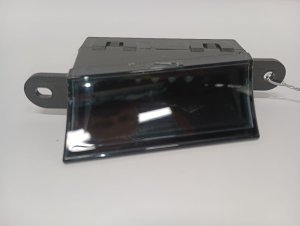
We Have This Part in Stock





The information in this article is provided for general reference and educational purposes only. Vehicle specifications, procedures, and part compatibility can vary by production date, trim level, and region. Always consult your vehicle's factory service manual and verify part numbers before purchasing or performing repairs. Safety-critical components such as airbags, seat belts, and braking systems should be installed by a qualified professional.
- Cadillac ESCALADE:
- 🎬 Helpful Videos
- 🛍️ Shop This Part
- What's Unique About the 2015-2020 Cadillac ESCALADE
- Diagnostic Flowchart
- Symptoms You May Notice
- Most Likely Causes
- Rare But Worth Checking
- Diagnosis Steps
- Parts You'll Likely Need
- Related Codes That Often Appear With This One
- Technical Service Bulletins (TSBs) & Recalls
- Platform-Specific Known Issues
- Hidden / Shadow Codes Worth Checking
- Scan Tool Commands That Help
- Real Owner Repair Stories
- OEM Part Supersession History
- Model Year Variations Within This Range
- 🎟️ Get 5% Off