

U0028 on 2013-2017 GMC Sierra 2500: Vehicle Communication Bus Fault Guide
Code U0028 on a 2013-2017 GMC Sierra 2500 indicates a communication failure on the MOST bus, which controls the infotainment system. This typically causes a blank radio/nav screen and loss of audio. The most common causes are a faulty module (like the radio, HMI, or CD player), a pinched wiring harness behind the dash, or a poor connection.
- U0028 on your Sierra 2500 means the infotainment network (MOST bus) has failed.
- The most common symptoms are a black screen and no audio.
- Do not replace expensive parts like the radio or HMI module without proper diagnosis. The fault could be a cheaper module (like the CD player) or a simple wiring problem.
- A known issue on these trucks is a pinched wiring harness behind the driver's side of the dashboard.
- This is a complex issue to diagnose at home and typically requires professional help with the right diagnostic tools.
What's Unique About the 2013-2017 Gmc SIERRA 2500
The 2013-2017 Sierra 2500 range spans two distinct vehicle generations (GMT900 and K2XX), which may have different wiring layouts. GM's use of a MOST 'ring' network for infotainment is key; if any single module on the ring fails or a wire breaks, the entire network can go down. Technical Service Bulletins specifically point to issues like pinched wiring harnesses behind the instrument panel near the parking brake pedal as a known weak point on these trucks, making it a primary area to investigate.
Diagnostic Flowchart
Tap your situation to follow the diagnostic path that matches what you're seeing on this vehicle.
Generation note: This range covers two generations of the Sierra 2500 HD: the end of the GMT900 platform (2013-2014) and the start of the K2XX platform (2015-2017). While the code's meaning is the same, the physical location of modules and wiring harness routing can differ between these two designs. The K2XX platform is where the MOST bus architecture is most prevalent for this issue.
Symptoms You May Notice
- Blank radio or infotainment display (screen is black).
- No audio from the stereo system, but chimes may still work.
- Radio and steering wheel control buttons are non-functional.
- HVAC (climate control) system goes blank or becomes unresponsive.
- A dead battery, as a faulty module may stay active and drain power when the truck is off.
- Various other communication-related trouble codes may be stored, particularly 'U' codes.
- Screen flickers, freezes, or randomly changes channels before failing completely.
- Backup camera may still function even when the radio screen is otherwise blank.
- Replacing the radio (head unit) or HMI module without confirming it is the source of the fault. The problem could be another module on the network (like the CD player) or a simple wiring issue, and replacing the wrong part will not solve the problem.
Most Likely Causes
- Faulty Control Module 🔴 High Probability Any module on the MOST ring network (Radio, HMI, CD Player, Amplifier, or Instrument Cluster) can fail internally, breaking the communication loop. The CD player and HMI module are frequently cited as the primary points of failure in owner forums and technician case studies.
How to confirm: A technician can use a special tool (EL-51578) or a MOST bypass loop to bypass modules one by one. If bypassing a specific module restores communication to the rest of the system (indicated by the U0028 code changing from 'current' to 'history'), that module is the source of the fault.
Typical fix: Replace the faulty module and perform any necessary programming with a GM scan tool. The HMI module, in particular, must be programmed to the vehicle's VIN.
Est. part cost: $200-$800 - Pinched or Damaged Wiring Harness 🟡 Medium Probability TSB #PIT5288G specifically identifies the dash harness being pinched between the left I/P dash mounting bracket and the body, near the parking brake pedal, as a known issue.
How to confirm: Visually inspect the wiring harnesses that connect the MOST bus modules, paying close attention to the area behind and around the dashboard and glove box. Per TSB #PIT5288G, the pinch point is on the left side of the dash; inspection requires looking under the dash to see if the harness is caught on the metal mounting bracket.
Typical fix: Loosen the I/P dash mounting bracket bolts, free the harness, open the loom, and repair any chafed or broken wires as necessary.
Est. part cost: $5-$50 - Poor Connection or Corrosion ⚪ Low Probability Connectors at the back of the radio, HMI module, or other components can become loose or suffer from water intrusion, leading to corrosion and a poor data connection. Some owners have reported temporarily fixing flickering screens by simply unplugging and replugging the main connectors on the infotainment module, suggesting a connection issue.
How to confirm: Disconnect and inspect the connectors for each module on the MOST bus. Look for bent pins, corrosion (green or white powder), or signs of water damage. Ensure connectors are fully seated.
Typical fix: Clean the connector terminals or replace the connector pigtail if damaged. Ensure a secure connection.
Est. part cost: $10-$50
Rare But Worth Checking
- Failed Over-The-Air (OTA) Update: On newer models, a failed software update has been known to cause communication issues and battery drain. While more common on 2024+ models, software corruption can still be a factor.
Diagnosis Steps
- Perform a full vehicle scan to identify all stored DTCs in all modules. Note if U0028 is accompanied by U0029.
- Prioritize any 'Lost Communication With...' codes, as they point to which modules are offline.
- Using a GM-specific scan tool (GDS2), access the radio data and check the 'Surrogate MOST Master Node Upstream Position' parameter. This can help identify where the break in the ring is occurring.
- Follow the diagnostic procedure outlined in TSB #PI1149A if the display is blank with no audio.
- Visually inspect wiring harnesses, especially behind the driver's side dash near the parking brake pedal, as noted in TSB #PIT5288G.
- If wiring appears intact, begin isolating modules. A common first step is to bypass the CD player, as it's a frequent failure point. Use a MOST bus bypass loop (such as from kit EL-51578, or a generic fiber optic loop) to complete the circuit. If the system starts working, the CD player is faulty.
- If the CD player is not the cause, continue bypassing other modules on the ring (HMI, Amplifier, etc.) one at a time until communication is restored and the U0028 code goes into history.
- Once the faulty module is identified, use a multimeter to verify it has proper power and ground before condemning it.
Parts You'll Likely Need
- Human Machine Interface (HMI) Module
(OEM #23228498, 84156699 (Varies by year and options like Navigation))— This module acts as the brain for the infotainment system. It is a common point of failure that can bring down the entire MOST network. Replacement requires VIN programming.
Trusted brands: ACDelco (GM Genuine)
OEM price range: $300-$700
Aftermarket price range: $250-$500 (Often remanufactured) - Radio Control Module — The radio is the 'master' of the MOST bus. If it fails, it can cause a U0028 code.
Trusted brands: ACDelco
OEM price range: $250-$600
Aftermarket price range: $200-$450 - CD Player / Media Player — An internal failure in the CD player can interrupt the MOST ring, causing a total loss of infotainment function. This is a well-documented failure point that is often bypassed to solve the issue.
Trusted brands: ACDelco
OEM price range: $150-$400
Aftermarket price range: $100-$300 - MOST Bus Bypass Loop
(OEM #EL-51578 (Kit), Dorman 645-500 (Pigtail that can be adapted))— Not a replacement part, but a crucial diagnostic tool for isolating the failed module on the MOST ring.
Trusted brands: Dorman, GM Essential Tools
OEM price range: $50-$150 (for kit)
Aftermarket price range: $10-$30
Related Codes That Often Appear With This One
- U0029 — This code often appears with U0028. While U0028 indicates a general MOST bus fault, U0029 can sometimes indicate that the ring integrity is still present but there's a communication error, helping to narrow down the diagnosis.
- U0140, U0151, U0121, etc. — When the communication bus goes down, other modules in the vehicle will post 'Lost Communication' codes for the modules on the failed bus. For example, the Body Control Module might set a code for lost communication with the radio (U0184).
Technical Service Bulletins (TSBs) & Recalls
- PIC6073E: References U0028 in the context of the Media Oriented Systems Transport bus.
- PIT5288H: Points to a pinched wire harness behind the left instrument panel as a cause for U0028 and other codes, with specific location photos.
- PIT5405A: Groups U0028 with other communication DTCs that appear when multiple systems fail.
- PI1149A: Provides a diagnostic flowchart for a blank display and no audio, which involves checking for U0028 and diagnosing the MOST bus.
Platform-Specific Known Issues
- TSB #PIT5288G notes that a pinched wire harness on the left side of the instrument panel, near the parking brake pedal, can cause U0028 and a host of other communication codes. The bulletin includes photos showing the exact location of the potential pinch point.
- TSB #PIC6073E (superseded by PIC6073B) directly links DTC U0028 to diagnostic procedures for the Media Oriented Systems Transport (MOST) bus and recommends using the EL-51578 diagnostic tool kit.
- TSB #PIT5405A lists U0028 as one of several codes that can set when the HVAC controls and other systems go blank due to a communication bus failure.
- TSB #PI1149A provides a detailed diagnostic flowchart for a blank display and no audio, specifically mentioning checking for U0028/U0029 and using the 'Surrogate MOST Master Node Upstream Position' data PID for diagnosis.
Mechanic-Grade Diagnostic Values
- GDS2 Live Data: 'Number of MOST Communication Breaks' — expected: 0. Failure: A high or incrementing number indicates the radio (master node) is sending a wakeup signal and not receiving it back, suggesting a ring break.
- GDS2 Live Data: 'Surrogate MOST Master Node Upstream Position' — expected: 0 or N/A. Failure: A value greater than 0 (e.g., '2') indicates the position in the ring *before* the communication failure. Counting backwards from the last module in the ring (IPC) by the number shown points to the faulty module or wiring preceding it.
- MOST Control Circuit (Wake-up Signal) Voltage — expected: Steady 12V (B+). Failure: An open or high resistance in this circuit can prevent modules from waking up and cause a U0028. The radio pulls this circuit to ground for 100ms to signal wakeup.
Hidden / Shadow Codes Worth Checking
- U0028 sym00: This is the full code displayed in the GM GDS2 scan tool. The 'sym00' is a symptom byte. GM bulletins specifically reference diagnosing 'Radio U0028 sym00' to track the state of the MOST bus. When a faulty module is bypassed, this code will change from 'current' to 'history'. (see via GM GDS2 or equivalent professional scan tool.)
Scan Tool Commands That Help
- GDS2 (Global Diagnostic System 2): Module Diagnostics -> Radio -> Data Display — This is the primary function to view live MOST bus data PIDs like 'Number of MOST Communication Breaks' and 'Surrogate MOST Master Node Upstream Position'. The radio is the master node, so its data provides the best overview of the ring's health.
- GDS2 (Global Diagnostic System 2): Data Bus Diagnostic Tool — This tool, launched from GDS2, acts as an external node to test communication with all modules on a selected data bus. It helps verify which modules are responding and can help pinpoint a non-communicative module when other methods are inconclusive.
- GDS2 (Global Diagnostic System 2): SPS (Service Programming System) — Required after replacing modules like the HMI or Radio to program them with the vehicle's correct VIN and configuration. Failure to program a new or used module will result in it not functioning and may keep the bus down.
Wiring & Ground Locations
- Dash Harness Pinch Point — Between the left Instrument Panel (I/P) dash mounting bracket and the body, near the parking brake pedal assembly.. TSB PIT5288G specifically identifies this as a location where the harness can be pinched, causing opens or shorts in the communication wires, leading to U0028 and other codes.
- HMI Module — Located behind the glove box assembly, often in a cradle under the main dash support bar.. This is a key node in the MOST ring. Knowing its location is essential for inspection of its fiber optic and power connectors, or for bypassing it during diagnosis.
- MOST Ring Order — Data flows in a ring: Radio -> CD Player -> HMI Module -> Instrument Panel Cluster (IPC) -> back to Radio. (Amplifier may also be in the loop if equipped).. Understanding this order is critical for interpreting the 'Surrogate MOST Master Node Upstream Position' data from the scan tool to identify the location of the fault.
- HMI Connector X1 — The main (often black) connector on the Human Machine Interface module.. While U0028 is a MOST bus code, other communication lines like the GM LAN pass through this connector. A video demonstrates jumping pins 11 to 13 and 12 to 14 on this connector to bypass the HMI's role in the GM LAN circuit, which can be useful if multiple network faults are present.
Real Owner Repair Stories
- iATN (International Automotive Technicians Network) (2015 Chevrolet Silverado 1500) — MyLink display was dark, radio would not play, and all control buttons were non-functional.
❌ Tried (didn't work) Initial thought was to check powers and grounds, but the multiple failures pointed to a network issue.
✅ What actually fixed it Scan tool showed U0028 in the Radio and U0029 in the HMI. The 'Surrogate MOST Master Node Upstream Position' data PID read '2'. Knowing the ring order (Radio-1, CD-2, HMI-3, IPC-4), counting back 2 positions from the end (IPC) pointed to the HMI module's upstream device: the CD player. The technician could not communicate with the CD player. Bypassing the CD player with a MOST loop immediately restored radio and display function. The CD player was faulty and replaced. - Reddit user in r/Silverado (2018 Chevrolet Silverado) — Black radio screen, no audio (including turn signals/warnings), non-functional steering wheel buttons. Backup camera worked but was very dim.
❌ Tried (didn't work) Pulling fuses and disconnecting the battery provided a temporary fix, but the problem returned.
✅ What actually fixed it The owner replaced the Human Machine Interface (HMI) module located by the cabin air filter. A used module was purchased from eBay and required a VIN reset using an OBD genie tool to resolve the theft lock. - YouTube video by 'Automotive Diagnostics & Programming' (Buick Verano (with identical MOST bus architecture)) — Radio not working, screen turns on but is blank. U0028 and U0029 codes present.
❌ Tried (didn't work) Initial scan confirmed a MOST bus fault.
✅ What actually fixed it The technician used a MOST bypass loop at the CD/Media player connector. Immediately, the radio crackled to life and the display began working. A subsequent check confirmed good power, ground, and wake-up signal to the CD player, proving the module itself had failed internally. The fix was to replace the CD player.
When the Usual Fixes Don't Work
- In one documented case for a 2017 GMC Sierra HD, a technician replaced the radio control module, CD player, and screen in an attempt to fix U0028 and U0029, but the fault persisted. The final fix was to install a known-good, complete system (HMI, Radio, CD, Screen) from another vehicle and perform a full Service Programming System (SPS) update on all related modules. This suggests that in some complex cases, a simple one-for-one part swap is insufficient, and the issue may lie in software/firmware incompatibility between modules that can only be resolved by a full system reprogram.
OEM Part Supersession History
23228498 (HMI Module, NG 2.0, IO5)→May be interchangeable with 23228496, 23228499 depending on vehicle options. Later model years use NG 2.5 modules (e.g., 84546904) which are not backward compatible without significant changes.— Minor hardware revisions or supplier changes.
Heads up: Using the wrong HMI module, even if it physically plugs in, will cause function loss or failure. It is critical to match the part number or use a service that provides a pre-programmed, VIN-locked unit for your specific vehicle.
Model Year Variations Within This Range
- 2013-2014: On some early K2XX platform trucks (2014) and late GMT900 trucks, the radio module may need an SPS software update to make the critical 'Surrogate MOST Master Node Upstream Position' data PID visible in GDS2, which is essential for diagnosis.
- 2016-2017: HMI modules changed around 2016 to support features like Apple CarPlay and Android Auto. These newer modules (often designated IO6) are not directly interchangeable with the earlier IO5 systems without changing other components and programming.
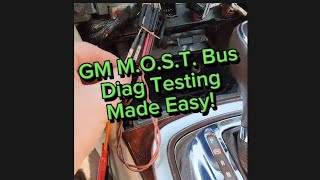
Helpful Videos
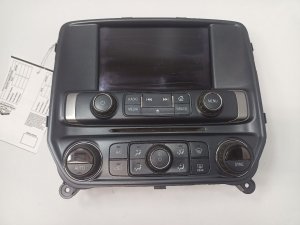
We Have This Part in Stock




The information in this article is provided for general reference and educational purposes only. Vehicle specifications, procedures, and part compatibility can vary by production date, trim level, and region. Always consult your vehicle's factory service manual and verify part numbers before purchasing or performing repairs. Safety-critical components such as airbags, seat belts, and braking systems should be installed by a qualified professional.
- Gmc SIERRA 2500:
- 🎬 Helpful Videos
- 🛍️ Shop This Part
- What's Unique About the 2013-2017 Gmc SIERRA 2500
- Diagnostic Flowchart
- Symptoms You May Notice
- Most Likely Causes
- Rare But Worth Checking
- Diagnosis Steps
- Parts You'll Likely Need
- Related Codes That Often Appear With This One
- Technical Service Bulletins (TSBs) & Recalls
- Platform-Specific Known Issues
- Mechanic-Grade Diagnostic Values
- Hidden / Shadow Codes Worth Checking
- Scan Tool Commands That Help
- Wiring & Ground Locations
- Real Owner Repair Stories
- When the Usual Fixes Don't Work
- OEM Part Supersession History
- Model Year Variations Within This Range
- 🎟️ Get 5% Off