

U0028 on 2013-2017 Chevrolet Silverado 2500: Communication Bus Fault Guide
Code U0028 on a 2013-2017 Silverado 2500 almost always points to a communication failure on the infotainment (MOST) bus. The most common cause, documented in GM Technical Service Bulletins, is a pinched wiring harness behind the driver's side dash. Repairing the harness is often the fix, costing little in parts but requiring several hours of labor. Other causes include failed modules on the network ring, like the HMI or CD player.
- U0028 on a 2013-2017 Silverado means there is a fault on the infotainment (MOST) communication bus.
- Before replacing any parts, thoroughly inspect the wiring harness under the driver's side of the dashboard for pinching or damage, as this is a very common, documented problem (TSB PIT5288H).
- If wiring is intact, the fault is likely a failed module on the MOST bus ring, such as the CD player or HMI module.
- Diagnosing this code often requires special tools to bypass modules one by one.
- Replacement infotainment modules (Radio, HMI, etc.) will likely require programming by a dealer or specialist to function correctly in your truck.
What's Unique About the 2013-2017 Chevrolet SILVERADO 2500
The K2XX platform (2014-2019) is particularly known for a specific wiring issue that causes this code. General Motors has issued Technical Service Bulletin #PIT5288H, which identifies a common problem where the main dash harness gets pinched between a metal mounting bracket and the body on the left side of the instrument panel, near the parking brake pedal assembly. This specific, documented manufacturing or design flaw is the leading cause of U0028 and a host of other seemingly unrelated communication failures on these trucks.
Diagnostic Flowchart
Tap your situation to follow the diagnostic path that matches what you're seeing on this vehicle.
Generation note: This range covers the end of the 2nd generation (GMT900, 2013-2014 HDs) and the start of the 3rd generation (K2XX, 2015-2017 HDs). While both use a MOST bus architecture, the well-documented issue of the pinched dash harness described in TSB #PIT5288H is most prevalent on the K2XX platform (2014+ 1500s and 2015+ HDs). The infotainment systems also changed significantly, with 2014-2015 models using one generation of HMI modules and 2016+ models receiving an updated version that supported Android Auto.
Symptoms You May Notice
- Blank radio or infotainment touch screen (the most common symptom).
- No audio from the stereo system, including radio, chimes, and turn signal clicks.
- Steering wheel controls for the radio are inoperative.
- A "Service Stabilitrak" message may appear on the Driver Information Center (DIC).
- The instrument cluster may lose some display information, as it is part of the MOST ring.
- In some cases, it can contribute to a dead battery due to modules not shutting down correctly.
- HVAC controls may appear non-functional on the screen.
- Backup camera may still work even when the rest of the screen is black.
- Replacing the radio or HMI module without first inspecting the dash wiring harness. The pinched harness is a very common cause documented in TSB #PIT5288H and should be checked first to avoid replacing expensive, non-faulty parts.
- Replacing the infotainment screen itself. The screen is usually just a display; the logic is in the HMI module. A blank screen is rarely a failure of the screen panel itself.
Most Likely Causes
- Pinched or Damaged Dash Wiring Harness 🔴 High Probability As identified in TSB #PIT5288H, the harness is frequently pinched by a metal I/P mounting bracket on the driver's side of the instrument panel, near the fuse block and parking brake assembly. This can chafe through the insulation on the MOST bus wires, causing a short.
How to confirm: Visually inspect the wiring harness under the driver's side dash. This requires removing the lower dash panels. Look for the main harness where it passes a large metal bracket. The damage may be on the back side and not immediately obvious. Check if the harness can move freely; if it's tight against the bracket, it's suspect.
Typical fix: Disconnect the battery. Loosen the bracket bolts to free the harness. Carefully open the harness loom and inspect the twisted pair of MOST wires (often gray and white/green) for chafing or breaks. Repair the damaged wires using solder and heat shrink. Wrap the repaired section in anti-abrasion tape and reroute the harness to prevent it from being pinched again.
Est. part cost: $5-$25 for wire, solder, and tape. - Failed Control Module on the MOST Bus 🟡 Medium Probability Any module in the MOST ring (Radio, CD Player, HMI, Amplifier, Instrument Cluster) can fail internally and bring down the entire network. The CD player and HMI module are common failure points.
How to confirm: This requires a professional diagnostic approach using a MOST bus bypass loop (like tool EL-51578 or a generic equivalent) to systematically bypass each module until communication is restored. The process involves unplugging a module and inserting the loop to complete the circuit. If the screen and audio return, the bypassed module is the faulty one.
Typical fix: Replace the faulty module. Note that replacement modules, especially the HMI, are VIN-locked and require programming (SPS) by a dealer or a properly equipped independent shop to function and avoid a "Theft Locked" message.
Est. part cost: $150-$800 depending on the module. A used CD player can be $50-$150, while a new HMI module can be over $500. - Poor Connection or Damaged Connector ⚪ Low Probability Vibrations and time can lead to loose connections at any of the infotainment modules. Aftermarket device installation can also lead to improperly seated connectors.
How to confirm: Visually inspect the connectors at the back of the radio, HMI module (often behind the glove box), and CD player for corrosion or damage. Ensure they are fully seated.
Typical fix: Clean and reseat the connector. If the connector itself is damaged, it may need to be repinned or replaced.
Est. part cost: $0-$50
Rare But Worth Checking
- Corrupted Module Software: An interrupted programming event or voltage spike can corrupt the software in a module, causing it to disrupt the network. This usually requires reprogramming with a dealer tool (SPS). TSBs have been issued for HMI software updates to fix various glitches.
- Temporary Glitch / Low Voltage: Sometimes, a simple software glitch or a low battery condition can cause the MOST bus to lock up. A hard reset by disconnecting the negative battery terminal for 15-30 minutes can sometimes restore function temporarily or permanently. This is often the first and easiest thing to try.
Diagnosis Steps
- Perform a full vehicle scan to identify all active and historical DTCs. Note all U-codes, especially U0028 and U0029.
- Attempt a hard reset. Disconnect the negative battery terminal for at least 15 minutes, then reconnect. This is a simple first step that sometimes resolves temporary glitches.
- If the reset fails, follow the guidance in TSB #PIT5288H. Remove the driver's side lower dash panels and knee bolster. Carefully inspect the main wiring harness near the I/P mounting bracket for signs of being pinched, chafed, or damaged. Pay close attention to where the harness passes the metal bracket near the body.
- If wiring damage is found, disconnect the battery, repair the affected wires with solder and heat-shrink, wrap the harness in protective tape, and properly reroute it away from the pinch point.
- If no wiring damage is found, the next step is to diagnose the MOST bus ring. This is best done with a MOST bypass tool kit (GM tool EL-51578 or equivalent).
- Start by bypassing the most accessible module, which is often the CD player located below the main screen. Unplug its connector and insert the bypass loop. If the radio and screen function returns, the CD player is faulty.
- If that doesn't work, move to the next module, typically the HMI module located behind the glove box. Bypass it and re-check system function.
- Continue bypassing modules one by one (e.g., Amplifier, if equipped) until the faulty component is isolated. The radio is the master and cannot be bypassed.
- Once the faulty module is identified, use a multimeter to verify it has proper power and ground at its connector before condemning it.
- Replace the faulty module. Remember that many infotainment modules are component-protected and will require dealer or professional programming (SPS) to unlock and configure them to the vehicle.
Parts You'll Likely Need
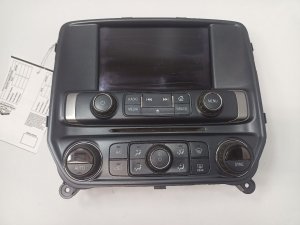
- Human Machine Interface (HMI) Module
(OEM #Varies by option package, e.g., 23442685, 84081870. Always verify by VIN.)— The HMI module is the 'brain' of the infotainment system. It is a common point of failure in the MOST bus ring that can cause a U0028 code. It is located behind the glove box.
Related Codes That Often Appear With This One
- U0029 — This code is also a MOST bus communication fault and is often set in the HMI module when U0028 is set in the radio. U0029 can indicate the ring has integrity but there's a performance issue, whereas U0028 often points to a more severe break or fault.
- U0140 — Loss of Communication with Body Control Module. A network-wide issue can cause various modules to report lost communication with the BCM. This code is listed in TSBs related to the pinched harness issue.
- U0184 — Loss of Communication with Radio. This is a very specific code indicating the radio itself is offline, which can be the root cause or a symptom of the U0028 fault.
- U0186 — Loss of Communication with Audio Amplifier. If the vehicle is equipped with a separate amplifier, its failure will break the MOST ring and set this code along with U0028.
Technical Service Bulletins (TSBs) & Recalls
- PIT5288H: RKE / Passive Entry And Start / No Audio / SWC / Touch Screen / Display Blank / Dead Battery and various communication DTCs, including U0028, caused by a pinched dash harness.
- PIT5405A: Mentions U0028 in a list of codes that can set when HVAC controls go blank, advising to check the body control module.
- PIC6073E: Discusses diagnostic procedures for U0028 and the use of the MOST bypass tool kit EL-51578.
- PI1149A: Provides a general diagnostic flow for blank display/no audio conditions, differentiating between a MOST bus down (U0028 present) and other failures.
Platform-Specific Known Issues
- TSB #PIT5288H: The Pinched Dash Harness: This is the most critical vehicle-specific issue. The bulletin explicitly details how the dash harness gets pinched by a bracket on the driver's side, causing U0028 and many other codes. The fix is to repair and reroute the harness. This should be the first check after a simple battery reset.
- Forum Experience: CD Player Failure: A common repair story on forums like gm-trucks.com and silveradosierra.com involves the CD player failing and taking down the MOST bus. Owners report a black screen and U0028/U0029 codes. The fix is often to remove the CD player and install a MOST bypass loop in its place, restoring radio and screen functionality.
- TSB #PIC6073E: Official Diagnostic Tool Release: This bulletin announced the release of the special diagnostic tool kit (EL-51578) specifically to help technicians diagnose MOST bus concerns related to code U0028, underscoring the need for proper tools.
Scan Tool Commands That Help
- GDS2 (GM Dealer Scan Tool): Radio Data Display > MOST Data — When U0028 is present, viewing this data can help pinpoint the fault. Look for parameters like 'Surrogate MOST Master Node Upstream Position' and 'Number of MOST Communication Breaks'. A non-zero value in the 'Upstream Position' can indicate which module is just before the communication break in the ring.
- GDS2 (GM Dealer Scan Tool): Data Bus Diagnostic Tool — This tool, available within GDS2 since 2015, actively queries modules on the bus to determine which are communicating and which are not. It can help quickly identify a non-responsive module that is breaking the MOST ring.
Wiring & Ground Locations
- MOST Bus Wires — Within the main dash harness, specifically at the connectors for the Radio, CD Player, HMI Module, and Instrument Panel Cluster.. These are the data-carrying wires for the infotainment network. They are typically a twisted pair, often colored Gray and White/Green. A break, short-to-ground, or short-to-power in either of these wires will bring down the entire network and set code U0028.
- G218 — On the driver's side A-pillar, behind the kick panel.. This is a major interior ground point. A known issue on these trucks involves the carpet or insulation getting trapped under the ground nut, causing a poor connection and a host of bizarre electrical issues, though not a primary cause for a MOST bus-specific fault.
- Engine Block Grounds — At the rear of the engine block on both the driver's and passenger's side. The passenger side ground is particularly critical for the PCM.. While not directly on the MOST bus, poor engine and body grounds can cause low voltage or electrical noise that can disrupt module communication and potentially trigger U-codes. Ensuring these main grounds are clean and tight is a fundamental step in any electrical diagnosis.
Real Owner Repair Stories
- iATN Technical Discussion Forum (2015 Silverado) — MyLink display was dark, radio would not play, and all control buttons were non-functional.
❌ Tried (didn't work) Initially suspected a power/ground issue, but ruled it out due to the multiple, specific module failures.
✅ What actually fixed it The technician found U0028 in the radio and U0029 in the HMI. Scan tool data indicated the failure was occurring at node 2, the CD player. The tech could not communicate with the CD player. Bypassing the CD player with a MOST loop restored all functions. The root cause was an internal failure of the CD player. - YouTube video (2015 Chevy Silverado) — Blank screen, no radio sound, but the backup camera still worked. Codes U0028 and U0029 were present.
❌ Tried (didn't work) The screen itself had been replaced, which did not solve the problem.
✅ What actually fixed it The technician identified the CD player as a likely cause for bringing the MOST bus down. After removing the CD player, they used a jumper to bridge the MOST bus connector (Gray and Green/White wires). This completed the ring, and the radio and screen immediately began working. The customer opted to leave the CD player eliminated.
OEM Part Supersession History
Varies (e.g., 23266008)→Varies (e.g., 84156699, 84156701)— Hardware updates for performance, bug fixes, and feature additions (like Android Auto in 2016+).
Heads up: HMI modules are specific to the vehicle's RPO codes, primarily IO5 (non-navigation) and IO6 (factory navigation). A module from a navigation-equipped truck cannot be used in a non-nav truck without extensive programming and additional parts. Furthermore, modules from 2016+ with Android Auto are not plug-and-play compatible with 2014-2015 models without a special conversion harness and programming.
Model Year Variations Within This Range
- 2013-2014 (GMT900 HD): These models were the last of the previous generation and had a different infotainment architecture and dash layout than the K2XX trucks, though they still used a MOST bus. The specific TSB #PIT5288H for the pinched harness is primarily associated with the newer K2XX platform.
- 2014-2015 (K2XX): These trucks feature the MyLink/IntelliLink system with RPO codes IO5 (non-nav) or IO6 (nav). They support Apple CarPlay with a software update but do NOT support Android Auto. Upgrading requires replacing the HMI module.
- 2016-2017 (K2XX): These models received an updated HMI module (NG 2.5) which supported both Apple CarPlay and Android Auto from the factory. While physically similar, these modules have different software and are not directly backward-compatible with earlier years without special programming.
Helpful Videos
We Have This Part in Stock





The information in this article is provided for general reference and educational purposes only. Vehicle specifications, procedures, and part compatibility can vary by production date, trim level, and region. Always consult your vehicle's factory service manual and verify part numbers before purchasing or performing repairs. Safety-critical components such as airbags, seat belts, and braking systems should be installed by a qualified professional.
- Chevrolet SILVERADO 2500:
- 🎬 Helpful Videos
- 🛍️ Shop This Part
- What's Unique About the 2013-2017 Chevrolet SILVERADO 2500
- Diagnostic Flowchart
- Symptoms You May Notice
- Most Likely Causes
- Rare But Worth Checking
- Diagnosis Steps
- Parts You'll Likely Need
- Related Codes That Often Appear With This One
- Technical Service Bulletins (TSBs) & Recalls
- Platform-Specific Known Issues
- Scan Tool Commands That Help
- Wiring & Ground Locations
- Real Owner Repair Stories
- OEM Part Supersession History
- Model Year Variations Within This Range
- 🎟️ Get 5% Off