

U0028 on 2013-2020 Cadillac Escalade: Vehicle Communication Bus Fault Guide
This code indicates a communication failure on the infotainment (MOST) network. The most common cause on these Escalades is a pinched or damaged wiring harness behind the left side of the instrument panel. Inspecting and repairing this harness is often the fix. If the wiring is intact, a failed HMI module, radio, or CD player is the next likely culprit.
- U0028 means there is a communication breakdown on the infotainment (MOST) network.
- Before suspecting expensive modules, you MUST inspect the wiring harness under the driver's side dashboard for pinching or damage, as this is a known, high-probability cause on Escalades.
- Symptoms are severe, often including a blank radio display, no audio, and potentially a dead battery.
- Proper diagnosis of a module failure (if wiring is okay) requires special tools to bypass modules one by one.
- Do not replace the HMI or Radio without confirming it is the point of failure through systematic diagnosis.
What's Unique About the 2013-2020 Cadillac ESCALADE
On this platform, which spans the end of the third generation (2013-2014) and the entire fourth generation (2015-2020), the complex infotainment system is heavily reliant on the MOST network. General Motors has issued specific Technical Service Bulletins (TSBs) that point to a high probability of a pinched wiring harness behind the driver's side dash causing this code and a host of other electrical issues. This makes a physical wire inspection a more critical first step than on many other vehicles, where a module failure might be the default assumption. The issue is so common that the TSB (PIT5288H) covers not just the Escalade but its K2XX platform mates like the Chevrolet Tahoe, Suburban, and GMC Yukon for the same problem.
Diagnostic Flowchart
Tap your situation to follow the diagnostic path that matches what you're seeing on this vehicle.
Generation note: This range covers the third generation (2013-2014 GMT900 platform) and the fourth generation (2015-2020 K2XX platform). While the underlying MOST network concept is similar, the specific modules and their locations differ. The well-documented issue of a pinched dash harness is particularly noted in TSBs covering the 2015-2020 models (4th gen). The HMI modules also differ, with 2014-2015 models using HMI 2.0 and 2016+ models using HMI 2.5, which supports Apple CarPlay/Android Auto.
Symptoms You May Notice
- Radio or infotainment display is blank or inoperative, sometimes after a battery change or jump-start.
- No audio from the speakers, but chimes for turn signals or doors may still work.
- Steering wheel controls do not work.
- Dead battery or a no-crank condition due to modules not shutting down.
- Various warning messages like 'Service Stabilitrak'.
- Instrument panel gauges may fluctuate or be inoperative.
- Passive entry and remote keyless entry (RKE) may not function.
- System stuck on the Cadillac logo or constantly reboots.
- "Waiting for Update Media" message on the screen, a definitive sign of HMI module failure.
- Replacing the radio or HMI module without first thoroughly inspecting the dash wiring harness. The pinched harness is a very common cause according to multiple TSBs and checking it first can save hundreds or thousands of dollars.
- Confusing a failed HMI module with a failed touchscreen display. If the screen has 'ghost touches' or is delaminating but otherwise powers on, the issue is the screen/digitizer, not the HMI module which causes a black screen or rebooting.
Most Likely Causes
- Pinched or Damaged Wiring Harness 🔴 High Probability Multiple GM TSBs (PIT5288G, PIT5288H) specifically identify a manufacturing/design issue where the main dash harness can get pinched between the left instrument panel mounting bracket and the vehicle's body, causing shorts or open circuits. This happens near the parking brake pedal assembly.
How to confirm: Visually inspect the wiring harness under the driver's side dash. After removing the I/P fuse block cover for a better view, look for the harness being crushed by a metal bracket (callout 1 in TSB PIT5288H). The damage can be subtle, so you may need to loosen the bracket bolts to free the harness and inspect it for chafed or broken wires.
Typical fix: Loosen the dash mounting bracket, free the harness, open the loom to inspect individual wires, and repair any damaged wires using proper splicing techniques. Reroute the harness to prevent future damage. For warranty repairs, GM specifies following bulletin 10-00-89-005 for wiring repair procedures.
Est. part cost: $5-$25 for wiring repair supplies like Tesa tape, solder, and heat shrink. - Failed Control Module on MOST Bus 🟡 Medium Probability The MOST bus is a ring network; if any single module on the ring fails internally, it can break communication for the entire system. Common culprits include the Radio (tuner), HMI module, CD/Media Player, or Instrument Panel Cluster (IPC). HMI modules in these vehicles are known to fail, sometimes due to voltage fluctuations from a battery replacement or jump-start.
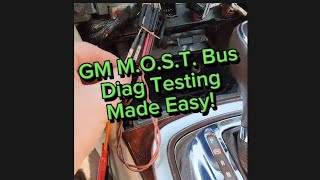
How to confirm: This requires a professional diagnostic approach using a MOST bus bypass loop tool 🎬 Watch: A simple guide to testing the GM MOST bus (like GM's EL-51578). A technician systematically bypasses each module on the network (e.g., CD player, HMI, Amplifier). When the faulty module is bypassed, communication is restored to the other modules, the screen may light up, and the U0028 code often changes from 'current' to 'history'.
Typical fix: Replace the identified faulty module. A replacement HMI or radio module is VIN-locked and MUST be programmed by a dealer or a specialist service to function in your vehicle.
Est. part cost: $300-$1500 depending on the specific module and whether it is new, used, or remanufactured. - Poor Connection or Terminal Issue ⚪ Low Probability Vibrations and time can lead to connectors backing out or terminals losing tension at the back of the radio, HMI module, or Serial Data Gateway Module (SDGM). In some cases, water intrusion has been found to cause corrosion on module connectors.
How to confirm: After accessing the relevant modules (HMI is behind the glove box, Radio is often below it), disconnect and inspect the connectors for any bent, loose, or corroded pins. Ensure they are fully seated upon reconnection.
Typical fix: Clean, repair, or replace the affected connector terminals. Ensure the connector is securely latched. In cases of corrosion, the module itself may need replacement.
Est. part cost: $10-$50 for terminal or connector repair kits like ACDelco 47973MMHP.
Rare But Worth Checking
- Failed CD/Media Player:
Diagnosis Steps
- Perform a full vehicle scan to check for all DTCs. Note all 'U' codes present in the Radio, HMI, IPC, and BCM.
- If a module-specific communication code (e.g., U0184 for the radio) is present along with U0028, prioritize diagnosing that module's power, ground, and connections first.
- Highest Priority: Based on TSB PIT5288H, perform a thorough visual inspection of the wiring harness located on the driver's side, under the dash. Focus on the area where the harness passes the metal instrument panel mounting bracket near the parking brake assembly.
- Check for any signs of the harness being pinched, chafed, or damaged. Loosen the bracket if necessary to get a clear view. If damage is found, repair the affected wires and properly reroute the harness to prevent a recurrence.
- If no wiring damage is found, the next step is to isolate the faulty module using a MOST bus bypass loop (GM tool EL-51578 or equivalent).
- Access the MOST bus modules. The order is typically Radio -> CD Player -> HMI Module -> Instrument Cluster -> Amplifier (if equipped) -> back to Radio.
- Bypass one module at a time (starting with the easiest to access, often the CD player or HMI) and re-check if communication on the network is restored (e.g., screen turns on, audio returns).
- The module that, when bypassed, allows the system to start working again is the faulty component and needs replacement.
- If all modules are bypassed and the fault persists, there is a break in the wiring between modules that was not found in the initial inspection.
Parts You'll Likely Need
- Human Machine Interface (HMI) Module
(OEM #84331776 (2018-2020), 23493430 (2015-2016) - Part numbers vary greatly by year and options (IO5 vs IO6). Verify with VIN.)— If not a wiring issue, the HMI module is a common point of failure on the MOST bus that can cause a U0028 code. It acts as the brain for the display.
Trusted brands: ACDelco (OEM)
OEM price range: $400-$800 for the part, plus programming costs.
Aftermarket price range: $250-$600 (often remanufactured or requiring mail-in programming service). - Radio Tuner Module — The radio acts as the master of the MOST bus. Its internal failure will bring down the entire network.
Trusted brands: ACDelco
OEM price range: $300-$700
Aftermarket price range: $200-$500 (often remanufactured) - Wiring Repair Supplies — Often, the fix is not a part but a repair to the pinched dash harness, which is the most probable cause according to GM TSBs.
Trusted brands: Tesa wiring tape, Solder sleeves, Heat shrink tubing
OEM price range: $10-$50
Aftermarket price range: $5-$25
Related Codes That Often Appear With This One
- U0029 — This code often appears with U0028. While U0028 indicates a general communication error (like a complete ring break), U0029 can indicate that the MOST ring integrity is still present but there's a fault, pointing more toward a module issue than a complete break in the wiring.
- B3101 — This Body Control Module (BCM) code is related to keyless entry, and it is listed alongside U0028 in TSB PIT5288H about the pinched dash harness, as the damaged wires can affect multiple systems.
- C0544, C0710 — These are chassis codes related to steering and stability control. They can be set as a consequence of the network communication failure identified by U0028, as described in TSB PIT5288H.
- U0184 — This code for 'Lost Communication With Radio' can be set in other modules when the radio (the MOST bus master) or HMI module fails, causing the U0028 fault.
Technical Service Bulletins (TSBs) & Recalls
- PIT5288H: The most critical TSB for this issue. Details how a pinched wire harness in the left instrument panel area can cause U0028 and a long list of other electrical DTCs and symptoms like a dead battery, no audio, and inoperative keyless entry. It provides images for locating the pinch point.
- PI1149A: A diagnostic aid for intermittent blank radio displays. It explains how to differentiate a MOST bus down condition (blank display, no audio) from other display issues and recommends using the EL-51578 bypass tool.
- PIC6073E: Announces the release of the EL-51578 MOST Bus Diagnostic Tool Kit and advises technicians to review the U0028 diagnostic procedures when encountering infotainment issues.
Platform-Specific Known Issues
- A well-documented issue covered by TSB PIT5288H involves the dash wiring harness being pinched by a metal mounting bracket on the driver's side, leading to a multitude of electrical faults including U0028. The TSB includes pictures showing the exact location of the pinch point.
Mechanic-Grade Diagnostic Values
- MOST Control Circuit (Wake-up Signal) Voltage — expected: Approx. 12V (B+) supplied by each module on the circuit. The radio (master) pulls this voltage to ground for ~100ms to wake up the network.. Failure: An open or high resistance in this circuit can prevent modules from waking up, causing a U0028. The voltage will not be present or will not pull down correctly.
- GDS2 Scan Tool Data: 'Surrogate MOST Master Node Upstream Position' — expected: A value of '0' indicates the radio cannot talk to the first module in the loop. A non-zero number (e.g., '2') indicates a communication failure occurred *before* that node position in the ring.. Failure: This parameter helps pinpoint the location of the ring break. For example, if the HMI is node 3 and the parameter reads '2', the problem is likely the CD player (node 2) or its wiring.
- GDS2 Scan Tool Data: 'Number of MOST Communication Breaks' — expected: 0. Failure: A number greater than 0 indicates a physical break in the ring network. However, this may read '0' if code U0029 is also present, which points to a module fault rather than a complete ring break.
Hidden / Shadow Codes Worth Checking
- U0028 sym00: This is a more specific version of the code displayed on dealer-level tools like GDS2. The '00' symptom byte is a general indicator for a bus communication failure and is the most common symptom associated with U0028 on this platform. (see via GM GDS2 or a high-end professional scan tool with GM-specific software.)
Scan Tool Commands That Help
- GDS2: Vehicle DTC Information (Full Scan) — This is the first step to see which modules are setting the U0028/U0029 codes. The code will typically be current in the Radio (master) and HMI modules.
- GDS2: Radio > Data Display > MOST Bus — Used to view critical parameters like 'Surrogate MOST Master Node Upstream Position' and 'Number of MOST Communication Breaks' to help isolate the fault location without physically accessing modules first.
- GDS2: Data Bus Diagnostic Tool — This function actively queries modules on the bus to see which ones are responding. It can help confirm which module is not communicating, corroborating the findings from the bypass loop test.
- SPS/SPS2 (Service Programming System): Module Programming — This is required after replacing a VIN-locked module like the Radio or HMI. The new module will not function until it is programmed to the vehicle's VIN.
Wiring & Ground Locations
- G303 / G304 — G303 is on the left (driver's) side B-pillar, behind the trim panel. G304 is on the right (passenger's) side B-pillar, behind the trim panel.. These are key interior ground points for various body and electronic modules. While not directly for the HMI or Radio, a poor ground here can introduce electrical noise or voltage issues that affect the sensitive data networks.
- HMI Module Connector — The HMI module is located behind the glove box. The main connector contains power, ground, and the MOST bus network wires.. This is a primary point of failure. Checking for fully seated connectors, power on the appropriate pins (Red/Violet wire), and good ground (Black wire) is a critical diagnostic step.
- Radio Module Connector — Typically located below the HMI module, behind the lower dash/glove box area.. The Radio is the master of the MOST bus. All communication originates and terminates here. A bad connection at this specific module will bring the entire infotainment system down.
Real Owner Repair Stories
- YouTube Channel 'The Car Lab' (2018 Chevrolet Suburban (platform mate)) — Radio not working, screen is switched off, U0028 and U0029 codes present.
❌ Tried (didn't work) Jumping the network at the CD player did not restore function.
✅ What actually fixed it The technician bypassed the HMI module, and the radio audio began working (though the screen remained off, as expected). Upon removing the HMI module, visible corrosion and damage were found on the circuit board. Replacing the HMI module was the final fix. - YouTube Channel 'Automotive Diagnostics & Programming' (2015 Chevrolet Silverado (platform mate)) — MyLink display is dark, radio non-functional, U0028 set in radio, U0029 set in HMI.
❌ Tried (didn't work) Initial assumption was a wiring issue, but the presence of U0029 suggested the ring was intact.
✅ What actually fixed it Scan tool data showed the 'Surrogate MOST Master Node Upstream Position' was 2, pointing to a failure at Node 2 (the CD player). The technician could not communicate with the CD player via the scan tool. Bypassing the CD player with a MOST loop tool restored all other functions. The CD player was faulty and required replacement.
OEM Part Supersession History
Multiple, including 23243168, 23415901→84096815 (and others like 84156699, 84331775, 84546902)— Standard part evolution for hardware/software updates and component revisions.
Heads up: These HMI 2.5 modules are VIN-locked. A replacement, even with a correct part number, must be programmed by a dealer or specialist using GM's SPS. Some vendors sell pre-programmed or 'unlocked' modules that register the vehicle's VIN upon installation.
Model Year Variations Within This Range
- 2013-2014: These models use the GMT900 platform and older generation infotainment (pre-HMI). While they use a MOST bus, the modules and specific wiring locations differ from the 2015+ K2XX platform.
- 2014-2015: These models use the HMI 2.0 module. The pinched dash harness TSB (PIT5288) is highly relevant to these years.
- 2016-2020: These models use the HMI 2.5 module, which added support for Apple CarPlay and Android Auto. The part numbers for the HMI are different from earlier years, and the software is more complex.
Helpful Videos
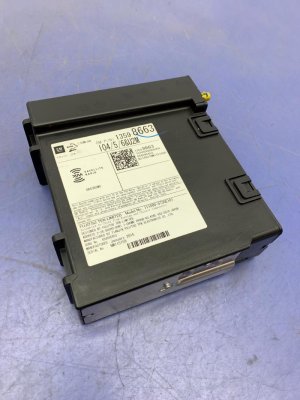
We Have This Part in Stock

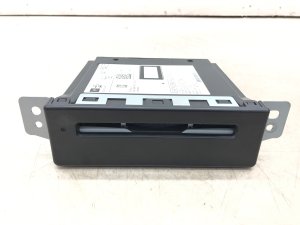



The information in this article is provided for general reference and educational purposes only. Vehicle specifications, procedures, and part compatibility can vary by production date, trim level, and region. Always consult your vehicle's factory service manual and verify part numbers before purchasing or performing repairs. Safety-critical components such as airbags, seat belts, and braking systems should be installed by a qualified professional.
- Cadillac ESCALADE:
- 🎬 Helpful Videos
- 🛍️ Shop This Part
- What's Unique About the 2013-2020 Cadillac ESCALADE
- Diagnostic Flowchart
- Symptoms You May Notice
- Most Likely Causes
- Rare But Worth Checking
- Diagnosis Steps
- Parts You'll Likely Need
- Related Codes That Often Appear With This One
- Technical Service Bulletins (TSBs) & Recalls
- Platform-Specific Known Issues
- Mechanic-Grade Diagnostic Values
- Hidden / Shadow Codes Worth Checking
- Scan Tool Commands That Help
- Wiring & Ground Locations
- Real Owner Repair Stories
- OEM Part Supersession History
- Model Year Variations Within This Range
- 🎟️ Get 5% Off