

U0028 on 2013-2018 Buick Enclave: Infotainment Network Fault Causes & Fixes
On a 2013-2018 Buick Enclave, code U0028 means there is a communication failure on the MOST bus, the fiber-optic network for the infotainment system. This usually results in a black screen and no audio. The most common cause is a failed module on the network, like the radio or amplifier, which can be diagnosed by systematically bypassing each module with a fiber-optic loop tool.
- U0028 means the infotainment system's fiber-optic network (MOST bus) has failed, causing a black screen and no sound.
- The most common cause is one of the modules on the network (like the radio, amplifier, or HMI module) failing internally.
- Diagnosis is done with a special tool called a MOST fiber-optic bypass loop, which allows you to isolate the faulty module.
- Before replacing an expensive module, always check its power and ground connections.
- This is a complex repair best left to professionals due to the need for special tools and extensive interior disassembly.
What's Unique About the 2013-2018 Buick ENCLAVE
The 2013-2018 Enclave range spans two generations with different infotainment systems: the first-gen (2013-2017) with the 'IntelliLink' system and the second-gen (2018) with the newer 'Buick Infotainment System'. While both use a MOST network, the specific modules and their susceptibility to failure can differ. The first-generation models are particularly known for screen delamination issues which cause 'ghost touches' but are a separate issue from a U0028 MOST bus failure. The 2018+ models are more prone to software glitches that can cause similar black screen symptoms. Regardless of the generation, the diagnostic principle of a MOST 'ring' network remains the same: one failed module or broken cable can disable the entire system.
Diagnostic Flowchart
Tap your situation to follow the diagnostic path that matches what you're seeing on this vehicle.
Generation note: This range covers the first generation (2013-2017) and the first year of the second generation (2018). The first generation is known for IntelliLink system issues like screen delamination. The second generation introduced a new infotainment platform that is more prone to software glitches causing black screens. While the modules differ, the MOST bus diagnostic concept is similar for both.
Symptoms You May Notice
- Infotainment screen is completely black or blank, especially on startup.
- No audio from the radio, CD player, or any other source.
- Radio or infotainment controls are unresponsive.
- Loss of turn signal 'click-clack' sound (as it's generated by the audio system/amplifier).
- Backup camera does not display when in reverse.
- Inability to access settings for navigation, Bluetooth, or other vehicle features.
- Cluster display shows 'Audio Off'.
- Loss of audible warning chimes.
- Replacing the infotainment screen (display) when the issue is actually a failed module elsewhere on the network, like the amplifier or radio tuner. A black screen with no audio is a classic MOST bus failure, not a screen failure.
- Replacing the wrong module because the diagnostic process of elimination with a bypass loop was not followed correctly.
- Assuming the HMI module is bad when it's actually the radio/tuner or CD player. The diagnostic process must be followed to isolate the true cause.
Most Likely Causes
- Failed Infotainment Module (Radio, HMI, Amplifier, etc.) 🔴 High Probability In a MOST ring network, the failure of a single module's internal communication components can break the entire communication loop, bringing the whole system down. The radio, HMI, and CD player are frequently cited as the points of failure in owner forums.
How to confirm: Use a MOST fiber-optic bypass loop (GM tool EL-51578 or equivalent). Disconnect one module on the network (e.g., the CD player or amplifier) and install the loop in its place. If the rest of the system powers on, the bypassed module is the faulty one. This process is repeated for each module in the ring until the culprit is found.
Typical fix: Replace the faulty module. A replacement HMI or Radio module must be programmed to the vehicle's VIN to avoid a 'theft lock' state. Several third-party services offer pre-programmed modules.
Est. part cost: $200-$800 - Damaged or Disconnected Fiber-Optic Cable 🟡 Medium Probability The fiber-optic cables are made of plastic or glass and can be easily kinked, crushed, or broken, especially if prior work was done behind the dash or under the seats where the cables are routed.
How to confirm: Visually inspect the fiber-optic cables connected to each module for sharp bends, breaks, or connector damage. A visible red light should be emitted from the 'out' port of a functioning module when the system is on. The absence of this light indicates a break upstream from that point in the ring.
Typical fix: Replace the damaged section of the fiber-optic cable. This may involve replacing an entire harness segment.
Est. part cost: $50-$150 - Software Glitch in HMI or Radio Module ⚪ Low Probability Particularly on 2018 and newer models, software issues can cause modules to lock up and stop communicating, mimicking a hardware failure. GM has released several software updates to address black screens 🎬 Watch: How to fix a black screen without programming. and other infotainment glitches.
How to confirm: Attempt a hard reset. Disconnecting the vehicle's battery for 30 minutes can sometimes work. For some models, pressing and holding the 'End Call' button on the steering wheel for 15-20 seconds may reboot the system.
Typical fix: A dealer needs to reflash or update the module's software using TIS2Web. This may resolve the issue without replacing hardware.
Est. part cost: $0-$200
Rare But Worth Checking
- Water Intrusion: On Enclaves and their platform mates (Traverse, Acadia), clogged sunroof drains are a very common problem. The front drains can leak water behind the A-pillar trim and onto the fuse block or BCM. The rear drains can also clog, potentially affecting modules located in the rear of the vehicle, like the amplifier. This water damage causes corrosion and module failure.
- Loss of Power or Ground to a Module: While the U0028 code points to a communication line fault, a module that has lost its power or ground connection will also drop off the network, causing the same symptoms. It is critical to use a multimeter to check for proper power and ground at the connector of the suspected faulty module before ordering a replacement.
Diagnosis Steps
- Scan all vehicle modules for trouble codes. Note which modules are not communicating and if any codes besides U0028 are present. Codes like U0184 (Radio) or U0186 (Amplifier) are strong clues.
- Confirm the symptom: If the screen is black and there is no audio, this confirms the MOST bus is down. If there is audio but no display, the problem is likely with the screen or its direct connections, not the MOST bus.
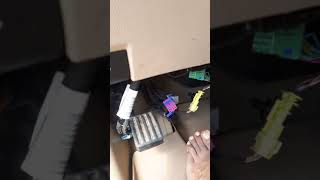
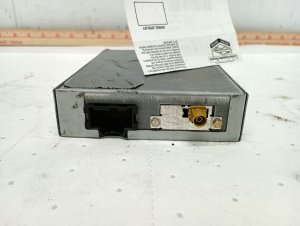
- Locate the modules on the MOST network. For the Enclave/Traverse/Acadia platform, this typically includes the radio/tuner (often behind the glove box), HMI module (behind the main display), CD/media player (in the center console), and the amplifier (often under the passenger front seat 🎬 See this walkthrough on how to replace the amplifier. or in the rear quarter panel).
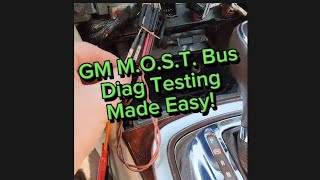
- Acquire a MOST fiber-optic bypass loop 🎬 Watch: A simple guide to testing the GM MOST bus. (GM tool EL-51578 or equivalent). This is an essential tool.
- Begin the process of elimination. Start with the most accessible module. In many GM vehicles, the CD player is a common and relatively easy module to access and bypass first.
- Disconnect the main electrical connector from the module. The fiber-optic connector is usually integrated into this.
- Plug the bypass loop into the fiber-optic connector you just removed. This completes the 'ring' while bypassing the disconnected module.
- Turn the ignition on. If the screen and audio now work (though functionality from the bypassed module will be gone), you have found the faulty module.
- If the system is still dead, reconnect the module and move to the next one in the network, repeating the bypass process until the faulty module is identified.
- Once the faulty module is identified, use a multimeter to check for proper power and ground at its connector before condemning the module. A blown fuse or bad connection could also be the root cause.
Parts You'll Likely Need
- MOST Bus Fiber Optic Bypass Loop
(OEM #EL-51578)— This is the essential diagnostic tool needed to isolate the failed component on the fiber-optic ring network.
Trusted brands: ACDelco, Dorman, Generic aftermarket
OEM price range: $20-$40
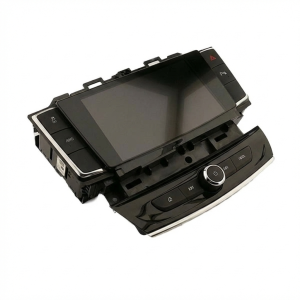
Aftermarket price range: $10-$25 - Human Machine Interface (HMI) Module
(OEM #23442728, 84081864 (part numbers are frequently superseded, VIN match is critical))— The HMI module controls the display and user inputs. It is a primary node on the MOST bus that can fail and cause a U0028 code. Replacement requires VIN programming.
Trusted brands: ACDelco (OEM)
OEM price range: $400-$800
Aftermarket price range: $250-$600 (Remanufactured/Pre-programmed) - Radio Receiver/Tuner Module
(OEM #Part numbers vary greatly by year and options, VIN match is critical)— The radio is the master module of the MOST bus. Its failure will bring down the entire network. It is a common point of failure.
Trusted brands: ACDelco (OEM)
OEM price range: $150-$500
Aftermarket price range: $100-$350 (Remanufactured) - CD/Media Player
(OEM #Part numbers vary, VIN match is critical)— The CD player is a node on the MOST bus and a very common failure point that will cause a U0028. Many owners choose to bypass it permanently rather than replace it.
Trusted brands: ACDelco (OEM)
OEM price range: $200-$400
Aftermarket price range: $100-$250 (Used/Remanufactured)
Related Codes That Often Appear With This One
- U0029 — This code often appears with U0028. While U0028 indicates a general MOST bus fault (like a complete ring break), U0029 can indicate a communication error where the ring integrity is still present, helping to narrow down the fault.
- U0140, U0155, U0184, U0186 — These codes indicate a loss of communication with specific modules (Body Control Module, Instrument Panel Cluster, Radio, Amplifier). If one of these is set alongside U0028, it strongly suggests that module is the source of the MOST bus failure. GM documentation advises diagnosing these specific codes first before U0028.
Technical Service Bulletins (TSBs) & Recalls
- PIC6073E: Mentions reviewing MOST bus operation and U0028 diagnostic procedures, indicating it's a known issue requiring standard diagnostics.
- PI1149A: Provides detailed diagnostic steps for a blank display and no audio, confirming the symptom is a MOST bus down condition. It explicitly mentions using the EL-51578 bypass loop and checking for codes like U0028/U0029. It also gives clues to rule out specific modules, e.g., no chimes points to the amp.
- 20-NA-199: Details software update procedures for newer GM infotainment systems to fix anomalies like blank screens, though more targeted at software glitches than complete MOST bus hardware failures.
Platform-Specific Known Issues
- Clogged Sunroof Drains Causing Amplifier Failure: A common owner experience involves the infotainment system failing after heavy rain. Investigation reveals clogged front or rear sunroof drains, which allows water to leak into the cabin. On the Enclave and its platform mates, the amplifier is often located in an area susceptible to this water intrusion. The water shorts out the amplifier, which breaks the MOST ring and causes the U0028 code, black screen, and loss of all audio, including turn signal chimes. The fix involves clearing the drains (often with compressed air or flexible wire) and replacing the damaged amplifier.
- Failed CD Player Bringing Down Entire System: In a documented repair on a similar GM platform, a vehicle presented with a black screen and U0028/U0029 codes. After checking power and grounds, the technician used a MOST bypass loop. Bypassing the HMI and radio modules did not solve the issue. However, when the CD/media player module in the center console was bypassed, the screen and radio immediately began working again. This confirms that any module in the ring, not just the main ones, can be the single point of failure.
- HMI Module Replacement and Programming: Owners who diagnose a faulty HMI module find that a simple swap is not possible. A replacement module, whether new from a dealer or a used unit, must be programmed with the vehicle's VIN. Failure to do so results in a 'LOCKED' message on the screen due to the anti-theft system. Owners have successfully used third-party services that sell pre-programmed HMI modules, allowing for a DIY plug-and-play installation without a trip to the dealer.
Mechanic-Grade Diagnostic Values
- MOST Enable Control Line (ECL) Voltage — expected: Approximately 12V (B+) key-on, engine-off. The radio module pulls this voltage to ground for ~100ms to wake up other modules on the bus.. Failure: Voltage significantly below B+ or an inability to be pulled to ground can indicate an open or high resistance in the circuit, which can cause a U0028 code.
- Module Power Supply Load Test — expected: When testing the power supply circuit for a MOST module (e.g., CD player, amplifier), it should be able to light a test bulb that draws a specific current, for example, 2 amps for a circuit protected by a 20-amp fuse.. Failure: If the circuit cannot supply enough current to light the test bulb brightly, it indicates high resistance in the power or ground circuit, which will cause the module to drop off the network even if the module itself is good.
Hidden / Shadow Codes Worth Checking
- U0028 sym00: This is a GM-specific code format where 'sym00' is a symptom byte. Its presence in GM service information indicates a current fault on the MOST bus that is causing a complete communication failure (e.g., black screen at startup). (see via A GM dealer-level scan tool like GDS2 or a high-end professional scanner capable of reading manufacturer-specific codes and data.)
Scan Tool Commands That Help
- GDS2 (Global Diagnostic System 2): View Radio Live Data > MOST Data — This is the primary diagnostic screen for this fault. Key parameters to watch are 'Number of MOST Communication Breaks' and 'Surrogate MOST Master Node Upstream Position'. An upstream position of '0' often means the radio can't communicate with the very first module in the ring (often the CD player). A non-zero number points to a break further down the line.
- GDS2 (Global Diagnostic System 2): Data Bus Diagnostic Tool — This tool, which installs with GDS2, actively polls the communication buses and displays a list of all modules that are currently responding. By comparing the list of responding modules to a wiring diagram of the MOST ring order, a technician can pinpoint exactly where the communication break has occurred.
Wiring & Ground Locations
- G304 — Below the floor console.. This ground point serves several modules in the center of the vehicle, including potentially the Instrument Panel Cluster (IPC), which is a node on the MOST bus. A poor connection at this ground could cause the IPC to malfunction and break the ring.
- Instrument Panel Fuse Block — Typically located on the passenger side of the center console or behind the glove box.. This fuse block contains specific fuses for infotainment components, often labeled 'RDO' (Radio), 'AMP' (Amplifier), 'DSPLY' (Display), and 'INFOTMNT'. A loss of power from a blown fuse will cause a module to drop off the network and set a U0028.
- MOST Bus Connector — At the back of each module on the ring (Radio, HMI, CD Player, Amplifier, IPC).. This connector contains the two fiber optic lines (In/Out) and often the copper MOST Enable Control Line. The fiber optic terminals must be perfectly clean and seated. The locking tabs are fragile and can break, leading to intermittent connections.
Real Owner Repair Stories
- iATN (International Automotive Technicians Network) Forum Post (2015 Chevrolet Silverado (platform mate with similar MOST system)) — MyLink display is dark, radio will not play, control buttons are non-functional.
❌ Tried (didn't work) Initial checks before isolating the fault.
✅ What actually fixed it The technician used a GDS2 scan tool and found U0028 in the radio and U0029 in the HMI. The 'Surrogate MOST Master Node Upstream Position' data parameter pointed to the CD player as the fault. After confirming loss of communication with the CD player, they bypassed it with a fiber optic loop, which restored system function. The final repair was replacing the faulty CD player. - Automotive Diagnostics & Programming YouTube Channel (Buick Verano (similar GM MOST system)) — Radio inoperative, cluster displays 'Audio Off', blank center screen.
❌ Tried (didn't work) The technician first verified power and ground to the suspect module before condemning it.
✅ What actually fixed it Scan data showed U0028 and U0029, with an 'upstream position' of zero, pointing to the first module after the radio: the CD player. The technician load-tested the power and ground to the CD player and confirmed they were good. Bypassing the CD player's fiber optic connector with a simple jumper immediately restored radio function. The root cause was a failed CD player.
"I Checked Everything" — The Actual Cause
- The equivalent of a 'smoke test clean' for this code is when the standard diagnostic—systematically bypassing each module with a fiber optic loop—fails to restore function. GM service information states that if bypassing all suspect modules does not resolve the U0028 code, the fault lies with the wiring itself. Technicians must then check the fiber optic cables for damage (kinks, breaks) and test the copper MOST Enable Control Line (ECL) circuit for opens, shorts, or high resistance between modules.
OEM Part Supersession History
e.g., 23442728 (for HMI Module)→Multiple, including 84081864, 84513027, and others.— Revisions for hardware improvements, software compatibility, and component sourcing changes.
Heads up: Crucially, matching the old part number is not reliable. HMI modules are platform-specific (e.g., HMI 2.0 vs 2.5) and must be programmed to the vehicle's VIN to function correctly and enable the proper features. A used module from another car will cause a theft-lock condition unless reprogrammed. Third-party sellers often sell new or remanufactured units pre-programmed to a buyer's VIN.
Model Year Variations Within This Range
- 2013-2017: These first-generation Enclave models use the 'Buick IntelliLink' system, typically with a 6.5-inch or 7-inch screen and HMI 2.0 modules (pre-2016) or HMI 2.5 (2016+). The earlier HMI 2.0 does not support Apple CarPlay or Android Auto.
- 2018: The redesigned 2018 Enclave introduced the 'Buick Infotainment System' with a standard 8-inch screen, a redesigned center console, and a different physical layout. These models use the HMI 2.5 generation of modules, which support Apple CarPlay and Android Auto. While the diagnostic principle of the MOST ring is the same, the specific HMI and Radio modules are not interchangeable with the previous generation.
Helpful Videos
We Have This Part in Stock




The information in this article is provided for general reference and educational purposes only. Vehicle specifications, procedures, and part compatibility can vary by production date, trim level, and region. Always consult your vehicle's factory service manual and verify part numbers before purchasing or performing repairs. Safety-critical components such as airbags, seat belts, and braking systems should be installed by a qualified professional.
- Buick ENCLAVE:
- 🎬 Helpful Videos
- 🛍️ Shop This Part
- What's Unique About the 2013-2018 Buick ENCLAVE
- Diagnostic Flowchart
- Symptoms You May Notice
- Most Likely Causes
- Rare But Worth Checking
- Diagnosis Steps
- Parts You'll Likely Need
- Related Codes That Often Appear With This One
- Technical Service Bulletins (TSBs) & Recalls
- Platform-Specific Known Issues
- Mechanic-Grade Diagnostic Values
- Hidden / Shadow Codes Worth Checking
- Scan Tool Commands That Help
- Wiring & Ground Locations
- Real Owner Repair Stories
- "I Checked Everything" — The Actual Cause
- OEM Part Supersession History
- Model Year Variations Within This Range
- 🎟️ Get 5% Off