

P2299 on 2015-2019 Ram 2500: Brake and Accelerator Pedal Conflict Explained
This code is almost always caused by driving with one foot on the brake and one on the accelerator ('two-footed driving'). Before replacing any parts, check your driving style, as confirmed by multiple Ram technical service bulletins. If a part has failed, it is most likely the inexpensive brake light switch, not the accelerator pedal assembly.
- P2299 means the brake and gas pedals were pressed at the same time.
- The most common cause is the driver's foot resting on the brake while accelerating ('two-footed driving').
- Do NOT replace the accelerator pedal assembly until you have ruled out driver habit and floor mat obstruction.
- If a part has failed, the most likely culprit is an inexpensive brake light switch, not the expensive accelerator pedal.
- Clearing the code and changing driving habits is often the only 'fix' needed.
What's Unique About the 2015-2019 Ram 2500
For this generation of Ram trucks, the manufacturer has been very clear about the primary cause of P2299. Ram has issued multiple Technical Service Bulletins (TSBs) to dealerships—including #9004225, #9003413, and #53034160A—explicitly stating that this code is "usually caused by a two footed driver" and that the accelerator pedal should not be replaced for this fault. This is a well-documented issue where owners can save significant money by understanding the cause is often driver habit, not a faulty part. Some TSBs also note that a PCM software update may resolve an overly sensitive trigger logic for this code on certain model years.
Diagnostic Flowchart
Tap your situation to follow the diagnostic path that matches what you're seeing on this vehicle.
Generation note: The 2015-2019 model years all fall within the fourth generation of Ram HD trucks (2010-2019). The issue and diagnosis are consistent across this generation and are also common on other FCA/Stellantis vehicles like the Jeep Grand Cherokee, Dodge Durango, and Chrysler 300.
Symptoms You May Notice
- Check Engine Light is on
- Electronic Throttle Control (ETC) or 'lightning bolt' warning light is on
- Vehicle enters 'limp mode' with reduced engine power and sluggish acceleration
- Cruise control may not work or may disengage unexpectedly
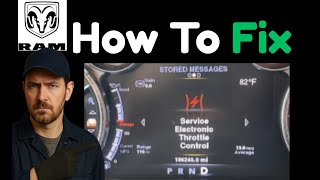
- Message on dash display: "Service Electronic Throttle Control& 🎬 See this video for a breakdown of common throttle control causes.quot;
- Replacing the Accelerator Pedal Assembly. Manufacturer TSBs #9004225, #9003413, and #53034160A specifically warn technicians *not* to replace the pedal for this code until driver habit has been ruled out as the cause.
Most Likely Causes
- Driver Habit (Two-Footed Driving) 🔴 High Probability The pedal ergonomics may lead some drivers to rest their left foot on the brake pedal while their right foot is on the accelerator. This is especially common when maneuvering a trailer or in stop-and-go traffic. Ram has issued multiple TSBs identifying this as the most frequent cause.
How to confirm: Interview the driver about their habits. Consciously drive using only the right foot for both pedals and see if the code returns after being cleared. A user on a Ram forum admitted this happened while using two feet to manage a trailer.
Typical fix: Change driving style to use only the right foot for both pedals. Keep the left foot on the floor or dead pedal when not braking. Clear the code. 🎬 Watch: How to clear the P2299 code using a scan tool.
Est. part cost: $0 - Obstructed Pedals 🟡 Medium Probability Thick or improperly placed aftermarket floor mats can slide forward and bunch up, preventing the accelerator pedal from returning to idle or pressing it down slightly. This can cause the code when the driver applies the brake.
How to confirm: Visually inspect the driver's side footwell. Ensure the floor mat is properly secured in its anchors and is not interfering with the travel of either the brake or accelerator pedal. Remove the mat entirely for a test drive to see if the problem disappears.
Typical fix: Remove, reposition, or replace the floor mat. Ensure the correct, properly fitting mat is used.
Est. part cost: $0-$150 - Faulty Brake Light Switch (Brake Pedal Position Sensor) ⚪ Low Probability Like any electronic sensor, the brake light switch can fail, degrade, or become misadjusted. It may send a signal to the PCM that the brake is applied even when it is not, or the signal may be intermittent. A Reddit user with a 2018 model described an issue where the switch seemed to hang up, causing brake drag, which was temporarily resolved by pulling the pedal back. 🎬 Watch: A quick tip for checking a sticking brake pedal.
How to confirm: Check if brake lights are stuck on. Use a scan tool to monitor the live data for the brake switch; the status should change from 'Off' to 'On' instantly when the pedal is pressed and vice-versa. Any delay or incorrect state indicates a problem.
Typical fix: Replace the brake light switch. It is located on the brake pedal support bracket and typically twists into place. Disconnect the battery before replacement.
Est. part cost: $15-$40
Rare But Worth Checking
- Wiring or Connector Issue: Per TSB #53034160A, wiring and connectors should be checked before replacing any major components. A corroded or loose pin at the accelerator pedal, brake switch, or PCM could cause an intermittent signal that mimics a pedal conflict.
- Faulty Accelerator Pedal Assembly: While TSBs warn against this as a first step, it is not impossible for the pedal's internal Accelerator Pedal Position (APP) sensors to fail. This should only be considered after all other causes, especially driver habit, have been definitively ruled out. A failure here would likely be accompanied by other APP-specific codes.
- PCM Software Issue: Several TSBs for FCA vehicles, including Ram, indicate that the PCM logic for detecting P2299 can be overly sensitive. In some cases, a dealer-installed software update is the required fix to prevent the code from being triggered erroneously.
Diagnosis Steps
- First, ask the primary driver(s) if they drive with two feet, or rest their left foot on the brake pedal. This is the most common cause.
- Clear the code using a scan tool. Test drive the vehicle using only the right foot for both pedals. If the code does not return, the issue is driver habit.
- If the code returns, inspect the driver's floor mat. Remove it completely and test drive again to ensure it is not interfering with pedal travel.
- With the ignition on (engine off), observe the brake lights while a helper presses and releases the brake pedal. Ensure they function correctly and are not stuck on.
- Use a scan tool to monitor live data for the Accelerator Pedal Position (APP) and Brake Pedal Position (BPP) sensors. Confirm the BPP sensor reads 'Off' when the brake is not touched and that the APP sensor reads 0% at rest.
- Inspect the wiring and connectors at the accelerator pedal and brake light switch for any signs of damage, corrosion, or looseness.
- If the brake switch signal is intermittent or incorrect, replace the brake light switch. This is an inexpensive part and a common point of failure after driver habit is ruled out.
- Check for any available PCM software updates by contacting a dealership, as some TSBs indicate a reflash can fix overly sensitive logic.
- Only after exhausting all other possibilities should the accelerator pedal assembly be considered as the fault.
Parts You'll Likely Need
- No Parts Needed - Driver Habit Adjustment — This code is most frequently caused by two-footed driving. The fix is to change driving style, which costs nothing.
OEM price range: $0
Aftermarket price range: $0 - Brake Light Switch
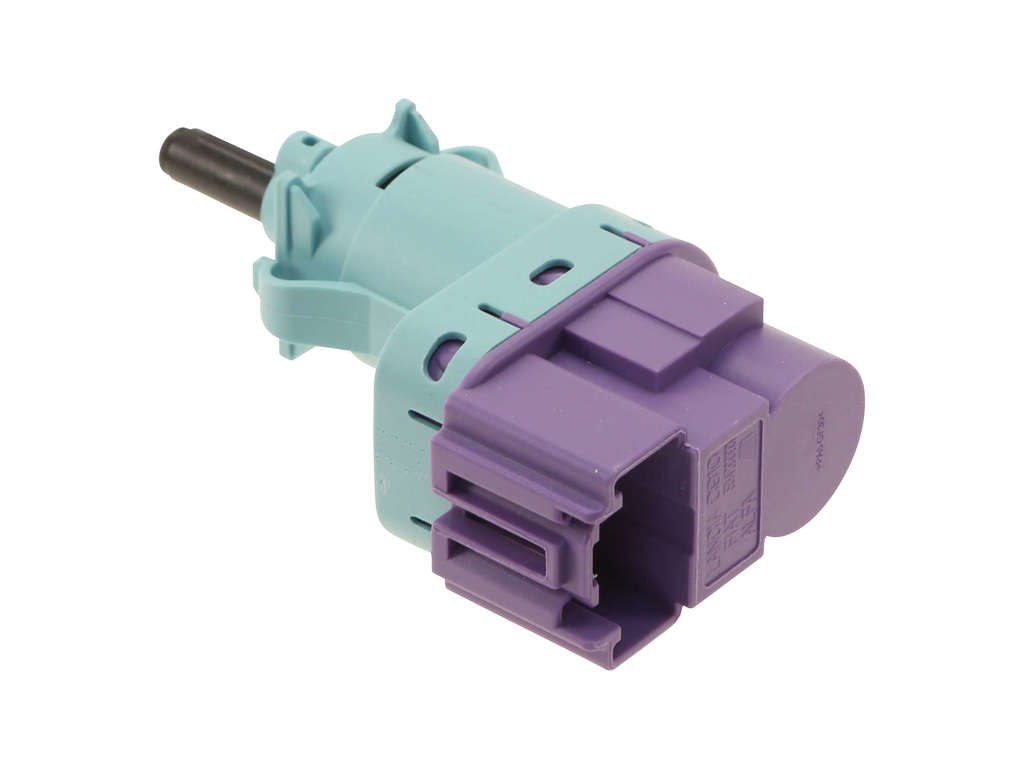
(OEM #56038914AC (example, verify by VIN))— If the code is not caused by driver habit or a floor mat, a faulty or misadjusted brake light switch is the next most likely component failure. A video for a 2018 Ram 2500 shows the replacement process.
Trusted brands: Mopar, Standard Motor Products, Dorman
OEM price range: $25-$40
Aftermarket price range: $15-$30
Related Codes That Often Appear With This One
- P2122 — This code (APP Sensor 1 Circuit Low) can be set if the accelerator pedal connector is disconnected during diagnosis, as noted in TSB #9004225.
- P2127 — This code (APP Sensor 2 Circuit Low) can also be set if the accelerator pedal connector is disconnected during diagnosis, as noted in TSB #9004225.
- U1424 — This code (Implausible Engine Torque Signal Received) can sometimes accompany P2299, particularly when a PCM software update is needed to resolve the issue, as mentioned in TSB 18-103-16 REV. B.
Technical Service Bulletins (TSBs) & Recalls
- Bulletin #9004225: Warns that P2299 is usually caused by a 'two footed driver' and the accelerator pedal should not be replaced.
- Bulletin #9003413: States P2299 is usually caused by a 'two footed driver' and the accelerator pedal should not be replaced for this fault.
- Bulletin #53034160A: Advises checking wiring and notes P2299 is usually caused by a 'two footed driver' and the pedal should not be replaced for this fault.
- Bulletin #18-103-16 REV. B: Not
Platform-Specific Known Issues
- This platform is well-known for logging the P2299 code due to driver habits. Ram has issued multiple TSBs (e.g., #9004225, #9003413, #53034160A) to prevent unnecessary replacement of accelerator pedals, which is a common misdiagnosis.
- A user on DieselTruckResource.com with an older Ram reported getting the P2299 code, and the dealer immediately asked if they were a 'left foot braker,' showing this has been a known issue for a long time.
- Some model years may have overly sensitive software logic, and a PCM reflash from a dealer may be required to resolve the issue, as indicated by TSBs like 18-103-16 REV. B.
Mechanic-Grade Diagnostic Values
- Accelerator Pedal Position (APP) Sensor 5V Supply — expected: 4.5 to 5.2 Volts at the APP sensor harness connector (KOEO).. Failure: Voltage outside this range suggests a short or open in the supply circuit.
- Brake Pedal Position (BPP) Sensor Voltage — expected: A smooth sweep from approximately 0.5V (pedal released) to 4.5V (pedal fully depressed).. Failure: Voltage is stuck, jumps erratically, or does not change with pedal movement.
Scan Tool Commands That Help
- wiTECH or equivalent professional scanner: Brake Pedal Calibration / BPP Sensor Relearn — This is a mandatory step after replacing the brake light switch/BPP sensor to calibrate the new sensor's values with the ABS and PCM modules.
- wiTECH or equivalent professional scanner: ETC Relearn / Throttle Follower Test — Used after replacing the accelerator pedal assembly to allow the PCM to learn the new sensor's voltage range.
- N/A (Manual Procedure): Accelerator Pedal Calibration Procedure — A tool-free method to recalibrate after pedal replacement. Involves turning the key to 'ON', slowly pressing and releasing the pedal once, then turning the key 'OFF'.
Wiring & Ground Locations
- G211 — Located on the left side of the dash, near the driver's kick panel area.. This is a potential ground point for the stop lamp switch circuit. A poor ground here could cause intermittent or incorrect signals from the brake switch, leading to a P2299 code.
- Stop Lamp Switch Connector — On the brake pedal support bracket under the driver's side dashboard.. This is the direct connection to the brake switch. A wiring diagram for a similar generation truck shows Pin 5 as the ground and Pin 2 as the stop lamp signal. Checking for voltage and ground at this connector is a key diagnostic step.
Real Owner Repair Stories
- Reddit user, r/MechanicAdvice (2018 Ram) — Brakes started to drag while driving.
❌ Tried (didn't work) Pumping the brakes while stopped did not release the dragging.
✅ What actually fixed it The owner manually pulled the brake pedal back towards the driver's seat, which had a small amount of slack. This action released the stuck brake switch and the brake booster, resolving the drag. The root cause was a physically hanging brake switch, not driver habit or a purely electrical failure.
"I Checked Everything" — The Actual Cause
- For code P2299, the equivalent of a 'smoke test clean' scenario is when all sensor data appears normal on a scan tool and the driver insists they are not a two-footed driver. In these cases, the root cause is often overly sensitive software logic in the Powertrain Control Module (PCM). The fix is not a part replacement, but a PCM software update (reflash) performed by a dealer, as specified in TSBs like 18-006-16 REV. B.
When the Usual Fixes Don't Work
- While manufacturer TSBs strongly and correctly point to 'two-footed driving' as the primary cause of P2299, it is not the only cause. There are confirmed owner experiences where the code was definitively caused by a failed component, even when driving habits were correct. A common example is a physically sticking or internally failed brake light switch, which falsely tells the PCM the brake is applied. This demonstrates that while checking driving style is the correct first step, it should not prevent a technician from diagnosing the brake switch and its circuit if the code persists.
OEM Part Supersession History
56038914AA, 56038914AB→56038914AC— Standard part revision by the manufacturer for improved reliability or minor design changes.
Model Year Variations Within This Range
- 2014-2016: These model years may have overly sensitive PCM logic for triggering P2299. Ram issued specific Technical Service Bulletins (e.g., 18-103-16 REV. B for 2014-2015, 18-006-16 REV. B for 2016) that involve a software update to correct the issue, which may not be applicable to later years in the range.
Helpful Videos

We Have This Part in Stock


The information in this article is provided for general reference and educational purposes only. Vehicle specifications, procedures, and part compatibility can vary by production date, trim level, and region. Always consult your vehicle's factory service manual and verify part numbers before purchasing or performing repairs. Safety-critical components such as airbags, seat belts, and braking systems should be installed by a qualified professional.
- Ram 2500:
- 🎬 Helpful Videos
- 🛍️ Shop This Part
- What's Unique About the 2015-2019 Ram 2500
- Diagnostic Flowchart
- Symptoms You May Notice
- Most Likely Causes
- Rare But Worth Checking
- Diagnosis Steps
- Parts You'll Likely Need
- Related Codes That Often Appear With This One
- Technical Service Bulletins (TSBs) & Recalls
- Platform-Specific Known Issues
- Mechanic-Grade Diagnostic Values
- Scan Tool Commands That Help
- Wiring & Ground Locations
- Real Owner Repair Stories
- "I Checked Everything" — The Actual Cause
- When the Usual Fixes Don't Work
- OEM Part Supersession History
- Model Year Variations Within This Range
- 🎟️ Get 5% Off