

P2138 on 2013-2018 GMC Yukon: Accelerator Pedal Sensor Causes and Fixes
Code P2138 on a 2013-2018 GMC Yukon almost always points to a faulty accelerator pedal position (APP) sensor or issues with its wiring. The vehicle will likely enter 'Reduced Engine Power' mode. Replacing the APP sensor assembly is a common fix, but inspecting wiring connectors for corrosion or poor pin tension is a critical first step due to multiple Technical Service Bulletins (TSBs) on this exact issue. Water intrusion into the IP-to-body harness connector in the driver's kick panel is a well
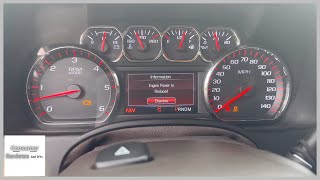
- P2138 on a GMC Yukon will immediately put the vehicle into 'Reduced Engine Power' mode.
- Do not immediately buy a new throttle body; this code points to the accelerator pedal or its wiring.
- Before replacing the accelerator pedal, thoroughly inspect its connector and the main body harness connector in the driver's kick panel for loose pins, corrosion, or water damage, as this is a known GM issue.
- Replacing the accelerator pedal assembly is a simple DIY job, typically involving two or three bolts and one electrical connector.
- If a new pedal doesn't fix the problem, the issue is almost certainly in the wiring between the pedal and the PCM.
What's Unique About the 2013-2018 Gmc YUKON
General Motors has issued multiple Technical Service Bulletins (TSBs) for this code across its truck and SUV lineup, including the Yukon. These bulletins, particularly TSB #07-06-04-019F, specifically highlight problems with the instrument panel (IP) to body harness connector, often found near the driver's side kick panel. This connector is prone to water intrusion from sources like leaking A-pillar seals, sunroof drains, or windshield seals, leading to corrosion that causes the P2138 code. This means that unlike in some other vehicles where P2138 is almost always a bad pedal sensor, on the Yukon, a thorough wiring and connector inspection is just as, if not more, important than checking the sensor itself.
Diagnostic Flowchart
Tap your situation to follow the diagnostic path that matches what you're seeing on this vehicle.
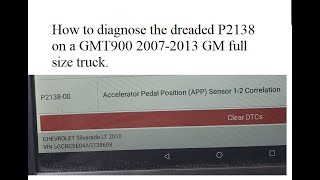
Generation note: This year range covers two Yukon generations: the end of the third generation (GMT900, 2013-2014) 🎬 Watch: Diagnostic diagrams and pinpointing P2138 on GMT900 models. and the beginning of the fourth (K2UG, 2015-2018). 🎬 See this walkthrough for P2138 on the K2XX platform. The P2138 code and its common causes are prevalent in both generations, with TSBs covering models from each. The underlying 'drive-by-wire' system architecture is similar, making the diagnostic process nearly identical.
Symptoms You May Notice
- Reduced Engine Power message displayed on the instrument cluster.
- Check Engine Light is on.
- Severely limited acceleration or sluggish throttle response.
- Vehicle may not accelerate past a certain low speed.
- Unstable or rough idle.
- Potential for the engine to stall when coming to a stop.
- Harsh or erratic transmission shifting while in limp mode.
- Replacing the Throttle Body Assembly. P2138 specifically relates to a disagreement between the two sensors in the *accelerator pedal assembly* or its wiring. While a faulty throttle body can cause similar symptoms, it will typically set different codes (like P2135 or P1516). Always diagnose based on the specific code set.
Most Likely Causes
- Wiring Harness or Connector Issue 🔴 High Probability Multiple GM TSBs (e.g., #070604019F, #PIP3783D) point directly to issues with water intrusion and corrosion in the IP-to-body harness connector, which carries the APP sensor signals. This connector is located in the driver's side kick panel area and is vulnerable to leaks from the A-pillar, sunroof drains, or windshield seal.
How to confirm: Visually inspect the IP-to-body harness connector (often a large, multi-wire connector near the driver's kick panel) for any signs of green or white corrosion, moisture, or backed-out pins. Perform a 'wiggle test' on the harness while watching live sensor data on a scan tool; fluctuations point to a wiring fault. Look for rust on metal brackets under the dash as evidence of past water intrusion.
Typical fix: Disconnect the battery, then unplug, clean, and dry the affected connector. Apply dielectric grease to the terminals before reconnecting to prevent future moisture damage. In cases of severe corrosion or frayed wires, the connector pigtail or specific wires may need to be replaced.
Est. part cost: $10-$50 - Faulty Accelerator Pedal Position (APP) Sensor 🔴 High Probability The APP sensor is a high-use electronic component that can wear out over time, causing its internal sensors to send conflicting signals. Aftermarket sensors have also been reported to be faulty out of the box.
How to confirm: Use a scan tool to monitor live data for APP Sensor 1 and APP Sensor 2. As you press the pedal, the voltages should change smoothly and have a consistent correlation (e.g., one is always half of the other). Jumps, dropouts, or erratic readings indicate a bad sensor.
Typical fix: Replace the entire accelerator pedal assembly, which includes the integrated sensors. This is a simple DIY job requiring only basic tools.
Est. part cost: $60-$150
Rare But Worth Checking
- Faulty Powertrain Control Module (PCM): This is very rare. Before condemning the PCM, all other possibilities, especially wiring and sensor issues, must be exhaustively ruled out. A forum user documented diagnosing a bad ECM by finding high internal resistance (15-50 ohms, where <5 ohms is expected) on the low-reference circuits after confirming the pedal and wiring were good.
- Water Intrusion from Leaking Cowl/Windshield/Sunroof: As noted in TSB #07-06-04-019F, water can leak into the cabin from A-pillar seals, sunroof drain lines, or windshield/cowl sealing and drip onto critical electrical connectors like the IP-to-body harness connector, causing shorts and corrosion that trigger P2138. Evidence of water stains on the A-pillar, headliner, or rust on the floor/brackets near the kick panel are strong clues.
Diagnosis Steps
- Read all fault codes with an OBD-II scanner and note them. Confirm P2138 is present.
- Using the scanner's live data function, monitor the voltage readings for 'APP Sensor 1' and 'APP Sensor 2'.
- Slowly press and release the accelerator pedal. Observe the voltage readings. They should move smoothly without any spikes or dropouts. One sensor typically reads about half the voltage of the other. If readings are erratic, the pedal assembly is suspect.
- If the readings are smooth, the problem may be intermittent or in the wiring. Disconnect the battery.
- Locate and inspect the instrument panel (IP) to body harness connector, often a large connector found in the driver's side kick panel area. Disconnect it and check thoroughly for signs of water intrusion, green/white corrosion, or backed-out pins as highlighted in GM TSB #07-06-04-019F.
- Also inspect the smaller electrical connector directly at the accelerator pedal assembly for corrosion, bent pins, or loose wires.
- If visual inspection reveals no issues, perform a 'wiggle test': with the scanner connected and displaying live data, gently wiggle the wiring harness leading to the pedal and at the body connector to see if you can force the voltage readings to fluctuate.
- If the sensor data is erratic and wiring appears intact, the APP sensor assembly is the most likely culprit.
- If a new APP sensor does not resolve the issue, a more in-depth circuit test is necessary. Check for 5V reference and good ground at the pedal connector. Test for high resistance in the signal and low-reference wires between the PCM and the APP sensor connector.
Parts You'll Likely Need
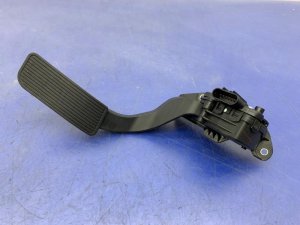
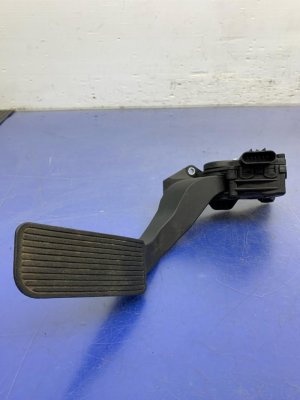
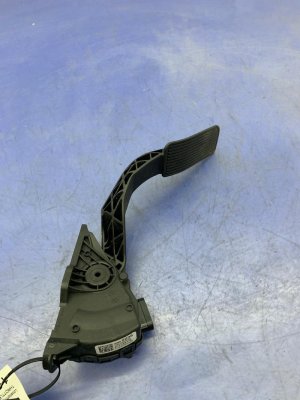
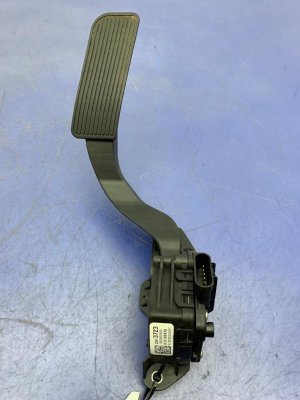
- Accelerator Pedal Position (APP) Sensor Assembly
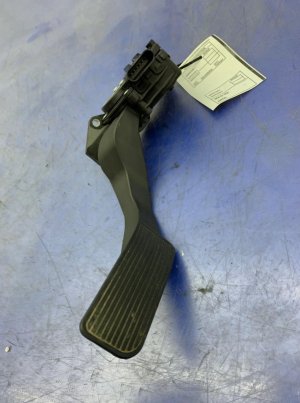
(OEM #ACDelco 25832864 (For GMT900, 2013-2014 w/ Adjustable Pedals, RPO Code JF4) or ACDelco 84096835 (For K2UG, 2015-2018). Part numbers vary based on adjustable vs. non-adjustable pedals, so verifying with VIN is crucial.)— This is the most common part to fail and cause a P2138 code when wiring is not the issue. The assembly includes the pedal and the two integrated sensors required for operation.
Trusted brands: ACDelco, Standard Motor Products (SMP), NGK/NTK, Dorman
OEM price range: $100-$150
Aftermarket price range: $60-$120
Related Codes That Often Appear With This One
- P2122 — Indicates APP Sensor 1 Circuit Low Voltage.
- P2123 — Indicates APP Sensor 1 Circuit High Voltage.
- P2127 — Indicates APP Sensor 2 Circuit Low Voltage.
- P2128 — Indicates APP Sensor 2 Circuit High Voltage.
- P0697 — Indicates Sensor Reference Voltage 'C' Circuit/Open, which can be related to the 5V reference circuit supplying the APP sensor.
Technical Service Bulletins (TSBs) & Recalls
- PIP5344: Mentions P2138 in a list of DTCs that may require wiring inspection.
- 070604019F: Cites repairing a harness connector to fix DTC P2138 and Reduced Engine Power, specifically due to water intrusion.
- PIP3783D: Recommends inspecting APP circuits for poor terminal tension for code P2138.
- 07-06-04-019E: An earlier, now superseded, version of the TSB to repair a harness connector for P2138.
Platform-Specific Known Issues
- TSB #070604019F is the most relevant bulletin, explicitly stating that intermittent P2138 and Reduced Engine Power are often caused by water intrusion into the IP-to-body harness connector. The fix involves finding and repairing the water leak, then cleaning or repairing the connector.
- TSB #PIP3783D advises technicians to inspect the Accelerator Pedal Position circuits for poor terminal tension when P2138 is present, which can also cause intermittent signal loss.
- TSB #PIP5344 lists P2138 among a group of codes that may set due to inconclusive diagnostics, pointing towards inspecting wiring as a necessary step.
- Water intrusion into the IP-to-body harness connector is a known cause of this code on GM trucks and SUVs. Common leak points are the windshield seal, sunroof drains, and roof-mounted antennas.
Mechanic-Grade Diagnostic Values
- APP Sensor 1 and 2 Voltage at Pedal Released (KOEO) — expected: One sensor at ~0.8-1.2V, the other at ~0.3-0.6V. The key is that they are different and stable.. Failure: Voltages are erratic, identical, or zero. A divergence greater than 0.5V between the expected correlated values can trigger the fault.
- APP Sensor 1 and 2 Voltage at Pedal Fully Depressed (KOEO) — expected: One sensor at ~4.5V, the other at ~2.3V. Voltages should sweep smoothly from released to depressed.. Failure: Voltage readings jump, drop out, or do not reach the expected maximums.
- 5-Volt Reference at APP Sensor Connector — expected: ~5.0 Volts. Failure: Voltage is significantly lower (e.g., below 4.8V) or absent, indicating a problem with the PCM or a short on the 5V reference circuit.
- Low Reference (Ground) Circuit Resistance — expected: Less than 5 Ohms to a known good ground.. Failure: High resistance (e.g., >20 Ohms) indicates a poor ground connection, which can cause floating voltage readings.
Scan Tool Commands That Help
- GDS2/Tech2: Diagnostic System Check - Vehicle — This is the initial step recommended by GM TSBs to check for any related 5V reference DTCs before focusing on the P2138 code itself.
- GDS2/Tech2: Diagnostic Repair Verification — Used after a repair (like cleaning a connector or replacing the pedal) to confirm the fault has been rectified and to clear the code from history.
- High-end OBD-II Scanner: Live Data Graphing for APP Sensor 1 & 2 — Essential for diagnosing P2138. Graphing both PIDs simultaneously while slowly pressing the pedal makes it easy to spot glitches, dropouts, or non-linear tracking that indicates a failing sensor.
Wiring & Ground Locations
- IP-to-Body Harness Connector (likely X225) — In the driver's side kick panel area, near the floor. It's a large, multi-pin connector that joins the main interior dash harness to the body harness.. This is the specific connector cited in GM TSB #07-06-04-019F as being highly susceptible to water intrusion from A-pillar or sunroof leaks, causing corrosion on the APP sensor signal pins and triggering P2138.
- APP Sensor Connector — Directly plugged into the top of the accelerator pedal assembly under the driver's side dashboard.. This is the primary connection point for the sensor. It should be checked for corrosion, backed-out pins, or damage, although it is less prone to water damage than the X225 connector.
- ECM/PCM Connectors — Located in the engine bay, typically on the driver's side near the firewall or fuse block.. The APP sensor signal wires terminate here. While less common, issues at the PCM connector pins can also cause this code.
Real Owner Repair Stories
- YouTube Channel 'AnthonyJ350' (2015+ (K2XX Platform) GM Truck/SUV) — Intermittent 'Reduced Engine Power' message and P2138 code.
❌ Tried (didn't work) Initial diagnosis often points to the APP sensor, but replacement may not fix it if the root cause is wiring.
✅ What actually fixed it The video documents clear evidence of a water leak in the driver's side A-pillar area, causing rust on brackets and corrosion on fuses in the kick panel. The fix is to find and seal the water leak (often from the windshield seal or roof antenna) and then clean or repair the corroded IP-to-body harness connector (X225) as per TSB #07-06-04-019F.
When the Usual Fixes Don't Work
- While replacing the accelerator pedal assembly is a very common and often successful fix, the prevalence of GM Technical Service Bulletins pointing to water intrusion at the IP-to-body harness connector means that simply replacing the pedal without a thorough inspection of the kick panel wiring can lead to the problem recurring. In many documented cases for the Yukon and its sister platforms, the pedal itself was not faulty; the root cause was corrosion in the X225 connector due to a water leak.
Model Year Variations Within This Range
- 2013-2014 (GMT900) vs 2015-2018 (K2UG): The accelerator pedal assemblies are different parts between the two generations. The GMT900 pedal (e.g., ACDelco 25832864 for adjustable) is not interchangeable with the K2UG pedal (e.g., ACDelco 84096835). While the P2138 fault and its root causes (wiring, water intrusion) are common to both, using the correct part number for the specific generation is critical.
Helpful Videos
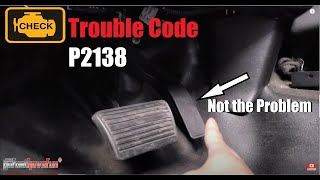


We Have This Part in Stock


The information in this article is provided for general reference and educational purposes only. Vehicle specifications, procedures, and part compatibility can vary by production date, trim level, and region. Always consult your vehicle's factory service manual and verify part numbers before purchasing or performing repairs. Safety-critical components such as airbags, seat belts, and braking systems should be installed by a qualified professional.
- Gmc YUKON:
- 🎬 Helpful Videos
- 🛍️ Shop This Part
- What's Unique About the 2013-2018 Gmc YUKON
- Diagnostic Flowchart
- Symptoms You May Notice
- Most Likely Causes
- Rare But Worth Checking
- Diagnosis Steps
- Parts You'll Likely Need
- Related Codes That Often Appear With This One
- Technical Service Bulletins (TSBs) & Recalls
- Platform-Specific Known Issues
- Mechanic-Grade Diagnostic Values
- Scan Tool Commands That Help
- Wiring & Ground Locations
- Real Owner Repair Stories
- When the Usual Fixes Don't Work
- Model Year Variations Within This Range
- 🎟️ Get 5% Off