

P2122 on 2007-2011 Chevrolet Silverado: APP Sensor Causes and Fixes
On a 2007-2011 Silverado, code P2122 almost always points to a faulty accelerator pedal position (APP) sensor or its wiring. This triggers a 'Reduced Engine Power' warning. The most common fix is replacing the entire accelerator pedal assembly, which costs about $70-$150 for the part and is an easy DIY job. Before replacing, always check the connector at the pedal for loose pins, as per a GM service bulletin.
- P2122 on a 2007-2011 Silverado means the computer is seeing a low voltage signal from the gas pedal sensor.
- This will cause the 'Reduced Engine Power' warning and make the truck difficult or impossible to accelerate.
- Always check the electrical connector at the gas pedal for loose pins or damage before buying parts, as this is a known issue (TSB #PIP3783D).
- If the wiring is good, the fix is to replace the entire accelerator pedal assembly, which is a simple, beginner-friendly DIY job.
What's Unique About the 2007-2011 Chevrolet SILVERADO

On this generation of Silverado (GMT900 platform), the APP sensor system is a notorious trouble spot. The issue is so common that General Motors issued Technical Service Bulletin #PIP3783D, which specifically directs technicians to check for poor electrical contact (terminal tension) in the APP sensor's connector before replacing any parts. This suggests that wiring and connection integrity are just as, if not more, likely to be the cause as a failed sensor itself. This problem is shared across nearly all 2007-2014 GM full-size trucks and SUVs.
Diagnostic Flowchart
Tap your situation to follow the diagnostic path that matches what you're seeing on this vehicle.
Generation note: The 2007-2011 year range primarily covers the second-generation Silverado (GMT900). However, the 2007 model year was a transition, and some 'Classic' models (first-generation, GMT800) were also sold. This issue is most commonly documented on the GMT900 platform and its direct relatives.
Symptoms You May Notice
- "Service Engine Soon" or Check Engine Light is on
- "Reduced Engine Power" message displayed on the dashboard
- Poor, delayed, or no throttle response
- Vehicle will not accelerate or is stuck at a low speed (limp mode)
- Hesitation or stumbling during acceleration
- Traction control light may also illuminate
- Replacing the throttle body assembly. This code specifically relates to the driver's input from the accelerator pedal sensor inside the cabin, not the throttle body on the engine. While a bad throttle body can cause similar symptoms, it will set different codes (like P2135).
Most Likely Causes

- Poor terminal tension at the APP sensor connector 🔴 High Probability This is a known issue documented by GM in TSB #PIP3783D. The female pin terminals in the connector can lose their grip over time due to vibration and heat cycling, causing an intermittent or low voltage signal.
How to confirm: With the ignition on, use a scan tool to monitor APP sensor 1 voltage while gently wiggling the connector and harness at the pedal. If the voltage fluctuates, drops out, or the code appears, the connection is faulty.
Typical fix: Repairing the connection. This may involve carefully re-tensioning the female pin terminals in the connector with a special pick tool, or replacing the connector pigtail if it's damaged or corroded.
Est. part cost: $15-$40 for a new connector pigtail - Failed Accelerator Pedal Position (APP) Sensor 🔴 High Probability The sensor is a high-use electronic component with internal wipers that move across a resistive strip, similar to a volume knob. These components can wear out internally, creating dead spots or incorrect voltage readings.
How to confirm: After confirming the wiring is good, use a scan tool to watch the APP Sensor 1 voltage as you slowly press and release the pedal. The voltage should sweep smoothly with no dropouts or dead spots. A jumpy, erratic, or flat signal indicates a bad sensor.
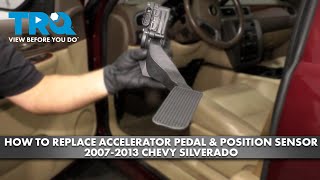
Typical fix: Replace the entire accelerator pedal assembly, as the sensor is integrated into it and not sold separately for this platform. 🎬 See this step-by-step guide to replacing the pedal assembly.
Est. part cost: $70-$150 - Damaged wiring harness 🟡 Medium Probability Wires can chafe against sharp metal edges under the dashboard or get damaged from aftermarket accessory installations. A specific, documented failure point involves screws used for fender liners or other accessories piercing the harness in the driver's side wheel well, causing a short to ground.
How to confirm: Visually inspect the harness running from the pedal toward the firewall and into the engine bay, especially in the driver's side wheel well area. If no visible damage is found, perform a continuity test on the signal wire (typically a dark blue wire in pin E) between the APP sensor connector and the PCM connector to check for an open or short to ground.
Typical fix: Repair the broken or shorted section of wire and protect it with loom or anti-abrasion tape.
Est. part cost: $5-$15 for wire and connectors
Rare But Worth Checking
- Faulty Powertrain Control Module (PCM): This is extremely rare. The PCM should only be suspected after all wiring and sensor tests have been performed and have passed. A PCM failure is a last resort diagnosis.
Diagnosis Steps
- Read all fault codes with an OBD-II scanner. Note any other codes present, especially P2127 or P2138, as they strongly point to the APP system.
- Visually inspect the accelerator pedal assembly and its electrical connector for any obvious damage, looseness, or corrosion.
- Following TSB #PIP3783D, carefully check the terminal tension in the connector. A loose pin is a very common cause. This is the most crucial first step. 🎬 Watch: How to diagnose and fix these common pedal sensor codes.
- Use a scan tool with live data capability to monitor the voltage for 'APP Sensor 1'. With the key on and engine off, the voltage should be around 0.3-0.8V at rest. It will read below the fault threshold (e.g., <0.25V) if the fault is active.
- Slowly press the pedal to the floor and release it, watching the voltage reading. It should increase smoothly to over 4.0V and return smoothly. Any drops, spikes, or dead spots indicate a faulty sensor.
- While watching the live data, gently wiggle the wiring harness at the pedal connector. If the voltage reading jumps around, the connector or wiring is the problem.
- If the sensor and connector seem good, perform a targeted visual inspection of the wiring harness, especially in the driver's side wheel well for any chafing or piercing from non-factory screws.
- If no visual fault is found, perform a continuity test on the signal wire between the pedal connector and the PCM to check for a short to ground or an open circuit.
- Only consider replacing the PCM if all other components and wiring have been proven to be good.
Parts You'll Likely Need

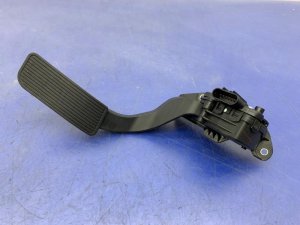
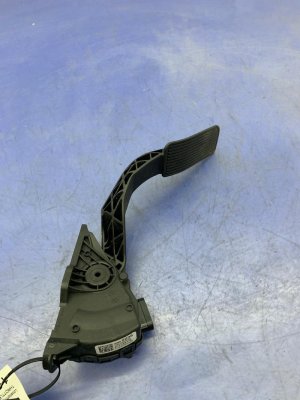
- Accelerator Pedal Assembly with Sensor
(OEM #25832864)— This is the most common repair. The sensor is integrated into the pedal assembly and is not sold separately for this platform. Replacing the whole unit is the standard fix when the sensor itself fails. No programming is required after installation.
Trusted brands: ACDelco (GM Genuine), Standard Motor Products, Delphi, Dorman (p/n 699-105)
OEM price range: $95-$145
Aftermarket price range: $70-$125
Related Codes That Often Appear With This One
- P2127 — This code indicates a 'Circuit Low' fault for APP Sensor 2 ('E' circuit). Since both sensors are in the same assembly and share a connector, a fault affecting one (like a bad connector or a failed pedal assembly) often affects the other simultaneously.
- P2138 — This code indicates a 'Voltage Correlation' error between APP Sensor 1 and Sensor 2. The PCM expects their voltages to change in a predictable, mirrored manner. A failure in one sensor (like P2122) will cause their signals to no longer correlate, triggering P2138.
- P2123, P2128 — These codes indicate a 'Circuit High' condition for APP sensors 1 and 2, respectively. They are often listed in the same TSBs as P2122 because they all point to a general failure within the APP sensor system.
Technical Service Bulletins (TSBs) & Recalls
- PIP3783D: Addresses Diagnostic Trouble Codes P2120, P2122, P2123, P2125, P2127, P2128, and/or P2138 and advises technicians to inspect the Accelerator Pedal Position circuits for poor terminal tension before replacing parts.
Platform-Specific Known Issues
- GM Technical Service Bulletin #PIP3783D was issued for these trucks, specifically identifying poor terminal tension in the APP sensor connector as a primary cause for P2122 and related codes, often leading to intermittent 'Reduced Engine Power' warnings.
- A documented, though less common, failure is the wiring harness being pierced by a non-factory screw in the driver's side wheel well area, causing a short to ground on the APP sensor circuit.
Mechanic-Grade Diagnostic Values
- APP Sensor 1 Signal Voltage (Scan Tool) — expected: 0.32V to 4.75V, sweeping smoothly as pedal is pressed.. Failure: A reading below 0.25V, or any spikes/dropouts, indicates a fault.
- APP Sensor 5-Volt Reference Circuit Voltage — expected: 4.8V to 5.2V with key on, engine off.. Failure: Voltage below 4.5V indicates an open/short in the reference circuit or a PCM fault.
- APP Sensor Low Reference (Ground) Circuit Voltage — expected: Less than 0.1V (100mV) when tested against a known good ground.. Failure: Higher voltage indicates a poor ground connection.
- Accelerator Pedal Mounting Bolt Torque — expected: 80 inch-pounds. Failure: N/A
Scan Tool Commands That Help

- Tech2/GDS2: Vehicle DTC Information (All Module Scan) — GM recommends using their proprietary software (Tech2 for 2007-2009, GDS2 for 2010+) to ensure all manufacturer-specific codes are read accurately from all modules, as generic scanners may miss information.
Wiring & Ground Locations
- APP Sensor Connector (Harness Side) — Connected to the top of the accelerator pedal assembly.. This is the primary connection point for the sensor. Pin E (Dark Blue wire) is the APP Sensor 1 signal wire. Pin F (Brown wire) is a ground. The White/Black wire is the 5V reference. TSB #PIP3783D specifically calls out checking terminal tension here.
- G103 / G104 — On the engine block.. These are major engine and chassis ground points. While not directly for the APP sensor (which is grounded through the PCM), poor engine grounds at these locations are a known cause of intermittent and difficult-to-diagnose electronic throttle problems on GMT900 trucks.
- Driver's Side Wheel Well Harness — The main wiring harness that runs through the driver's side front wheel well area.. This harness is vulnerable to being pierced by non-factory screws used for fender liners or accessories. A short to ground on the APP sensor signal wire (Dark Blue) in this location is a documented, though uncommon, cause of P2122.
Real Owner Repair Stories
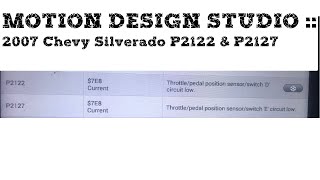
- YouTube channel 'motiondesignstudio' (2007 Chevrolet Silverado) — Check Engine Light with codes P2122 and P2127, Reduced Engine Power mode.
❌ Tried (didn't work) The video focuses directly on diagnosing the wiring, bypassing preliminary part swaps.
✅ What actually fixed it A non-factory machine screw used to attach a fender liner had pierced the wiring loom in the driver's side wheel well. The screw made contact with the Dark Blue wire (APP Sensor 1 signal), causing a short to chassis ground. Repairing the damaged wire and protecting the harness resolved the codes.
OEM Part Supersession History
15101848, 15847349→25832864— Standard part revision and consolidation by GM.
Heads up: The connector type is critical. Part number 25832864 is specified as having a 'Tin connector'. Ensure the replacement part matches the vehicle's harness connector.
Model Year Variations Within This Range
- 2007: The 2007 model year was a transition. 'Classic' models (GMT800 platform) were sold alongside the new GMT900 body style. While the APP sensor function is similar, part numbers and specific wiring locations may differ between the two platforms. This article primarily addresses the GMT900.
Helpful Videos
We Have This Part in Stock

The information in this article is provided for general reference and educational purposes only. Vehicle specifications, procedures, and part compatibility can vary by production date, trim level, and region. Always consult your vehicle's factory service manual and verify part numbers before purchasing or performing repairs. Safety-critical components such as airbags, seat belts, and braking systems should be installed by a qualified professional.
- Chevrolet SILVERADO:
- 🎬 Helpful Videos
- 🛍️ Shop This Part
- What's Unique About the 2007-2011 Chevrolet SILVERADO
- Diagnostic Flowchart
- Symptoms You May Notice
- Most Likely Causes
- Rare But Worth Checking
- Diagnosis Steps
- Parts You'll Likely Need
- Related Codes That Often Appear With This One
- Technical Service Bulletins (TSBs) & Recalls
- Platform-Specific Known Issues
- Mechanic-Grade Diagnostic Values
- Scan Tool Commands That Help
- Wiring & Ground Locations
- Real Owner Repair Stories
- OEM Part Supersession History
- Model Year Variations Within This Range
- 🎟️ Get 5% Off