

C1710 on 2004-2011 Nissan TITAN: Causes and Fixes for TPMS Sensor Fault
Code C1710 on a 2004-2011 Nissan Titan means the Tire Pressure Monitoring System (TPMS) is not receiving data from one of the rear wheel sensors, most commonly the Rear-Right. The most common cause is a dead battery inside the sensor, requiring sensor replacement and registration. Before replacing parts, unplug all aftermarket electronics (like phone chargers) to rule out radio frequency (RF) interference, a known issue. Expect to pay $40-$90 for a new sensor.
- C1710 means a TPMS sensor (specifically the Rear-Right one) is not sending a signal, usually due to a dead battery.
- Before replacing parts, unplug all aftermarket chargers and electronics to rule out radio frequency interference, a known issue on these trucks.
- Replacing a sensor is the most common fix and requires dismounting the tire.
- A new sensor must be registered to the vehicle using a scan tool or a manual 'paper clip' relearn procedure.
What's Unique About the 2004-2011 Nissan TITAN

For the first-generation Nissan Titan, now 15-20+ years old, the original TPMS sensor batteries are well past their expected 7-10 year lifespan, making this a very common age-related failure. Additionally, Nissan issued technical service bulletins for this platform highlighting that radio frequency (RF) interference from aftermarket electronics, like phone chargers or dash cams, can interrupt the 315MHz sensor signals 🎬 Learn more about how TPMS frequencies and interference work. and trigger a C1710 code. Forum users have specifically identified poorly-shielded USB power adapters and dash cam power cords as culprits. This susceptibility to interference is a known quirk of the system.
Diagnostic Flowchart
Tap your situation to follow the diagnostic path that matches what you're seeing on this vehicle.
Symptoms You May Notice

- TPMS warning light flashing for approximately one minute after startup, then remaining illuminated.
- Inability to read the tire pressure of one specific tire using a TPMS scan tool.
- A TPMS scan tool will show the code C1710, often with the description '[NO-DATA]-RR'.
- Replacing the wrong TPMS sensor because the wheel positions were not verified with a scan tool first.
- Confusing the C1710 TPMS code with incorrect definitions found on generic code websites, which may falsely point to throttle body, wiper, or communication circuit issues.
- Replacing the BCM when the actual cause is a simple dead sensor battery or RF interference.
Most Likely Causes

- Dead TPMS Sensor Battery 🔴 High Probability The internal, non-serviceable batteries in TPMS sensors have a typical lifespan of 7-10 years. Vehicles in the 2004-2011 range are now old enough that battery failure is the most likely cause. The sensor and battery are a single, sealed unit.
How to confirm: Use a TPMS activation tool to attempt to 'wake up' or read the sensor. If the tool cannot get a response from the sensor, the sensor has failed, almost certainly due to a dead battery.
Typical fix: Replace the faulty TPMS sensor and perform the TPMS ID registration procedure. 🎬 See this easy walkthrough for programming your new sensors. Many owners choose to replace all four sensors at once, as the others are likely to fail soon.
Est. part cost: $40-$90 - Radio Frequency (RF) Interference 🟡 Medium Probability Nissan TSB #NTB13-088a specifically calls out that devices like aftermarket phone chargers, dash cams, and DVD players can broadcast frequencies that interfere with the TPMS signals. Owners on forums have confirmed that cheap or unshielded USB adapters are a common source of this interference.
How to confirm: Unplug all aftermarket electronic devices from the vehicle's power outlets (12V sockets). Clear the code and drive the vehicle to see if the code returns. If the code does not return, one of the devices was the cause. You can then plug them back in one by one to isolate the offender.
Typical fix: Remove or replace the interfering electronic device. Sometimes, using a higher-quality, well-shielded power adapter or a power cable with a ferrite core can resolve the issue.
Est. part cost: $0-$50 - Damaged or Faulty TPMS Sensor ⚪ Low Probability Sensors can be physically damaged during tire changes if the technician is not careful. The electronics can also fail internally from vibration or moisture intrusion, though this is less common than battery failure.
How to confirm: A visual inspection after dismounting the tire may reveal physical damage to the sensor body or valve stem. If a TPMS tool can read the sensor's ID but it still won't register or provides erratic data, the sensor is faulty.
Typical fix: Replace the damaged TPMS sensor and perform the registration procedure.
Est. part cost: $40-$90
Rare But Worth Checking
- Faulty Body Control Module (BCM) or TPMS Receiver: This is very rare. Before suspecting the BCM, all other possibilities, especially the sensors themselves and RF interference, should be exhaustively ruled out. A BCM failure would typically be accompanied by other, unrelated electrical issues.
Diagnosis Steps
- Verify the TPMS warning light behavior: it should flash for about 60 seconds on startup and then stay on solid. A solid light with no flashing indicates low pressure, not a system fault.
- Scan the TPMS system for codes using a capable OBD-II scanner. Confirm C1710 is present, which points to the Rear-Right wheel.
- Disconnect all aftermarket accessories plugged into power outlets (phone chargers, dash cams, GPS units, etc.) to eliminate potential RF interference.
- Clear the codes and drive the vehicle for several minutes above 25 MPH to see if the light and code return. If they do not, an accessory was the cause.
- If the code returns, use a TPMS activation tool to test each of the four sensors individually. The tool will likely fail to get a response from the Rear-Right sensor.
- Once the non-responsive sensor is identified, replace it. This requires breaking down the tire from the wheel at a tire shop.
- After installing the new sensor, perform the TPMS ID registration (relearn) procedure. This can be done with a capable scan tool or via the manual 'paper clip' method for some Nissan models.
- To perform the manual relearn: locate the single-wire TPMS service connector taped to the OBD-II harness under the dash. 🎬 Watch: How to find the connector and perform the manual reset. Insert a paper clip or wire into the connector. Turn the ignition ON (engine off) and tap the other end of the wire to a metal ground 6 times. The TPMS light should begin to flash slowly, indicating it's in learning mode. Drive the vehicle until the light goes out.
- Adjust all tires to the pressure listed on the door jamb placard and confirm the TPMS light is off.
Parts You'll Likely Need

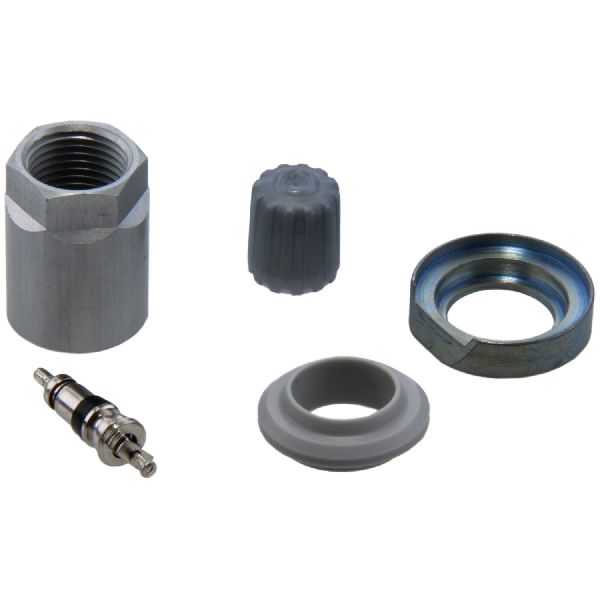
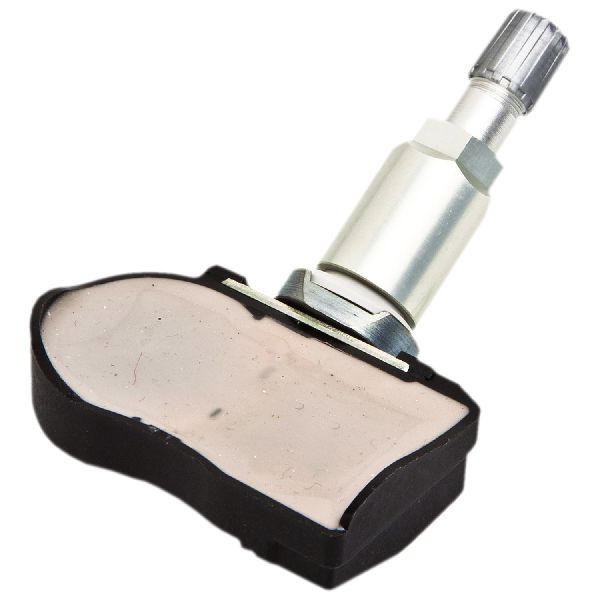
- Tire Pressure Monitoring System (TPMS) Sensor
(OEM #40700-1AA0B)— This is the component that fails, usually due to its internal battery expiring. The entire unit is sealed and must be replaced. Part numbers vary by year; 40700-CK001 or 40700-CK002 for '04-'07, and 40700-1AA0B for '08-'11 are common. Always verify the correct part number for your specific vehicle's VIN.
Trusted brands: Schrader (OEM supplier), Denso, HUF/BH Sens, Standard Motor Products (SMP), VXDAS
OEM price range: $70-$120
Aftermarket price range: $35-$75
Related Codes That Often Appear With This One
- C1708, C1709, or C1711 — These are the corresponding codes for the other three wheel sensors (Front-Left, Front-Right, Rear-Left). It is common for multiple sensors to fail around the same time due to similar battery age. Seeing two or more of these codes together strongly suggests the sensor batteries have reached the end of their life.
Technical Service Bulletins (TSBs) & Recalls

- NTB13-088a - LOW TIRE PRESSURE WARNING SYSTEM BULLETINS SUMMARY: Confirms C1708-C1711 are 'No Data' codes and lists RF interference from accessories like phone chargers as a primary diagnostic step.
- NTB14-073 - TPMS LIGHT FLASHING AND DTC C1710 AND/OR C1711 STORED: Specifically identifies C1710 as 'NO-DATA-RR' and points to a potential faulty batch of sensors on 2013-2014 models, requiring replacement.
Platform-Specific Known Issues

- Nissan TSB NTB13-088a and its revisions confirm that RF interference from accessories can cause a 'No Data' condition, leading to codes C1708, C1709, C1710, or C1711.
- A manual relearn procedure is possible by grounding a specific wire near the OBD-II port. This white, single-pin connector is often taped to the main harness. Grounding the pin six times with the key on puts the BCM into learning mode.
- TSB NTB14-073 specifically applies to 2013-2014 Titans and identifies an issue where sensors with part number 40700-1AA0D can cause intermittent C1710/C1711 codes, recommending replacement of all four sensors with an updated part (40700-3AN0C).
Mechanic-Grade Diagnostic Values
- Live data check with CONSULT-III scan tool — expected: Normal operation shows pressure readings for all four tires.. Failure: If all tire pressures are displayed as 0 kPa, the service manual points towards checking the TPMS receiver connector or the BCM, rather than individual sensors.
- Tire pressures for manual relearn procedure (paper-clip method) — expected: Set tires to specific, staggered pressures before initiating learn mode. One common sequence is: Front-Left: 36 PSI, Front-Right: 33 PSI, Rear-Right: 30 PSI, Rear-Left: 27 PSI.. Failure: Using incorrect or uniform pressures may prevent the BCM from identifying each wheel's position and completing the relearn process.
Scan Tool Commands That Help

- Nissan CONSULT-II / CONSULT-III: ID Registration — This function is required after replacing a TPMS sensor to write the new sensor's unique ID to the Body Control Module (BCM).
- Nissan CONSULT-II / CONSULT-III: DATA MONITOR — Used to view the live pressure data being received by the BCM from each individual tire sensor. This helps confirm if a signal is being received at all, and is a key step in diagnosing if the fault lies with the sensor or the receiver/BCM.
- Nissan CONSULT-III: Work support > WRITE CONFIGURATION — This function is used when replacing the BCM itself to ensure the vehicle's specific options, including the TPMS configuration, are correctly programmed into the new module.
Wiring & Ground Locations
- TPMS Receiver / Antenna — Located in the passenger-side front A-pillar.. This is the component that receives the radio signals from all four tire sensors. A fault with this receiver or its wiring/connector can prevent the signal from the RR wheel from reaching the BCM, causing a C1710 even if the sensor itself is good.
- Body Control Module (BCM) — Underneath the steering column, to the right. It is a black box with several large electrical connectors.. The BCM is the computer that interprets the signal from the TPMS receiver. It is the module that ultimately stores the C1710 trouble code. A fault here is rare but possible if all sensors and the receiver are confirmed to be working.
- TPMS Interface Plug (for manual relearn) — A white, single-wire female connector typically taped to the main OBD-II port wiring harness under the driver's side dash.. This connector is intentionally provided for diagnostics and manual relearn procedures. Grounding the pin in this connector 6 times with the ignition on puts the system into learning mode, which is essential for DIY sensor replacement without a proprietary scan tool.
Real Owner Repair Stories
- Maxima.org forum user (2007 Nissan Maxima (uses a similar TPMS architecture)) — Persistent C1710 code ('Data From Rear Right Transmitter Cannot Be Received') despite replacing the RR sensor multiple times.
❌ Tried (didn't work) Replacing the rear-right TPMS sensor multiple times.
✅ What actually fixed it The user performed a crucial diagnostic step: they rotated the wheels. The C1710 code remained for the Rear-Right *position*, even with a known-good sensor now in that location. This proved the fault was not the sensor, but the vehicle's ability to receive the signal from that specific corner, pointing to a likely failure in the TPMS receiver/antenna or its wiring to the BCM.
"I Checked Everything" — The Actual Cause
- A scenario analogous to a 'smoke test clean' failure is described in Nissan TSB NTB14-073 for 2013-2014 models. A vehicle may store a C1710 or C1711 code, but when the technician tests the corresponding sensor with a handheld activation tool (like the Signal Tech II), the sensor responds and tests as 'good'. The root cause was an intermittent internal fault in that specific batch of sensors (P/N 40700-1AA0D). The official fix was to replace all four sensors with an updated part number (40700-3AN0C), even though they appeared to be functional during bench testing.
OEM Part Supersession History
40700-CK001 / 40700-CK002→40700-1AA0B (and others)— Standard part evolution and updates.
Heads up: The primary incompatibility is frequency. Titans of this era used both 315 MHz and 433 MHz sensors. Using a sensor with the wrong frequency will cause a 'No Data' fault code, as it cannot communicate with the receiver. Always verify frequency before purchase.40700-1AA0D (on later models)→40700-3AN0C— The original part was found to cause intermittent 'No Data' faults (C1710/C1711) even when testing as good.
Heads up: This was a specific fix for an identified problem part; using the old part number could lead to the same intermittent code returning.
Model Year Variations Within This Range
- 2004-2011: The TPMS sensor frequency could be either 315 MHz or 433 MHz depending on the specific year and potentially the wheel type (steel vs. alloy). It is critical to verify the frequency of the existing sensors before ordering replacements.
- Approx. 2004-2007 vs 2008-2011: The OEM part numbers for the TPMS sensors changed. Early models often used 40700-CK001, while later models used parts like 40700-1AA0B. While they may be cross-compatible if the frequency matches, it's best to verify by VIN.
Helpful Videos
We Have This Part in Stock


The information in this article is provided for general reference and educational purposes only. Vehicle specifications, procedures, and part compatibility can vary by production date, trim level, and region. Always consult your vehicle's factory service manual and verify part numbers before purchasing or performing repairs. Safety-critical components such as airbags, seat belts, and braking systems should be installed by a qualified professional.
- Nissan TITAN:
- 🎬 Helpful Videos
- 🛍️ Shop This Part
- What's Unique About the 2004-2011 Nissan TITAN
- Diagnostic Flowchart
- Symptoms You May Notice
- Most Likely Causes
- Rare But Worth Checking
- Diagnosis Steps
- Parts You'll Likely Need
- Related Codes That Often Appear With This One
- Technical Service Bulletins (TSBs) & Recalls
- Platform-Specific Known Issues
- Mechanic-Grade Diagnostic Values
- Scan Tool Commands That Help
- Wiring & Ground Locations
- Real Owner Repair Stories
- "I Checked Everything" — The Actual Cause
- OEM Part Supersession History
- Model Year Variations Within This Range
- 🎟️ Get 5% Off