

C1710 Nissan Frontier Code Guide: Right Rear TPMS Fault (2005-2012)
On a 2005-2012 Nissan Frontier, code C1710 indicates the vehicle's computer is not receiving a signal from the right rear (RR) tire pressure sensor. The most common cause is a dead battery inside the sensor, requiring the sensor to be replaced and registered to the vehicle. Before replacing parts, rule out radio frequency (RF) interference from aftermarket electronics like phone chargers.
- C1710 on your Nissan Frontier means the right rear TPMS sensor is not communicating with the vehicle.
- The most likely cause on a 2005-2012 model is a dead battery in the original sensor due to age.
- Before buying parts, unplug all phone chargers and accessories from the power outlets to rule out radio frequency interference, a known Nissan issue.
- Replacing the sensor requires dismounting the tire. After replacement, a TPMS relearn procedure is mandatory, which may require a special tool or a specific manual process.
What's Unique About the 2005-2012 Nissan FRONTIER

Nissan Frontiers of this era, along with their D40 platform mates, are particularly susceptible to radio frequency (RF) interference that disrupts the 315MHz signal from the TPMS sensors to the vehicle's receiver. Nissan issued Technical Service Bulletin NTB13088A acknowledging that devices like aftermarket phone chargers, dash cams, or GPS units can cause a 'No Data' condition, leading to codes like C1710. This means the problem isn't always a faulty sensor, but could be external electronic noise.
Diagnostic Flowchart

Tap your situation to follow the diagnostic path that matches what you're seeing on this vehicle.
Symptoms You May Notice
- TPMS warning light flashing for approximately one minute after startup, then remaining solidly lit. This sequence specifically indicates a TPMS system fault, not just low pressure.
- Solid TPMS warning light on the instrument cluster.
- Inability to get a pressure reading for the right rear tire on a scan tool or advanced vehicle display.
- Replacing the BCM when the issue is a simple dead sensor battery.
- Ignoring the possibility of RF interference and immediately replacing the sensor, only to have the problem return when the interfering device is plugged back in.
- Replacing a single sensor when multiple are failing due to age, leading to repeated repairs for other wheels shortly after.
Most Likely Causes

- Dead TPMS Sensor Battery 🔴 High Probability TPMS sensors use sealed, non-replaceable batteries with a typical lifespan of 7-10 years. Vehicles in the 2005-2012 range are now at an age where battery failure is the most common reason for a sensor to stop transmitting. This is a widely reported failure mode in owner forums for trucks of this vintage.
How to confirm: Use a TPMS diagnostic tool to attempt to 'wake up' or read the sensor. If the tool cannot get a response from the right rear sensor, the sensor has failed, almost certainly due to a dead battery. A professional tool can often read the battery status directly from the sensor's transmission.
Typical fix: Replace the right rear TPMS sensor. The tire must be dismounted from the wheel to access and replace the sensor. Afterwards, a TPMS relearn procedure is required to register the new sensor's ID with the BCM.
Est. part cost: $30-$80 - Radio Frequency (RF) Interference 🟡 Medium Probability As noted in Nissan TSB NTB13088A, the TPMS receiver is sensitive to RF noise. Forum discussions frequently point to cheap, unshielded USB phone chargers, dash cameras, and power inverters plugged into the 12V outlets as the source of interference that specifically triggers C1708-C1711 codes.
How to confirm: If the TPMS light is on, unplug all aftermarket electronic devices from the power ports. Turn the vehicle off. Start the vehicle and drive for several minutes above 15-20 MPH to see if the light extinguishes and the code clears.
Typical fix: Remove the interfering device. If the device is necessary, replace it with a higher-quality, better-shielded version. Some users on MyNissanLeaf forums noted that adding a ferrite core to the power cable of a dash cam resolved the issue.
Est. part cost: $0-$50 - Damaged TPMS Sensor ⚪ Low Probability Sensors can be physically damaged during tire mounting/dismounting, especially by technicians unfamiliar with TPMS-equipped wheels. Using corrosive aftermarket tire sealants can also damage the sensor's electronics or clog its pressure port.
How to confirm: Visual inspection of the sensor after dismounting the tire. If a tire service was recently performed just before the light came on, damage during service is a high possibility.
Typical fix: Replace the damaged TPMS sensor and perform the relearn procedure.
Est. part cost: $30-$80
Rare But Worth Checking
- Faulty Body Control Module (BCM) or TPMS Receiver: This is very rare. The BCM is the control unit for the TPMS, and while failure is possible, it is far more likely that the sensor has failed or there is an interference issue. Before suspecting the BCM, all other possibilities should be thoroughly ruled out. Diagnosis involves checking the wiring and connectors to the receiver and potentially testing the BCM with an advanced scan tool like Nissan's CONSULT.
Diagnosis Steps
- Verify that the tire pressure in all four tires is set to the specification on the driver's door jamb sticker. A flashing light indicates a system fault, but it's always best to start with the basics.
- Check for and remove any aftermarket devices plugged into the power outlets (phone chargers, inverters, dash cams, etc.). Clear the codes if possible, then drive the vehicle for 5-10 minutes at speeds over 25 MPH to see if the code returns.
- Use a TPMS diagnostic tool to attempt to read the data (ID, pressure, temperature, battery status) from the right rear sensor. A good tool can often tell you if the sensor's internal battery is low.
- If the tool gets no response or indicates a dead battery, the sensor has failed and must be replaced.
- If the tool can read the sensor, but the C1710 code persists, the issue may be with the vehicle's receiver or a failed relearn process. The signal is being sent but not received by the BCM.
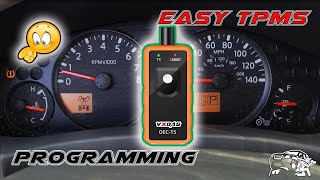
- Attempt a TPMS ID registration (relearn) procedure. For the D40 Frontier, this is not a simple button press. It typically involves either using an advanced scan tool/TPMS tool to write the IDs via the OBD-II port, 🎬 Watch: An easy and cheap way to program your sensors. or a manual procedure that involves grounding a specific pin on a connector 🎬 Watch: Two ways to manually trigger the TPMS relearn mode. under the dash to put the BCM in 'learn mode'.
- If a new sensor is installed and cannot be registered, inspect the wiring and connectors for the TPMS receiver/BCM. If all else fails, diagnosis of the BCM itself may be necessary.
Parts You'll Likely Need
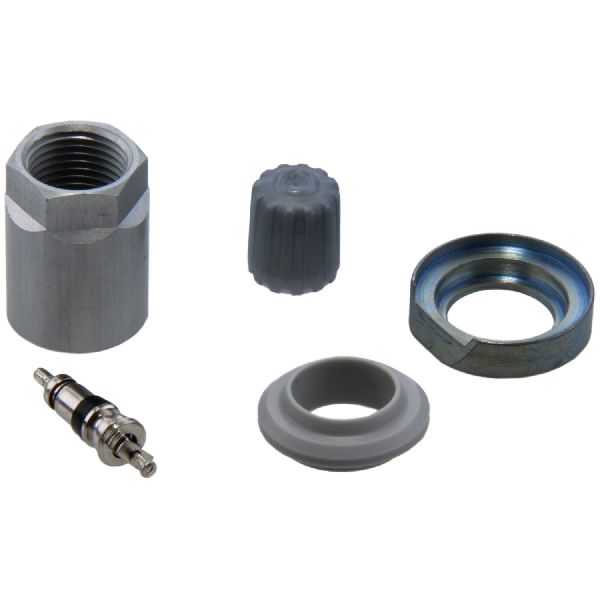
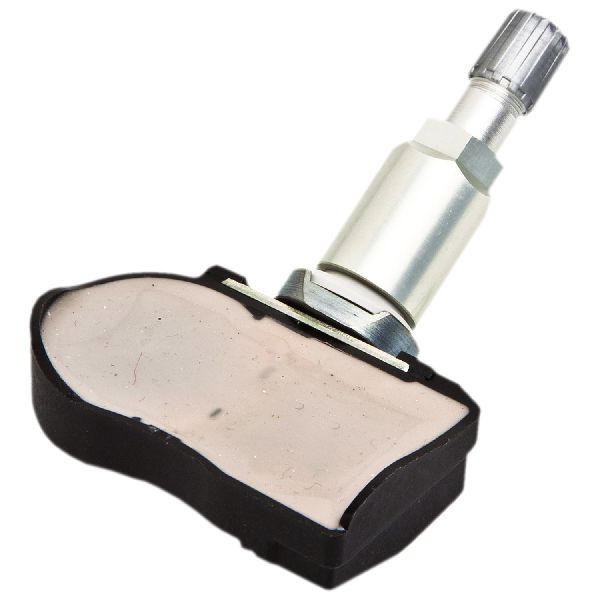
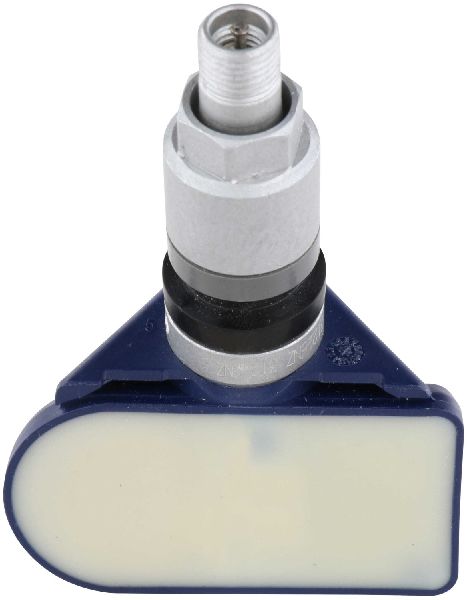
- Tire Pressure Monitoring System (TPMS) Sensor
(OEM #40700-JA01C)— This is the component that fails most often, usually due to its internal battery reaching the end of its 7-10 year service life. The code C1710 directly points to a communication loss with this specific part.
Trusted brands: Hitachi, Schrader, Denso, Continental/VDO, Huf
OEM price range: $70-$100
Aftermarket price range: $30-$60
Related Codes That Often Appear With This One
- C1708 — This code indicates a 'No Data' condition from the Front-Left sensor. Seeing multiple codes (C1708, C1709, C1710, C1711) together strongly points towards a systemic issue like widespread RF interference or multiple sensors failing around the same time due to age.
- C1711 — This code indicates a 'No Data' condition from the Rear-Left sensor. If seen with C1710, it could mean both rear sensors have failed or are being affected by interference. TSB NTB14-094 specifically addresses an issue on similar models where RF from the audio unit causes both C1710 and C1711 to appear.
Technical Service Bulletins (TSBs) & Recalls

- NTB13088A - This bulletin provides general information on the Low Tire Pressure Warning System (LTPWS), including a specific mention of RF interference from devices like cell phone chargers causing 'No Data' conditions for codes C1708-C1711.
- NTB14-094 - While for 2014 models, this TSB is notable as it identifies an issue where certain factory audio units cause RF interference leading to C1710/C1711, with the prescribed fix being to replace all four sensors with an updated part.
Platform-Specific Known Issues
- Nissan TSB NTB13088A specifically warns that radio frequency interference can cause a 'No Data' condition for TPMS sensors, resulting in codes C1708, C1709, C1710, or C1711.
- TSB NTB14-094, while for 2014 models, is highly relevant. It identifies an issue where certain factory audio units with color monitors (non-Navi) cause RF interference leading to C1710/C1711. The prescribed fix is to replace all four sensors with an updated part (40700-3AN0C), indicating Nissan has had to improve sensor shielding to combat interference.
Mechanic-Grade Diagnostic Values
- Body Ground Voltage Drop — expected: 0.10 to 0.20 Volts (Good), < 0.50 Volts (Acceptable). Failure: A reading greater than 0.50V, and especially over 1.00V, indicates a poor body ground which can cause various electrical issues, potentially affecting the BCM/TPMS receiver.
- Manual Relearn Tire Pressures — expected: Front-Left: 34-36 PSI, Front-Right: 31-33 PSI, Rear-Right: 29-30 PSI, Rear-Left: 26-27 PSI. A 2-3 PSI separation between tires is required.. Failure: Not setting these specific, staggered pressures will cause the manual relearn procedure to fail.
Scan Tool Commands That Help
- Nissan CONSULT-III / CONSULT-III plus: Work Support > ID Registration — This is the dealer-level command used to write new TPMS sensor IDs to the Body Control Module (BCM) after a sensor has been replaced. It is the primary function for resolving a C1710 code when a new sensor is installed.
- Nissan CONSULT-III / CONSULT-III plus: Data Monitor — Allows a technician to view live data from the TPMS, including the reported pressure, temperature, and battery status for each sensor that is successfully communicating. For a C1710, the data for the RR sensor would be missing or show as 'N/A'.
- Nissan CONSULT-III / CONSULT-III plus: Active Test — While less common for TPMS, this function allows for testing specific outputs. For TPMS, its main use would be to confirm the BCM is active and attempting to communicate, though it cannot force a sensor to transmit.
- Aftermarket TPMS Tool (e.g., Autel, Bartec): OBD Relearn / ID Registration — Most professional aftermarket TPMS tools can perform the same ID registration function as the factory CONSULT tool by connecting to the OBD-II port and writing the new sensor IDs to the BCM.
Wiring & Ground Locations

- Body Control Module (BCM) — Located at the left front of the center console, behind the dash.. The BCM acts as the receiver and control unit for the TPMS system. All signals from the tire sensors are sent to the BCM. A poor connection or faulty ground at the BCM can prevent it from receiving sensor data, potentially causing a C1710 code.
- Tire Pressure Warning Check Connector — A single-wire white plug located under the driver's side dash, near the OBD-II connector.. This connector is intentionally placed for the manual TPMS relearn procedure. Grounding this connector's wire to the chassis (e.g., the metal OBD-II port bracket) 6 times within 10 seconds of turning the key to 'ON' puts the BCM into learning mode, which is necessary to register new sensors without a scan tool.
- Ground Point M57 — Located behind the left side of the dash.. This is a primary ground distribution point for many interior components, including the BCM. A loose or corroded M57 ground could cause intermittent issues with the BCM and its ability to receive TPMS signals.
- Main Body Ground — On the passenger-side inner fender panel, where a strap from the negative battery cable bolts to the body.. A poor main body ground can cause widespread, erratic electrical problems. While not a direct cause of C1710, a high-resistance ground here can affect the BCM's stability and should be checked if multiple, unrelated electrical faults are present.
Real Owner Repair Stories
- Project:Keira (Blog Post) (Nissan Frontier (D40 generation)) — TPMS light on after a tire shop broke the original front-left sensor during a tire rotation.
❌ Tried (didn't work) Installing a cheap replacement TPMS sensor purchased from eBay., Attempting to program the faulty eBay sensor with a dealership's professional TPMS tool (the tool could not get a reading from the new sensor).
✅ What actually fixed it The owner purchased a new OEM Nissan TPMS sensor from a dealership. After installation, they successfully programmed it themselves using the manual relearn procedure: setting staggered tire pressures, grounding the TPMS reset connector under the dash to enter learn mode, and driving the vehicle until the light went out.
OEM Part Supersession History
40700-JA01C→40700-JK01C— Standard part evolution for improved reliability and manufacturing consistency. The -JK01C is a widely used replacement for many earlier Nissan sensors.
Heads up: Part number 40700-JK01C is a direct, backward-compatible replacement for 40700-JA01C and many others, including 40700-JA01A, 40700-JA01B, 40700-JA02B, and 40700-JK00A through 40700-JK00E.
Helpful Videos
We Have This Part in Stock


The information in this article is provided for general reference and educational purposes only. Vehicle specifications, procedures, and part compatibility can vary by production date, trim level, and region. Always consult your vehicle's factory service manual and verify part numbers before purchasing or performing repairs. Safety-critical components such as airbags, seat belts, and braking systems should be installed by a qualified professional.
- Nissan FRONTIER:
- 🎬 Helpful Videos
- 🛍️ Shop This Part
- What's Unique About the 2005-2012 Nissan FRONTIER
- Diagnostic Flowchart
- Symptoms You May Notice
- Most Likely Causes
- Rare But Worth Checking
- Diagnosis Steps
- Parts You'll Likely Need
- Related Codes That Often Appear With This One
- Technical Service Bulletins (TSBs) & Recalls
- Platform-Specific Known Issues
- Mechanic-Grade Diagnostic Values
- Scan Tool Commands That Help
- Wiring & Ground Locations
- Real Owner Repair Stories
- OEM Part Supersession History
- 🎟️ Get 5% Off