

C1709 on 2013-2016 Nissan Frontier: Front-Right TPMS Fault Causes and Fixes
Code C1709 on a 2013-2016 Nissan Frontier means the front-right tire pressure sensor is not sending a signal. The most likely cause is a dead sensor battery. The fix is to replace the sensor and register it to the vehicle, which typically costs $130-$270 at a shop. Before replacing parts, unplug all aftermarket 12V accessories to rule out radio frequency (RF) interference, a known issue for this truck.
- C1709 means the front-right TPMS sensor isn't communicating, most likely due to a dead battery.
- The TPMS light will flash for a minute then stay solid, which indicates a system fault, not low tire pressure.
- Before buying any parts, unplug ALL aftermarket phone chargers, dash cams, or other 12V accessories to rule out Radio Frequency (RF) interference.
- Replacing the sensor requires tire dismounting and registering the new sensor's ID to the truck's computer using a special tool or a specific DIY procedure.
What's Unique About the 2013-2016 Nissan FRONTIER
The 2013-2016 Frontier is part of the long-running D40 generation, which uses a straightforward direct TPMS system. What's notable for this platform and other Nissans of this era is a documented susceptibility to radio frequency (RF) interference. Nissan issued a specific Technical Service Bulletin (NTB13088A) warning that something as simple as a cheap aftermarket phone charger or dash cam can block the 315 MHz TPMS sensor signals, triggering codes like C1709. This makes ruling out RF interference a crucial first step before replacing any parts.
Diagnostic Flowchart
Tap your situation to follow the diagnostic path that matches what you're seeing on this vehicle.
Symptoms You May Notice
- TPMS warning light flashes for approximately one minute at startup, then stays on solid.
- Inability to see the front-right tire pressure reading on the information display (if equipped).
- A "Check Tire Pressure" message may appear on the instrument cluster display.
- Replacing the TPMS sensor without first checking for RF interference from aftermarket accessories.
- Assuming the TPMS light is on only because of low tire pressure, without reading the specific C1709 fault code. A flashing light indicates a system fault.
- Replacing the sensor but failing to perform the required ID registration (relearn) procedure, causing the light to remain on.
Most Likely Causes
- Dead or Failing TPMS Sensor Battery 🔴 High Probability TPMS sensors use sealed, non-replaceable batteries with a lifespan of 5-10 years. Vehicles from the 2013-2016 model years are now at an age where battery failure is the most common reason for this code.
How to confirm: Use a TPMS activation tool to try and read the sensor at the front-right wheel. If the tool cannot get a response (fails to trigger), the sensor battery is almost certainly dead and the sensor needs replacement.
Typical fix: Replace the front-right TPMS sensor and register the new sensor ID to the BCM.
Est. part cost: $30-$100 - Radio Frequency (RF) Interference 🟡 Medium Probability Nissan issued TSB NTB13088A specifically about this issue. Aftermarket devices like phone chargers (especially wireless or multi-port), dash cams, and power inverters plugged into the 12V outlets can transmit signals that interfere with the 315 MHz TPMS frequency.
How to confirm: Unplug ALL aftermarket accessories from the 12V power outlets. Clear the codes (if possible) and drive the vehicle to see if the C1709 code returns. If it does not, one of the accessories was the cause. Forum users have specifically noted that wireless phone chargers are a common culprit.
Typical fix: Remove or replace the interfering electronic device. Sometimes, using a high-quality power cord with a ferrite core can solve the issue.
Est. part cost: $0-$50 - Failed or Damaged TPMS Sensor ⚪ Low Probability Sensors can be physically damaged during tire mounting or demounting if the technician is not careful. They can also fail due to internal electronic faults or corrosion of the valve stem, though this is less common than battery death.
How to confirm: A visual inspection during a tire change might reveal a broken stem or cracked sensor housing. If the sensor responds to a TPMS tool but provides erratic data or if the code persists after ruling out other causes, the sensor itself has likely failed.
Typical fix: Replace the damaged or faulty TPMS sensor and register the new one.
Est. part cost: $30-$100
Rare But Worth Checking
- Faulty Body Control Module (BCM): The BCM is the receiver for the TPMS signals. While rare, if a new, correctly registered sensor still won't communicate with the vehicle and RF interference is ruled out, the BCM itself could be the problem. This requires advanced diagnostics and should be considered a last resort.
Diagnosis Steps
- Verify the symptom: Confirm the TPMS warning light flashes for about a minute on startup before staying solid.
- Scan for codes: Use an OBD-II scanner that can read Chassis (C) codes to confirm C1709 is the active code.
- Check for RF Interference: Unplug all aftermarket accessories (phone chargers, dash cams, GPS units, etc.) from the 12V power outlets. Clear the code and drive to see if it returns. This is the most important and cheapest first step.
- Activate the Sensor: Use a dedicated TPMS tool at the front-right wheel to attempt to read the sensor's ID, pressure, and battery status.
- Interpret TPMS Tool Results: If the tool gets no response ('Trigger Failed'), the sensor is bad and needs replacement. If it does get a response, the issue may be with the BCM or sensor registration.
- Replace and Register: If the sensor is confirmed bad, replace it. This involves breaking the tire bead. Afterwards, use a TPMS tool with an OBD-II module to perform the OBD relearn procedure, writing the new sensor's ID to the BCM.
- DIY Relearn (Alternative): For those without a scan tool, a manual relearn can be attempted. This involves setting tires to specific differing pressures, finding the single-wire TPMS connector near the OBD-II port, and grounding it six times within 10 seconds of turning the ignition ON to make the TPMS light flash, indicating it's in learn mode. Then, a short drive is required for the BCM to find the sensors.
Parts You'll Likely Need
- Tire Pressure Monitoring System (TPMS) Sensor
(OEM #40700-3AN0B (replaces 40700-3AN0A))— This is the most common failure. The internal, non-serviceable battery dies, causing the loss of signal that triggers code C1709.
Trusted brands: Schrader (OEM Supplier), Continental/VDO, Denso, Dorman
OEM price range: $70-$105
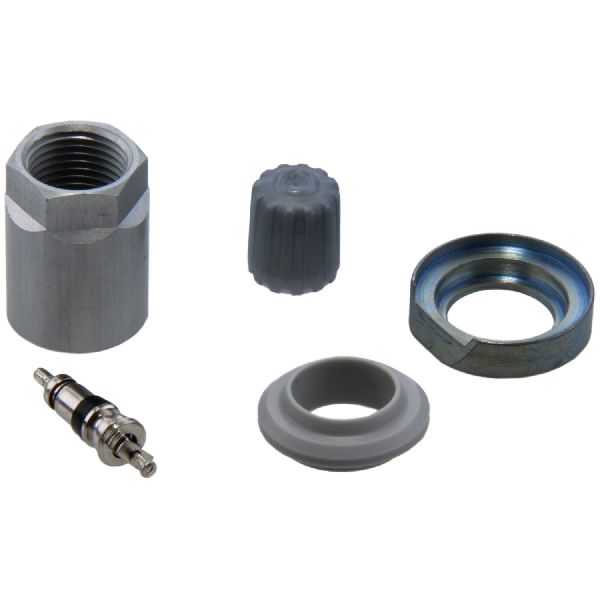
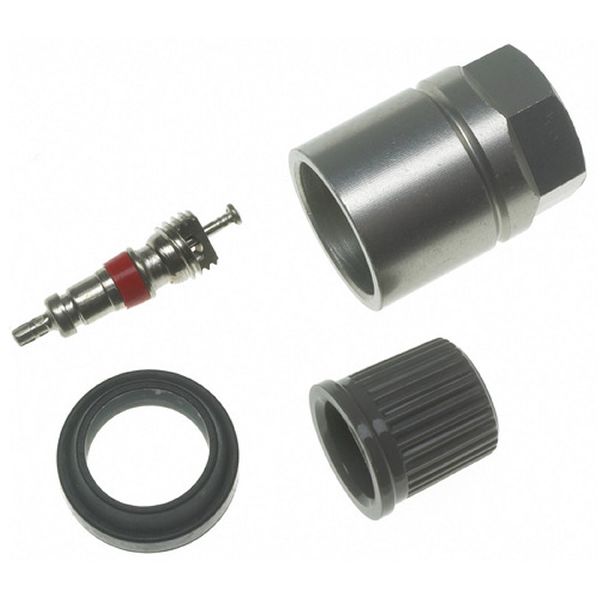
Aftermarket price range: $30-$60 - TPMS Sensor Service Kit — This is not the sensor itself, but a kit containing the valve stem, nut, seal, and core. It should be replaced whenever a tire is dismounted to prevent leaks from the valve stem seal, a common issue. It will not fix a C1709 code but is preventative maintenance.
Trusted brands: Schrader, Dorman
OEM price range: $5-$15
Aftermarket price range: $3-$10
Related Codes That Often Appear With This One
- C1708 — This is the code for the Front-Left TPMS sensor. Seeing both codes together strongly suggests a systemic issue like widespread RF interference or that multiple sensor batteries are failing at the same time due to age.
- C1710 — This is the code for the Rear-Right TPMS sensor. Multiple 'No Data' codes appearing together point towards either multiple aged-out sensors or a signal-blocking problem.
- C1711 — This is the code for the Rear-Left TPMS sensor. As with the others, its presence alongside C1709 suggests more than one sensor has failed or there is a common interference issue.
Technical Service Bulletins (TSBs) & Recalls
- NTB13088A: Details information regarding the Low Tire Pressure Warning System, including diagnosis for 'No Data' conditions (C1708-C1711) caused by radio frequency interference from devices like cell phone chargers.
Platform-Specific Known Issues
- Nissan TSB NTB13088A specifically warns that radio frequency interference from aftermarket electronics can cause a 'No Data' condition, leading to codes C1708, C1709, C1710, or C1711. The bulletin explicitly mentions 'Smart cell phone chargers' as a potential cause.
Mechanic-Grade Diagnostic Values
- TPMS Sensor Operating Frequency — expected: 315 MHz. Failure: N/A - This is a fixed value for the system.
- TPMS Sensor Battery Voltage — expected: Approx. 3 Volts (new). Failure: A TPMS tool may show 'Low' or 'N/A' battery status, or fail to trigger the sensor entirely. A weakened battery can cause sporadic operation.
- Main Body Ground Voltage Drop — expected: 0.10 to 0.20 Volts. Failure: A reading greater than 0.50 Volts, and especially over 1.0 Volt, indicates a poor ground connection that needs to be cleaned and tightened. Perform test with engine running and multiple accessories on.
Scan Tool Commands That Help
- Nissan CONSULT or advanced aftermarket scan tool: ID Registration / OBD Relearn — This function is required after replacing a TPMS sensor to write the new sensor's unique ID into the Body Control Module (BCM). Failure to do this will result in the TPMS light remaining on.
- Nissan CONSULT: BCM Configuration / After Replace ECU — This is a mandatory procedure when installing a brand new BCM to configure it for the specific vehicle's options. It is not used for TPMS sensor replacement.
Wiring & Ground Locations
- TPMS Diagnostic Connector — A small, single-wire white plug located under the driver's side dash, usually taped to the wiring harness very close to the OBD-II port.. This connector is used for the DIY manual relearn procedure. Grounding the pin in this connector 6 times in 10 seconds (with ignition ON) puts the BCM into 'learn mode', allowing it to register new or existing sensor IDs without a scan tool.
- Body Control Module (BCM) — Located behind the glove box or in the left front of the center console area.. The BCM is the receiver for all TPMS sensor signals. In the rare event of a BCM failure, this is its location for testing or replacement. It's also the target for programming new sensor IDs.
- Main Body Ground — On the passenger-side inner fender panel, where the negative battery cable is strapped to the body.. A corroded or loose main body ground can cause a wide range of bizarre electrical issues, including TPMS faults that mimic sensor or module failure. Verifying this ground is secure and has low voltage drop is a key diagnostic step for hard-to-solve electrical problems.
Real Owner Repair Stories
- Project:Keira blog post (Nissan Frontier (D40 generation)) — TPMS light on after a sensor was broken during tire service.
❌ Tried (didn't work) Installing a cheap replacement TPMS sensor from eBay., Attempting to program the eBay sensor, which failed even at a Nissan dealership with their CONSULT tool.
✅ What actually fixed it Purchased a new, genuine OEM Nissan TPMS sensor. After installation, the owner successfully performed the manual 'paper clip' relearn procedure themselves by grounding the TPMS diagnostic connector to put the system in learn mode and driving the vehicle.
Helpful Videos

We Have This Part in Stock


The information in this article is provided for general reference and educational purposes only. Vehicle specifications, procedures, and part compatibility can vary by production date, trim level, and region. Always consult your vehicle's factory service manual and verify part numbers before purchasing or performing repairs. Safety-critical components such as airbags, seat belts, and braking systems should be installed by a qualified professional.
- Nissan FRONTIER:
- 🎬 Helpful Videos
- 🛍️ Shop This Part
- What's Unique About the 2013-2016 Nissan FRONTIER
- Diagnostic Flowchart
- Symptoms You May Notice
- Most Likely Causes
- Rare But Worth Checking
- Diagnosis Steps
- Parts You'll Likely Need
- Related Codes That Often Appear With This One
- Technical Service Bulletins (TSBs) & Recalls
- Platform-Specific Known Issues
- Mechanic-Grade Diagnostic Values
- Scan Tool Commands That Help
- Wiring & Ground Locations
- Real Owner Repair Stories
- 🎟️ Get 5% Off