

B3926 on 2019-2020 Buick Envision: Causes for 'No Start' & 'No Fob Detected'
On a 2019-2020 Envision, code B3926 almost always means the Body Control Module (BCM) has a software glitch, usually after a battery change or jump-start, causing a no-start condition. The fix is not parts replacement, but a specific BCM reprogramming procedure at a GM dealer or qualified shop, as outlined in TSB #23-NA-163. This is a well-known issue on many GM platforms of this era.
- If your Envision won't start and shows 'No Fob Detected' after a battery issue, B3926 is the likely cause.
- This is a known software glitch in the Body Control Module (BCM); it is not a failed part.
- Do NOT waste money replacing the battery, starter, or key fobs. This will not fix the problem.
- The vehicle must be serviced by a GM dealer or qualified shop with the correct programming tools (GDS2/SPS).
- Reference TSB #23-NA-163 with your service advisor to ensure the correct, most cost-effective repair is performed.
What's Unique About the 2019-2020 Buick ENVISION
This issue is a well-documented software problem on this GM platform, not a typical hardware failure. GM has issued multiple Technical Service Bulletins (TSBs) acknowledging that low voltage events (like a battery change or jump-start) can corrupt the memory of the specific 'GEN3R' BCM used in these vehicles. This leads to a no-start condition that cannot be fixed by replacing parts like the battery, starter, or even the BCM itself. The only solution is a specific dealer-level software reprogramming to restore the corrupted data.
Diagnostic Flowchart
Tap your situation to follow the diagnostic path that matches what you're seeing on this vehicle.
Symptoms You May Notice
- No Crank, No Start condition.
- Engine starts and immediately stalls.
- "No FOB Detected" or "Key Not Detected" message on the driver information center.
- Key fobs are completely inoperative (cannot lock/unlock doors).
- Security/anti-theft light may be illuminated.
- Horn chirps three times when exiting the vehicle, indicating it thinks a key has been left inside.
- Replacing the vehicle battery
- Replacing the key fob or its battery (CR2032)
- Replacing the starter motor
- Replacing the Body Control Module (BCM) without first attempting the TSB reprogramming procedure.
Most Likely Causes
- Body Control Module (BCM) Memory Corruption 🔴 High Probability As documented in GM TSB #23-NA-163, the 'GEN3R' BCM used in these vehicles is sensitive to voltage fluctuations. A low voltage event from a weak battery, jump-start, or battery replacement can cause a memory corruption event in the BCM. This is the primary and most common cause for this specific cluster of codes and symptoms.
How to confirm: A professional technician must use a GM-specific scan tool (GDS2) to verify the presence of B3926 along with a group of other codes like B389A, B3924, B3925, and P0513. The TSB states that DTC B389A and three or more of the B392x codes must be current. The diagnosis is confirmed if the fault appeared immediately after a low-voltage event.
Typical fix: The fix does not involve replacing parts. A technician must follow the specific reprogramming and immobilizer learn procedures outlined in TSB #23-NA-163 using GM's Service Programming System (SPS). The TSB details two procedures, "Programming A" for the initial attempt, and "Programming B" if an immobilizer learn was already tried unsuccessfully.
Est. part cost: $0
Rare But Worth Checking
- Wiring Harness Chafing: While BCM corruption is most common, other GM bulletins for similar platforms mention that engine wire harness chafing can cause a wide range of electrical issues, including no-start conditions. This should be investigated as a secondary step if the BCM reprogram does not resolve the issue.
- Faulty Body Control Module (BCM): In very rare cases where the reprogramming fails to correct the issue, the BCM itself may have a hardware failure and require replacement. However, TSBs strongly advise against replacing the BCM as a first step, as the issue is almost always software-related.
Diagnosis Steps
- Confirm the symptoms: Vehicle does not start and displays a 'No Fob Detected' message or has inoperative key fobs.
- Note if the issue occurred immediately after a battery replacement, jump-start, or period of a dead battery. This is the primary trigger.
- Use a professional scan tool (GM GDS2 is required) to scan all modules for DTCs.
- Look for a combination of codes: B389A must be present, along with three or more codes from the B3924-B3928 range. P0513 may also be present.
- If codes are present, DO NOT replace parts. The vehicle must be taken to a facility with GM programming capabilities.
- Inform the service provider of TSB #23-NA-163, which details the BCM reprogramming procedure.
- The technician will use the GDS2 tool to confirm the vehicle has an affected 'GEN3R' BCM by checking the Base Model Part Number (BMPN) against a list in the TSB.
- The technician will then follow the specific programming ('Programming A' or 'Programming B') and immobilizer learn steps in the TSB to restore BCM function.
Parts You'll Likely Need
- BCM Reprogramming Service
Related Codes That Often Appear With This One
- B389A — This code for 'Environment Identification' is the primary code that triggers the others when the BCM memory is corrupted. TSB #23-NA-163 notes this code will be current, and if it's not, to disconnect the battery for 30 seconds to see if it appears.
- P0513 — This code means 'Invalid Immobilizer Key' and is set by the Engine Control Module (ECM) because the BCM has told it the security check failed. It's a direct consequence of the BCM fault.
- B3924, B3925, B3927, B3928 — These are other 'Incorrect Environmental Identifier' codes from different modules (like the EBCM or HVAC module). The TSBs state that B3926 will appear with a group of these codes during this specific fault.
Technical Service Bulletins (TSBs) & Recalls
- 23-NA-163: Corrects a concern of No Crank, No Start, Quick Start/Stall, No FOB Detected, Key FOBs Inoperative with various B392x codes set, by reprogramming the BCM. This is the most current and definitive bulletin for this issue.
- 21-NA-277: An earlier bulletin that also addresses the no-start concern with B3926 and related codes, pointing to a dealer-level software fix. It applies to 'Gen III' BCMs and may require contacting the GM Technical Assistance Center (TAC).
- 23-NA-165: A related bulletin addressing a loss of both active (lock/unlock) and passive (start) key fob functions with DTC P0513 set, also on vehicles with GEN3R BCMs.
Platform-Specific Known Issues
- GM has issued Technical Service Bulletin #23-NA-163 to address this specific problem. It notes that a low voltage condition can cause a memory corruption event in the BCM, leading to a no-start condition with DTCs B3924, B3925, B3926, B3927, or B3928 set. The fix is a specific software reprogramming, not parts replacement.
- The issue is specific to vehicles equipped with a 'GEN3R' BCM. The TSB provides a list of over 20 affected BCM part numbers (BMPNs) that a technician must verify using a GDS2 scan tool before proceeding.
Mechanic-Grade Diagnostic Values
- 12V Battery Voltage (engine off) — expected: Greater than 12.4 Volts. Failure: A reading below 12.4V indicates a weak battery that needs charging or replacement. While this is the trigger for the BCM fault, the fault will remain even after charging until the BCM is reprogrammed.
Hidden / Shadow Codes Worth Checking
- B389A 00: Environment Identification. This is the primary code indicating a BCM memory corruption event due to low voltage. TSB #23-NA-163 states this code will be current, along with three or more B392x codes, to confirm the condition. (see via A professional GM-specific scan tool (GDS2). The TSB advises that if this code is not present, to disconnect and reconnect the battery for 30 seconds and check again.)
Scan Tool Commands That Help
- GM GDS2 / SPS (Service Programming System): Navigate to: GDS2 > Module Diagnostics > [K9] Body Control Module > Identification Information — This path is used to view the 'BMPN part number' to verify the vehicle has an affected 'GEN3R' BCM, which is a required step before attempting the reprogramming procedure per TSB #23-NA-163.
- GM SPS (Service Programming System): K9 Body Control Module “Programming A Per Bulletin 23-NA-163 and 23-NA-165 Only.” — This is the primary reprogramming function to restore the corrupted BCM data. It is the first step in the software repair process.
- GM SPS (Service Programming System): Immobilizer procedure “Body Control Module IMMO Learn with Existing Transponder or Remote Key.” — This procedure is performed immediately after “Programming A” to re-synchronize the existing key fobs with the newly programmed BCM.
- GM SPS (Service Programming System): K9 Body Control Module “Programming B Per Bulletin 23-NA-163 Only” — This is an alternative programming function to be used ONLY if an immobilizer learn was already attempted before starting the TSB procedure and the issue was not corrected.
Wiring & Ground Locations
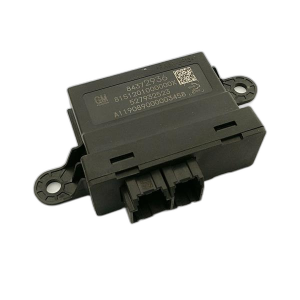
- K9 Body Control Module (BCM) — Located in the center console, directly behind the lower trim panel on the passenger side of the vehicle.. This is the module that has its memory corrupted and requires reprogramming. Physical access is only needed if the module is completely unresponsive and requires power/ground checks at its connectors.
- G103 (Likely BCM Ground) — On similar GM platforms, G103 is located at the left rear of the engine compartment on the cowl, above the brake booster.. This is a primary ground point for the BCM, Instrument Panel Cluster (IPC), and Data Link Connector (DLC). A loose or corroded ground at this location could cause low voltage conditions at the BCM, potentially triggering the memory corruption event.
- BCM Power and Ground Pins — At the multi-pin connectors of the K9 BCM.. If the BCM is unresponsive to a scan tool, a technician would check for Battery Positive Voltage and Ground at the BCM connectors to rule out a wiring issue before condemning the module. Pinouts for the K9 BCM show multiple power inputs (e.g., Connector X1, Pin 1 RD/GY) and grounds (e.g., Connector X1, Pin 2 BK).
"I Checked Everything" — The Actual Cause
- This fault code is the quintessential example of a pattern where all standard diagnostic tests would pass, yet the vehicle remains inoperative. A technician could test the battery (it might be new), the starter, the key fob signal, and even the wiring to the BCM and find no issues. The actual cause is not a physically testable hardware failure but a transient software corruption within the BCM's memory, triggered by a past low-voltage event. As TSB #23-NA-163 outlines, the only fix is to ignore the healthy hardware and perform a specific software reprogramming, a solution that cannot be found with a multimeter or smoke machine.
OEM Part Supersession History
Multiple (GEN3R BCMs)→Software Calibration Update (Not a hardware change)— To fix a software vulnerability that allows memory corruption during low-voltage events.
Heads up: Per TSB #23-NA-163, the reprogramming fix is ONLY applicable to specific GEN3R BCMs with the following Base Model Part Numbers (BMPNs): 13518569, 13518570, 13518602, 13518603, 13519619, 13519620, 13519648, 13527252, 13527260, 13527261, 13527297, 13527298, 13527827, 13529492, 13529493, 13533809, 13533813, 13533814, 13533817, 13533821. If the BCM is not one of these part numbers, the TSB does not apply.
Model Year Variations Within This Range
- 2018+: The key variation is the type of Body Control Module installed. TSB #23-NA-163 is specifically for vehicles with a 'GEN3R' BCM. An earlier TSB, #21-NA-277, addressed similar symptoms on vehicles with the older 'Gen III' BCM. A technician must first identify the BCM type using the GDS2 scan tool to ensure they follow the correct diagnostic path.
Helpful Videos

We Have This Part in Stock




The information in this article is provided for general reference and educational purposes only. Vehicle specifications, procedures, and part compatibility can vary by production date, trim level, and region. Always consult your vehicle's factory service manual and verify part numbers before purchasing or performing repairs. Safety-critical components such as airbags, seat belts, and braking systems should be installed by a qualified professional.
- Buick ENVISION:
- 🎬 Helpful Videos
- 🛍️ Shop This Part
- What's Unique About the 2019-2020 Buick ENVISION
- Diagnostic Flowchart
- Symptoms You May Notice
- Most Likely Causes
- Rare But Worth Checking
- Diagnosis Steps
- Parts You'll Likely Need
- Related Codes That Often Appear With This One
- Technical Service Bulletins (TSBs) & Recalls
- Platform-Specific Known Issues
- Mechanic-Grade Diagnostic Values
- Hidden / Shadow Codes Worth Checking
- Scan Tool Commands That Help
- Wiring & Ground Locations
- "I Checked Everything" — The Actual Cause
- OEM Part Supersession History
- Model Year Variations Within This Range
- 🎟️ Get 5% Off