

B3924 on 2018-2024 GMC Terrain: 'No FOB Detected' Causes and Fixes
This code means the vehicle can't communicate with a keyless entry antenna, often causing a 'No FOB Detected' message and preventing the car from starting. The most common cause is a software glitch in the Body Control Module (BCM) after a battery replacement or jump-start, which may require a dealer to reprogram. If not a glitch, the antenna itself has failed.
- B3924 on your GMC Terrain means a keyless entry antenna isn't working, which can prevent the car from starting.
- Before replacing any parts, consider if the problem started after a battery change or jump-start. If so, the issue is likely a known BCM software glitch that a dealer must fix per TSB 23-NA-163.
- You can try starting the vehicle by placing the key fob in the special transmitter pocket inside the center console.
- Do not immediately replace the key fob battery; it is unlikely to be the cause of this specific code.
- The issue is also common on the 2018-2024 Chevrolet Equinox.
What's Unique About the 2018-2024 Gmc TERRAIN
For this generation of GMC Terrain and its platform-mate, the Chevrolet Equinox, this code is frequently not due to a failed part. GM has issued a detailed Technical Service Bulletin (TSB 23-NA-163) acknowledging that a simple low-voltage event, like a battery change or jump-start, can cause a 'memory corruption event' in the Body Control Module (BCM). This software glitch triggers code B3924 and others in its family (B3925-B3928), and the fix is often a specific BCM reprogramming procedure rather than a hardware replacement.
Diagnostic Flowchart
Tap your situation to follow the diagnostic path that matches what you're seeing on this vehicle.
Symptoms You May Notice
- "No FOB Detected" message on the driver information center
- Vehicle will not crank or start (No Crank/No Start)
- Engine starts but immediately stalls
- Key fob functions (lock/unlock buttons) are inoperative
- Push-button start does not work
- Service Stabilitrak message may appear in conjunction with communication loss codes.
- Replacing the key fob battery. While a weak fob battery can cause similar symptoms, it typically won't set a specific antenna circuit code like B3924.
- Replacing the main vehicle battery without addressing the BCM glitch. A new battery is often the *trigger* for the code, not the fix.
- Replacing the BCM without first attempting the reprogramming procedure in TSB 23-NA-163. The TSB explicitly warns against module replacement before following the bulletin.
Most Likely Causes
- Body Control Module (BCM) Memory Corruption 🔴 High Probability As documented in TSB 23-NA-163, the 'GEN3R' BCM in these vehicles is sensitive to low-voltage situations like a battery replacement, jump-start, or charging. This can corrupt its memory and cause it to lose communication with the keyless entry antennas, often setting code B389A along with B3924.
How to confirm: This is the likely cause if the problem appeared immediately after a battery-related event. A GM dealer or a shop with advanced scan tools can check for a current B389A code alongside B3924 and verify the BCM is a 'GEN3R' model eligible for the TSB procedure.
Typical fix: Reprogramming the Body Control Module (BCM) using the specific 'Special Data Reset' procedure outlined in TSB 23-NA-163. This is not a parts replacement and must be done with GM's Service Programming System (SPS).
Est. part cost: $0 - Failed Keyless Entry Antenna 🟡 Medium Probability These antennas are electronic components that can fail over time. While less common than the BCM glitch on this platform, it is still a possible hardware failure.
How to confirm: A technician will use a scan tool to confirm B3924 (Antenna 4) is the fault. They will then access the antenna, typically located in the center console, and test its circuit for continuity, shorts, or opens with a multimeter according to the service manual.
Typical fix: Replacement of the faulty keyless entry antenna (GM Part #13580788).
Est. part cost: $40-$90 - Wiring Harness or Connector Damage ⚪ Low Probability Damage can occur from liquid spills in the center console area, previous repairs, or chafing over time.
How to confirm: Visual inspection of the wiring leading to the center console antenna for breaks, corrosion, or pinched wires. The connector at the antenna and the BCM should be checked for loose pins or corrosion.
Typical fix: Repairing the damaged section of the wiring harness or cleaning/replacing the connector.
Est. part cost: $5-$50
Rare But Worth Checking
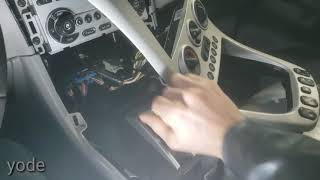
- Faulty Body Control Module (BCM): If reprogramming per the TSB fails and the antenna/wiring are confirmed to be good, the BCM itself may have an internal hardware failure. 🎬 Watch this DIY walkthrough for replacing the Body Control Module. This is rare and expensive, often costing $450-$1,000+ at a dealership.
- Loose Fuse Box Relay: In some crank/no-start situations on the same platform, a loose relay in the underhood fuse block can cause a loss of communication with the ECM, mimicking some of these symptoms. This is worth checking as a simple preliminary step.
Diagnosis Steps
- Verify the code B3924 and any other related codes with a professional OBD-II scanner capable of reading BCM codes.
- Question the driver: Did the issue start immediately after a battery replacement, jump-start, or the battery dying? If yes, the primary suspect is a BCM software glitch per TSB 23-NA-163.
- Try the backup starting procedure: Place the key fob in the designated transmitter pocket (usually inside the center console storage area or a cupholder) and attempt to start the vehicle. If it starts, this confirms the issue is with the passive detection antennas.
- If a BCM glitch is suspected (especially with code B389A present), the vehicle must be taken to a dealer or qualified shop to perform the reprogramming procedure outlined in TSB 23-NA-163. Do not replace modules before this step.
- If reprogramming is not applicable or does not work, use a scan tool to monitor the status of the keyless entry antennas and confirm the fault is with Antenna 4 (B3924).
- Locate and access the suspect antenna in the center console. This will require removing console trim panels.
- Visually inspect the antenna's wiring and connector for any obvious damage, corrosion, or loose connections.
- Using a multimeter and the vehicle's service manual, test the antenna's circuit for correct resistance, continuity to the BCM, and check for shorts to power or ground.
- If the wiring and connector are good but the circuit tests fail, replace the keyless entry antenna (Part #13580788).
- If the antenna and wiring are confirmed good, the Body Control Module (BCM) itself may be faulty, which requires advanced diagnostics and likely replacement.
Parts You'll Likely Need
- Keyless Entry Antenna
(OEM #13580788)— If the cause is not a BCM software glitch, the antenna module itself is the most likely hardware component to have failed. This part number is used for multiple antenna locations, including the center console (Antenna 4).
Trusted brands: ACDelco, GM Genuine
OEM price range: $47-$70
Aftermarket price range: $40-$70
Related Codes That Often Appear With This One
- B3925 — Part of the same family of codes for other keyless entry antennas. TSB 23-NA-163 lists them together as symptoms of the same BCM memory corruption issue.
- B3926 — Part of the same family of codes for other keyless entry antennas. TSB 23-NA-163 lists them together as symptoms of the same BCM memory corruption issue.
- B3927 — Part of the same family of codes for other keyless entry antennas. TSB 23-NA-163 lists them together as symptoms of the same BCM memory corruption issue.
- B3928 — Part of the same family of codes for other keyless entry antennas. TSB 23-NA-163 lists them together as symptoms of the same BCM memory corruption issue.
- B389A — This 'Environment Identification' code is often set alongside the antenna codes when the BCM has a memory corruption issue. The TSB states that if B389A is present with three or more of the B392x codes, the reprogramming procedure applies.
Technical Service Bulletins (TSBs) & Recalls
- 23-NA-163: Provides a specific two-part software procedure ('Special Data Reset A' or 'B') to correct a no-start condition with codes B3924-B3928 and B389A set, caused by a BCM memory issue after a low-voltage event. It explicitly warns technicians not to replace modules before performing this procedure.
Platform-Specific Known Issues
- A known issue, documented in GM TSB #23-NA-163, can cause codes B3924, B3925, B3926, B3927, or B3928 to set after a low voltage event due to a BCM memory corruption, requiring a software fix rather than a hardware replacement.
- This issue is not unique to the Terrain; its platform-mate, the Chevrolet Equinox (2018-2024), is also explicitly mentioned in the TSB and experiences the exact same failure mode.
Mechanic-Grade Diagnostic Values
- Antenna Circuit Resistance — expected: Less than 2 Ω. Failure: A reading of 2 Ω or greater indicates an open or high resistance in the circuit.
- Antenna Low Reference Circuit to Ground — expected: Less than 30 Ω. Failure: A reading greater than 30 Ω suggests a faulty ground connection.
Hidden / Shadow Codes Worth Checking
- B3924 00: The '00' is a GM symptom byte indicating a 'General Electrical Failure'. It provides more specific diagnostic information than the base DTC alone, confirming a general circuit fault rather than a performance or signal issue. (see via A professional scan tool capable of reading manufacturer-specific codes and symptom bytes, such as the dealer GDS2 tool.)
Scan Tool Commands That Help
- GM SPS (Service Programming System) with GDS2: K9 Body Control Module - Special Data Reset A — This is the primary step in TSB #23-NA-163 to fix BCM memory corruption after a low voltage event. It should be followed by the 'Body Control Module IMMO Learn with Existing Transponder or Remote Key' procedure.
- GM SPS (Service Programming System) with GDS2: K9 Body Control Module - Special Data Reset B — This is used as a secondary step in TSB #23-NA-163 ONLY if 'Special Data Reset A' and the subsequent immobilizer learn do not resolve the issue.
- GDS2: Module Diagnostics > [K9] Body Control Module > Identification Information — To verify the BCM is a 'GEN3R' model and check its Base Model Part Number (BMPN) to confirm it is eligible for the procedures in TSB #23-NA-163.
Wiring & Ground Locations
- K9 Body Control Module (BCM) — Located in the passenger footwell, accessible after removing the cover on the side of the center console.. The BCM is the control unit that sets code B3924. All diagnostic tests for the antenna circuit originate or terminate at the BCM's connectors. The TSB reprogramming procedure is performed directly on this module.
- Keyless Entry Antenna 4 — Located within the center console assembly.. This is the specific hardware component monitored by the BCM that triggers code B3924. Access is required for visual inspection, circuit testing, or replacement.
OEM Part Supersession History
13580788→13580788— No supersession found.
Heads up: This part number appears to be stable for the specified antenna location across the model years. Another antenna part, 13546098 (which supersedes 13592451), is listed for this platform but may be for a different location (e.g., doors or rear fascia).
Model Year Variations Within This Range
- 2018-2024: The critical variation is the specific Body Control Module (BCM) hardware. The fix in TSB 23-NA-163 only applies to 'GEN3R' BCMs. A technician must verify the BCM is a GEN3R model by checking the part label or using a GDS2 scan tool. Eligible BCM part numbers include 13518569, 13519619, 13527260, 13529492, 13533813, and others listed in the TSB.
Helpful Videos
We Have This Part in Stock



The information in this article is provided for general reference and educational purposes only. Vehicle specifications, procedures, and part compatibility can vary by production date, trim level, and region. Always consult your vehicle's factory service manual and verify part numbers before purchasing or performing repairs. Safety-critical components such as airbags, seat belts, and braking systems should be installed by a qualified professional.
- Gmc TERRAIN:
- 🎬 Helpful Videos
- 🛍️ Shop This Part
- What's Unique About the 2018-2024 Gmc TERRAIN
- Diagnostic Flowchart
- Symptoms You May Notice
- Most Likely Causes
- Rare But Worth Checking
- Diagnosis Steps
- Parts You'll Likely Need
- Related Codes That Often Appear With This One
- Technical Service Bulletins (TSBs) & Recalls
- Platform-Specific Known Issues
- Mechanic-Grade Diagnostic Values
- Hidden / Shadow Codes Worth Checking
- Scan Tool Commands That Help
- Wiring & Ground Locations
- OEM Part Supersession History
- Model Year Variations Within This Range
- 🎟️ Get 5% Off