

B2462 on 2015-2018 GMC Yukon: GPS Antenna Failure, Causes, and Fixes
On a 2015-2018 GMC Yukon, code B2462 almost always means the roof-mounted 'shark fin' antenna has failed, often due to water intrusion from a bad seal. The original antenna design trapped water, while updated parts have a relocated drain hole. Replacing the antenna assembly (e.g., GM Part #84544243) is the common fix, costing around $70-$150 for the part and is a 2/5 difficulty DIY job.
- B2462 on a 2015-2018 Yukon is almost certainly caused by a failed roof 'shark fin' antenna.
- The root cause is usually a failed gasket that allows water to leak into the antenna, corroding the electronics inside.
- Look for secondary evidence like water stains on the headliner or problems with XM radio and OnStar.
- The fix is to replace the entire antenna assembly. This is a manageable DIY repair that involves partially dropping the headliner.
- Do not replace the expensive radio or other modules until you have replaced the antenna, as it is the most common and least expensive failure point.
What's Unique About the 2015-2018 Gmc YUKON

This generation of GMC Yukon, along with its K2XX platform siblings (Tahoe, Suburban, Escalade, Silverado, Sierra), is known for issues with the multi-function roof antenna. GM issued multiple Technical Service Bulletins (TSBs) acknowledging that the antenna assembly's seal can fail, allowing water to leak in. A design flaw in the original antenna placed a drain hole at the top, trapping water, while updated parts move the drain to the bottom. This water intrusion is the primary cause of the antenna's electronic failure, leading to code B2462 and other related issues.
Diagnostic Flowchart
Tap your situation to follow the diagnostic path that matches what you're seeing on this vehicle.
Symptoms You May Notice

- Inaccurate or no GPS location on the navigation display.
- A red 'X' or slash through the GPS icon on the infotainment screen.
- OnStar system shows a red indicator light or is unable to locate the vehicle.
- Poor or no signal for XM satellite radio.
- Visible water stains on the headliner, typically near the overhead console or sun visors.
- Compass on the driver information center may read 'CAL' or be inaccurate.
- In some cases of severe water leakage, a dead battery may occur due to corrosion on other electrical components, such as the LH I/P BEC (fuse box).
- Replacing the entire infotainment 🎬 Watch this before you spend money on a new radio. head unit or radio when the issue is only the inexpensive roof antenna.
- Replacing the OnStar/Telematics module (VCIM) before verifying the antenna and its coaxial cable are good.
Most Likely Causes

- Failed Roof 'Shark Fin' Antenna 🔴 High Probability As documented in GM TSBs #17-NA-214 and #PIT5362B, the antenna assembly is prone to internal failure from water intrusion due to a compromised seal and a poor original design that trapped water. The electronics inside corrode, causing an open or shorted circuit.
How to confirm: After confirming no damage to the coaxial cable, replacement of the antenna is the definitive test. Visual inspection of the old part after removal often reveals obvious signs of rust 🎬 See how water damage causes these common GPS and XM issues. and water damage inside. If a new antenna resolves the symptoms, the old one was faulty.
Typical fix: Replace the entire high-frequency antenna assembly with an updated part. The new part is an improved design with a relocated drain hole to prevent future water collection.
Est. part cost: $70-$150 - Water Intrusion from Antenna Base Seal 🔴 High Probability The gasket at the base of the antenna can degrade over time, allowing water to leak under the antenna and into the vehicle, damaging the antenna's connectors or internal circuitry.
How to confirm: Visually inspect the headliner directly below the antenna for any signs of water staining or dampness. When the antenna is removed, look for rust or corrosion on the mounting stud and connectors.
Typical fix: Replace the antenna assembly. TSB #17-NA-214 suggests applying a bead of clear seam sealer around the mounting hole as a preventative measure. However, TSB #PIT5362B specifically advises against using any sealants on the replacement antenna's gasket, suggesting reliance on the updated part's design. Following the latest TSB and relying on the new gasket is the recommended procedure.
Est. part cost: $70-$150 - Damaged or Corroded Coaxial Cable/Connector ⚪ Low Probability If water has been leaking for a long time, it can travel down the antenna cable and cause corrosion at the connector on the antenna base or even further down the line where it connects to the radio/telematics module.
How to confirm: Partially lower the headliner to access the antenna's connectors (often purple and yellow/mustard colored). Unplug them and inspect for any green or white corrosion, or physical damage to the cable.
Typical fix: Clean the connectors if corrosion is minor. If the cable or connector ends are severely damaged, the antenna assembly (which includes the pigtail) must be replaced.
Est. part cost: $0-$150
Rare But Worth Checking
- Faulty Radio or Telematics Module: This is uncommon. Before replacing an expensive radio or OnStar (VCIM) module, it is critical to first test or replace the antenna and its wiring, as they are the cause in the vast majority of cases.
Diagnosis Steps

- Verify the symptoms: Check for a 'No GPS' message or a red slash through the GPS icon on the navigation screen.
- Check for related codes: Use an OBD-II scanner capable of reading B-codes (Body) to confirm B2462 and look for B2470 or B125C. TSBs often mention specific subtypes like B2462-02 (Short to Ground) or B2462-04 (Open Circuit).
- Inspect for water leaks: Carefully examine the headliner around the overhead console, sun visors, and A-pillars for any water stains. This is a strong indicator of a failed antenna seal.
- Gain access to the antenna: Partially lower the rear of the headliner. This typically requires removing the A-pillar trim, sun visors (T15 Torx screws), and passenger grab handles (8mm bolts).
- Inspect connectors: Disconnect the coaxial cables (often purple and yellow) from the antenna base and check for any signs of water damage or corrosion.
- Remove and Replace the antenna: Use a 10mm wrench, often a stubby ratcheting wrench is easiest, 🎬 Watch: Step-by-step walkthrough for replacing the high frequency antenna. to remove the single nut holding the antenna to the roof. Given the high probability of failure, the most practical step is to replace the antenna assembly. If the GPS and other functions are restored (green OnStar light, accurate GPS), the diagnosis is complete.
Parts You'll Likely Need

- High Frequency Antenna Assembly
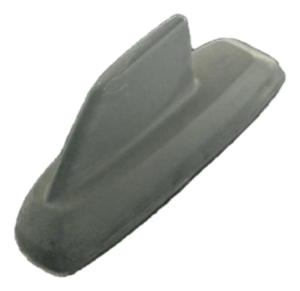
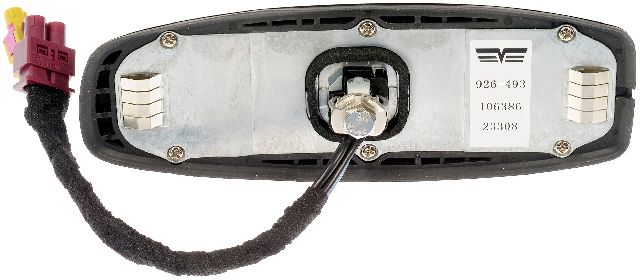
(OEM #84544243 (supersedes older numbers like 23225332, 84331298). Part number may vary by paint color.)— This is the complete 'shark fin' unit that contains the GPS, XM, and OnStar antennas. It fails due to internal water damage and is the direct cause of code B2462. TSBs instruct technicians to replace it with the latest part number available.
Trusted brands: ACDelco (GM Genuine), Dorman (e.g., 926-493)
OEM price range: $100-$150
Aftermarket price range: $70-$120
Related Codes That Often Appear With This One
- B2470 — This code also relates to the GPS/Navigation Antenna Circuit and is frequently set alongside B2462, as noted in GM's service bulletins.
- B125C — This is another antenna-related fault code that GM service bulletins group with B2462 and B2470, indicating a general failure in the antenna system.
Technical Service Bulletins (TSBs) & Recalls
- 17-NA-214: Addresses OnStar, XM, GPS, or antenna malfunction, specifically citing DTC B2462 and water leaks on the headliner from the antenna base.
- PIT5362B: Cites DTCs B2462-02 and B2462-04 related to inaccurate GPS location and recommends replacing the high-efficiency antenna with the latest part number.
Platform-Specific Known Issues
- Real Owner Repair Story: A user on the TruckNerd YouTube channel documented the repair on a similar GM truck, showing the water stain on the headliner as the first clue. Upon removing the old antenna, he cut it open to reveal significant internal corrosion and water. He compared the old part to the new, updated GM part, clearly showing how the original design had a drain hole near the top of the base (trapping water), while the new design has the drain hole at the bottom, allowing any moisture to escape.
- GM Technical Service Bulletin #17-NA-214: This TSB explicitly details the problem of the roof antenna malfunctioning and causing water leaks into the headliner area, potentially leading to a dead battery if water migrates down the A-pillar to the fuse box. It covers vehicles up to 2018 and lists B2462 as a primary DTC.
- GM Technical Service Bulletin #PIT5362B: This earlier bulletin also points to water intrusion in the antenna assembly as the root cause for B2462 and related codes, advising replacement of the antenna. It specifically warns technicians *not* to use any form of sealant on the replacement antenna, relying instead on the new part's gasket.
Mechanic-Grade Diagnostic Values
- GPS Antenna Coax Cable Voltage — expected: 4.0-5.5 volts. Failure: A reading outside this range suggests a faulty radio or telematics module, not the antenna itself.
- Coax Cable Center Conductor Resistance — expected: Less than 5 ohms. Failure: Resistance greater than 5 ohms indicates a break in the cable, requiring replacement.
- Coax Cable Center Conductor to Shield Resistance — expected: Infinite resistance (an open circuit). Failure: Any reading less than infinite resistance indicates a short within the cable, requiring replacement.
Hidden / Shadow Codes Worth Checking
- B2462 02: Global Positioning System (GPS) Signal Short to Ground. This indicates the radio or telematics module has detected that the signal wire in the coaxial cable is shorted to the vehicle's chassis ground. (see via A professional scan tool like the GM GDS2 is required to view these specific failure bytes.)
- B2462 04: Global Positioning System (GPS) Signal Open Circuit. This indicates the radio or telematics module has detected a break or high resistance in the antenna's signal circuit, which is the most common failure mode when water corrodes the antenna's internal electronics. (see via A professional scan tool like the GM GDS2 is required to view these specific failure bytes.)
Wiring & Ground Locations
- G103 — Located at the left rear of the engine compartment on the cowl, above the brake booster.. This is a primary ground point for the Body Control Module (BCM), Instrument Panel Cluster (IPC), and the Radio. A poor connection here could cause a variety of electrical issues, including communication problems with the radio/telematics module.
- BCM Ground (un-designated) — Inside the cabin, beside the front left speaker. Access requires pulling the A-pillar covers and lifting the front dash trim.. A forum post from an experienced member identifies this as a key ground for the BCM. Since the BCM is involved in overall vehicle communication, a fault here could contribute to intermittent electronic issues.
- Frame Grounds (un-designated) — On the frame, located right behind both front wheels.. These grounds are noted to be in a terrible location, subject to constant water splash from the tires. While not directly for the radio, poor frame grounds can cause unpredictable electrical behavior throughout the vehicle.
- Antenna Connectors — Under the headliner, directly at the base of the shark fin antenna mounting stud.. These are the primary connectors (often purple and yellow/mustard colored) for the GPS, XM, and OnStar signals. They are the first place to check for corrosion when the headliner is lowered.
Real Owner Repair Stories
- Tahoe Yukon Forum user (2015 Tahoe LTZ) — Strange electrical problems, though the specific codes were not listed in the thread.
❌ Tried (didn't work) The user was advised to check the battery first, but the main focus was on finding and cleaning ground points before replacing parts.
✅ What actually fixed it The user located and cleaned the main ground on the driver's side firewall and was directed to other critical ground points behind the front wheels and inside the cab near the A-pillar, which are known trouble spots for this platform. Cleaning these grounds is a critical first step for any electrical issue.
OEM Part Supersession History
23225332 (and others)→84331298, then 84544243— The original antenna design had a flawed drain hole location that trapped water. The updated parts, including the latest 84544243, have a relocated drain hole at the bottom of the unit to allow moisture to escape, preventing internal corrosion.
Heads up: When replacing, it is critical to use the latest available part number. GM also transitioned from supplying paint-to-match black antennas to pre-painted, color-matched antennas. The catalog should be checked for the specific color RPO code.
Helpful Videos
Used OEM Parts in Stock
New Aftermarket Parts Available


The information in this article is provided for general reference and educational purposes only. Vehicle specifications, procedures, and part compatibility can vary by production date, trim level, and region. Always consult your vehicle's factory service manual and verify part numbers before purchasing or performing repairs. Safety-critical components such as airbags, seat belts, and braking systems should be installed by a qualified professional.
- Gmc YUKON:
- 🎬 Helpful Videos
- 🛍️ Shop This Part
- What's Unique About the 2015-2018 Gmc YUKON
- Diagnostic Flowchart
- Symptoms You May Notice
- Most Likely Causes
- Rare But Worth Checking
- Diagnosis Steps
- Parts You'll Likely Need
- Related Codes That Often Appear With This One
- Technical Service Bulletins (TSBs) & Recalls
- Platform-Specific Known Issues
- Mechanic-Grade Diagnostic Values
- Hidden / Shadow Codes Worth Checking
- Wiring & Ground Locations
- Real Owner Repair Stories
- OEM Part Supersession History
- 🎟️ Get 5% Off