

B2256 on 2020-2024 Subaru Legacy: Infotainment & DCM Communication Fault Guide
This code indicates a communication problem between your car's Telematics unit (DCM) and the main infotainment screen. The most likely cause is a faulty Data Communications Module (DCM), which can also cause a parasitic battery drain. Before paying for repairs, check with a Subaru dealer about warranty extensions that may cover the fix for free.
- B2256 is an infotainment communication code, specifically between the STARLINK (DCM) and display (Cockpit Control Module) units.
- The most common symptom is not an on-screen error, but a dead battery caused by a faulty DCM constantly trying to connect to the decommissioned 3G network.
- DO NOT replace the expensive infotainment screen before thoroughly diagnosing the DCM and its related wiring, as mandated by Subaru's own service bulletins.
- Contact a Subaru dealer and inquire about warranty extensions for the Data Communication Module (TSB 15-317-24R or similar) before authorizing any paid repairs, as the fix is often covered for up to 8 years/100,000+ miles.
What's Unique About the 2020-2024 Subaru LEGACY

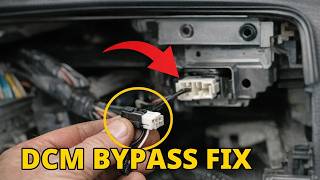
The seventh-generation Legacy uses a large, tablet-style Harman CP1/CP1.5 infotainment system that integrates many vehicle functions. A common issue on this platform is a faulty Data Communication Module (DCM) that can cause a parasitic battery drain as it constantly tries to connect to the now-defunct 3G cellular network. 🎬 Watch: A detailed walkthrough of the Legacy DCM battery drain fix. This issue is so prevalent that Subaru has issued Technical Service Bulletins (TSBs) and warranty extensions specifically to address DCM failures and prevent the unnecessary replacement of the expensive head unit.
Diagnostic Flowchart

Tap your situation to follow the diagnostic path that matches what you're seeing on this vehicle.
Symptoms You May Notice
- Dead battery, especially after the vehicle sits for a day or two.
- Infotainment system freezing, lagging, or going blank.
- Loss of audio from front speakers and non-functional Bluetooth microphone (often occurs if the DCM fuse is pulled to prevent battery drain, as audio signals are routed through the DCM).
- STARLINK telematics features (e.g., remote start from phone, SOS button) are inoperative.
- Vehicle requires frequent jump-starts.
- Replacing the Cockpit Control Module (infotainment head unit) without first diagnosing the Telematics system and DCM. The TSBs for this code were specifically issued to prevent this costly and incorrect repair.
- Replacing the battery repeatedly without performing a parasitic draw test to find the root cause. Many owners report replacing the battery multiple times before the faulty DCM is identified.
Most Likely Causes

- Faulty Data Communication Module (DCM) 🔴 High Probability A known issue, often related to the 3G network shutdown, causes the DCM to continuously search for a signal, drawing excessive power (150-400mA) and leading to battery death and communication faults. Subaru has extended warranties for this part on many models to 8 years/100,000 miles or more.
How to confirm: A technician will perform a parasitic draw test on the battery, isolating the draw to the DCM fuse (often fuse #9 in the engine bay fuse box). The presence of other telematics-related DTCs also points to the DCM.
Typical fix: First, the dealer will attempt a software update or reprogram the DCM to a 'Factory' status to stop it from searching for a network. If that fails, the DCM must be replaced. For unsubscribed vehicles, a DCM bypass harness can be installed. This repair is often covered by a warranty extension.
Est. part cost: $800-$1200 - Infotainment System Software Glitch 🟡 Medium Probability The Harman CP1/CP1.5 infotainment systems have received numerous software updates to fix bugs related to stability, black screens, and communication. Subaru has also extended the warranty on the head unit itself for certain issues.
How to confirm: A technician checks the current software version against the latest version available from Subaru via the Subaru Select Monitor.
Typical fix: Update the Cockpit Control Module and/or DCM to the latest software version using dealer tools. This is the first step in almost all diagnostic paths.
Est. part cost: $0 - Wiring Harness or Connector Issue ⚪ Low Probability While less common, a loose connection or damaged wire between the DCM and the head unit can interrupt communication.
How to confirm: Visual inspection of connectors and testing the wiring harness for continuity and shorts between the DCM and Cockpit Control Module, as outlined in the service manual.
Typical fix: Repair the damaged wire or re-seat the loose connector.
Est. part cost: $5-$50
Diagnosis Steps
- Connect a professional scan tool (like the Subaru Select Monitor) and perform a full system scan for all DTCs.
- Address and resolve ANY DTCs found in the Telematics system FIRST. Do not proceed until the Telematics system is confirmed to be free of codes. This is a critical step emphasized in TSB 18-224-22R.
- Clear the B2256 code from the Cockpit Control module.
- Cycle the ignition OFF, then ON. Re-read the codes.
- If B2256 does not return, the issue may have been a temporary glitch. If it returns, proceed with diagnosis.
- Perform a parasitic battery draw test. After letting the vehicle sit for at least 30 minutes for all modules to go to sleep, measure the amperage draw. A reading above 70mA is cause for concern.
- If a high draw is present, pull the fuse for the DCM (Data Communication Module) and see if the draw drops significantly (below 50-70mA). If it does, the DCM is confirmed as the source of the drain.
- Inspect the wiring and connectors between the DCM and the Cockpit Control Module for any visible damage or looseness.
- If a parasitic draw is confirmed from the DCM or other telematics codes persist, follow the warranty extension guidelines (TSB 15-316-23R, 15-317-24R, 15-318-24R) or replace the DCM.
- If the DCM and wiring are confirmed good, the final step would be to suspect a fault in the Cockpit Control Module itself, following diagnostics for that unit.
Parts You'll Likely Need
- Data Communication Module (DCM) — This module is the most frequent root cause of code B2256 and related issues like parasitic battery drain, especially after the 3G cellular network sunset.
Trusted brands: Subaru (OEM)
OEM price range: $800-$1200
Aftermarket price range: N/A - Cockpit Control Module — This is the infotainment head unit. It is rarely the cause and should only be replaced after all other possibilities, especially the DCM, have been ruled out.
Trusted brands: Harman (OEM for Subaru)
OEM price range: $2000+
Aftermarket price range: N/A - DCM Bypass Harness
(OEM #86229AL400 (example for some models))— For vehicles without an active Starlink subscription, Subaru offers a bypass box/harness to eliminate the faulty DCM while restoring audio functions. This is a dealer-installed part under warranty extension TSB 15-318-24R. Aftermarket versions also exist.
Trusted brands: Subaru (OEM), Aftermarket
OEM price range: N/A (Installed under warranty)
Aftermarket price range: $50-$100
Related Codes That Often Appear With This One
- Other Telematics DTCs — B2256 is often a symptom of a broader problem within the telematics system. The diagnostic procedure for TSB 18-224-22R mandates fixing any other DCM-related codes first.
- B2A0C — This is an internal error code for 'DCM Communication' that is often found alongside the parasitic draw issue on 2019+ models, as noted by technicians in forum discussions.
Technical Service Bulletins (TSBs) & Recalls
- 18-224-22R: Informs of the diagnosis procedure for the CP1/CP1.5 Infotainment System when DTC B2256 is detected.
- 18-224-22: The original bulletin to inform of the diagnosis procedure for the Harman Infotainment System when DTC B2256 is detected.
- 15-317-24R / 15-316-23R: Details the DCM warranty extension to 8 years/100,000 miles for many models due to the 3G sunset battery drain issue.
- 15-318-24R: Details the DCM warranty extension for 2019 models to 8 years/150,000 miles and introduces the 'DCM Bypass Box' solution for unsubscribed vehicles.
- 15-322-25R: Details a separate warranty extension for the Harman CP1 head unit itself for issues like black screens or rebooting.
Platform-Specific Known Issues
- Subaru has issued multiple warranty extensions for the Data Communication Module (DCM) due to widespread issues with parasitic battery drain, particularly after the 3G cellular network shutdown. This code is often a direct result of that underlying DCM problem.
- A class-action lawsuit was filed regarding the battery drain issue, which prompted wider acknowledgment and warranty extensions from Subaru.
- Even brand new 2024 models have had reports of bad batteries, sometimes requiring an upgrade to a larger battery, tray, and tie-down, separate from the DCM issue.
Mechanic-Grade Diagnostic Values
- CAN Bus Network Resistance — expected: Approximately 60 Ohms. Failure: A reading of 120 Ohms indicates a missing termination resistor or a break in the circuit. A reading of 40 Ohms or less indicates an extra termination resistor or a shorted wire.
- CAN High (CAN_H) Voltage — expected: Fluctuates between 2.5V and 3.5V (Average ~2.7V on a multimeter). Failure: No voltage, or voltage that is stuck high or low, indicates a circuit fault.
- CAN Low (CAN_L) Voltage — expected: Fluctuates between 1.5V and 2.5V (Average ~2.2V on a multimeter). Failure: No voltage, or voltage that is stuck high or low, indicates a circuit fault.
- Parasitic Draw from DCM — expected: Should be part of the vehicle's total draw, which is under 70mA when asleep.. Failure: A sustained draw of 150mA to over 400mA that drops significantly when the DCM fuse is pulled.
Scan Tool Commands That Help
- Subaru Select Monitor: Force DCM to 'Factory' Mode — As a software-based repair for the parasitic draw issue on unsubscribed vehicles, this command forces the DCM into a hibernation state, preventing it from searching for the defunct 3G network. This is detailed in TSB 15-312-23R.
- Subaru Select Monitor: Clear Memory — Used to clear DTCs from a specific module, such as the Cockpit Control Module, after a repair or during diagnosis to see if a code returns immediately.
Wiring & Ground Locations

- Data Communication Module (DCM) — Located behind the main infotainment head unit, mounted within the metal radio cage.. This is the module that fails to communicate, causing code B2256 and the associated parasitic draw.
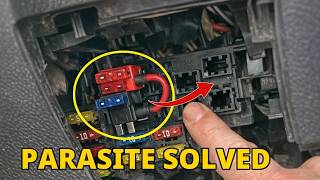
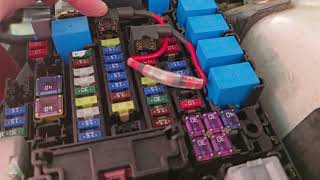
- DCM Fuse — On many Subarus, this is fuse #9 (7.5A) in the engine bay fuse box. However, on some 2020+ models, owners report it may be in an unmarked holder in the driver's side interior fuse panel.. Pulling this fuse is the primary method to confirm the DCM is the source of a parasitic draw. It is also the target for DIY fuse-tap repairs.
- Head Unit Connector i87 — A connector on the back of the main infotainment head unit.. When installing the official DCM Bypass Box, a wire must be tapped into pin #4 of this connector to restore power to the Bluetooth microphone.
Real Owner Repair Stories
- r/Subaru_Outback and YouTube DIY channels (Multiple 2016-2021 Subaru models including Legacy/Outback platform) — Recurring dead battery after the car sits for 1-2 days. Requires frequent jump starts.
❌ Tried (didn't work) Replacing the battery (sometimes multiple times)., Simply pulling the DCM fuse, which stopped the drain but also disabled the front speakers and Bluetooth microphone.
✅ What actually fixed it A DIY fuse-tap bypass was created. An 'add-a-circuit' was used to move the DCM's power source from its original constant-hot fuse slot (e.g., engine bay fuse #9) to an ignition-switched fuse slot in the interior fuse panel. This physically cuts power to the DCM when the car is off, completely eliminating the parasitic drain while retaining all audio functions when the car is on. - YouTube channel 'Joe's WRX' (2019 Subaru WRX (platform shares DCM issue)) — Battery drain when the car is turned off, caused by the DCM constantly trying to connect to the non-existent 3G network.
❌ Tried (didn't work) Living with the battery drain.
✅ What actually fixed it The factory DCM was physically removed from behind the head unit. An aftermarket bypass harness from AutoHarnessHouse was plugged into the vehicle's wiring harness where the DCM used to connect. This harness loops back the microphone and front speaker audio circuits, restoring full stereo and Bluetooth phone functionality while permanently removing the faulty DCM from the system. A parasitic draw test after installation confirmed the draw dropped to a normal level (0.029A in the video).
OEM Part Supersession History
N/A (DCM Module)→86229AL400— This is not a direct supersession but an alternative part. 86229AL400 is the OEM 'DCM Bypass Box' introduced via TSB 15-318-24R as a repair for unsubscribed vehicles. It replaces the faulty DCM entirely, restoring audio functions while eliminating the telematics features and the parasitic drain.
Heads up: This part is specifically for vehicles WITHOUT an active Starlink subscription. It requires minor re-wiring of the microphone power circuit during installation.
Model Year Variations Within This Range
- 2020-2022: These model years are equipped with the Harman CP1 infotainment system. This system has one microphone and does not support wireless CarPlay or Android Auto from the factory.
- 2023-2024: These model years feature the updated Harman CP1.5 infotainment system. Hardware changes include the addition of a second microphone, support for wireless CarPlay/Android Auto, and updated USB ports (one Type-A and one Type-C). The voice recognition engine was also updated from Nuance to Cerence.
Helpful Videos
We Have This Part in Stock



The information in this article is provided for general reference and educational purposes only. Vehicle specifications, procedures, and part compatibility can vary by production date, trim level, and region. Always consult your vehicle's factory service manual and verify part numbers before purchasing or performing repairs. Safety-critical components such as airbags, seat belts, and braking systems should be installed by a qualified professional.
- Subaru LEGACY:
- 🎬 Helpful Videos
- 🛍️ Shop This Part
- What's Unique About the 2020-2024 Subaru LEGACY
- Diagnostic Flowchart
- Symptoms You May Notice
- Most Likely Causes
- Diagnosis Steps
- Parts You'll Likely Need
- Related Codes That Often Appear With This One
- Technical Service Bulletins (TSBs) & Recalls
- Platform-Specific Known Issues
- Mechanic-Grade Diagnostic Values
- Scan Tool Commands That Help
- Wiring & Ground Locations
- Real Owner Repair Stories
- OEM Part Supersession History
- Model Year Variations Within This Range
- 🎟️ Get 5% Off