

B2255 on 2019-2024 Subaru Ascent: Infotainment Communication Fault Causes and Fixes
Code B2255 on a Subaru Ascent indicates a communication problem between the infotainment head unit and the Telematics (DCM) module. Before replacing any parts, follow the official diagnostic procedure from Subaru, as the root cause is often a related Telematics system fault, not a failure of the head unit or USB cable. This is a well-documented issue across multiple Subaru models.
- B2255 on a Subaru Ascent means the infotainment head unit has lost communication with the Telematics (DCM) module.
- Do NOT immediately assume the head unit or USB port is bad. This is a common and costly misdiagnosis.
- The absolute first step is a full system scan to check for any trouble codes in the Telematics module; these must be fixed first.
- This issue is not unique to the Ascent and affects other Subaru models from the same era with similar infotainment and telematics systems.
What's Unique About the 2019-2024 Subaru ASCENT
The Subaru Ascent uses a Harman-sourced infotainment system that is tightly integrated with the vehicle's Telematics (Starlink) system. Subaru has issued specific Technical Service Bulletins (TSBs) for the Ascent and other models regarding code B2255. These bulletins explicitly warn technicians that this code is frequently misdiagnosed, leading to unnecessary replacement of expensive head units or USB cables when the actual problem lies within the Telematics system. Proper diagnosis requires checking for and resolving any Telematics DTCs *before* addressing the B2255 code directly, as a fault-free DCM is a prerequisite for the head unit to function correctly.
Diagnostic Flowchart
Tap your situation to follow the diagnostic path that matches what you're seeing on this vehicle.
Symptoms You May Notice
- Warning message on the infotainment or multi-function display
- Front USB port may not function for data (Apple CarPlay/Android Auto) or charging
- Apple CarPlay or Android Auto disconnects or fails to launch
- Infotainment system may be slow, freeze, or lock up
- Loss of Starlink telematics features (e.g., remote start, vehicle locator, SOS button)
- Red or green lights near the overhead console SOS/i-button may be off or flashing
- Replacing the infotainment head unit without first diagnosing the Telematics (DCM) system.
- Replacing the front USB port or its cable without proper diagnosis.
Most Likely Causes
- Underlying Telematics System Fault 🔴 High Probability The system logic requires the Telematics (DCM) module to be fault-free for the infotainment system to operate correctly. Subaru TSBs and TechTIPS newsletters highlight this as the primary point of misdiagnosis. The DCM itself can fail or have other DTCs (like B2A0C) that must be resolved first.
How to confirm: Perform a full system scan with a compatible tool like the Subaru Select Monitor. Any DTCs in the Telematics module must be diagnosed and repaired first, per TSB 18-225-22R.
Typical fix: Diagnose and repair the specific Telematics DTCs found. This could range from a software update to replacing the DCM. In some cases, issues were related to the 3G network sunset, requiring a DCM update or replacement.
Est. part cost: $0-$800 - Infotainment System Software Glitch 🟡 Medium Probability Modern infotainment systems are complex and can suffer from software-related issues that cause communication errors or lockups. A reset can often resolve temporary glitches.
How to confirm: Attempt to reset the head unit by pressing and holding the power/volume knob for 10-15 seconds. Check with a dealer for any available software updates for the infotainment unit.
Typical fix: Perform a system reset or have a dealer install the latest firmware update for the infotainment unit.
Est. part cost: $0 - Faulty USB Cable or Connected Device ⚪ Low Probability While the TSB warns against replacing the vehicle's USB cable, a faulty or low-quality phone charging cable can cause communication issues with Apple CarPlay or Android Auto, which can sometimes trigger faults.
How to confirm: Test with a different, high-quality, data-certified USB cable and a different phone to see if the symptoms disappear.
Typical fix: Replace the user's personal USB cable.
Est. part cost: $10-$30 - Faulty Infotainment Head Unit ⚪ Low Probability
How to confirm: This is a last resort after following the complete diagnostic procedure in TSB 18-225-22R, which confirms all wiring and other modules are functioning correctly.
Typical fix: Replace the infotainment head unit.
Est. part cost: $800-$2500
Rare But Worth Checking
- Open or Short in Wiring Harness: A damaged wire or poor connection between the DCM and the head unit can cause this communication fault. The diagnostic procedure in the TSB includes steps for checking harness and connector integrity.
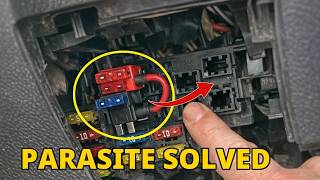
- Parasitic Battery Drain from DCM: In some cases, a faulty DCM can cause a parasitic battery drain by continuously trying to connect to the cellular network, especially after the 3G sunset. 🎬 Watch: How the 3G sunset causes battery drain and DCM issues. This internal DCM fault can sometimes manifest as communication codes like B2255. Subaru has issued warranty extensions for DCMs related to this issue on some models.
Diagnosis Steps
- Connect a professional scan tool (like the Subaru Select Monitor) and perform a full system scan for DTCs in all modules.
- IMPORTANT: If any DTCs are present in the [Telematics] module, diagnose and repair those faults FIRST. Do not proceed with B2255 diagnosis until the Telematics system is free of codes.
- As part of the basic telematics check, verify the DCM ground from terminal A14 to chassis ground is secure.
- Once the Telematics system is confirmed clear, clear the B2255 code from the [Infotainment] module.
- Cycle the ignition OFF, then ON, and re-read the codes.
- If B2255 returns as a current code, proceed with the diagnostic trouble tree outlined in TSB #18-225-22R.
- This procedure involves checking for open circuits in the harness between the Data Communications Module (DCM) and the audio unit.
- Thoroughly inspect all related connectors and pins for damage or poor contact.
- Only after confirming the wiring and Telematics system are fault-free should you consider a faulty head unit as the cause.
Parts You'll Likely Need
- Data Communications Module (DCM)
(OEM #86229AN01B (Note: This is for a 2020 Outback, part number for Ascent may vary but will be similar. Always verify with VIN.))— This module is frequently the source of the communication fault, as highlighted by Subaru's service bulletins. A fault here must be resolved before B2255 can be properly addressed.
Trusted brands: Subaru (OEM)
OEM price range: $500-$800 - Infotainment Head Unit — This is the most expensive and least likely cause. It should only be replaced as a final step after all other diagnostics outlined in TSB 18-225-22R have failed to find another cause.
Trusted brands: Harman (OEM)
OEM price range: $800-$2500
Related Codes That Often Appear With This One
- B2256 — This is a similar communication fault code related to the Telematics system and Cockpit Control Module, indicating a broader communication issue on the network.
- Any Telematics DTCs (e.g., B2A0C) — The presence of any other codes in the Telematics module is a prerequisite for diagnosing B2255, as they are often the root cause. B2A0C specifically points to a DCM communication failure.
Technical Service Bulletins (TSBs) & Recalls
- 18-225-22R: Diagnostics Procedure Addition: DTC B2255. This TSB provides the official diagnostic procedure and explicitly states its purpose is to prevent unnecessary replacement of the head unit or USB cable by correctly identifying faults in the Telematics system.
- 15-317-24 / 15-318-24R: Data Communication Module (DCM) Warranty Extension. These bulletins announce warranty extensions for the DCM on various models due to issues like parasitic drain after the 3G network sunset, which can be related to overall DCM health.
Platform-Specific Known Issues
- Subaru has issued multiple revisions of Technical Service Bulletin #18-225-22R specifically to address the misdiagnosis of DTC B2255.
- A November 2021 TechTIPS newsletter highlighted a high frequency of unnecessary head unit and USB cable replacements due to technicians failing to diagnose the Telematics system first.
- Some earlier model year Ascents experienced various issues, including transmission problems and infotainment glitches, though many owners report high satisfaction.
Mechanic-Grade Diagnostic Values
- Parasitic Current Draw (Dark Current) — expected: < 70 mA. Failure: A steady reading of 120-150 mA or higher after the vehicle has been off and locked for over 20 minutes often points to a faulty DCM that is not entering sleep mode.
- Harness Check (Short to Power) — expected: No voltage. Failure: Voltage detected when checking between the specified audio unit connector pins (AD63) and chassis ground indicates a short circuit in the harness.
Scan Tool Commands That Help
- Subaru Select Monitor (SSM): Full System Scan — This is the mandatory first step. It must be used to check for DTCs in ALL vehicle modules, especially the [Telematics] module, before diagnosing B2255.
- Subaru Select Monitor (SSM): Clear Memory [Infotainment] — Used to clear the B2255 code from the infotainment module after the root cause in the Telematics system has been repaired, to verify the fix.
- DCM Factory Mode Tool: Mode Setting — This separate software application, used with the SSM's interface, can put the DCM into a low-power 'Factory' state. This is used to diagnose or mitigate parasitic battery drain caused by a faulty DCM, particularly on older models affected by the 3G network sunset.
Wiring & Ground Locations
- DCM Ground — The ground wire for the Data Communications Module (DCM) is at terminal A14 of the DCM's main connector. The DCM itself is located behind the main infotainment head unit in the dashboard.. TSB 18-225-22R specifically requires technicians to verify the integrity of this ground connection to the chassis as a basic diagnostic step before proceeding with more complex tests.
- DCM Fuse — Typically fuse #9 (7.5A or 20A depending on model/year) located in the fuse box in the engine bay.. Pulling this fuse can be a quick diagnostic step to confirm if the DCM is the source of a parasitic battery drain, which is a common related fault. If the drain stops, the DCM is the likely culprit. However, pulling this fuse will also disable the front speakers and microphone as they are routed through the DCM.
Real Owner Repair Stories
- Reddit user in r/Subaru_Outback (2019 Subaru Outback) — Recurring dead battery that would not hold a charge.
❌ Tried (didn't work) Replacing the battery., Initial dealership visit where they were unhelpful.
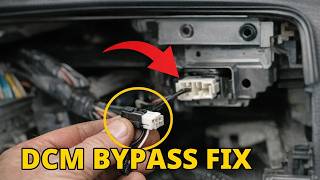
✅ What actually fixed it The owner called Subaru of America (1-800-782-2783), explained the history, and received goodwill assistance. Subaru of America covered the $1100 cost to replace the faulty Data Communications Module (DCM). The owner also noted that as of early 2024, Subaru dealerships now offer an official DCM bypass service for approximately $500. - Reddit user in r/SubaruAscent (2022 Subaru Ascent Onyx) — DCM failed, causing issues with the head unit. The red light next to the SOS button was illuminated.
❌ Tried (didn't work) Resetting via Subaru phone support.
✅ What actually fixed it The DCM and the head unit were both replaced under warranty. The owner later had the DCM fail a second time.
OEM Part Supersession History
86229AN01A→86229AN01B— Part revision or update by the manufacturer. This is common for electronic modules to address hardware or firmware issues.
Heads up: The new part number (86229AN01B) is the correct replacement for the original. Using old stock of the 'A' version may re-introduce the original problem.
Model Year Variations Within This Range
- 2019-2022: These models use the original Harman infotainment system with an 8-inch screen (on most trims) and more physical buttons. TSB 18-225-22R directly and consistently applies to this generation of hardware.
- 2023-2024: These models feature a significant mid-cycle refresh, including a new standard 11.6-inch tablet-style STARLINK Multimedia Plus system and wireless Apple CarPlay/Android Auto. This is a completely different head unit. While some versions of TSB 18-225-22R have been updated to include 2023 models like the Forester, its direct applicability to the new Ascent infotainment hardware is less clear, and diagnostic procedures may differ.
Helpful Videos

We Have This Part in Stock



The information in this article is provided for general reference and educational purposes only. Vehicle specifications, procedures, and part compatibility can vary by production date, trim level, and region. Always consult your vehicle's factory service manual and verify part numbers before purchasing or performing repairs. Safety-critical components such as airbags, seat belts, and braking systems should be installed by a qualified professional.
- Subaru ASCENT:
- 🎬 Helpful Videos
- 🛍️ Shop This Part
- What's Unique About the 2019-2024 Subaru ASCENT
- Diagnostic Flowchart
- Symptoms You May Notice
- Most Likely Causes
- Rare But Worth Checking
- Diagnosis Steps
- Parts You'll Likely Need
- Related Codes That Often Appear With This One
- Technical Service Bulletins (TSBs) & Recalls
- Platform-Specific Known Issues
- Mechanic-Grade Diagnostic Values
- Scan Tool Commands That Help
- Wiring & Ground Locations
- Real Owner Repair Stories
- OEM Part Supersession History
- Model Year Variations Within This Range
- 🎟️ Get 5% Off