

B2204 on 2014-2020 Jeep Cherokee: ECU Configuration Mismatch Causes & Fixes
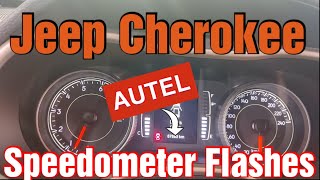
B2204 means a module isn't configured to the vehicle, causing a flashing odometer. The fix is a 'Proxi Alignment', a software procedure requiring a special scan tool, not a typical part replacement. Expect a shop to charge for 1-2 hours of labor. This is common after a battery change, jump start, or module replacement (like a radio).
- B2204 is a data network problem, not a mechanical one. The most common symptom is a flashing odometer.
- The fix is almost always a 'Proxi Alignment', a software procedure that requires a specialized scan tool.
- Do not replace any modules unless a technician has confirmed it is faulty by repeatedly failing a Proxi Alignment.
- The issue is often triggered by replacing an electronic part (like the radio) or by a weak or failing battery.
- This is not a DIY-friendly repair; you will likely need to visit a dealership or a well-equipped independent shop.
What's Unique About the 2014-2020 Jeep CHEROKEE

The 2014-2020 Jeep Cherokee (KL generation) is built on the Fiat Compact Wide platform, co-developed by Chrysler and Fiat. This FCA architecture is highly sensitive to module configuration. Unlike older vehicles where you could swap many parts freely, most electronic modules on the Cherokee (like the Radio, Instrument Panel Cluster, and even door modules) are 'VIN-locked' and part of a complex network that expects all members to be present and accounted for. Any change, like replacing a radio, a significant battery drain, or a jump start, can disrupt this network harmony. The required fix, a 'Proxi Alignment', is a specific FCA software procedure to re-synchronize all the modules with the BCM's master list.
Diagnostic Flowchart

Tap your situation to follow the diagnostic path that matches what you're seeing on this vehicle.
Symptoms You May Notice

- Flashing odometer mileage (the most common and definitive symptom)
- Loss of features like Lane Departure or Park Assist, specifically mentioned in TSB 08-032-20 for 2019-2020 models.
- Radio or Uconnect system not functioning correctly, especially after replacement or a software update attempt. [TSB 08-033-14].
- In rare cases, a no-crank/no-start condition, sometimes with a flashing security light, if the Wireless Ignition Node (WIN) or BCM loses its configuration.
- In rare cases, transmission may not engage or shift properly.
- A/C system may not function.
- Replacing the Body Control Module (BCM) unnecessarily. The BCM is the host of the configuration, but the B2204 code is often caused by another module failing to sync with it, not the BCM itself being faulty.
- Replacing the battery without attempting a Proxi Alignment first. While a weak battery can be the root cause, simply replacing it won't fix the corrupted configuration data that has already occurred.
Most Likely Causes

- Module Replacement Without Programming 🔴 High Probability The FCA platform requires nearly all electronic modules (Radio, Instrument Cluster, BCM, HVAC controls, etc.) to be registered to the vehicle's network via a Proxi Alignment. Swapping a part from another vehicle, especially an aftermarket radio, will immediately cause a mismatch because the BCM is looking for a module that is no longer there.
How to confirm: Scan the vehicle to see which module is reporting as 'not configured' or has failed the Proxi Alignment check. Ask about recent repair history, specifically if a radio or other electronic component was replaced. A Reddit thread on r/MechanicAdvice discusses this exact scenario after an aftermarket radio install.
Typical fix: Perform a Proxi Alignment procedure. If an aftermarket radio was installed, the BCM configuration must be changed to 'no radio' or the appropriate setting before the alignment will succeed. This can be done with tools like AlfaOBD.
Est. part cost: $0 - Software Glitch or Corrupted Configuration 🟡 Medium Probability Low battery voltage during startup, a jump start, or a failing battery can sometimes corrupt the configuration data in one or more modules, causing them to fall out of sync with the BCM. A TSB notes this can happen if voltage drops below 4.5 volts for over 200 milliseconds. Several forum users report the flashing odometer appeared after a battery replacement or jump start.
How to confirm: The issue appears with no history of parts being replaced, often after a battery event. A Proxi Alignment is attempted; if it succeeds and the code disappears, the cause was likely a temporary glitch.
Typical fix: Fully charge the battery and ensure it is healthy. Perform a Proxi Alignment. In some cases, a specific module may require a software update from the dealer, as noted in TSBs for the radio.
Est. part cost: $0 - Faulty Module ⚪ Low Probability An internal failure in a module (e.g., Radio, EPS, BCM, Steering Column Control Module) can prevent it from communicating properly or retaining its configuration, causing the Proxi Alignment to fail repeatedly.
How to confirm: A Proxi Alignment is attempted but fails, and the scan tool indicates a specific module is not responding or accepting the configuration. For example, an iATN post describes a case where the Proxi Alignment failed until a faulty Steering Column Control Module (SCCM) was identified.
Typical fix: Replace the faulty module, then perform a Proxi Alignment to program the new module to the vehicle.
Est. part cost: $300-$1500
Diagnosis Steps
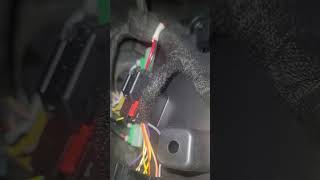
- Connect a scan tool capable of FCA diagnostics (wiTECH, AlfaOBD, Autel MaxiSYS, etc.). Note that for 2018+ models, a Security Gateway (SGW) bypass cable may be required for aftermarket tools. 🎬 See this video to find the SGW bypass cable location.
- Scan all modules for DTCs. Note that B2204 is often accompanied by a suffix, like B2204-55, indicating 'Not Configured'.
- Confirm the primary symptom is a flashing odometer.
- Access the Body Control Module (BCM) and navigate to the 'Proxi Alignment' or 'Vehicle Configuration' function.
- Run the Proxi Alignment procedure. The scan tool will attempt to synchronize the configuration of all modules on the network.
- If the alignment completes successfully, clear all DTCs. Cycle the ignition off, open and close the driver's door, and wait for the vehicle's network bus to go to sleep (often indicated by the light around the USB port turning off). Verify the odometer is no longer flashing.
- If the alignment fails, the scan tool should indicate which module is causing the failure. This module is the primary suspect. For example, a tech on iATN noted their scan tool showed the Steering Column Control Module (SCCM) was not configured, which caused the Proxi to fail.
- Investigate the failing module. Check for software updates (per TSBs 08-033-14 and 08-032-20), check its power and ground connections, and if all else fails, replace the module and repeat the Proxi Alignment.
Parts You'll Likely Need
- Proxi Alignment Service — This is not a physical part, but the software procedure that is the required fix in most cases. It re-synchronizes the vehicle's computer modules.
OEM price range: $150-$300
Aftermarket price range: $100-$250 - Radio Head Unit
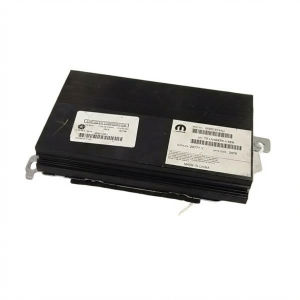
(OEM #68228453AF, 68258929AB (Examples, VIN specific))— If the Proxi Alignment fails and points to the radio, the radio itself may be faulty or have incompatible software. TSB 08-033-14 specifically addresses this issue on 2014 models, requiring a software update before alignment.
Trusted brands: Mopar
OEM price range: $500-$1500
Aftermarket price range: $300-$800 - Power Steering (EPS) Module — TSB 08-032-20 identifies a potential configuration mismatch in the EPS module on 2019-2020 models. If the Proxi Alignment fails and implicates this module, it may require a software update or replacement.
Trusted brands: Mopar
OEM price range: $800-$1200
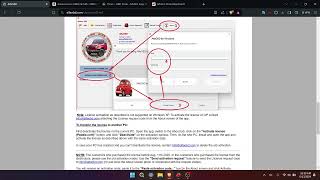
Aftermarket price range: $500-$900 - AlfaOBD Software and OBDLink MX+ Adapter — For advanced DIYers, this combination is the most commonly cited method for performing a Proxi Alignment at home. The software costs around $50, and the adapter is ~$100-150. It allows for both running the alignment and changing vehicle configuration (e.g., for an aftermarket radio).
Trusted brands: AlfaOBD, OBDLink
Aftermarket price range: $150-$200
Related Codes That Often Appear With This One
- U115C-00: Lost Communication with Entertainment Telematic Module (ETM), especially after an aftermarket radio install.
Technical Service Bulletins (TSBs) & Recalls
- 08-032-20: Addresses B2204-55 on 2019-2020 models related to the Power Steering (EPS) module, causing a flashing odometer and loss of lane departure/park assist.
- 08-033-14: Addresses B2204-55 on 2014 models with specific radios, requiring a radio software update before a Proxi Alignment will succeed.
Platform-Specific Known Issues
- On 2014 models, the original radio software could cause B2204 to set after a Proxi Alignment; the fix is to update the radio software via USB before running the alignment again, as detailed in TSB 08-033-14. [TSB 08-033-14].
- On 2019-2020 models built between June and August 2019, the Lane Departure and Park Assist features can become inoperative due to a configuration mismatch in the power steering module, setting code B2204-55. The fix involves a Proxi Alignment followed by an EPS learn procedure. [TSB 08-032-20].
Mechanic-Grade Diagnostic Values
- Vehicle System Voltage Drop — expected: Must remain above 4.5 volts.. Failure: A voltage drop below 4.5 volts for more than 200 milliseconds can cause the Wireless Control Module (WCM) to lose its configuration data, triggering a B2204 code.
- Proxi Alignment Module Status — expected: In tools like AlfaOBD or Appcar DiagFCA, all modules should show 'Proxi OK? - yes'.. Failure: If any module shows 'Proxi OK? - no' after the alignment procedure, that module is the source of the configuration mismatch.
Hidden / Shadow Codes Worth Checking
- B2204-55: ECU Configuration Mismatch - Not Configured. This is the most common suffix and is explicitly mentioned in TSBs 08-032-20 and 08-033-14, indicating a module has not been programmed or aligned to the vehicle's configuration. (see via FCA-compatible scan tools like wiTECH, AlfaOBD, or high-end Autel/Snap-on scanners.)
- B2204-00: ECU Configuration Mismatch. This is a more general version of the code, often seen when an aftermarket part (like a radio) is installed that the BCM cannot identify, leading to a conflict. (see via FCA-compatible scan tools like wiTECH, AlfaOBD, or high-end Autel/Snap-on scanners.)
Scan Tool Commands That Help
- wiTECH (Dealer Tool): Proxi Configuration Alignment — This is the primary function used to resolve B2204. It synchronizes the configuration data from the BCM to all other modules on the network. It's found under the 'Guided Diagnostics' tab.
- wiTECH (Dealer Tool): Restore Vehicle Configuration — This function should be used before a Proxi Alignment if certain features (like Navigation) are missing. It restores the BCM's master configuration list from a backup, which can resolve issues before attempting to align other modules.
- wiTECH (Dealer Tool): Reset ECU — Used on a specific module (like the WCM) if it is causing a no-start condition along with B2204. This forces the individual module to relearn its configuration from the BCM.
- AlfaOBD / Appcar DiagFCA: Proxi Alignment — This is the DIY/aftermarket equivalent of the dealer function. The user selects 'Body Computer', connects, and runs the 'Proxi alignment' routine. The software displays a list of all modules and their configuration status, which is useful for identifying the problem module if the alignment fails.
Wiring & Ground Locations
- Body Control Module (BCM) / Gateway — The BCM serves as the central gateway and is located at the left end of the dashboard, accessible after removing lower dash panels.. The BCM hosts the master vehicle configuration. All Proxi Alignment procedures are initiated by connecting to the BCM. A poor connection or faulty BCM can prevent alignment.
- CAN Bus Star Connectors — These are junction points for the CAN bus wiring. On a 2016 Cherokee, star connectors are located under the center console and under the passenger side glovebox.. A fault at a star connector (corrosion, loose pin) can disrupt communication for multiple modules, potentially causing a B2204 code and Proxi alignment failure. They are a key diagnostic point for network issues.
- Drivetrain Control Module (DTCM) — Located in the rear cargo area, near the spare tire. The plastic trim must be removed for access.. As a networked module, a faulty DTCM or one with a mismatched VIN can cause the B2204 code and a flashing odometer.
- Comfort Seat Wheel Module (CSWM) — Located under the passenger seat.. This is another module on the network that must be properly configured. A failure here can cause the Proxi alignment to fail.
- Security Gateway Module (SGW) — On 2018+ models. Location varies, with sources indicating it can be behind the radio or behind the OBD-II port/driver's side lower dash.. The SGW blocks write commands (like Proxi Alignment) from non-authenticated scan tools. A bypass cable is required for any aftermarket tool to perform the fix on 2018+ vehicles.
Real Owner Repair Stories
- MHH Auto forum user 'srck' (2014 Jeep Cherokee KL) — Car starts but will not run. Flashing odometer. DTCs B2205 (config mismatch) in BCM and P0631 (incorrect VIN) in TCM after a Proxi Alignment attempt with AlfaOBD.
❌ Tried (didn't work) Running a Proxi Alignment with AlfaOBD., Running a Proxi Alignment with Appcar DiagFCA.
✅ What actually fixed it The user discovered the Engine Control Unit (PCM) had a blank VIN field. The fix was to first write the correct VIN to the PCM, and only then perform the Proxi Alignment procedure again. After this, all codes cleared and the vehicle ran correctly.
Model Year Variations Within This Range
- 2018-2020: Introduction of the Security Gateway (SGW) module. This module prevents unauthorized write access to the vehicle's network. To perform a Proxi Alignment with aftermarket tools (like AlfaOBD or Autel), a physical 12+8 pin SGW bypass cable is required. The SGW is typically located behind the radio or driver's side dash.
- 2019-2020: A mid-cycle refresh introduced a new optional 2.0L turbocharged engine and updated Uconnect infotainment systems. This creates potential for different radio hardware and software compared to earlier models, which can be a factor in B2204 faults related to the radio.
- 2014: TSB 08-033-14 specifically targets 2014 models with RA2, RJ2, or RG2 radios. The original software on these units can cause B2204 to appear after a Proxi Alignment. The fix requires a specific radio software update via USB *before* the alignment will be successful.
Helpful Videos

We Have This Part in Stock





The information in this article is provided for general reference and educational purposes only. Vehicle specifications, procedures, and part compatibility can vary by production date, trim level, and region. Always consult your vehicle's factory service manual and verify part numbers before purchasing or performing repairs. Safety-critical components such as airbags, seat belts, and braking systems should be installed by a qualified professional.
- Jeep CHEROKEE:
- 🎬 Helpful Videos
- 🛍️ Shop This Part
- What's Unique About the 2014-2020 Jeep CHEROKEE
- Diagnostic Flowchart
- Symptoms You May Notice
- Most Likely Causes
- Diagnosis Steps
- Parts You'll Likely Need
- Related Codes That Often Appear With This One
- Technical Service Bulletins (TSBs) & Recalls
- Platform-Specific Known Issues
- Mechanic-Grade Diagnostic Values
- Hidden / Shadow Codes Worth Checking
- Scan Tool Commands That Help
- Wiring & Ground Locations
- Real Owner Repair Stories
- Model Year Variations Within This Range
- 🎟️ Get 5% Off