

B1561 on 2022-2026 Ram 3500: Causes and Fixes for Cellular Antenna 2 Fault
Code B1561 on a 2022-2026 Ram 3500 means there's an electrical fault with the Cellular Antenna 2, part of the Uconnect 5 system. This usually triggers a "Uconnect Box Requires Service" message. The most common fix is inspecting and securing the antenna cable connections at the antenna base and the Telematics Box Module (TBM), which is located behind the glove box, next to the passenger airbag.
- B1561 points to a problem with Cellular Antenna 2, not necessarily the main Uconnect radio or computer.
- The most common symptom is a "Uconnect Box Requires Service" message on your screen.
- Before buying any parts, thoroughly inspect the antenna wiring at the back of the radio/TBM and at the antenna base.
- Do not replace the expensive Telematics Box Module (TBM) unless all wiring and antenna checks have been completed.
- Check for any available software updates, as they can sometimes resolve these error messages.
What's Unique About the 2022-2026 Ram 3500

On the fifth-generation Ram Heavy Duty (DT platform), the Uconnect 5 system is deeply integrated with the vehicle's network. This B1561 code is a common issue, frequently addressed in multiple Technical Service Bulletins (TSBs) issued by the manufacturer. The problem often isn't the expensive Telematics Box Module (TBM) itself, but rather the simple wiring and connections running to the antennas. TSBs repeatedly advise technicians to check for loose connections or damaged wiring before replacing any major components. Customer Satisfaction Notification Z91 confirms the TBM is located on a bracket bolted to the Instrument Panel (IP) carrier, next to the passenger airbag.
Diagnostic Flowchart
Tap your situation to follow the diagnostic path that matches what you're seeing on this vehicle.
Symptoms You May Notice

- "Uconnect Box Requires Service" message on the infotainment screen.
- "Uconnect Box Requires Service/Wifi Unavailable" pop-up message.
- Loss of cellular-dependent features like in-vehicle Wi-Fi hotspot, SOS/Assist buttons, and remote vehicle functions through the smartphone app.
- Red light on the overhead SOS/Assist buttons.
- GPS navigation showing incorrect vehicle location or being unable to get a signal (often when B1562 is also present).
- Replacing the Telematics Box Module (TBM) without first thoroughly checking the antenna wiring, connections, and software versions. TSBs explicitly state that an intermittent harness connection is a more likely cause and to not replace the TBM if the issue cannot be duplicated.
Most Likely Causes

- Loose or disconnected antenna cable 🔴 High Probability Manufacturer TSBs specifically call out "Antenna loose connection" as a primary cause for this group of codes. Vibrations and trim removal/reinstallation for other work can lead to these connections becoming unsecured at the TBM or the antenna itself.
How to confirm: Visually inspect and physically check the antenna cable connections. The Telematics Box Module (TBM) is located behind the glove box area, mounted to the instrument panel carrier next to the passenger airbag, as detailed in service campaign Z91. TSB S228A000005 specifically notes that Cellular Antenna 2 is the IP (Instrument Panel) antenna, which is also accessed through the glove box opening. Ensure connectors are fully seated and locked.
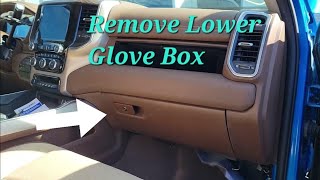
Typical fix: Securely reconnect the loose cable. Ensure connector locks are fully engaged. This often requires removing the glove box assembly for access. 🎬 Watch: How to quickly remove the lower glove box for access.
Est. part cost: $0 - Damaged or shorted antenna wiring 🟡 Medium Probability The antenna cable is routed through the dashboard and pillars, where it can be pinched or chafed during assembly or subsequent repairs, causing a short or open circuit.
How to confirm: Perform a continuity and resistance test on the antenna cable with a multimeter after disconnecting it from both the TBM and the antenna. Check for shorts to ground or power. TSB S228A000005 advises checking for cable pinch or damage.
Typical fix: Repair or replace the damaged section of the antenna cable. In many cases, the entire antenna assembly, which includes the cable, must be replaced.
Est. part cost: $20-$100 - Faulty Cellular Antenna 2 🟡 Medium Probability
How to confirm: If the wiring tests good, the antenna itself may have an internal failure. A dealership can use a test antenna to connect directly to the TBM; if the code disappears, the vehicle's antenna is faulty. The Cellular 2 antenna is identified as the IP (Instrument Panel) antenna and is accessed by removing the glove box.
Typical fix: Replace the faulty antenna. The Cellular 2 antenna is located in the instrument panel.
Est. part cost: $50-$150 - Outdated Telematics Box Module (TBM) or Radio Software ⚪ Low Probability Ram has issued several software updates via Over-The-Air (FOTA) or dealer installation to address various Uconnect bugs, including false error messages. TSB 08-071-26 specifically lists reprogramming the TBM with the latest software as the repair for B1561-11.
How to confirm: A dealer can check the current software version against the latest available updates using a wiTECH scan tool. Some updates may address the conditions that trigger this code.
Typical fix: Update the TBM and/or radio software to the latest version. This can sometimes be done over-the-air (FOTA) or may require a dealer visit.
Est. part cost: $0 if done via FOTA, or shop labor cost if done at a dealer.
Rare But Worth Checking
- Faulty Telematics Box Module (TBM): This is the control unit that processes the antenna signals. While possible, TSBs repeatedly warn against replacing the TBM unless all other possibilities (wiring, antenna, software) have been exhausted. It's more likely to be the cause if accompanied by code B22A9-96 (Internal Performance Failure). In some cases, an incorrect TBM may have been installed from the factory, as noted in Customer Satisfaction Notification Z91.
Diagnosis Steps

- Read all Diagnostic Trouble Codes (DTCs) from all vehicle modules using a capable scan tool. Note if B1560, B1562, or B22A9 are also present.
- Check for any available Over-The-Air (FOTA) software updates for the Uconnect system by navigating through the radio menus. Also, have a dealer verify if any TBM-specific software flashes, like TSB 08-071-26, are applicable.
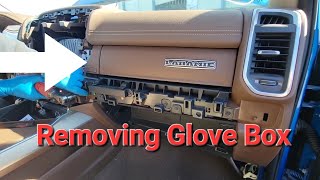
- Gain access to the Telematics Box Module (TBM). On these trucks, this involves removing the upper and lower glove box assemblies. 🎬 See this walkthrough for removing the upper glove box on Laramie trims. Service campaign Z91 provides a detailed procedure.
- Visually inspect the antenna connections at the TBM. There will be multiple coaxial connectors. Look for loose connectors, damaged pins, or pushed-out terminals. Firmly reseat all connections.
- Locate and inspect the Cellular 2 antenna, which TSB S228A000005 identifies as the IP (Instrument Panel) antenna. It is also located behind the glove box, often mounted to the IP support structure. Check its connection.
- If connections look good, disconnect the antenna cable from the TBM and use a multimeter to test the cable for continuity and for shorts to ground or power, following a procedure similar to the one outlined for radio antennas.
- If wiring and connections are confirmed to be good, the antenna itself is the next most likely point of failure. A temporary swap with a known-good antenna is the most definitive test.
- Only consider replacing the TBM if all wiring, antenna, and software update possibilities have been exhausted and the code remains active.
Parts You'll Likely Need
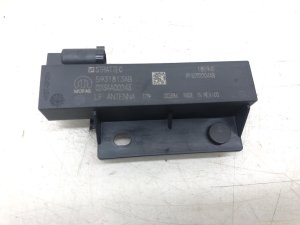
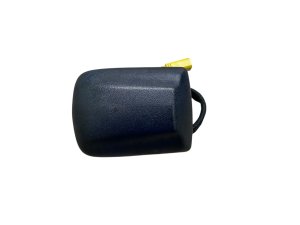
- Cellular Antenna 2 (IP Antenna)
(OEM #68432310AA (This is a commonly cited part number for an IP-mounted antenna in this family, but always verify with VIN before ordering))— The antenna itself can fail internally, causing an open or shorted circuit. TSB S228A000005 identifies Cellular Antenna 2 as the IP (Instrument Panel) antenna.
Trusted brands: Mopar
OEM price range: $50-$150
Related Codes That Often Appear With This One
- B1560 — This code indicates a fault with Cellular Antenna 1. Since both antennas are part of the same system and share similar wiring paths and are connected to the same TBM, a problem affecting one can often affect the other.
- B1562 — This code is for a GPS antenna fault. The GPS and cellular antennas are often housed in the same physical unit (the 'shark fin' on the roof) or have wiring routed together, so a loose connection or damage can trigger multiple antenna codes.
- B22A9 — This code indicates an internal performance failure of an ECU, in this case, the TBM. It often appears with the antenna codes when the TBM is struggling to communicate with its peripheral components or has an internal software or hardware fault.
Technical Service Bulletins (TSBs) & Recalls

- 08-071-26: Defines B1561-11 as Cellular Antenna 2 - short to ground and specifies the fix is to reprogram the TBM with the latest software.
- OTHERDOC_134 & OTHERDOC_132: Link B1561 to "Antenna loose connection" and the "Uconnect Box Requires Service" pop-up.
- S228A000005: Details troubleshooting for B1561-11 (short to ground) and B1561-13 (open or short), advising to check harness connections and not replace the TBM for intermittent issues.
- S2508000100: Associates B1561 with an intermittent "Uconnect Box Requires Service" message.
- Z91: A customer satisfaction notification that, while addressing an incorrect TBM part, provides invaluable, detailed instructions and diagrams for accessing the TBM and instrument panel
Platform-Specific Known Issues
- Multiple Technical Service Bulletins have been released for this issue, including S228A000005, 08-071-26, and others provided by NHTSA. They consistently point to the "Uconnect Box Requires Service" message being tied to antenna circuit faults (B1560, B1561, B1562).
- Technicians are specifically advised by Ram not to replace the Telematics Box Module (TBM) for intermittent faults, as the cause is most likely a harness or connection issue.
- A detailed procedure for accessing the TBM and nearby antennas is outlined in Customer Satisfaction Notification Z91, which involves extensive disassembly of the glove box area.
Hidden / Shadow Codes Worth Checking
- B1561-11: Cellular Antenna 2: Circuit Short To Ground. The control module detects that the antenna circuit is connected to ground for a specified period. (see via A professional scan tool like wiTECH is required to read manufacturer-specific sub-codes.)
- B1561-13: Cellular Antenna 2: Circuit Open or Short to Battery. The control module determines an open circuit (lack of connection) or a short to power via lack of bias voltage or low current flow. (see via A professional scan tool like wiTECH is required to read manufacturer-specific sub-codes.)
Scan Tool Commands That Help
- wiTECH or equivalent dealer-level scan tool: ECU Reset / TBM Reset — After clearing DTCs, an ECU reset can be performed to force the module to re-initialize. This is often a necessary step after checking connections or replacing a component.
- wiTECH and Mopar Special Tool 9977-6-CELL: Test Antenna Substitution — To definitively diagnose a faulty antenna or wiring. Disconnect the vehicle's antenna from the TBM and connect the known-good test antenna. If the DTC B1561 no longer sets, the fault is in the vehicle's original antenna or its cabling. If the code remains, the issue is more likely the TBM itself.
Wiring & Ground Locations
- Antenna Jumper Connector — On previous generation trucks, the in-line jumper connector for the roof antenna harness was located behind the passenger side kick panel or behind the passenger side A-pillar trim. This is a likely location to check for loose connections on the current generation as well.. This connector is a common point of failure or intermittent connection between the TBM and the roof/IP antenna. A loose connection here will cause an open circuit (B1561-13).
- TBM Antenna Connectors (FAKRA) — On the back of the Telematics Box Module (TBM) behind the glove box. Cellular antenna connectors are typically a Claret Violet (purplish) color on Stellantis vehicles.. This is the primary connection point. TSBs repeatedly advise checking for proper seating, damaged connector locks, and pushed-out terminals at this location.
Real Owner Repair Stories
- RAM TRX Forum user (2022 Ram 1500 TRX) — "Uconnect Box requires service" message on the radio screen.
❌ Tried (didn't work) Initial replacement of the Telematics Box Module (TBM) did not immediately fix the problem; the error message returned while still at the dealership.
✅ What actually fixed it The issue resolved itself by the following morning. This suggests that after a TBM replacement, the system may require a full sleep/wake cycle or a period of time to communicate with Uconnect servers and re-provision itself before the fault clears permanently. - Reddit user jeffjeep88 (Ram Truck (year/model not specified)) — "Uconnect Box Requires Service" message.
✅ What actually fixed it A simple battery disconnect for 2-3 minutes to reset all modules. While not a guaranteed fix for a hard fault, it can resolve intermittent software glitches that may trigger the message without a true hardware failure.
OEM Part Supersession History
68541934AB, 68541934AC, 68541934AD, 68541934AF, 68571287AA, 68571287AB→68604984AA— Standard part evolution for bug fixes, hardware revisions, or supplier changes.
Heads up: Applies to Ram 3500/4500/5500 Chassis Cab models. The new part is a direct replacement for the older numbers.68541933AB, 68541933AC, 68541933AD, 68541933AF, 68571285AA, 68571285AB→68604980AA— Standard part evolution for bug fixes, hardware revisions, or supplier changes.
Heads up: Applies to Ram 1500 models, but shows the pattern of frequent TBM part number updates during this period.
Model Year Variations Within This Range
- 2022: A Firmware-Over-The-Air (FOTA) update released in mid-2023 had different installation paths depending on the vehicle. 2022 Ram 1500 (DS) models required a two-step update to get to version 5.39.1, while 2022 Ram HD trucks (DJ, D2) updated directly to 5.39.1. This highlights that software handling can differ between light-duty and heavy-duty models even within the same model year.
Helpful Videos
We Have This Part in Stock



The information in this article is provided for general reference and educational purposes only. Vehicle specifications, procedures, and part compatibility can vary by production date, trim level, and region. Always consult your vehicle's factory service manual and verify part numbers before purchasing or performing repairs. Safety-critical components such as airbags, seat belts, and braking systems should be installed by a qualified professional.
- Ram 3500:
- 🎬 Helpful Videos
- 🛍️ Shop This Part
- What's Unique About the 2022-2026 Ram 3500
- Diagnostic Flowchart
- Symptoms You May Notice
- Most Likely Causes
- Rare But Worth Checking
- Diagnosis Steps
- Parts You'll Likely Need
- Related Codes That Often Appear With This One
- Technical Service Bulletins (TSBs) & Recalls
- Platform-Specific Known Issues
- Hidden / Shadow Codes Worth Checking
- Scan Tool Commands That Help
- Wiring & Ground Locations
- Real Owner Repair Stories
- OEM Part Supersession History
- Model Year Variations Within This Range
- 🎟️ Get 5% Off