

B1561 on 2022-2026 Ram 1500: Cellular Antenna 2 (IP Antenna) Circuit Fault Explained
This code indicates a short to ground in the Cellular Antenna 2 circuit, which is part of the Uconnect system. It almost always triggers a "Uconnect Box Requires Service" message. TSBs reveal this antenna is located in the instrument panel (IP), not the roof's shark fin. The most common cause is a loose connection at the antenna or the Telematics Box Module (TBM) located behind the glove box.
- B1561 on a 2022-2026 Ram 1500 is almost always related to the Uconnect system's Cellular Antenna 2.
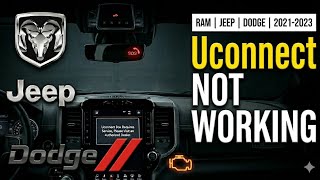
- The most common symptom is a "Uconnect Box Requires Service" message on your screen.
- Before buying any parts, thoroughly check the antenna cable connections at the roof antenna and the Telematics Box Module (TBM). A loose connection is the most frequent cause.
- If connections are secure, the shark fin antenna is the next most likely part to have failed. The TBM itself is rarely the problem.
- This fault will not prevent you from driving the truck, but telematics features like the mobile app and SOS will not work.
What's Unique About the 2022-2026 Ram 1500

On the 5th generation Ram 1500 and its platform mates, this code is a well-documented issue directly addressed by several manufacturer Technical Service Bulletins (TSBs). Unlike generic circuit faults, the problem is very frequently traced back to an intermittent connection at the IP-mounted antenna or the TBM itself, rather than a more complex wiring issue. TSB S228A000005 specifically distinguishes between the roof antenna (Cell 1) and the IP antenna (Cell 2), making diagnosis for B1561 more straightforward by pointing directly to the dash area components and their immediate connections.
Diagnostic Flowchart
Tap your situation to follow the diagnostic path that matches what you're seeing on this vehicle.
Symptoms You May Notice
- "Uconnect Box Requires Service" message on the radio display. 🎬 Watch: A quick overview of the Uconnect Box Service fix
- Loss of cellular-based Uconnect services (e.g., remote start from app, SOS calling, vehicle tracking).
- In some cases, the TBM may fail to enter sleep mode, potentially causing a battery drain.
- GPS, satellite radio, or other antenna functions may be intermittently affected if the root cause is a loose main connector at the TBM.
- Replacing the radio/head unit. The radio is separate from the Telematics Box Module (TBM) that sets this code.
- Replacing the TBM before thoroughly checking the antenna and its wiring. STAR Case S2108000016 explicitly advises against replacing the TBM if the issue cannot be duplicated or the code is not active.
- Replacing the Shark Fin (Roof) Antenna. TSBs clarify that B1561 refers to the Cellular Antenna 2, which is located in the instrument panel, not the roof.
Most Likely Causes

- Loose or Damaged Antenna Connection (at TBM or IP Antenna) 🔴 High Probability Multiple TSBs and STAR cases specifically call out loose connections at both the IP antenna base and the Telematics Box Module (TBM) as the primary cause. STAR Case S228A000005 explicitly states that if the code is stored (not active), the cause is most likely an intermittent harness connection and warns not to replace the TBM.
How to confirm: Access the TBM behind the glove box. Inspect all coaxial cable connections at the back of the TBM and at the base of the IP-mounted antenna. Ensure they are fully seated and the locking tabs are engaged. Check for any signs of damage, pinched cables, or corrosion.
Typical fix: Reseat the connector(s) securely. If a connector is damaged, it may need to be repaired or the antenna pigtail/cable replaced.
Est. part cost: $0 - Faulty IP Cellular Antenna (Cell 2) 🟡 Medium Probability The antenna assembly itself can fail internally, causing a short. This is the next logical part to replace after confirming connections are secure.
How to confirm: After verifying connections are good, the official diagnostic step is to connect a known-good test antenna (special service tool 9977-6-cell) to the Cell 2 port on the TBM. If the code does not return with the test antenna, the vehicle's IP antenna is faulty.
Typical fix: Replace the IP-mounted cellular antenna.
Est. part cost: $50-$150 - Damaged Antenna Coaxial Cable ⚪ Low Probability The cable runs from the TBM to the antenna's location within the dash. It can be pinched or chafed during vehicle assembly or subsequent repairs, though this is less common than a simple loose connector.
How to confirm: Perform a continuity test on the cable with a multimeter to check for a short to ground between the center pin and the outer shield. STAR Case S228A000005 advises checking harness continuity and looking for cable pinch or damage. A resistance reading below 30k Ohms between the signal circuit and ground indicates a short.
Typical fix: Replace the damaged antenna cable, such as Mopar P/N 68483935AA.
Est. part cost: $50-$100 - Faulty Telematics Box Module (TBM) ⚪ Low Probability While less common, an internal failure of the TBM can incorrectly report an antenna fault. This is often accompanied by other codes, like B22A9-96 (ECU Internal Performance). Forum users have reported having TBMs replaced, sometimes successfully, sometimes not.
How to confirm: This is the last step in diagnosis. If the wiring and antenna have been proven good with a test antenna, the TBM is the likely culprit. A dealership-level scan tool is needed to confirm and program a replacement.
Typical fix: Replace the Telematics Box Module. This requires programming by a dealer using the 'TBM Replacement Routine' in wiTECH.
Est. part cost: $300-$600
Rare But Worth Checking
- Outdated TBM or Radio Software: TSB S228A000005 advises checking that both the TBM and Radio software are up to date before proceeding with hardware replacement. TSB 24-001-23 details an update to version 5.39.1 to fix various Uconnect issues.
- Backend Server Issue: At least one forum user reported being told by RAM Connect that the issue could be fixed on their end, suggesting a possible server-side or provisioning problem, though this is unconfirmed.
Diagnosis Steps

- Verify the "Uconnect Box Requires Service" message is present on the display.
- Scan the Telematics Box Module (TBM) for DTCs. Confirm if B1561-11 (Short to Ground) or B1561-13 (Circuit Open) is Active or Stored. If Stored, the issue is likely an intermittent connection.
- Using a dealer tool (wiTECH), check if the TBM and Radio have the latest software versions and update if necessary.
- Perform a hard reset by disconnecting the vehicle's negative battery terminal for 15-20 minutes. Reconnect and see if the code returns. This sometimes temporarily clears software glitches.
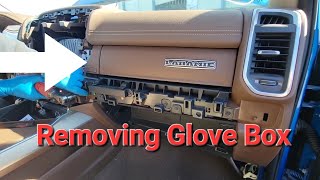
- Gain access to the TBM. Customer Satisfaction Notification Z91 shows it is located behind the glove box, mounted to the instrument panel carrier. This requires removing the glove box and side/mid trim panels. 🎬 Watch: Step-by-step guide to removing the upper glove box
- Unplug all harness connections at the TBM, antenna, and any inline connectors. Visually inspect the coaxial cable connections for looseness, damage (pinched cables), or bent/pushed-out terminals.
- Reseat all connections firmly. Clear codes, perform an ECU reset, and turn the ignition off for at least 10 seconds before retesting.
- If the code returns as Active, disconnect the Cell 2 antenna cable from the TBM. Use a multimeter to test the antenna cable for a short to ground. A reading below 30k Ohms indicates a short.
- Connect a known-good test antenna (special service tool 9977-6-cell) to the Cell 2 port on the TBM. If the code clears and does not return, the original IP antenna is faulty.
- If the code persists with a good test antenna and verified good wiring, the Telematics Box Module (TBM) is the most likely cause of the fault.
- If the TBM is replaced, it must be programmed using the "TBM Replacement Routine" in the wiTECH scan tool.
Parts You'll Likely Need

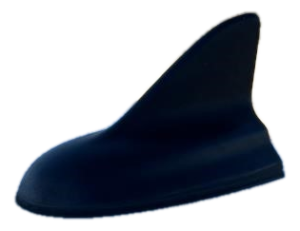
- Shark Fin Antenna Assembly (Cellular 1, GPS, SAT)
(OEM #68475114AA (supersedes 68366538AA))— While not the direct cause of B1561, this part is frequently misdiagnosed or replaced alongside other antenna work. It houses Cellular Antenna 1 (B1560) and the GPS antenna (B1562). A loose connection here or at the TBM can cause multiple codes.
Trusted brands: Mopar
OEM price range: $150-$250
Aftermarket price range: $100-$180 - IP Cellular Antenna (Cell 2) — This is the specific antenna that sets the B1561 code. It is located inside the instrument panel. Part number is not widely published and may be part of a larger assembly.
Trusted brands: Mopar
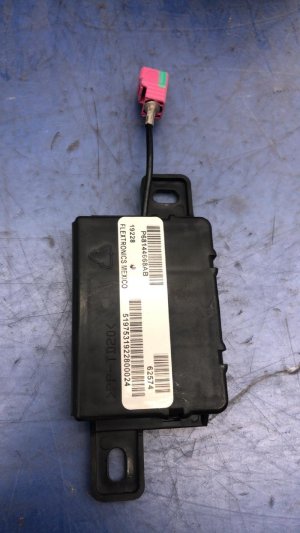
OEM price range: $50-$150 - Telematics Box Module (TBM)
(OEM #68604980AA)— This is the control unit that sets the code. It is replaced as a last resort after wiring and antennas are confirmed good. It requires dealer programming after installation.
Trusted brands: Mopar
OEM price range: $300-$600
Related Codes That Often Appear With This One
- B1560 — This is the code for a Cellular Antenna 1 (Roof Antenna) circuit fault. A problem with the main TBM connector or a larger harness issue could potentially trigger faults for both antennas.
- B1562 — This code is for a GPS antenna fault. The GPS antenna is housed in the shark fin unit, but its wiring also leads to the TBM. A loose TBM connection could cause multiple antenna codes simultaneously.
- B22A9 — This code indicates an internal performance failure of the ECU, in this case, the Telematics Box Module (TBM). If you see this code alongside B1561, it significantly increases the likelihood that the TBM itself is the problem.
Technical Service Bulletins (TSBs) & Recalls

- 08-067-26: Notes B1561-11 as Cellular Antenna 2 Short To Ground.
- 08-070-26: Defines B1561-11 as Cellular Antenna 2-Circuit Short To Ground.
- S2508000100: Links B1561 to the intermittent "Uconnect Box Requires Service" message.
- OTHERDOC_132 & OTHERDOC_146: Attribute B1561 to a loose antenna connection causing the service message.
- S228A000005: Links the service message to B1561-11 and B1561-13, advises checking connections, and warns against replacing the TBM for intermittent/stored codes.
- S2108000016: Provides diagnostic guidance for B1561-11 and B1561-13, including using a test antenna.
- Z91: Details the TBM replacement procedure and location.
- 24-001-23 Rev. B: Details a TBM software update to fix Uconnect service messages.
Platform-Specific Known Issues
- A series of STAR cases and TSBs from Ram directly link the "Uconnect Box Requires Service" pop-up message to DTCs B1560, B1561, and B1562, attributing the cause to loose antenna connections.
- STAR Case S228A000005 is critical, as it clarifies that B1561 is for the IP-mounted antenna (Cell 2), not the roof antenna. It warns technicians not to replace parts if the DTC is stored (not active), as the cause is most likely an intermittent harness connection.
- Customer Satisfaction Notification Z91 provides a detailed guide for replacing the TBM, confirming its location behind the glove box for the 2022 Ram 1500.
Mechanic-Grade Diagnostic Values
- Antenna Signal Circuit to Ground Resistance — expected: Infinite or very high resistance (above 30k Ohms).. Failure: Resistance below 30k Ohms indicates a short to ground in the antenna or its coaxial cable.
- Antenna Coaxial Cable Shield to Chassis Ground — expected: Less than 1.0 Ohm.. Failure: High or infinite resistance indicates a poor ground connection for the antenna system.
Hidden / Shadow Codes Worth Checking
- B1561-11: Cellular Antenna 2: Circuit Short To Ground. This is the most common variant of the code. (see via A dealership-level scan tool like wiTECH is required to see the specific sub-code or failure type.)
- B1561-13: Cellular Antenna 2: Circuit Open. This indicates a break in the wiring or a completely disconnected antenna. (see via A dealership-level scan tool like wiTECH is required to see the specific sub-code or failure type.)
Scan Tool Commands That Help
- wiTECH 2.0: TBM Replacement Routine — This function, found under the TBM2 icon's 'Misc. Functions' menu, is required after physically replacing the Telematics Box Module (TBM) to program the new module to the vehicle.
- wiTECH 2.0: ECU Reset — STAR Case S2108000016 recommends performing an ECU reset after clearing DTCs to ensure the module re-establishes communication and confirms if the fault is still present.
Wiring & Ground Locations
- Telematics Box Module (TBM) — Located behind the glove box, mounted to the instrument panel carrier/reinforcement bar.. This is the module that sets the code and is the central connection point for all antenna wiring. Access is required to check all coaxial and harness connections.
- IP Cellular Antenna (Cell 2) — Located within the instrument panel (dashboard), separate from the roof antenna.. This is the specific antenna monitored by code B1561. A loose connection at the antenna base itself can cause the fault.
- Chassis Grounds — Specific ground point designators (e.g., G-numbers) for the TBM antenna circuits are not detailed in publicly available documents. General IP grounds are located in the kick panel areas and on the firewall.. A 'Short to Ground' code means the signal wire is touching a ground path somewhere. While less common than a faulty component, a wiring harness chafing against a chassis ground point could be a cause.
Real Owner Repair Stories
- RAM TRX Forum user (2022 Ram 1500 TRX) — "Uconnect Box Requires Service" message, non-functional SOS and ASSIST buttons.
❌ Tried (didn't work) Dealer replaced the Telematics unit; the error remained., Dealer advised driving the truck for over 100 miles to let an 'ATT security certificate' update via satellite, which did not resolve the issue.
✅ What actually fixed it The owner called RAM Connect customer service and escalated the issue. The support team acknowledged the problem and fixed it remotely from their end ('on the back end') after about a week. This suggests a backend provisioning or account synchronization issue can trigger the same symptoms as a hardware fault.
"I Checked Everything" — The Actual Cause
- The diagnostic equivalent for this electrical code is when standard hardware troubleshooting fails to find a cause. A user on the RAM TRX Forum reported that after the dealership replaced the Telematics Box Module (a common but expensive guess) with no success, the actual fix was a call to RAM Connect customer service. They resolved the issue remotely, indicating the problem was with the service provisioning or a backend server glitch, not the vehicle's physical hardware. This is a critical finding, as no amount of in-shop hardware testing would have identified or fixed this root cause.
OEM Part Supersession History
68541933AB / AC / AD / AF, 68571285AA / AB→68604980AA— Standard part evolution for hardware revisions and bug fixes.
Heads up: While newer parts are backward compatible, they all require dealer programming with the 'TBM Replacement Routine' in wiTECH to function.
Model Year Variations Within This Range
- 2022-2023: The TBM software has undergone several revisions. TSB 24-001-23 Rev. B, released in mid-2023, details an update from versions 5.13 or 5.25 to 5.39.1. This was intended to fix issues including the 'Uconnect Box requires service' message. A vehicle built earlier in the date range may be running older, more problematic software.
Helpful Videos
We Have This Part in Stock

The information in this article is provided for general reference and educational purposes only. Vehicle specifications, procedures, and part compatibility can vary by production date, trim level, and region. Always consult your vehicle's factory service manual and verify part numbers before purchasing or performing repairs. Safety-critical components such as airbags, seat belts, and braking systems should be installed by a qualified professional.
- Ram 1500:
- 🎬 Helpful Videos
- 🛍️ Shop This Part
- What's Unique About the 2022-2026 Ram 1500
- Diagnostic Flowchart
- Symptoms You May Notice
- Most Likely Causes
- Rare But Worth Checking
- Diagnosis Steps
- Parts You'll Likely Need
- Related Codes That Often Appear With This One
- Technical Service Bulletins (TSBs) & Recalls
- Platform-Specific Known Issues
- Mechanic-Grade Diagnostic Values
- Hidden / Shadow Codes Worth Checking
- Scan Tool Commands That Help
- Wiring & Ground Locations
- Real Owner Repair Stories
- "I Checked Everything" — The Actual Cause
- OEM Part Supersession History
- Model Year Variations Within This Range
- 🎟️ Get 5% Off