

B1560 on 2022-2026 Ram 3500: Cellular Antenna 1 Fault Causes and Fixes
This code indicates a fault with the Cellular Antenna 1 circuit, usually causing a "Uconnect Box Requires Service" message. The most common causes are a loose connection at the Telematics Box Module (TBM), a damaged antenna cable, or a faulty roof-mounted 'shark fin' antenna. Checking connections is the first and most important step.
- B1560 points directly to an electrical fault in the Cellular Antenna 1 circuit.
- The most common symptom is a "Uconnect Box Requires Service" message on the screen.
- Before buying parts, always check for loose antenna connections at the Telematics Box Module (TBM) located behind the glove box.
- This fault does not affect the truck's drivability or primary safety systems.
- If a part is needed, the roof-mounted 'shark fin' antenna is a more likely culprit than the expensive Telematics Box Module.
What's Unique About the 2022-2026 Ram 3500

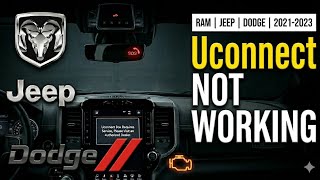
For the fifth-generation Ram (DT), the Uconnect 5 system is deeply integrated. This B1560 code is very specific to the Telematics Box Module (TBM) and its connection to the roof-mounted 'shark fin' antenna. The issue is common enough that Ram has issued multiple Technical Service Bulletins (TSBs) that directly link this code to the "Uconnect Box Requires Service" message that frequently frustrates owners. 🎬 Watch: A quick guide to fixing the Uconnect Box message. TSB S228A000005 explicitly states that every time an antenna open or short DTC is set, the error popup will show on the screen.
Diagnostic Flowchart
Tap your situation to follow the diagnostic path that matches what you're seeing on this vehicle.
Symptoms You May Notice
- "Uconnect Box Requires Service" message on the infotainment screen
- "Wifi Unavailable" pop-up message
- Inoperative SOS or Assist buttons (red light on the overhead console button)
- Failure of remote services (e.g., remote start, lock/unlock) from the Ram app
- Poor or no cellular connectivity for the vehicle's Wi-Fi hotspot
- GPS showing incorrect location or not working at all (if the fault also affects the GPS antenna in the same unit)
- Replacing the radio/head unit. The fault lies within the separate Telematics Box Module and its antenna circuit, not the main infotainment unit.
- Replacing the media hub (USB ports). TSB S268A000008 specifically warns that other communication codes can be misdiagnosed as a media hub issue when the problem is actually wiring between the radio and TBM.
- Assuming the issue is a software glitch that can be fixed with an over-the-air (OTA) update. While software updates are possible, an OTA update cannot complete if the cellular antenna circuit is faulty.
Most Likely Causes

- Loose or disconnected antenna cable 🔴 High Probability TSBs specifically call out checking for loose connections at both the Telematics Box Module (TBM) and the antenna base. Vibrations and prior service work (like a windshield replacement or dash repairs) can lead to connectors not being fully seated. TSB S228A000005 states that intermittent faults are most likely a connection concern.
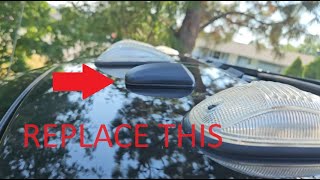
How to confirm: Locate the TBM, which is mounted to the instrument panel carrier behind the glove box, near the passenger airbag. Access it by opening/removing the glove box. Visually inspect and reseat the multi-colored coaxial connectors. Also check the connection at the base of the roof antenna, which may require accessing it by removing the third brake light or partially dropping the rear headliner. 🎬 Watch: This walkthrough shows how to replace the roof antenna.
Typical fix: Firmly reseat the connectors until they click. If the connector lock is damaged, it may need to be repaired or replaced. Some owners have used tape to secure a loose connection as a temporary fix.
Est. part cost: $0 - Damaged antenna cable (short or open circuit) 🟡 Medium Probability The antenna cable runs from the roof, down the A-pillar, and across the dash to the TBM. It can get pinched or chafed during assembly or subsequent repairs, causing a short (B1560-11) or open circuit (B1560-13).
How to confirm: Perform a continuity test on the antenna cable using a multimeter after disconnecting it from both the TBM and the antenna base. Check for continuity from the center pin at one end to the center pin at the other. Then check for continuity of the outer shield. Finally, check for a short by testing for continuity between the center pin and the outer shield; there should be none (an open circuit or 'OL' reading).
Typical fix: Replace the damaged antenna cable assembly. Repairing a coaxial cable is difficult and often not recommended as it can affect signal quality.
Est. part cost: $40-$80 - Failed roof 'shark fin' antenna 🟡 Medium Probability The antenna assembly itself contains electronics that can fail due to moisture intrusion from a failed gasket, physical damage (e.g., car washes, tree branches), or internal defects. The foam gasket at the base is a known failure point that can lead to water leaks into the cab.
How to confirm: After verifying the wiring is good, the next step is to substitute a known-good antenna. A Reddit user noted that replacement is the most likely DIY confirmation method. A dealer may use a 9977-6-CELL-LTE Cell Antenna Test Kit to verify.
Typical fix: Replace the roof-mounted antenna assembly. This involves partially dropping the headliner to access the mounting nut and connectors.
Est. part cost: $65-$110 - Faulty Telematics Box Module (TBM) ⚪ Low Probability While less common, the TBM itself can fail. TSBs often advise against replacing the TBM unless all wiring and antenna issues have been ruled out. In some cases, an incorrect TBM may have been installed from the factory, as noted in Customer Satisfaction Notification Z91 for some 2022 Ram 1500s.
How to confirm: This is a process of elimination. If the antenna and wiring are confirmed to be good, and a Uconnect software update doesn't resolve it, the TBM is the likely culprit. A dealer-level scan tool is needed for advanced diagnostics.
Typical fix: Replace the Telematics Box Module. This part requires programming by a dealership using wiTECH to function with the vehicle.
Est. part cost: $150-$250
Diagnosis Steps
- Confirm the presence of code B1560 using an OBD-II scanner. Note if it is active or stored, and if it has a suffix like '-11' (Short to Ground) or '-13' (Circuit Open).
- Check for any related TSBs in your vehicle's service history. TSBs S228A000005 and 08-071-26 are directly relevant.
- Try a soft reset of the Uconnect system by pressing and holding the power button for 15-30 seconds until the screen reboots. This occasionally clears temporary glitches but is unlikely to fix a hardware fault.
- Disconnect the negative battery cable for at least 5 minutes to reset all vehicle modules.
- Locate the Telematics Box Module (TBM). On 5th Gen Rams, it is mounted behind the glove box. Open the glove box, press the sides to release the stops, and let it hang down to gain access.
- Carefully inspect the coaxial antenna connectors at the TBM. They are often color-coded. Look for loose connections, bent pins, or corrosion. Firmly reseat all connectors, ensuring they 'click' into place.
- If accessible, inspect the connections at the base of the roof antenna. This may require partially dropping the headliner or removing the center high-mount stop lamp (third brake light).
- Reconnect the battery, clear the codes, and cycle the ignition to see if the code and message return.
- If the code returns, disconnect the antenna cable at both ends (TBM and antenna base) and test its integrity with a multimeter set to continuity/resistance. Test for an open in the center conductor and a short between the center and outer shield.
- If wiring is confirmed to be intact, the most likely cause is a faulty roof antenna assembly.
- If replacing the antenna does not resolve the issue, the final step is to suspect a faulty Telematics Box Module (TBM), which will require dealer replacement and programming.
Parts You'll Likely Need

- Roof Antenna Assembly
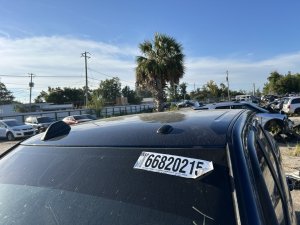
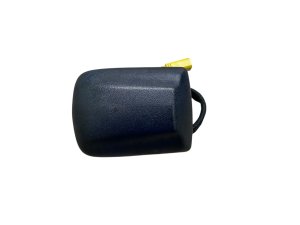
(OEM #68483909AA)— This 'shark fin' unit houses the cellular and GPS antennas and is the most common part to fail, after ruling out simple connection issues. This part number supersedes 68359011AA.
Trusted brands: Mopar
OEM price range: $75-$115
Aftermarket price range: $65-$90 - Telematics Box Module (TBM)
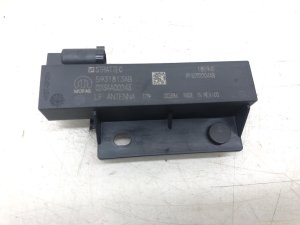
(OEM #68604984AA)— This module is the 'brain' for the telematics system. It is replaced only after wiring and antenna faults are ruled out. This part number supersedes 68571287AB, 68571287AA, and several others. Note: This part requires dealer programming.
Trusted brands: Mopar
OEM price range: $200-$300
Aftermarket price range: $150-$220
Related Codes That Often Appear With This One
- B1561 — This code is for 'Cellular Antenna 2'. Since both antennas are in the same area and connect to the same module (TBM), a fault affecting one can often affect the other (e.g., a loose main connector or damaged harness).
- B1562 — This code is for the GPS antenna circuit. The GPS and cellular antennas are often housed in the same 'shark fin' unit and connect to the TBM, so they share a common failure point. [Bulletin #08-071-26]
- B22A9 — This code indicates an internal performance failure of the TBM. It can appear alongside antenna codes if the module is failing or if the antenna faults are causing the module to report internal errors. [Bulletin #S2508000100, Bulletin #OTHERDOC_134]
Technical Service Bulletins (TSBs) & Recalls

- 08-071-26: Links B1560-11 to a 'Cellular Antenna 1 - short to ground'.
- OTHERDOC_134: Links B1560 to 'Antenna loose connection' and the 'Uconnect Box Requires Service' pop-up.
- OTHERDOC_132: Also links B1560 to 'Antenna loose connection' and the 'Uconnect Box Requires Service' pop-up.
- S228A000005: Mentions B1560-11 (short) and B1560-13 (open) and advises checking connections for intermittent faults.
- S2508000100: Shows B1560 appearing alongside TBM internal failure code B22A9.
- OTHERDOC_148: Links B1560 to 'Antenna loose connection' and potential battery drain if the TBM fails to enter sleep mode.
Platform-Specific Known Issues
- Multiple Technical Service Bulletins (TSBs) exist for the "Uconnect Box Requires Service" message associated with code B1560 and its relatives (B1561, B1562). [Bulletin #08-071-26, #OTHERDOC_134, #S228A000005, #S2508000100]
- TSB S228A000005 Rev. A explicitly advises technicians to check all harness connections, check for cable damage, and to NOT replace the TBM for intermittent faults, as they are most likely due to a connection concern.
- Owner forums are filled with reports of this exact issue. On the RAM TRX Forum, a user noted that even after a TBM replacement, the issue persisted until the next day, suggesting a backend or certificate update may also be involved in some cases.
- On a Reddit thread for r/ram_trucks, a user correctly predicted the fault code was B1560-13 and suggested the repair order: check connections, replace shark fin, then suspect TBM.
Mechanic-Grade Diagnostic Values
- Antenna Cable Resistance (Short Test) — expected: Below 47.5 Ohms. Failure: A resistance reading above 52.5 Ohms indicates an open circuit in the cable.
Hidden / Shadow Codes Worth Checking
- B1560-11: Cellular Antenna 1: Circuit Short to Ground. The TBM has detected that the antenna circuit is shorted to ground for more than 60 seconds. (see via Dealer-level scan tool like wiTECH.)
- B1560-13: Cellular Antenna 1: Circuit Open or Short to Battery. The TBM has detected that the antenna circuit is open (disconnected) or shorted to a power source. (see via Dealer-level scan tool like wiTECH.)
Scan Tool Commands That Help
- wiTECH: Reprogram TBM — Used to update the Telematics Box Module software to resolve certain software-related glitches causing error messages. This is often performed before module replacement. A battery charger supplying 13.2-13.5 volts is required.
- wiTECH: Clear all DTCs — This function is used after a reprogramming event or part replacement to clear any fault codes that were set during the repair process.
- wiTECH: ECU Reset — A general reset command performed after checking connections to see if an intermittent fault will clear. This is often followed by a 10-second ignition off cycle.
Wiring & Ground Locations
- TBM Antenna Connectors — On the Telematics Box Module, located behind the glove box. They are typically multi-colored coaxial connectors.. This is the primary connection point for the antenna cable. A loose or corroded connector here is a high-probability cause for B1560.
- Antenna Base Connectors — Under the headliner at the base of the 'shark fin' antenna assembly. Access often requires removing the third brake light assembly.. This is the other end of the antenna cable. A loose connection here will also cause an open circuit fault (B1560-13).
- Body Ground — While no specific ground point is designated solely for the TBM in public documents, general body grounds are located under the dash, near the A-pillars, and in the passenger-side wheel well area.. A poor ground connection for the TBM could potentially cause a variety of electrical issues, including the B1560-11 short-to-ground code.
Real Owner Repair Stories
- 5thGenRams Forum User (2019 Ram 1500) — Crushed and snapped off the shark fin antenna in a carport.
❌ Tried (didn't work) N/A - The cause was obvious physical damage.
✅ What actually fixed it Replaced the OEM shark fin antenna. The user noted that access to the antenna mounting bolt was possible by removing the third brake light assembly, which was held by four Phillips screws, avoiding the need to fully drop the headliner.
OEM Part Supersession History
68571287AA, 68571287AB, 68541934AB/AC/AD/AF→68604984AA— Standard part revision and consolidation for the Telematics Box Module (TBM).
Heads up: Customer Satisfaction Notification Z91 for some 2022 Ram 1500s indicates that an incorrect TBM may have been installed from the factory, necessitating replacement with the correct part number to restore Uconnect functions. Always verify the correct part for the specific VIN, as programming is required.68359011AA→68483909AA— Standard part revision for the roof antenna assembly.
Helpful Videos
We Have This Part in Stock



The information in this article is provided for general reference and educational purposes only. Vehicle specifications, procedures, and part compatibility can vary by production date, trim level, and region. Always consult your vehicle's factory service manual and verify part numbers before purchasing or performing repairs. Safety-critical components such as airbags, seat belts, and braking systems should be installed by a qualified professional.
- Ram 3500:
- 🎬 Helpful Videos
- 🛍️ Shop This Part
- What's Unique About the 2022-2026 Ram 3500
- Diagnostic Flowchart
- Symptoms You May Notice
- Most Likely Causes
- Diagnosis Steps
- Parts You'll Likely Need
- Related Codes That Often Appear With This One
- Technical Service Bulletins (TSBs) & Recalls
- Platform-Specific Known Issues
- Mechanic-Grade Diagnostic Values
- Hidden / Shadow Codes Worth Checking
- Scan Tool Commands That Help
- Wiring & Ground Locations
- Real Owner Repair Stories
- OEM Part Supersession History
- 🎟️ Get 5% Off