

B1498 on 2021-2026 Chrysler Pacifica: Uconnect Communication Fault Guide
This code indicates a communication problem between your radio and the Uconnect telematics module, often causing a 'Uconnect Box Requires Service' message. The most common causes are a wiring issue between the two components or a software glitch requiring a dealer-installed update. Do not replace the user-facing USB media hub, as this is a common misdiagnosis.
- B1498 on a modern Pacifica means there's a communication problem between the radio and the Uconnect telematics module.
- Do NOT replace the user-facing USB media hub; this is a common misdiagnosis.
- The most likely causes are a wiring fault behind the dashboard or a software issue.
- A trip to the dealer is recommended, as fixing this code often requires special tools for software updates and complex diagnosis.
What's Unique About the 2021-2026 Chrysler PACIFICA

For this generation of Pacifica with the Uconnect 5 system, Chrysler has issued specific technical service bulletins (TSBs) addressing this code. The bulletins clarify that the fault is often misdiagnosed as a problem with the user-facing USB media hub. The actual issue lies in the dedicated USB communication wiring between the main radio unit and the separate telematics module, or in the software of the telematics module itself, which has been the subject of multiple updates.
Diagnostic Flowchart
Tap your situation to follow the diagnostic path that matches what you're seeing on this vehicle.
Generation note: The 2021-2026 Chrysler Pacifica is a significant refresh of the first generation (RU), which began in 2017. This refresh introduced the Uconnect 5 system, and this trouble code and its associated TSBs are specific to these updated 2021+ models and their platform mates.
Symptoms You May Notice

- "Uconnect Box Requires Service, Please Visit an Authorized Dealer" message on the infotainment screen.
- Loss of SOS or Assist call functionality, with a red light on the overhead console buttons.
- Wi-Fi hotspot not working or losing connection.
- Uconnect mobile app features not updating or showing vehicle information.
- Radio or infotainment screen may be unresponsive or black.
- GPS location not updating in the mobile app.
- "Uconnect box backup battery low" message on the radio.
- Replacing the USB Media Hub. TSB S268A000008 explicitly warns technicians that this code is unrelated to the media hub, even though the code description may mention 'USB Hub'. The fault is in the communication line between the radio and the TBM.
Most Likely Causes

- Wiring Fault Between Radio and Telematics Box Module (TBM) 🔴 High Probability A manufacturer TSB (S268A000008) explicitly identifies this as the primary cause. The wiring harness runs from the radio and splits in a 'Y' to the TBM and the media hub, and an open or short circuit can occur in the branch going to the TBM. This can be due to pinched wires behind the dash or loose/corroded connector terminals.
How to confirm: A technician must access the back of the radio and the TBM to perform continuity and voltage checks on the USB communication circuit. Visual inspection for pinched or damaged wires and checking for bent or loose pins in the connectors is also necessary.
Typical fix: Repairing the damaged section of the wiring harness or ensuring connectors are fully seated at the radio and TBM. In some cases, the entire harness may need replacement.
Est. part cost: $0-$150 for wiring repair supplies or a used harness section. - Telematics Box Module (TBM) Software Requires Update 🟡 Medium Probability Chrysler has released multiple TSBs (e.g., 08-175-23) to resolve various Uconnect issues, including the 'requires service' message, by updating the TBM software. These updates address software bugs that can cause communication failures.
How to confirm: A dealer technician connects the vehicle to the wiTECH diagnostic tool to check the current software version of the TBM against the latest available version specified in the TSBs.
Typical fix: Flashing the TBM with the latest software. This can be done at a dealership or sometimes via an Over-The-Air (FOTA) update, though many owners report FOTA updates failing to resolve the issue, requiring a dealer visit.
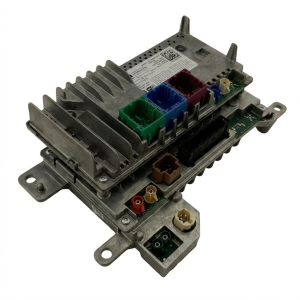
Est. part cost: $0 - Internal Failure of Radio or TBM ⚪ Low Probability While less common than wiring or software, the electronic modules themselves can fail internally. This can be a hardware failure on the circuit board of either the radio or the TBM.
How to confirm: If wiring is confirmed to be good and all software is up to date, the fault is isolated to one of the modules through substitution with a known-good part, following the diagnostic procedure outlined in TSB S268A000008.
Typical fix: Replacement of the Radio Head Unit or the Telematics Box Module. This requires programming to the specific vehicle, which must be done by a dealer.
Est. part cost: $400-$1500+. A new TBM can cost between $270 and $995, depending on the part number.
Diagnosis Steps
- Verify the presence of B1498-13, B1498-19, and/or B1570-93 using a capable OBD-II scanner.
- Check for any applicable Technical Service Bulletins (TSBs) related to the Uconnect system for your vehicle's VIN. Key TSBs are S268A000008 and 08-175-23.
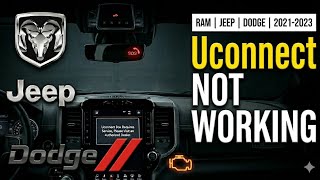
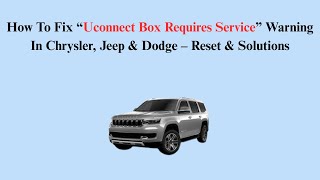
- Perform a soft reset of the Uconnect system by holding the power button for 10-20 seconds until the screen resets. 🎬 See how to perform a reset and other DIY solutions This is a common first step but rarely a permanent fix for this specific code.
- If the code persists, professional diagnosis is required. A technician will first check for software updates for the Telematics Box Module (TBM) and Radio using the wiTECH tool.
- If software is current, inspect the integrity of the USB communication circuit between the Radio and the TBM as per TSB S268A000008. This includes checking for damaged wires and secure connections at both modules.
- Perform continuity and voltage checks on the communication lines as detailed in the service manual.
- If wiring and software are ruled out, the fault is likely an internal failure of the Radio or TBM, requiring replacement and programming.
Parts You'll Likely Need
- Telematics Box Module (TBM)
(OEM #68598934AD (supersedes multiple previous numbers like 68444865AC/AD/AE, etc.), 68423484AC)— If a software update does not fix the issue and the wiring is intact, the module itself may have failed internally.
Trusted brands: Mopar
OEM price range: $270-$995.
Aftermarket price range: N/A - Radio Head Unit — In rare cases where the TBM and wiring are good, the fault may originate in the radio unit that communicates with the TBM.
Trusted brands: Mopar
OEM price range: $800-$1500+
Aftermarket price range: N/A - USB Communication Harness — The harness between the radio and TBM is a primary failure point according to TSB S268A000008. While often repaired, a replacement might be needed if damage is severe.
Trusted brands: Mopar
OEM price range: $75-$200
Aftermarket price range: N/A
Related Codes That Often Appear With This One
- B1570-93 — This code for 'USB Communication No Operation' is listed in the same TSB (S268A000008) and points to the exact same wiring fault between the Radio and the Telematics Box Module.
- B1408-13, B140C-13, B1431-00 — These codes are mentioned alongside B1498-13 in TSB S2008000188 Rev., indicating a broader issue within the infotainment system that may require radio diagnostics or replacement.
Technical Service Bulletins (TSBs) & Recalls

- S268A000008: Uconnect Box Requires Service... With DTCs B1498-13, B1498-19 or B1570-93. Clarifies the fault is between the Radio and TBM, not the media hub.
- S2008000188 Rev.: R1 Radio... With DTC?s B1498-13... Points to radio-related faults.
- 08-175-23: Telematics Box Module (TBM) wiTECH update to 4.36. Addresses the 'Uconnect box requires service' message via a software update for vehicles built on or before June 04, 2023.
Platform-Specific Known Issues
- A known issue documented in TSB S268A000008 points to a communication fault between the Radio and the Telematics Box Module (TBM), which can be misdiagnosed as a media hub failure. The TSB advises checking the USB wiring between the TBM and Radio for opens or shorts.
- Owner experiences confirm that this is a widespread issue across Uconnect 5-equipped vehicles, with many reporting multiple dealer visits. 🎬 Watch: How to resolve common Uconnect connection and software issues Some owners have had success with a TBM software update, while others required a full TBM replacement or wiring harness repair to resolve the 'Uconnect Box Requires Service' message.
Scan Tool Commands That Help
- wiTECH: Restore Vehicle Configuration — This function is required after replacing the Telematics Box Module (TBM) to ensure the new module is correctly configured to the vehicle's options. It is also used to resolve certain software-related communication issues.
- wiTECH: Proxi Configuration Alignment — This procedure must be performed after a 'Restore Vehicle Configuration' or any time a module on the CAN bus is replaced. It synchronizes the configuration of all modules on the network, ensuring they recognize the new or reconfigured TBM.
- wiTECH: Reset ECU (ETM) — After performing a software update or Proxi Alignment, a reset of the Entertainment Telematics Module (ETM, another name for the TBM) may be required to force it to re-initialize and clear persistent faults.
Wiring & Ground Locations

- Telematics Box Module (TBM) — Located behind the glove box. The glove box must be removed to access it.. This is one of the two main modules involved in the B1498 fault. Access is required for connector inspection, wiring tests, and replacement.
- Security Gateway Module (SGM/SGW) — On 2018+ Pacificas, the SGM is located behind the climate control panel, underneath the main infotainment screen.. Aftermarket scan tools require a special bypass cable (often a 12+8 pin adapter) to be connected directly to the SGM to perform bidirectional functions like software flashes or configuration procedures needed to fix this code.
- Radio Connector C1 — The main connector at the rear of the radio head unit.. This connector contains the pins for the USB communication circuit to the TBM. TSB S268A000008 points to a fault in this circuit. The specific pins are Pin 21 (USB_TBM_D+), Pin 22 (USB_TBM_D-), Pin 23 (USB_TBM_VBUS), and Pin 24 (USB_TBM_GND).
- Chassis Ground — A primary chassis ground point is located on the left front frame rail, just inside the front bumper. Other key grounds are located in the driver's kick panel area.. While not a primary cause listed in TSBs, poor ground connections can cause intermittent and difficult-to-diagnose electrical issues in any module, including the radio and TBM. Verifying ground integrity (less than 1 ohm resistance to the negative battery terminal) is a fundamental diagnostic step.
Real Owner Repair Stories
- RAM TRX Forum user (2021 Dodge Durango (platform mate with Uconnect 5)) — Persistent "Uconnect Box Requires Service" message on the display.
❌ Tried (didn't work) Following bulletins to check connections., Over-the-air (OTA) updates.
✅ What actually fixed it The dealer replaced the Telematics Box Module (TBM). The part number ordered was 68541933-AD.
OEM Part Supersession History
68444865AC, 68444865AD, 68444865AE, 68444865AF, 68444865AG, 68444865AH, 68444865AJ→68598934AD— Part revisions to address hardware or software logic flaws.
Heads up: The latest part number, 68598934AD, is the recommended replacement for all previous versions. Using an older, superseded part number, even if new-old-stock, may re-introduce the original fault.68546266AB, 68598934AB, 68598934AC→68598934AD— Part revisions to address hardware or software logic flaws.
Heads up: The latest part number, 68598934AD, is the recommended replacement for all previous versions.
Model Year Variations Within This Range
- 2021-2023 (built on or before June 04, 2023): TSB 08-175-23 specifically targets these model years for a TBM software update to version 4.36 to fix the 'Uconnect box requires service' message. Vehicles built after this date may have the updated software from the factory, making a wiring or hardware fault more likely if the code appears.
Helpful Videos
We Have This Part in Stock




The information in this article is provided for general reference and educational purposes only. Vehicle specifications, procedures, and part compatibility can vary by production date, trim level, and region. Always consult your vehicle's factory service manual and verify part numbers before purchasing or performing repairs. Safety-critical components such as airbags, seat belts, and braking systems should be installed by a qualified professional.
- Chrysler PACIFICA:
- 🎬 Helpful Videos
- 🛍️ Shop This Part
- What's Unique About the 2021-2026 Chrysler PACIFICA
- Diagnostic Flowchart
- Symptoms You May Notice
- Most Likely Causes
- Diagnosis Steps
- Parts You'll Likely Need
- Related Codes That Often Appear With This One
- Technical Service Bulletins (TSBs) & Recalls
- Platform-Specific Known Issues
- Scan Tool Commands That Help
- Wiring & Ground Locations
- Real Owner Repair Stories
- OEM Part Supersession History
- Model Year Variations Within This Range
- 🎟️ Get 5% Off