

B1008 on 2015-2019 GMC Yukon Denali: Front Camera & Lane Assist Faults Explained
On a 2015-2019 GMC Yukon Denali, code B1008 almost always means the front camera for the driver-assist systems can't calibrate, most often due to a recently replaced aftermarket windshield. Before replacing any parts, verify the windshield is a genuine GM part by looking for the 'GM' logo. The fix requires professional calibration after the root cause is addressed.
- B1008 on a Yukon Denali almost always points to a front camera calibration issue, not a broken camera.
- The number one cause is an aftermarket windshield. Check for the 'GM' logo on the glass before attempting any other repair.
- This is not a DIY fix. The repair requires professional-grade scan tools to perform a specific on-road calibration procedure.
- Do not replace the front camera module unless you have definitively ruled out the windshield, obstructions, and mounting issues.
- The vehicle is safe to drive with this code, but be aware that important safety features like Lane Keep Assist and Forward Collision Alert will not work.
What's Unique About the 2015-2019 Gmc YUKON DENALI
The K2XX platform, which includes the 2015-2019 Yukon, is notoriously sensitive to windshield replacements. GM has a formal position statement advising against the use of any non-OEM glass, as aftermarket versions may have different optical clarity, material, and dimensional specifications that interfere with ADAS performance. GM issued multiple Technical Service Bulletins (TSBs) because the ADAS camera system requires the precise optical quality and bracket placement found only on OEM windshields. Aftermarket glass brackets can be misaligned, causing the camera to see the truck's hood, which it interprets as a fault, preventing calibration and triggering the B1008 code. This makes verifying the windshield's authenticity by checking for the 'GM' logo a mandatory first diagnostic step, a unique aspect of this problem on this platform.
Diagnostic Flowchart
Tap your situation to follow the diagnostic path that matches what you're seeing on this vehicle.
Symptoms You May Notice
- "Service Front Camera" message on the driver information center. [⭐ MANUFACTURER TSB — highest authority, 11]
- "Service Lane Departure Warning" message. [⭐ MANUFACTURER TSB — highest authority, 11]
- "Service Lane Keep Assist" message. [⭐ MANUFACTURER TSB — highest authority, 11]
- "Service Driver Assist" message.
- Forward Collision Alert, Lane Departure Warning, and Lane Keep Assist features are inoperative.
- Amber or white indicator lights for the affected safety systems.
- In some related software-fault scenarios, a dead battery or no-crank condition 🎬 Watch: Troubleshooting communication failures and electrical issues on a Yukon. can occur.
- Replacing the Front View Camera Module first. The most common cause is the windshield, not the camera hardware. TSBs specifically advise against replacing the camera until all other possibilities are exhausted.
Most Likely Causes
- Aftermarket Windshield Installed 🔴 High Probability The front camera's mounting bracket on aftermarket windshields is often positioned incorrectly, causing the camera's view to be partially blocked by the hood, which prevents calibration. GM TSBs explicitly state that some aftermarket windshields do not properly position the camera.
How to confirm: Inspect the lower corner of the windshield (usually the passenger side) for a 'GM' logo. If the logo is missing, the windshield is aftermarket. This is the primary check recommended by GM service bulletins.
Typical fix: Replace the aftermarket windshield with a genuine GM OEM part, followed by a professional ADAS camera calibration. One owner on TahoeYukonForum noted this was the only solution after an aftermarket glass failed to work.
Est. part cost: $500-$1200 - Camera View Obstructed 🟡 Medium Probability The camera's view must be perfectly clear to function. Dirt, stickers, bug deflectors, heavy tint, or even heavy rain can trigger a fault.
How to confirm: Visually inspect the windshield area in front of the camera, both inside and out, for any dirt, mud, snow, ice, stickers, or heavy tint. TSB PIT6473C provides a specific cleaning procedure for the lens and inside of the windshield.
Typical fix: Clean the windshield thoroughly. Remove any obstructions.
Est. part cost: $0 - Camera Recalibration Required 🟡 Medium Probability Calibration can be lost after events like windshield replacement, collision repair, or even disconnecting the camera. The B1008 Sym 4B code specifically means 'Calibration Not Learned'. The calibration is a dynamic 'learn' procedure performed while driving.
How to confirm: This is confirmed when a professional attempts to perform the 'Front View Camera Module Calibration' with a GDS2 or equivalent scan tool and the procedure fails or the code returns.
Typical fix: Perform a dynamic (on-road) ADAS camera recalibration using specialized diagnostic equipment. This requires driving on a well-marked road at speeds between 35-56 MPH. 🎬 See how a dynamic ADAS calibration is performed on-road.
Est. part cost: $0 - Improperly Mounted Camera or Windshield ⚪ Low Probability Poor workmanship during a previous repair can leave the camera or the entire windshield misaligned. OEM windshields use alignment pins to prevent this, but aftermarket ones often do not.
How to confirm: Verify the camera module is fully seated in its bracket and the bracket is secure on the windshield. Check that the gap between the top of the windshield and the roof is 3.6 mm (+/- 1 mm) and that the glass is not sitting proud of the roofline.
Typical fix: Reseat the camera module correctly. If the windshield is misaligned, it may need to be professionally re-installed or replaced.
Est. part cost: $0-$1200
Rare But Worth Checking
- Faulty Front View Camera Module: This is rare. TSB #PIT5535E explicitly warns technicians NOT to replace the camera module if B1008 Sym 4B is the only code set. Only consider this after all other causes, especially the windshield, have been ruled out. A YouTube case study on a 2019 Yukon showed that after all other steps failed, 🎬 Watch: A case study on diagnosing a faulty camera module. the module itself was faulty and required replacement.
- Software Glitch / Parasitic Drain: TSB 23-NA-095 (which supersedes PIT5912G) notes that a software issue, sometimes triggered by an OnStar task, can cause the camera to become inoperative and may even lead to a dead battery. The fix is a software update for the Front Camera Module. In some cases, a simple vehicle restart can temporarily clear the message.
Diagnosis Steps
- Scan the vehicle with a professional-grade tool that can read manufacturer-specific codes and symptom bytes (e.g., B1008 Sym 4B).
- Thoroughly clean the windshield area in front of the camera, both inside and out.
- Inspect the windshield for a 'GM' logo, typically in the lower passenger-side corner, to determine if it is an OEM or aftermarket part. This is the most critical step.
- If the windshield is aftermarket, it is the most likely cause. Plan for replacement with an OEM part before proceeding.
- If the windshield is OEM, check for proper mounting. Ensure the gap between the windshield and roof is 3.6 mm (+/- 1 mm) and that the glass is not sitting proud of the roofline.
- Verify the camera module is securely clipped into its bracket on the windshield.
- If all physical checks pass, attempt a 'Front View Camera Module Calibration' using a GM GDS2 or equivalent scan tool. This is a dynamic (on-road) procedure requiring specific driving conditions.
- If calibration fails and the windshield is confirmed to be OEM and properly installed, investigate for a software update per TSB 23-NA-095 before condemning the camera.
- If all other steps fail, the camera module itself may be faulty.
Parts You'll Likely Need
- OEM Windshield — The most common cause of B1008 is an aftermarket windshield with an improperly positioned camera bracket, which prevents successful calibration. GM explicitly does not approve of aftermarket glass for ADAS-equipped vehicles.
Trusted brands: GM Genuine Parts
OEM price range: $500-$1200
Aftermarket price range: $300-$700 - Front View Camera Module
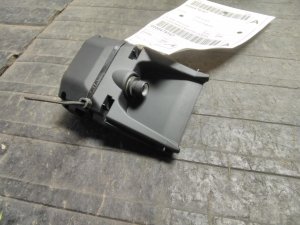
(OEM #23387263)— This part should only be replaced after confirming the windshield is OEM and properly installed, and all calibration attempts have failed. Part numbers are frequently superseded; always verify with a VIN. Other possible part numbers include 84517633 and 84586312 depending on year and options.
Trusted brands: ACDelco, GM Genuine Parts
OEM price range: $170-$280
Aftermarket price range: $100-$180
Related Codes That Often Appear With This One
- B1008 Sym 4B — This is the most common and specific version of the code for this issue, where '4B' indicates 'Calibration Not Learned'. A generic scanner may only show B1008.
- B395D — This code for 'Camera Misaligned' may be set along with B1008 when the physical alignment is the root cause of the calibration failure.
- U3000 — This code indicates a 'Control Module Internal Malfunction' and may appear if the camera module itself has failed, rather than just having a calibration or vision issue. TSB 23-NA-095 specifically mentions U3000 with symptom bytes 44, 49, 54, or 57 in relation to a software issue causing camera inoperability.
Technical Service Bulletins (TSBs) & Recalls
- PIT5535E: The primary TSB for this issue. Instructs technicians to check for aftermarket windshields, obstructions, or improper mounting before replacing parts for a B1008 Sym 4B code.
- PIT5535B/C: Earlier versions of the same bulletin, which include helpful diagrams and lists of affected vehicles across the GM lineup.
- 23-NA-095: Addresses a software issue where the front camera can become inoperative and cause a parasitic battery drain, sometimes setting DTC U3000. The fix is a software update.
- PI1346A: Notes that some 2015 models may have an original camera that cannot be re-calibrated and must be replaced with an updated service unit.
Platform-Specific Known Issues
- GM Technical Service Bulletin PIT5535E directly addresses code B1008 Sym 4B and instructs technicians to check for aftermarket windshields or obstructions before replacing any parts. [⭐ MANUFACTURER TSB — highest authority]
Hidden / Shadow Codes Worth Checking
- B1008 Sym 4B: Indicates 'Calibration Not Learned'. This is the most specific version of the code, confirming the camera has failed its dynamic calibration process, which is the core of this issue. (see via A professional scan tool like the GM GDS2 is required to see the two-character symptom byte.)
- U3000 (Sym 44, 49, 54, 57): Indicates 'Control Module Internal Malfunction'. When seen with B1008, this strongly suggests the software-related issue described in TSB 23-NA-095, where the module fails to enter sleep mode, potentially causing a parasitic battery drain. Symptom 49 can also indicate a film or residue on the inside of the windshield blocking the camera lens. (see via A professional scan tool (e.g., GM GDS2) that can read manufacturer-specific symptom bytes from the Front View Camera Module (B174W).)
Scan Tool Commands That Help
- GDS2 (GM Global Diagnostic System 2): Front View Camera Module Calibration / Learn — This is the standard dynamic (on-road) calibration procedure required after a windshield replacement, camera replacement, or if calibration has been lost for any reason.
- GDS2 (GM Global Diagnostic System 2): Extended Camera Relearn Procedure — Use this multi-step procedure detailed in TSB PIT5912G when the standard learn procedure fails. It involves a sequence of learn attempts and vehicle sleep cycles to force a reset and achieve a 'Dynamically Calibrated' status.
- GDS2 or equivalent: SPS (Service Programming System) Programming — This is required when replacing the Front View Camera Module with a new one to load the correct software and VIN for the vehicle. It is also used to apply software updates, such as the one to fix the parasitic drain issue in TSB 23-NA-095.
Wiring & Ground Locations
- B174W — The official GM designator for the Front View Camera Module itself, located on the windshield near the rearview mirror.. Using this identifier when searching for service information or wiring diagrams ensures you are looking at the correct component.
- F11DR Fuse — Located in the X51R Right Instrument Panel Fuse block.. TSB PIT5912G instructs technicians to pull this fuse for one minute as a hard reset for the B174W camera module when it becomes unresponsive or is causing a parasitic drain. This can sometimes restore function without needing to perform a full recalibration.
Real Owner Repair Stories
- YouTube Case Study by Autel Consultant (2019 GMC Yukon) — Code B1008 Sym 4B was present, and the ADAS features were inoperative. The technician was unable to get the module out of 'Learn Mode'.
❌ Tried (didn't work) Attempting the standard camera calibration/learn procedure using a high-end Autel Maxisys scan tool. The procedure failed with a 'conditions not met' error., Attempting a reset function using OEM diagnostic software (ACDelco TDS)., Flash programming the existing module., Visual inspections confirmed an OEM windshield and no obstructions.
✅ What actually fixed it The module was determined to be faulty due to an internal hardware issue, indicated by the 'conditions not met' error during calibration attempts. The Front View Camera Module (B174W) was replaced, which then allowed for successful programming and calibration.
Helpful Videos
Used OEM Parts in Stock


New Aftermarket Parts Available



The information in this article is provided for general reference and educational purposes only. Vehicle specifications, procedures, and part compatibility can vary by production date, trim level, and region. Always consult your vehicle's factory service manual and verify part numbers before purchasing or performing repairs. Safety-critical components such as airbags, seat belts, and braking systems should be installed by a qualified professional.
- Gmc YUKON DENALI:
- 🎬 Helpful Videos
- 🛍️ Shop This Part
- What's Unique About the 2015-2019 Gmc YUKON DENALI
- Diagnostic Flowchart
- Symptoms You May Notice
- Most Likely Causes
- Rare But Worth Checking
- Diagnosis Steps
- Parts You'll Likely Need
- Related Codes That Often Appear With This One
- Technical Service Bulletins (TSBs) & Recalls
- Platform-Specific Known Issues
- Hidden / Shadow Codes Worth Checking
- Scan Tool Commands That Help
- Wiring & Ground Locations
- Real Owner Repair Stories
- 🎟️ Get 5% Off