

B1000 on 2004-2009 Hummer H2: Airbag Module and OnStar Faults Explained
On a 2004-2009 Hummer H2, B1000 means a control module has failed. If your airbag light is on, it's very likely the Airbag Module (SDM) under the driver's seat has failed due to a water leak. If you hear a 'Phone Unavailable' message, it's the obsolete OnStar module. A full-system scan is needed to know which module is at fault.
- B1000 means a module has failed, not a sensor. You MUST use a scan tool that reads Body and SRS codes to find out which module is at fault.
- If the airbag light is on, the problem is almost certainly the Airbag Module (SDM) under the driver's seat, which has been damaged by water from a roof leak.
- If you get a 'Phone Unavailable' message, the OnStar module is bad. Since the service is obsolete, this can usually be ignored.
- Before replacing the SDM, you must identify and fix the source of the water leak (usually roof clearance lights) or the new module will also fail.
- Replacing the SDM is not plug-and-play; it requires programming to your vehicle's VIN with a professional scan tool like a GM Tech2.
What's Unique About the 2004-2009 Hummer H2
The Hummer H2 is notoriously prone to water leaks from the roof clearance lights, body seams, and sunroof drains. This water often drips down, soaks the carpet under the driver's seat, and destroys the Airbag Control Module (SDM) located there, making it the most common cause for a B1000 code accompanied by an airbag light. Additionally, the authoritative TSBs for this vehicle specifically link B1000 to the OnStar module, which uses an analog cellular technology that is now obsolete, meaning even a 'fixed' module won't provide service.
Diagnostic Flowchart
Tap your situation to follow the diagnostic path that matches what you're seeing on this vehicle.
Symptoms You May Notice
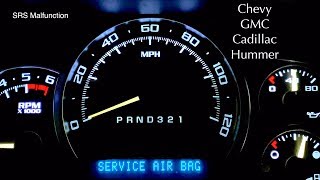
- Airbag warning light is illuminated on the instrument cluster.
- "Service Air Bag" message on the Driver Information Center (DIC).
- "Phone Unavailable" audio message when trying to use OnStar. [Bulletin #PIC3278F, #PIC3278G]
- Inability to communicate with the specific failed module using a scan tool.
- After module replacement, a B1001 code may appear if programming is incorrect or incomplete.
- Replacing the Powertrain Control Module (PCM/ECM). B1000 is a body code, not a powertrain code, so replacing the main engine computer will not fix it.
- Assuming any airbag light is a bad sensor. B1000 specifically points to a module's internal failure, not an external sensor input.
Most Likely Causes
- Airbag Module (SDM) Failure Due to Water Intrusion 🔴 High Probability The SDM is located on the floor under the driver's seat, directly in the path of water from common H2 roof leaks (clearance lights, roof seams, sunroof drains). The module's casing corrodes, allowing moisture to destroy the internal circuit board.
How to confirm: Scan the SRS module for codes. If B1000 is present, remove the driver's seat and pull back the carpet to physically inspect the module for white, powdery corrosion or signs of moisture. 🎬 See this walkthrough on fixing GM service airbag malfunctions The module is bolted directly to the floor.
Typical fix: Replace the Sensing and Diagnostic Module (SDM) and its connector if corroded. The root cause (the water leak) must also be repaired to prevent repeat failure. The new module requires programming to the vehicle's VIN using a GM Tech2 or similar device. The source of the leak is often the gaskets for the roof clearance lights, which can be sealed with RTV silicone or replaced.
Est. part cost: $220-$450 - Internal OnStar Module (VCIM) Failure 🟡 Medium Probability As documented in GM Technical Service Bulletins, the OnStar module can fail internally, setting a B1000 code. [Bulletin #PIC3278F, #PIC3278G] This is a known issue across many GM platforms of this era.
How to confirm: Scan the VCIM for codes. The primary symptom is a "Phone Unavailable" audio message. If this occurs and the B1000 code is in the VCIM, the module is faulty.
Typical fix: Replace the OnStar module. However, since the analog service is no longer active, most owners choose to ignore this fault or simply unplug the module to prevent potential parasitic battery drain.
Est. part cost: $100-$300 - Low Vehicle Battery Voltage ⚪ Low Probability
How to confirm: Test the battery's voltage and health. A voltage below 12.4V at rest may indicate a weak battery. Charge the battery fully, clear the codes, and see if B1000 returns. In rare cases, a voltage spike from jump-starting can also trigger a false B1000.
Typical fix: Recharge or replace the vehicle's 12V battery.
Est. part cost: $150-$350
Rare But Worth Checking
- Corroded Front Impact Sensors: While these usually set specific sensor codes (like B0100/B0103), severe corrosion and wiring issues related to them can sometimes contribute to communication problems that may be flagged as a general module fault.
Diagnosis Steps
- Connect a full-featured scan tool (like a GM Tech2) capable of reading codes from all modules (Engine, BCM, SRS, VCIM, etc.).
- Scan all modules and identify which one is reporting the B1000 code.
- If the SRS/Airbag module (SDM) has the B1000 code: Proceed to inspect for water damage. Disconnect the negative battery terminal and wait at least 10 minutes. Remove the driver's seat (typically held by four E-Torx bolts, E14 for the rear and E20 for the front). Peel back the carpet and inspect the metal-cased SDM for white powder, corrosion, or dampness. Check the connector for corrosion as well.
- If the OnStar module (VCIM) has the B1000 code: Confirm the symptom is a 'Phone Unavailable' message. If so, the module has failed internally. The module can be unplugged to prevent battery drain.
- If no obvious cause is found: Check the vehicle's battery voltage and charging system. A weak battery can cause spurious module faults.
- Inspect the wiring and connector for the identified module for any signs of damage, corrosion, or loose pins. Pay special attention to the ground connection for the module.
Parts You'll Likely Need
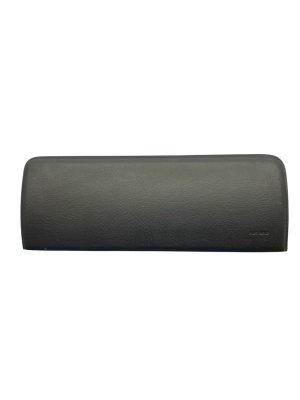
- Sensing and Diagnostic Module (Airbag Module)
(OEM #12231750)— This is the most common point of failure on the H2 for this code, due to its vulnerable location under the driver's seat where water collects.
Trusted brands: ACDelco (OEM)
OEM price range: $220-$450
Related Codes That Often Appear With This One
- U1000 — U1000 indicates a Class 2 Data Link Malfunction (loss of communication). If a module like the SDM or VCIM fails internally (setting B1000), it can stop communicating on the network, triggering a U1000 code in other modules.
- U1500 — The official TSB mentions that a failing OnStar module can set either B1000 or U1500, which is a specific communication error related to the LIN Bus. [Bulletin #PIC3278F, #PIC3278G]
- B1001 — This code for 'Option Configuration Error' often appears after replacing the SDM if the new module has not been properly programmed to the vehicle's BCM and VIN.
Technical Service Bulletins (TSBs) & Recalls
- PIC3278F / PIC3278G - Notes that the OnStar module can have an internal fault, causing a B1000 or U1500 DTC and a 'Phone Unavailable' message.
Platform-Specific Known Issues
- Manufacturer TSBs PIC3278F and PIC3278G state that the OnStar module can have an internal fault that produces a B1000 code and a 'Phone Unavailable' audio message. [Bulletin #PIC3278F, #PIC3278G]
- H2 models are highly prone to water leaks that damage the Airbag Module (SDM) under the driver's seat, causing a B1000 code and disabling the SRS system. Common leak points are the roof marker light gaskets, body seams, and sunroof drains.
Hidden / Shadow Codes Worth Checking
- B1000 39: ECU Performance Internal Electronic Failure. This indicates a general hardware failure inside the module. (see via Requires a professional scan tool like the GM Tech 2 or equivalent to read the two-digit symptom code (failure byte).)
- B1000 3B: ECU Performance Internal Self Test Failed. The module failed its own internal diagnostic check upon startup. (see via Requires a professional scan tool like the GM Tech 2 or equivalent to read the two-digit symptom code (failure byte).)
- B1000 35: ECU Performance ROM Failure. This indicates a failure in the module's permanent Read-Only Memory. (see via Requires a professional scan tool like the GM Tech 2 or equivalent to read the two-digit symptom code (failure byte).)
Scan Tool Commands That Help
- GM Tech2: Setup New SDM — This function must be performed after installing a new Sensing and Diagnostic Module (SDM). It pairs the new module to the vehicle's BCM and VIN. Failing to do this will result in a B1001 'Option Configuration Error' and the airbag system will remain inoperative.
- GM Tech2 / TIS2000: VTD Relearn / Security Programming — On some early models (e.g., 2003), after replacing the SDM, a U1000 communication code may persist. Oddly, the fix is to perform a Vehicle Theft Deterrent (VTD) relearn procedure, which reprograms the security module and allows the new SDM to communicate correctly with other modules on the network.
Wiring & Ground Locations
- SDM (Sensing and Diagnostic Module) — Bolted to the floor, under the driver's seat, beneath a cutout in the carpet.. This is the physical location of the module most likely to fail with a B1000 code. Its position makes it highly vulnerable to water intrusion from roof leaks, causing corrosion and internal failure.
- G103 — Located at the left rear of the engine compartment on the cowl, above the brake booster.. This is a primary ground point for multiple interior modules, including the Inflatable Restraint SDM. A poor connection at this shared ground can cause communication issues or erratic behavior, potentially leading to a false B1000 code.
- G300 — Located on the floor behind the left (driver's) seat, near the B-pillar.. This ground serves the driver's seat controls and associated wiring. While not the primary ground for the SDM, any wiring work or water intrusion in this area affecting G300 could also impact the nearby SDM harness.
Real Owner Repair Stories
- YouTube video by 'TNOlds' (Hummer H2 (year not specified, but within range)) — Airbag light was on constantly. A scan tool showed 'no communication' with the supplemental inflatable restraint module.
❌ Tried (didn't work) The owner immediately suspected the SDM due to common knowledge of the water leak issue.
✅ What actually fixed it The owner removed the driver's seat, pulled back the carpet, and found the SDM heavily corroded with white aluminum oxide powder. Replacing the SDM with a new one (noting the superseded part number) and cleaning the area resolved the issue. After installation, the scan tool could communicate with the new module and showed no fault codes. The owner also noted the importance of removing the wet sound-deadening material to prevent a recurrence. - Hummer Forums thread 'Air Bag ECU' (Hummer H2 (year not specified)) — Airbag light came on, scanner showed B1000. A Tech 2 scanner identified the faulty module as the SDM.
✅ What actually fixed it The owner confirmed the location under the driver's seat. The final fix required replacing the SDM and having it programmed by a dealer or a shop with a Tech 2. The discussion confirmed the need for E20 and E14 Torx sockets for seat removal.
OEM Part Supersession History
15058450, 12224725, 12220310→12231750— Standard part revision and consolidation by GM.
Heads up: While physically similar, using an SDM from a 2008-2009 H2 (which had a significant interior/electrical refresh) in an earlier model or vice-versa will likely cause programming and communication failures.15177813→85598006— Part revision for front impact sensor.
Model Year Variations Within This Range
- 2008-2009: The 2008 model year introduced a major interior and electrical system refresh for the H2. The SDM and other control modules are different from the 2003-2007 models. For example, the side impact sensor for 2008-2009 models is a different part than earlier years. Using parts across this refresh boundary is not advised and will likely fail.
- 2003-2004: The original SDM part number was 15058450 (or earlier revisions), which was superseded by 12231750. While the newer part is backward compatible, programming is still required.
Helpful Videos



Used OEM Parts in Stock


New Aftermarket Parts Available


The information in this article is provided for general reference and educational purposes only. Vehicle specifications, procedures, and part compatibility can vary by production date, trim level, and region. Always consult your vehicle's factory service manual and verify part numbers before purchasing or performing repairs. Safety-critical components such as airbags, seat belts, and braking systems should be installed by a qualified professional.
- Hummer H2:
- 🎬 Helpful Videos
- 🛍️ Shop This Part
- What's Unique About the 2004-2009 Hummer H2
- Diagnostic Flowchart
- Symptoms You May Notice
- Most Likely Causes
- Rare But Worth Checking
- Diagnosis Steps
- Parts You'll Likely Need
- Related Codes That Often Appear With This One
- Technical Service Bulletins (TSBs) & Recalls
- Platform-Specific Known Issues
- Hidden / Shadow Codes Worth Checking
- Scan Tool Commands That Help
- Wiring & Ground Locations
- Real Owner Repair Stories
- OEM Part Supersession History
- Model Year Variations Within This Range
- 🎟️ Get 5% Off