

B1000 on 2003-2007 GMC Sierra Denali: Airbag, OnStar, and BCM Failure Guide
B1000 on a GMC Sierra Denali means a control module has failed. If the airbag light is on, the airbag module (SDM) has likely failed due to water damage, especially on 2007 models. If you see a 'Phone Unavailable' message, the OnStar module is the cause. A pro-level scan is required to know which module is at fault.
- B1000 means a module has failed, but it doesn't tell you which one. You must use a professional scan tool to identify the source.
- Your symptoms are the best clue: an airbag light points to a failed Airbag Module (SDM), while a 'Phone Unavailable' message points to the OnStar module (VCIM).
- If the airbag light is on, treat this as a critical safety failure. The airbag system is likely offline and will not work in a crash.
- On 2007 models with the new body style, the first thing to check for an airbag-related B1000 is the SDM under the driver's seat for water damage.
- Replacing the SDM or BCM is not a simple swap; the new part must be professionally programmed to your truck's VIN to function correctly.
What's Unique About the 2003-2007 Gmc SIERRA DENALI
The 2003-2007 year range covers two distinct Sierra generations (GMT800 and GMT900), which have different common failure points for this code. On older GMT800 models (2003-2006, 2007 'Classic'), the B1000 code is frequently triggered by an internal fault in the now-obsolete analog OnStar module, as documented in GM Technical Service Bulletins. For the new body style 2007 GMT900 models, the code is very commonly caused by a water-damaged Airbag Control Module (SDM) located under the driver's seat, a known design vulnerability acknowledged by GM in Special Coverage program #09184B.
Diagnostic Flowchart
Tap your situation to follow the diagnostic path that matches what you're seeing on this vehicle.
Generation note: This range covers two generations. The 2003-2006 and 2007 'Classic' models are the GMT800 platform. The new body style 2007 models are the GMT900 platform. The most common cause for a B1000 code differs between them, with the water-damaged airbag module being a prominent issue on the 2007 GMT900 trucks due to its placement on the floor.
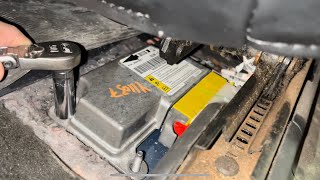
🎬 Watch: Diagnosing a water-damaged airbag module and no-communication fault.Symptoms You May Notice
- Solid Airbag (SRS) warning light on the dashboard (indicates SDM failure).
- "Phone Unavailable" audio message on the radio (indicates OnStar/VCIM failure). [Bulletin #PIC3278G, Bulletin #PIC3278F]
- Other random electrical issues, such as problems with power locks, radio, or windows not working (can indicate BCM failure).
- "Service Airbag" message on the Driver Information Center (DIC).
- Replacing the BCM when the fault is actually in the SDM or VCIM. It is critical to use a scan tool that can pinpoint which module is setting the code before purchasing any parts.
- Replacing the SDM without fixing the water leak that caused the original failure, leading to a repeat failure of the new part.
Most Likely Causes
- Failed Airbag Control Module (SDM) 🔴 High Probability On 2007 (GMT900) models, the SDM is located under the driver's seat carpet, where it is highly susceptible to water damage from leaky door seals, clogged sunroof drains, a leaking third brake light, or snowmelt. This causes corrosion and internal failure, an issue so common GM issued Special Coverage program #09184B for trucks in salt-belt states.
How to confirm: Use a scan tool to confirm the B1000 code is stored in the SRS/SDM module. Visually inspect the module under the driver's seat for white, chalky corrosion on the aluminum case or a swollen, 'bubbled' appearance on the gel sealant on the bottom. The carpet and padding will likely feel damp.
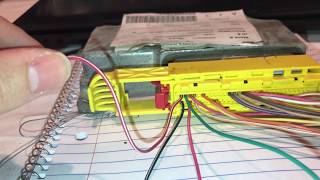
Typical fix: Replace the SDM and its wiring connector if corroded. The new module must be programmed to the vehicle's VIN. The source of the water leak must also be repaired. As a preventative measure, some owners place the new module in a sealed plastic bag, leaving the connector area open, before reinstalling.
Est. part cost: $250-$500 (New OEM), $70-$200 (Used/Remanufactured) - Failed OnStar Module (VCIM) 🔴 High Probability As documented in GM TSBs, the OnStar module can suffer an internal fault. [Bulletin #PIC3278G, Bulletin #PIC3278F] As the analog cellular network it used became obsolete, these modules often fail their self-checks, sometimes causing a parasitic battery drain.
How to confirm: The primary symptom is a 'Phone Unavailable' message. A scan tool will show the B1000 code originating from the Telematics Communication Interface Control Module (VCIM). The module is typically located behind the glove box on 2007 GMT900 models.
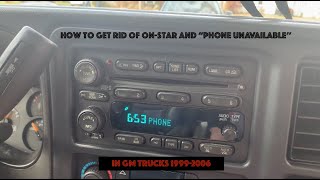
Typical fix: Replace the VCIM. However, since the service is obsolete on older models, many owners opt to simply disconnect the module to clear the code and prevent potential battery drain. This can be done by removing the radio to access the module behind it or by pulling the fuse labeled 'RADIO/PHONE' or 'INFO'.
Est. part cost: $0 (disconnect) - $300 (replacement) - Failed Body Control Module (BCM) ⚪ Low Probability The BCM can fail due to age, voltage spikes, or internal solder joint issues, causing it to report an internal checksum or memory error. On GMT900 models, GM issued a bulletin (07-08-47-004D) warning that disconnecting the left instrument panel junction block without first disconnecting the battery can internally damage the BCM.
How to confirm: A scan tool will indicate the B1000 code is stored in the BCM. This is usually diagnosed after ruling out the more common SDM and VCIM failures and is often accompanied by other strange electrical problems.
Typical fix: The BCM must be replaced and programmed to the vehicle.
Est. part cost: $200-$400
Rare But Worth Checking
- Low Voltage Event or Poor Grounds: A dead battery, a jump-start, or corroded main ground straps can cause voltage spikes or drops that may set a false B1000 code. It's worth clearing the code and checking battery/ground connections before replacing an expensive module. Key grounds are located near the driver-side A-pillar (G201) and under the passenger seat (G302) on GMT900 models.
Diagnosis Steps
- Connect a professional-grade scan tool capable of reading manufacturer-specific codes from all vehicle modules (SRS, BCM, VCIM, etc.).
- Scan all systems and identify which specific module (SDM, VCIM, BCM, etc.) is storing the B1000 code. Note any symptom sub-codes (e.g., B1000 39, B1000 00) for more detail.
- If the code is in the SDM and the airbag light is on, disconnect the battery. Remove the driver's seat (typically four 15mm bolts), pull back the sill plate 🎬 Watch: Step-by-step SDM replacement and programming for GMT800 models. and lift the carpet to physically inspect the SDM and its connector for water damage or corrosion. Look for a swollen or bubbled gel backing.
- If the code is in the VCIM and a 'Phone Unavailable' message is present, locate the OnStar module (often behind the glove box or radio on GMT900s) and inspect its connections. Consider disconnecting it as a test.
- If the code is in the BCM, inspect its connectors for any signs of damage or corrosion and check related ground points.
- Before replacing any module, verify it is receiving proper power and has a solid ground connection using a multimeter.
- If wiring is good and the module is confirmed as the source, replace the faulty module. Note that SDM and BCM replacements require VIN programming with a tool like a GM Tech 2.
Parts You'll Likely Need
- Sensing and Diagnostic Module (SDM)
(OEM #Varies by year/options. Common GMT900 numbers include 25816951, 20982474. Always verify with VIN.)— This is the most common fix when the B1000 code is accompanied by an airbag light, especially on 2007 GMT900 models, due to frequent failure from water damage.
Trusted brands: ACDelco, GM Genuine
OEM price range: $300-$500
Aftermarket price range: $150-$350 - Vehicle Communication Interface Module (VCIM)
(OEM #Varies by year. A common number for 2007 is 25826499.)— This OnStar module is the likely culprit if the main symptom is a 'Phone Unavailable' message, as cited in GM TSBs. [Bulletin #PIC3278G, Bulletin #PIC3278F]
Trusted brands: ACDelco
OEM price range: $150-$300
Aftermarket price range: $100-$200
Related Codes That Often Appear With This One
- U1500 — This communication code is also mentioned in TSBs alongside B1000 as being related to an internal OnStar module fault. [Bulletin #PIC3278G, Bulletin #PIC3278F]
- U0151 — This code means "Lost Communication With Restraints Control Module." It often appears when the SDM has failed completely due to severe water damage, preventing it from communicating on the vehicle's network.
Technical Service Bulletins (TSBs) & Recalls
- PIC3278G: Addresses internal OnStar module faults causing a 'Phone Unavailable' message and B1000/U1500 codes.
- PIC3278F: An earlier version of the same bulletin, covering the same OnStar module issue.
- Special Coverage #09184B: Addresses SDM corrosion on 2007-2009 models in specific states due to snow/water/salt ingress under the driver's seat. The fix involves removing an acoustical pad and inspecting/replacing the SDM.
Platform-Specific Known Issues
- OnStar Module Internal Fault: TSB #PIC3278G and #PIC3278F state that an internal fault in the OnStar module can produce a 'Phone Unavailable' audio message and set a B1000 or U1500 trouble code.
- SDM Water Intrusion (GMT900): On 2007 (GMT900) models, the placement of the SDM under the driver's seat carpet makes it extremely vulnerable to corrosion from water intrusion. GM Special Coverage #09184B was issued for this, acknowledging that snow/salt-contaminated water saturates the carpet and corrodes the module, potentially disabling the airbags or, in rare cases, causing unintended deployment.
- Sources of Water Leaks (GMT900): Common sources for the water that damages the SDM include leaking third brake light gaskets, clogged sunroof drains, cracked rear sliding window frames, and degraded door seals.
Hidden / Shadow Codes Worth Checking
- B1000-00: ECU Malfunction. This is a generic internal failure code often associated with the SDM. (see via Professional scan tool like GM Tech 2 or equivalent.)
- B1000 39: ECU Performance Internal Electronic Failure. This indicates a general hardware failure within the module. (see via A professional scan tool like the GM Tech 2 or GDS2 is required to read these two-digit hexadecimal symptom codes.)
- B1000 3B: Internal Self-Test Failed. The module failed its own internal diagnostic check upon power-up. (see via A professional scan tool like the GM Tech 2 or GDS2.)
- B1000 31: ECU General Checksum Problem. This points to a data corruption or memory error within the module. (see via A professional scan tool like the GM Tech 2 or GDS2.)
Scan Tool Commands That Help
- GM Tech 2 / GDS2: Setup SDM Primary Key in BCM — This function is required after replacing the SDM or BCM. It 'marries' the new airbag module to the Body Control Module, allowing them to communicate securely. Failure to perform this step will result in a persistent airbag light.
- GM Tech 2 / GDS2: Enable Deployment Loops — This is the second part of the SDM setup procedure after programming. It activates the airbag and pretensioner firing circuits. The procedure will fail if any other faults exist in the SRS system (e.g., bad sensors, broken wiring).
- GM Tech 2 / GDS2: Clear All Codes — After a new module is installed and programmed, all DTCs in the SRS system must be cleared. A flashing airbag light during startup is a good indicator, while a solid light suggests remaining faults.
Wiring & Ground Locations
- G201 — On the GMT900, this ground is located on the upper left corner of the dash, near the A-pillar.. This is a major instrument panel ground point. A poor connection here can cause communication issues and phantom codes for various modules connected to the I/P harness.
- G302 — On the GMT900, this ground is located below the right side of the passenger's seat.. This ground is used by the Inflatable Restraint Passenger Presence System (PPS) module. A fault here could cause SRS codes, though B1000 is more specific to the module's internal health.
- G304 (GMT800) — On the 2007 'Classic' (GMT800), this ground is located under the right front seat and serves the passenger presence system module.. A poor ground connection at G304 on the GMT800 platform can cause various issues with the SRS system, potentially leading to false codes or communication problems.
- SDM Connector — Under the driver's seat on GMT900 models, accessed by pulling back the carpet.. This is the direct connection to the most commonly failed part. Water intrusion often corrodes the connector pins as well as the module itself, requiring connector replacement or repair in addition to a new SDM.
Real Owner Repair Stories
- YouTube channel 'Jeremy's Car Repair' (2007-2013 Silverado/Sierra) — Solid airbag warning light on the dashboard. Scan revealed a B1000 code stored in the SRS module.
❌ Tried (didn't work) Initial visual inspection of the SDM connector showed no obvious moisture or damage.
✅ What actually fixed it The SDM itself was internally damaged from moisture. The gel backing on the bottom of the module was bubbled up, and the aluminum case showed corrosion. Replacing the SDM with a used unit that had the exact same part number cleared the code and turned off the airbag light without requiring reprogramming. The root cause was identified as a leaking door gasket.
Model Year Variations Within This Range
- 2007 'Classic' (GMT800): The Sensing and Diagnostic Module (SDM) on the GMT800 'Classic' models is located under the left front seat, but it is a different part number and design than the GMT900. While still an electronic component, it is not as notoriously prone to water damage as the GMT900 version due to differences in vehicle body construction and floor design.
- 2007 'New Body Style' (GMT900): The SDM is located under the driver's seat, directly on the floor beneath the carpet. This specific location makes it highly vulnerable to water intrusion from multiple sources (door seals, third brake light, etc.), which is the primary driver of B1000 failures on this model year.
Helpful Videos

Used OEM Parts in Stock


New Aftermarket Parts Available



The information in this article is provided for general reference and educational purposes only. Vehicle specifications, procedures, and part compatibility can vary by production date, trim level, and region. Always consult your vehicle's factory service manual and verify part numbers before purchasing or performing repairs. Safety-critical components such as airbags, seat belts, and braking systems should be installed by a qualified professional.
- Gmc SIERRA DENALI:
- 🎬 Helpful Videos
- 🛍️ Shop This Part
- What's Unique About the 2003-2007 Gmc SIERRA DENALI
- Diagnostic Flowchart
- Symptoms You May Notice
- Most Likely Causes
- Rare But Worth Checking
- Diagnosis Steps
- Parts You'll Likely Need
- Related Codes That Often Appear With This One
- Technical Service Bulletins (TSBs) & Recalls
- Platform-Specific Known Issues
- Hidden / Shadow Codes Worth Checking
- Scan Tool Commands That Help
- Wiring & Ground Locations
- Real Owner Repair Stories
- Model Year Variations Within This Range
- 🎟️ Get 5% Off