

2018 Ford F-150 Navigation Module (APIM): A Guide to Failures, Replacement, and Programming
This guide covers common failures, part number details, and the critical programming steps required for the 2018 Ford F-150's SYNC 3 navigation and infotainment module.
- A black or constantly rebooting screen almost always means the APIM module has failed and needs to be replaced.
- Programming is REQUIRED. A replacement module must be programmed to your truck's VIN and options using tools like FORScan or by a dealer.
- When buying used, you must match the part number and ensure you get a navigation-equipped unit if you want that feature.
- The truck is safe to drive with a failed APIM, but you will lose all infotainment functions, including the radio and on-screen climate controls.
What is the SYNC 3 Navigation Module (APIM)?
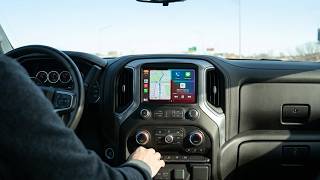
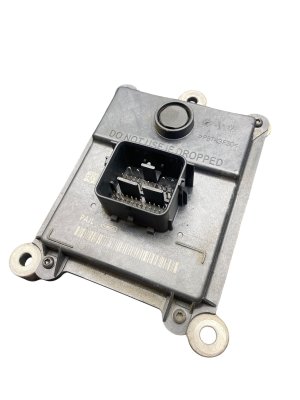
In the 2018 Ford F-150, the part often called the 'Navigation Module' is technically the Accessory Protocol Interface Module, or APIM. This is the central computer that runs the entire SYNC 3 infotainment system. It's a small box, typically mounted to the back of the 8-inch touchscreen display. It is responsible for processing everything you see and do on the screen, from displaying maps and controlling audio to handling voice commands and connecting to your phone. When this module fails, it can render the entire center screen and its related functions useless.
Common Symptoms of a Failing 2018 F-150 APIM Module
A failing APIM module is a well-documented issue in 2018 Ford F-150s and can manifest in several ways. While some issues can be temporary software glitches fixed with a reset, persistent problems often point to hardware failure within the module itself.
- Black or Blank Screen: The most common and definitive sign of a failed APIM is a screen that remains completely black and unresponsive, even though the rest of the truck works fine.
- Constant Rebooting or Freezing: The system may show the Ford logo, attempt to load, and then restart in a continuous loop, or it may freeze on a single screen.
- Unresponsive Touchscreen: The screen may be on but will not respond to any touch inputs.
- "No GPS" Error: The navigation system may show a "No GPS" icon or display the vehicle's location incorrectly.
- Laggy and Slow Performance: The system may be extremely slow to respond to commands, making it difficult to use.
- Bluetooth and USB Issues: The truck may fail to connect to phones via Bluetooth, or the USB ports may stop working for media or Apple CarPlay/Android Auto.
- Ghost Touches: The system may act as if someone is touching the screen, randomly changing settings or making calls.
Pro Tip: Before assuming the APIM has failed, try a soft reset. Press and hold the Power button and the Seek Right button simultaneously for about 10 seconds until the screen restarts. This can sometimes resolve temporary software glitches. 🎬 Watch this 10-second guide to unfreeze your Ford screen If the problems persist, a hardware failure is more likely.
Known Issues, TSBs, and Recalls
While there are no specific recalls for the 2018 F-150 APIM module itself, Ford has issued several Technical Service Bulletins (TSBs) related to SYNC 3 performance. TSBs like 20-2255 and 21-2411 address a wide range of issues including display problems, inoperative navigation, and slow system response, often recommending a software update as the first step. Ford notes in these bulletins that many APIMs are replaced when only a software update was needed. However, for symptoms like a persistent black screen, a software update is not possible and hardware replacement is the only fix.
There have been several recalls for the 2018 F-150, but they relate to issues like the powertrain control module software, seat belts, and brake master cylinders, not the APIM.
Warning: A completely dead or black screen cannot be fixed with a software update. Software updates require a functioning screen and system to install. A black screen almost always indicates a hardware failure requiring module replacement.
Buying a Used 2018 F-150 Navigation Module: What You MUST Know
Purchasing a used APIM can save you a significant amount of money, but it's crucial to get the right part. Here’s what to look for:
1. Part Number is Everything
The most critical step is to match the engineering part number printed on the sticker of your original module. For the 2018 F-150, a common number is JS7T-14G371-GCD. The first four characters (JS7T) are the most important, as they denote the vehicle generation and major hardware version. While service part numbers like JS7Z-14G371-GDC exist for ordering from a dealer, the engineering number on the physical part is the best way to ensure compatibility when buying used.
2. Navigation vs. Non-Navigation
APIM modules come in two main hardware variants: Navigation and Non-Navigation. A module from a truck without factory navigation cannot be upgraded to have navigation simply by changing the software. The navigation-equipped modules have more internal memory (typically 32GB or 64GB) to store map data. Ensure the replacement unit you buy is from a vehicle that had factory navigation.
3. Programming is NOT Optional
A used APIM is not a plug-and-play part. It must be programmed to your truck’s specific Vehicle Identification Number (VIN) and features. An unprogrammed module may cause features like the backup camera, climate controls, or specific audio settings to work incorrectly or not at all. Some sellers on sites like eBay offer pre-programming services if you provide your VIN.
4. Why a Used OEM Module is a Good Choice
A used OEM (Original Equipment Manufacturer) module that has been properly tested and programmed is often a better choice than a cheap aftermarket unit. It ensures perfect fitment and integration with the truck's other systems. Given that a new OEM module from a dealer can be very expensive, a quality used unit offers the best balance of reliability and value.
Programming is REQUIRED After Installation
You cannot simply swap an APIM from one truck to another and expect it to work perfectly. The module contains 'As-Built' data, which is a set of codes that tailors it to the specific options of the vehicle it came from.
Programming Options: Dealer vs. DIY
- Ford Dealership: A dealer can program a new or used module using their Integrated Diagnostic System (IDS) software. This is the most straightforward but also the most expensive option.
- DIY with FORScan: Many owners and independent shops use a powerful software tool called FORScan. With a compatible OBD-II adapter and a laptop, you can back up the 'As-Built' data from your original (even if it's failing) module and write it to the replacement. If the original module is completely dead, you can download the original 'As-Built' data from Ford's service website using your VIN.
- Pre-Programmed Units: Several online vendors sell used APIMs that are pre-programmed to your VIN before shipping, making the physical installation much simpler.
Replacement Cost Breakdown
The cost to replace a 2018 F-150 APIM can vary dramatically based on the path you choose.
| Part Source | Estimated Part Cost |
|---|---|
| New OEM (Dealer) | $800 - $1,200 |
| Used OEM (Pre-Programmed) | $300 - $600 |
| Used OEM (DIY Programming) | $150 - $400 |
| Shop Labor (Installation & Programming) | $150 - $300 |
Frequently Asked Questions (FAQ)
Can I upgrade my non-navigation F-150 to have navigation by swapping the APIM?
Yes, this is a popular upgrade. You will need to purchase a navigation-equipped APIM module and program it to your vehicle. You may also need a new GPS antenna if your truck doesn't already have one.
Will my truck still drive if the navigation module is dead?
Yes. The APIM module is not connected to the engine or transmission control systems. Your truck will start and drive normally, but you will have no access to the radio, climate controls on the screen, navigation, or phone connectivity.
My screen is black. Is it the screen or the module (APIM)?
In the vast majority of cases, a black screen is caused by a failed APIM module, not the screen itself. The LCD screen is a relatively simple component that just displays the signal sent by the APIM. Internal hardware failure of the APIM is a much more common problem.
What is FORScan and is it difficult to use?
FORScan is a software application that allows you to communicate with the modules in Ford vehicles. While powerful, it has a learning curve. For a simple APIM swap, the process involves saving the configuration from the old module and loading it onto the new one. Many tutorials and forums are available to guide you through the process.
Helpful Videos
Technical Specifications
OEM Part Numbers: JS7T-14G371-GCD JS7T14G371GCD JS7Z-14G371-BDC JS7Z-14G371-CDC JS7Z-14G371-GDC JS7Z14G371GDC
The module is part of the SYNC 3 system and controls the 8-inch touchscreen. Navigation-equipped units typically have 32GB or 64GB of internal storage.
We Have This Part in Stock





The information in this article is provided for general reference and educational purposes only. Vehicle specifications, procedures, and part compatibility can vary by production date, trim level, and region. Always consult your vehicle's factory service manual and verify part numbers before purchasing or performing repairs. Safety-critical components such as airbags, seat belts, and braking systems should be installed by a qualified professional.
- Ford F-150:
- 🎬 Helpful Videos
- 🛍️ Shop This Part
- What is the SYNC 3 Navigation Module (APIM)?
- Common Symptoms of a Failing 2018 F-150 APIM Module
- Known Issues, TSBs, and Recalls
- Buying a Used 2018 F-150 Navigation Module: What You MUST Know
- 1. Part Number is Everything
- 2. Navigation vs. Non-Navigation
- 3. Programming is NOT Optional
- 4. Why a Used OEM Module is a Good Choice
- Programming is REQUIRED After Installation
- Programming Options: Dealer vs. DIY
- Replacement Cost Breakdown
- Frequently Asked Questions (FAQ)
- 🎟️ Get 5% Off