

2012-2017 Mazda 5 Bluetooth Module Failure: Parasitic Drain and Fixes
Diagnose and fix the common Bluetooth module issues in the 2012-2017 Mazda 5, from connectivity problems to the notorious parasitic battery drain.
- A failing Bluetooth module is a primary cause of parasitic battery drain in 2012-2017 Mazda 5 models.
- Replacement is plug-and-play and does not require dealer programming.
- The module is easily accessible behind the glove box, making DIY replacement simple.
- As a temporary fix for battery drain, you can simply unplug the module with no adverse effects.
Symptoms of a Failing Mazda 5 Bluetooth Module
A failing Bluetooth module in the 2012-2017 Mazda 5 can cause more than just connectivity problems. The most significant and widely reported issue is a parasitic battery drain that can leave you with a dead battery overnight. Here are the most common symptoms to watch for:
- Parasitic Battery Drain: This is the most severe symptom. The module fails to enter its low-power 'sleep' mode when the car is off, continuously drawing power (often 300-400mA) and draining the battery. This issue is often traced to the 'ROOM' fuse circuit.
- Inability to Pair or Connect: The vehicle may not find your phone, or your phone may not see the car's Bluetooth signal. Existing paired devices may suddenly stop connecting.
- Constant Dropping and Reconnecting: The Bluetooth connection may drop intermittently while driving, often interrupting music or phone calls and then reconnecting moments later.
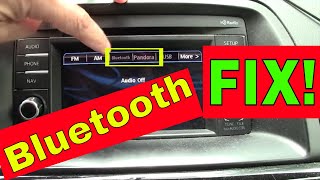
- Radio Display or Control Issues: The radio display might show the Bluetooth or Pandora options as 'grayed out' and inaccessible. In some cases, the audio controls on the steering wheel or head unit may become unresponsive.
- No Audio: The phone may appear to be connected, but no audio comes through the speakers during calls or music playback.
Diagnosing the Problem
If you suspect the Bluetooth module is failing, especially if you have a dead battery, you can perform a few simple diagnostic steps.
- Parasitic Draw Test: The most definitive test is to measure the electrical draw from the battery when the car is off. A normal draw should be under 50-75 milliamps (mA) after the vehicle's systems go to sleep (which can take up to 40 minutes). If the draw is significantly higher (e.g., 200-400mA), start by pulling the 'ROOM' fuse. If the draw drops to a normal level, the Bluetooth module is a very likely culprit.
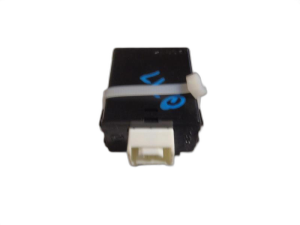
- The Unplug Test: The simplest way to confirm the module is the cause of a battery drain is to physically disconnect it. The module is located behind the glove box. After removing the glove box, you can locate the small metal box and unplug its electrical connector. If your battery drain problem disappears, you have found the faulty part.
- Hard Reset: As a temporary measure, you can perform a hard reset of the audio system by disconnecting the car battery's negative terminal for a few minutes. 🎬 Watch: Quick 20-second trick to reset and pair your Mazda Bluetooth This can sometimes restore functionality, but it does not fix the underlying hardware failure and the problem will likely return.
Pro Tip: If your battery keeps dying and you're waiting for a replacement part, simply unplugging the faulty module is a free and effective way to prevent being stranded. You will lose Bluetooth functionality, but your car will start reliably.
Buying a Used Mazda 5 Bluetooth Module
When purchasing a used module, compatibility and reliability are key. Given the known issues with this part, buying a used OEM unit is often a cost-effective and reliable solution.
- Check the Part Number: The OEM part number for this module has several revisions. The base number is CG36-66-DHX. Later revisions are indicated by a letter at the end, such as CG36-66-DHXA, CG36-66-DHXB, and CG36-66-DHXE. It is highly recommended to purchase the latest revision available (like 'DHXE'), as it may contain internal updates to improve reliability.
- No Programming Required: For the 2012-2017 Mazda 5, replacing the Bluetooth module is typically a plug-and-play procedure. You do not need to visit a dealer for programming or flashing. After installation, you will simply need to pair your phone(s) to the new module as if it were a new car.
- Physical Inspection: When you receive the part, inspect the casing for any signs of physical damage or corrosion. Ensure the connector pins are straight and clean.
- Source Vehicle: If possible, choose a part from a newer model year within the 2012-2017 range, as it is more likely to be a later revision and have less operational time.
Replacement Guide
Replacing the Bluetooth module is a straightforward job that most DIY mechanics can complete in under an hour.
- Disconnect the Battery: Always disconnect the negative battery terminal before working on vehicle electronics.
- Remove the Glove Box: Open the glove box, empty its contents, and release the retaining clips or screws that hold it in place. It should pivot down and pull out.
- Locate the Module: Look up and behind the glove box opening. You will see a small metal box, the Bluetooth module, typically bolted to a dash support bracket.
- Disconnect and Remove: Unplug the single electrical connector from the module. Then, unbolt the module from its bracket (usually one or two 10mm bolts).
- Install the New Module: Bolt the replacement module into place, reconnect the electrical connector, and re-install the glove box.
- Reconnect Battery and Test: Reconnect the negative battery terminal. Turn the car on and navigate to the Bluetooth settings on your radio to pair your phone.
Warning: This module is for vehicles that were originally equipped with factory Bluetooth. If your Mazda 5 did not have this feature from the factory, the necessary wiring harness may not be present, and simply plugging in this module will not work.
Cost Comparison
| Part Type | Estimated Cost |
|---|---|
| New OEM | $430 - $640 |
| New Aftermarket | Not commonly available |
| Used OEM | $50 - $150 |
| Shop Labor | $100 - $150 |
Frequently Asked Questions (FAQ)
Does the Mazda 5 Bluetooth module need to be programmed?
No. For the 2012-2017 Mazda 5, this is a plug-and-play part. You do not need special tools or a dealer visit for programming. After installation, you just need to re-pair your phone.
Why is my car battery dying? Is it the Bluetooth module?
It's a very strong possibility. A faulty Bluetooth module that fails to go into sleep mode is a well-documented cause of parasitic battery drain in these and other Mazda vehicles of the era. If your battery dies after sitting for a day or two, this module should be your primary suspect.
Can I just unplug the module instead of replacing it?
Yes. If you don't use Bluetooth and want to solve a battery drain issue immediately, you can simply unplug the module and leave it disconnected. This will stop the power draw and will not cause any other issues with the vehicle's operation.
Will a module from a Mazda 3 or CX-5 work in my Mazda 5?
While other Mazda models from the same era use similar modules and experience the same failures, it is critical to match the part number exactly. Only use a module with a part number listed as compatible (e.g., CG36-66-DHX and its revisions) to ensure proper function with your vehicle's specific wiring and radio system.
Helpful Videos
Technical Specifications
OEM Part Numbers: CG36-66-DHX CG36-66-DHXA CG36-66-DHXB CG36-66-DHXE CG3666DHX CG3666DHXA CG3666DHXE
Location: Behind the right-hand side of the dashboard, accessible after removing the glove box.
We Have This Part in Stock



The information in this article is provided for general reference and educational purposes only. Vehicle specifications, procedures, and part compatibility can vary by production date, trim level, and region. Always consult your vehicle's factory service manual and verify part numbers before purchasing or performing repairs. Safety-critical components such as airbags, seat belts, and braking systems should be installed by a qualified professional.
- Mazda 5: