

2023 Genesis GV60 Mobile Phone Module: Diagnosing Digital Key, Bluetooth, and Charging Failures
This guide covers common failures, programming requirements, and replacement costs for the GV60's essential connectivity and security module.
- This module is critical for the Digital Key feature and is linked to the vehicle's immobilizer system.
- Replacement is NOT a DIY job. The part MUST be programmed by an EV-certified Genesis dealer using their proprietary GDS software.
- Many symptoms, like Bluetooth and Digital Key issues, can be caused by software glitches; always check for vehicle software updates before replacing hardware.
- While a used module is much cheaper than new, the mandatory dealer programming adds significant cost and complexity to the repair.
Symptoms of a Failing Mobile Phone Control Module
Failure of the Mobile Phone Control Module in the Genesis GV60 typically manifests as a loss of connectivity features rather than a complete breakdown. Since many issues are software-related, symptoms can appear intermittently, often after a phone or vehicle software update.
- Digital Key Malfunctions: The most common complaint is the unreliability of the Digital Key. This can include the passive entry feature (where the car unlocks as you approach) failing to work, forcing you to manually tap the phone on the door handle. In other cases, the car may not recognize the phone to allow it to start, requiring the phone to be placed perfectly on the charging pad.
- Poor Bluetooth Call Quality: Owners report that during phone calls, their voice sounds choppy, distorted, or "robot-like" to the person on the other end. Calls may also drop unexpectedly.
- Wireless Phone Charger Overheating: Many users experience their phone becoming excessively hot while on the wireless charging pad, often causing the phone's own thermal protection to stop the charging process. Some report that it generates significant heat while providing very little actual charge.
- Inability to Connect Wireless Apple CarPlay or Android Auto: The vehicle may fail to establish or maintain a connection for wireless phone projection, even if standard Bluetooth for calls is working.
- Loss of Genesis Connected Services: The vehicle may lose its data connection, preventing the use of remote features through the Genesis app. A Technical Service Bulletin (TSB) was issued for this issue, which can sometimes be fixed with a system reset.
Pro Tip: Before assuming the module has failed, try basic software troubleshooting. Delete the phone from the vehicle's Bluetooth and phone projection settings, and forget the vehicle in your phone's Bluetooth menu. Then, restart both your phone and the vehicle's infotainment system and attempt to pair them again. Also, check for any Over-the-Air (OTA) software updates for your vehicle, as Genesis frequently releases patches for these types of issues.
Known Issues, Recalls, and Technical Service Bulletins (TSBs)
While no recalls directly target the Mobile Phone Control Module itself, several software-related campaigns highlight the complexity of the GV60's electronic systems.
- TSB 25-01-018G: Addresses intermittent loss of Genesis Connected Car Services (CCS) due to communication network issues. The prescribed fix is for a dealer to perform a reset of the Data Communication Unit (DCU).
- NHTSA Recall 24V-204: A critical recall for the GV60 involves the Integrated Charging Control Unit (ICCU), which can fail and prevent the 12-volt battery from charging, potentially leading to a loss of drive power. While not the same part, it underscores the potential for module failure in the vehicle's electrical system.
- NHTSA Recall 027G: Relates to a software error that can cause the instrument panel display to go blank at startup. The fix is a software update performed by the dealer.
Programming and Installation Requirements
Warning: This is not a plug-and-play part. Replacing the Mobile Phone Control Module requires programming by an EV-certified Genesis dealership. The module is tied to the vehicle's immobilizer and security system through the Digital Key function.
A new or used module must be electronically paired to the vehicle's VIN and security system. This procedure requires the proprietary Genesis Diagnostic System (GDS) software and VCI interface, which is exclusive to dealers and highly specialized independent shops. Attempting to install this part yourself will result in a non-functional unit; features like Digital Key and possibly even starting the vehicle will not work until it is properly programmed by a qualified technician.
Buying a Used Mobile Phone Control Module
Purchasing a used module can offer significant cost savings, but it's crucial to understand the total cost and process. Given the mandatory programming, a used part is only a viable option if you factor in the subsequent dealer visit.
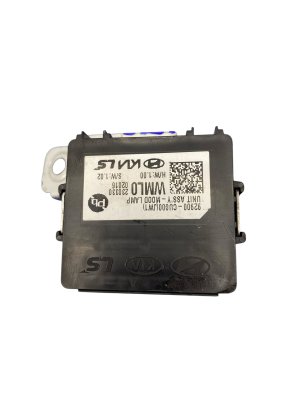
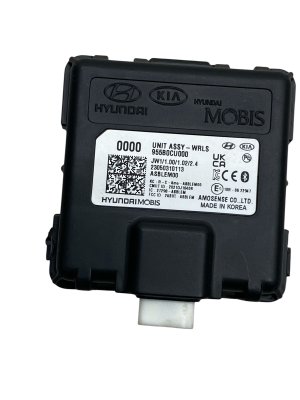
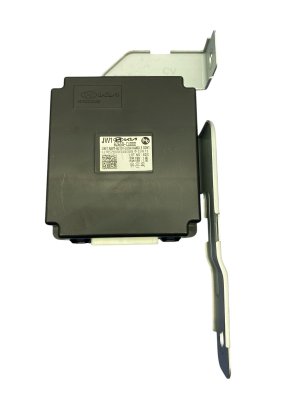
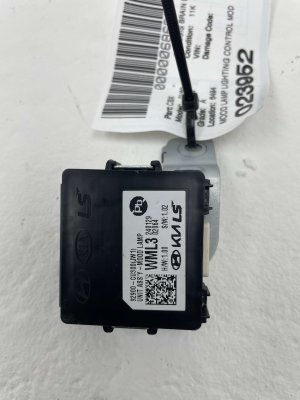
- Verify the Part Number: Ensure the part you are buying is OEM part number 91926-CU040. While other modules exist in the vehicle, this specific number corresponds to the Data Connectivity Unit integrated with the wireless charger.
- Physical Inspection: When the part arrives, inspect the electrical connector pins for any signs of damage, corrosion, or bending. Check the plastic housing for cracks or evidence of liquid spills, which could damage the internal electronics.
- Factor in Programming Costs: A used module that costs $125 is not a $125 repair. You must contact a Genesis dealer, confirm they are willing to install and program a customer-supplied used part, and get a quote for the labor. This can add several hundred dollars to the final cost.
- Why Used OEM is the Only Option: There are no new aftermarket versions of this complex, vehicle-specific module. A used OEM part is the only alternative to a new one from the dealer. It contains the correct hardware and firmware designed specifically for the GV60's systems.
Cost Comparison
The price of the physical part is only one component of the total repair cost. The mandatory dealer programming is a significant factor.
| Part Type | Estimated Part Cost | Notes |
|---|---|---|
| New OEM | $450 - $675 | Purchased from a Genesis dealership parts department. |
| Used OEM | $120 - $220 | Sourced from online auto recyclers or eBay. Price varies by condition and mileage. |
| Shop Labor & Programming | $250 - $500 | Estimated 1.5-2.5 hours at a dealer labor rate. This includes physical installation and the required GDS programming session. |
Frequently Asked Questions (FAQ)
Do I have to get this module programmed at the dealer?
Yes. This module is linked to the vehicle's anti-theft and Digital Key system. It requires programming with dealer-specific Genesis Diagnostic System (GDS) software to function. An EV-certified Genesis retailer is required for the repair.
Can I fix my Digital Key or Bluetooth issues with a software update?
It's possible. Many connectivity issues on the GV60 are software-based. Before replacing hardware, ensure your vehicle has the latest Over-the-Air (OTA) updates installed and check with your dealer about any applicable TSBs or software flashes that might resolve your problem without needing a new part.
Why does my phone get so hot on the wireless charger?
This is a common complaint among GV60 owners and users of in-car wireless chargers in general. The heat is a byproduct of the inductive charging process. Removing your phone case and ensuring the phone is perfectly centered on the pad can sometimes help improve efficiency and reduce heat. However, the issue is often inherent to the design and may not indicate a faulty module unless it fails to charge at all.
Will a used module work in my car?
A used module with the correct part number (91926-CU040) will work, but only after it has been professionally programmed to your vehicle by a Genesis dealer. It is not a plug-and-play component.
Technical Specifications
OEM Part Numbers: 91926-CU040 91926CU040
Integrates wireless phone charger (Qi standard), Near Field Communication (NFC), Bluetooth, and Ultra-Wideband (UWB) transceivers. Also known as Data Connectivity Unit (DCU).
We Have This Part in Stock

The information in this article is provided for general reference and educational purposes only. Vehicle specifications, procedures, and part compatibility can vary by production date, trim level, and region. Always consult your vehicle's factory service manual and verify part numbers before purchasing or performing repairs. Safety-critical components such as airbags, seat belts, and braking systems should be installed by a qualified professional.
- Genesis GV60: