

Ford Key Fob Not Working? A Guide for C-Max, Focus, Escape, Explorer & More (2011-2019)
This guide clarifies the confusing world of Ford keyless entry remotes, helping you identify, replace, and program the correct key for your vehicle.
- You MUST match the FCC ID on the back of your old remote to the new one. There are three main types for these vehicles: OUCD6000022 (turn-key), KR55WK48801 (push-start), and M3N5WY8609 (push-start with remote start).
- If you have two working keys, you can program a third key's transponder chip yourself, saving significant money. If you only have one key, you must see a locksmith or dealer.
- For remote head keys (turn-key ignition), the remote lock/unlock function can often be programmed at home using a simple ignition cycling procedure, separate from the transponder chip programming.
- An automotive locksmith is usually a cheaper and more convenient option than a dealership for programming, especially in an 'all keys lost' situation.
Understanding Your Ford Key: Not All Remotes Are the Same

If your key fob for a 2013-2018 Ford C-Max, 2012-2018 Ford Focus, 2013-2019 Ford Escape, or other listed Ford model has stopped working, you've likely discovered that finding a replacement isn't simple. These vehicles use several different types of keyless entry transmitters that may look similar but are not interchangeable. The correct key depends on your vehicle's ignition system (traditional turn-key or push-to-start) and specific options like a rear liftgate or remote start. Using the wrong key will result in a failure to program and a waste of time and money.
The most important identifier on your key is the FCC ID, which is typically printed on the back of the remote case. You must match this ID to ensure you are buying a compatible part.
Key Type 1: Remote Head Key (for Turn-Key Ignitions)
Pro Tip: This is the most common key for models with a standard ignition where you physically turn a key to start the car.
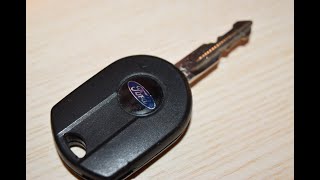
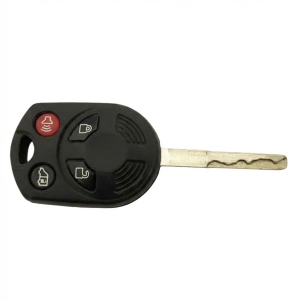
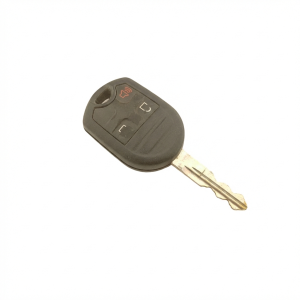
- FCC ID: OUCD6000022
- Frequency: 315 MHz
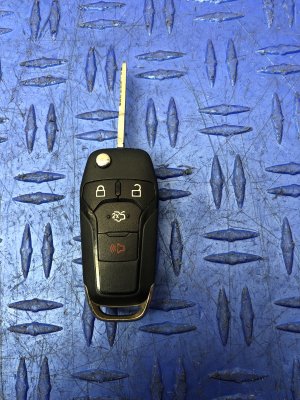
- Buttons: 3-Button (Lock, Unlock, Panic) or 4-Button (Lock, Unlock, Panic, Trunk/Liftgate)
- Description: This key combines the physical key blade and the remote buttons into a single unit. The key blade itself contains a transponder chip that must be programmed to start the vehicle, and the remote portion must be programmed for the lock/unlock functions.
- Commonly Fits: 2013-2018 Ford C-Max, 2013-2019 Ford Escape, 2012-2018 Ford Focus, 2011-2019 Ford Fiesta, 🎬 Watch: Easy DIY guide for replacing your key fob battery 2014-2019 Ford Transit Connect, and others.
Key Type 2: 3-Button Smart Key (for Push-to-Start)
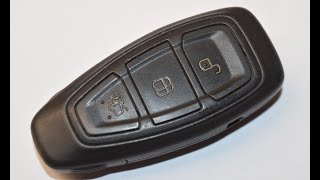
- FCC ID: KR55WK48801
- Frequency: 433/434 MHz
- Buttons: Lock, Unlock, Trunk
- Description: This is a smart key, or proximity key, for vehicles with a push-to-start button. The vehicle detects the key's presence, allowing you to unlock the doors and start the engine without inserting a key. It includes a slide-out emergency key blade for manual door unlocking.
- Commonly Fits: 2013-2019 Ford C-Max, 2011-2019 Ford Fiesta, 2012-2019 Ford Focus (especially Titanium models).
Key Type 3: 5-Button Smart Key (for Push-to-Start with Remote Start)
Warning: This key is for vehicles equipped with both push-to-start ignition and factory remote start. Do not confuse it with other smart keys.
- FCC ID: M3N5WY8609
- Frequency: 315 MHz
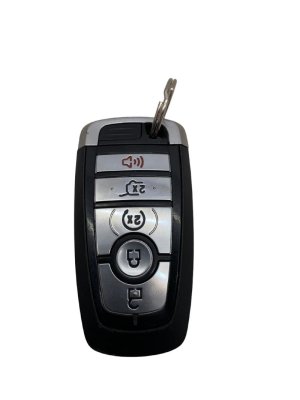
- Buttons: Lock, Unlock, Panic, Remote Start, Trunk/Liftgate
- Description: This advanced smart key adds a remote start button. It is common on higher trim levels of larger Ford vehicles.
- Commonly Fits: 2013-2019 Ford Escape, 2011-2014 Ford Edge, 2015-2017 Ford Expedition, 2011-2015 Ford Explorer, 2013-2019 Ford Flex, 2013-2019 Ford Taurus. It may also be found on some C-Max and Focus models.
Symptoms of a Failing Keyless Entry Transmitter


Failure can be gradual or sudden. Here are the common signs:
- Intermittent Operation: The buttons only work when pressed multiple times or from very close to the vehicle. This often starts as the first sign of a dying internal battery or failing electronics.
- No Response: The vehicle does not respond to any button presses. Always try replacing the CR2032 battery in the fob first, as this is the most common and cheapest fix. 🎬 See how to quickly swap out your old remote battery
- "No Key Detected" Message: For push-to-start vehicles, the dashboard may display a "No Key Detected" or similar warning, preventing the car from starting. This points to a failure in the fob's transponder signal.
- Reduced Range: You have to be much closer to the car than you used to for the remote to work.
- Security Light Flashing Rapidly: When you try to start the car with a failing transponder key, the security or anti-theft light on the dashboard may flash rapidly, indicating an immobilizer issue.
Failure is rarely associated with specific OBD-II codes readable by basic scanners. Issues are typically stored in the Body Control Module (BCM) or Radio Transceiver Module (RTM) and require advanced tools like FORScan to read. A TSB for some 2013 models pointed to DTC P1595 (in the PCM) related to a no-crank condition after a remote start, which required a module reprogram.
Known Issues, TSBs, and Recalls
While there are no widespread recalls for the key fobs on these specific models, some issues are commonly reported by owners.
- Battery Terminal Contact: The small metal tab that makes contact with the battery inside the fob can become bent or lose tension, leading to intermittent power and function. Often, this can be fixed by carefully bending the tab back into place.
- Case and Button Wear: The physical plastic case can crack, and the rubber button pads can wear out, making the buttons difficult to press or exposing the internal circuit board to moisture and dirt.
- TSB 13-4-4: While for the 2013 Fusion/MKZ, this service bulletin addresses an issue where RKE functions are inoperative and the vehicle may not crank after a remote start. It required reprogramming the RTM and BCM. This indicates that on related platforms, a software issue can sometimes be the cause, not a faulty key.
Programming: The Most Critical Step

Programming is a two-part process: programming the remote buttons (for locks) and programming the transponder chip (for starting the car). How you do this depends on the key type and how many working keys you currently have.
DIY Programming: When Is It Possible?
Remote Buttons (Turn-Key Remotes ONLY): You can often program the lock/unlock functions of a new remote head key (OUCD6000022) yourself. The procedure is simple:
- Close all doors, then open the driver's door and press the UNLOCK button on the door panel.
- Cycle the ignition from OFF to RUN 8 times within 10 seconds, ending in the RUN position.
- The door locks will cycle (lock then unlock) to confirm programming mode is active.
- Within 8 seconds, press any button on the new remote. The locks will cycle again to confirm that remote is programmed.
- Repeat the previous step for any other remotes (including your old ones).
- Turn the ignition to OFF. The locks will cycle a final time to exit programming mode.
Transponder Chip (If You Have TWO Working Keys): For both remote head keys and some smart keys, you can program a third key yourself if you already have two valid, programmed keys. This is known as the "two-key method."
- Insert the first working key into the ignition (or place it in the programming slot for smart keys) and turn the ignition to ON for 3-5 seconds.
- Turn the ignition OFF and remove the key.
- Within 10 seconds, insert the second working key and turn the ignition to ON for 3-5 seconds.
- Turn the ignition OFF and remove the key.
- Within 10 seconds, insert the new, unprogrammed key and turn the ignition to ON. The security light should turn off, and the locks may cycle, confirming the new key is programmed.
Warning: If you only have one working key (or zero), you CANNOT use these DIY methods to program a new key to start the car. You will need professional help.
Professional Programming: Locksmith, Dealer, or FORScan
If you only have one key, lost all your keys, or have a smart key that won't program with the DIY method, you need professional programming.
- Automotive Locksmith: This is often the best and most cost-effective option. Locksmiths have specialized tools to program transponders and smart keys directly to your vehicle's computer, and they can come to you.
- Ford Dealership: The dealer can always program a key, but they are typically the most expensive option and will require you to bring the vehicle to them.
- FORScan Software: For advanced DIY mechanics, FORScan software with an extended license and a compatible OBDII adapter can be used to erase all keys from the vehicle's memory and add new ones. This is a powerful tool but requires technical knowledge and carries the risk of error if not done correctly.
Buying a Used Keyless Entry Transmitter
Buying a used OEM remote can be a great way to save money, but it comes with risks. Here’s what you need to know.
- MATCH THE FCC ID: This is the most important rule. A remote with the same button layout but a different FCC ID will not work.
- Inspect the Case: Look for cracks, significant wear, or signs that the case has been pried open, which could indicate internal damage.
- Remote Head Keys (OUCD6000022): Used remote head keys are generally safe to buy. The remote portion can be reprogrammed via the 8-cycle method, and a locksmith can cut and program the new transponder chip.
- Smart Keys (KR55WK48801, M3N5WY8609): Be cautious. Many used smart keys are electronically "locked" to their original vehicle and cannot be reprogrammed to a new one unless they have been professionally "unlocked" or refurbished. It is safer to buy a new aftermarket key or a professionally refurbished used OEM key than a standard used one from a private seller.
- Why Used OEM vs. New Aftermarket? A used OEM remote has factory electronics that are proven to be compatible and have a strong signal. Some new aftermarket remotes, while cheaper, can have issues with programming, range, or longevity. However, reputable aftermarket brands like Dorman are generally considered reliable.
Cost Breakdown
Prices can vary significantly based on the key type, where you buy it, and who programs it.
| Item / Service | Estimated Cost |
|---|---|
| New OEM Key Fob (from Dealer) | $150 - $400+ (part only) |
| New Aftermarket Key Fob | $25 - $90 |
| Used OEM Key Fob | $20 - $70 |
| Dealer Programming Labor | $100 - $250 |
| Locksmith Programming Labor | $50 - $200 |
| Key Blade Cutting | $10 - $50 |
FAQ
How do I find my key's FCC ID?
The FCC ID is usually printed or engraved on the back of the plastic key fob case. If it has worn off, you may need to open the case to see if it's printed inside, or call a Ford dealership with your VIN to get the correct part number.
Can I just replace the battery?
Yes, and you should always try this first! All of these keys use a single CR2032 coin battery. Replacing it does not require reprogramming. If your remote stops working, a weak battery is the most likely cause.
Can I put the electronics from my old, broken key into a new shell?
Yes. If your remote's electronics still work but the case is broken or the buttons are worn out, you can buy an empty replacement shell. Carefully transfer the circuit board and transponder chip to the new shell for a cheap and effective repair.
Why won't my car start even after I replaced the fob battery?
The remote buttons for locking/unlocking are powered by the battery, but the transponder chip that allows the car to start is passive and doesn't need the battery. If the car won't start and you see a flashing anti-theft light, the transponder chip in your key has failed or lost its programming. The key itself needs to be replaced and reprogrammed.
I only have one key. What should I do?
You should get a second key made immediately. If you lose your only key, the cost and hassle to get a new one made is significantly higher, as it becomes an "all keys lost" situation requiring a locksmith or dealer to access the car's computer. Having two keys allows you to program a third one yourself, saving hundreds of dollars in the future.
Helpful Videos
Technical Specifications
OEM Part Numbers: 5WK50170 7S7Z-15K601-L BT4T-15K601-HC BT4T-15K601-HX CJ5T-15K601-DX CJ5T-15K601-HX 164-R8046 164-R8007 164-R8048 164-R8092 5921709 5919918 5921286
FCC IDs: OUCD6000022 (315 MHz), KR55WK48801 (433/434 MHz), M3N5WY8609 (315 MHz). All use a CR2032 battery.
We Have This Part in Stock



The information in this article is provided for general reference and educational purposes only. Vehicle specifications, procedures, and part compatibility can vary by production date, trim level, and region. Always consult your vehicle's factory service manual and verify part numbers before purchasing or performing repairs. Safety-critical components such as airbags, seat belts, and braking systems should be installed by a qualified professional.
- Ford C-Max:
- Ford Focus:
- Ford Escape:
- Ford Edge:
- Ford Expedition:
- Ford Explorer:
- Ford Fiesta:
- Ford Flex:
- Ford Taurus:
- Ford Transit Connect:
- 🎬 Helpful Videos
- 🛍️ Shop This Part
- Understanding Your Ford Key: Not All Remotes Are the Same
- Key Type 1: Remote Head Key (for Turn-Key Ignitions)
- Key Type 2: 3-Button Smart Key (for Push-to-Start)
- Key Type 3: 5-Button Smart Key (for Push-to-Start with Remote Start)
- Symptoms of a Failing Keyless Entry Transmitter
- Known Issues, TSBs, and Recalls
- Programming: The Most Critical Step
- DIY Programming: When Is It Possible?
- Professional Programming: Locksmith, Dealer, or FORScan
- Buying a Used Keyless Entry Transmitter
- Cost Breakdown
- FAQ
- 🎟️ Get 5% Off