

2024-2025 Tesla Model 3 Cabin Camera: Fixing 'Unavailable' Errors and Autopilot Faults
A guide to diagnosing a faulty interior camera, understanding the critical post-installation software steps, and what to check when buying a used unit for your 'Highland' Model 3.
- A faulty cabin camera will disable or limit Autopilot and Full Self-Driving (FSD) as a safety precaution.
- Replacement is NOT plug-and-play; the new camera must be configured via Tesla's Service Mode to function.
- A common failure is the infrared (IR) emitter, which causes the camera to stop working at night.
- Before replacing the part, try cleaning the lens and the inside of the windshield, and perform a full system reboot.
Symptoms of a Failing Cabin Camera

A problem with the interior cabin camera will usually be obvious. The car relies on this part to confirm the driver is alert, and when it can't, it will disable key features and display warnings. Watch for these specific symptoms.
"Cabin Camera Unavailable" or "Covered/Blinded" Alerts
The most common symptom is an alert on the center touchscreen stating that the cabin camera is unavailable, covered, or blinded. This message indicates the system can no longer see the driver. While this can be caused by a simple obstruction, it often points to a deeper hardware or software issue.
Autopilot or FSD Disengages or is Unavailable
Because the camera's main job is to monitor the driver during semi-autonomous driving, its failure directly impacts these features. You may experience sudden Autopilot disengagements, often accompanied by an audible chime and an instruction to take over immediately. In other cases, you may be prevented from engaging Autopilot or FSD altogether. This problem is often more frequent at night, which points to a specific type of hardware failure.
Infrared (IR) Emitter Failure
A very common failure mode for this camera is a dead infrared (IR) emitter. The camera needs these invisible IR lights to see you in the dark. If they fail, the camera goes "blind" at night and reports that its view is blocked, causing Autopilot to become unavailable. You can easily test this yourself.
Pro Tip: To check if your camera's IR emitters are working, sit in the car at night with the system on. Open the camera app on your smartphone and point its main rear-facing lens (not the selfie camera) at the cabin camera assembly above the mirror. Your phone's sensor can see infrared light. If the emitters are working, you will see faint, pulsing purple dots on your phone's screen. If the screen remains dark, your IR emitters have failed, and the camera module needs to be replaced.
🎬 Watch this guide to fix your Tesla cabin camera issuesDiagnosing the Problem: Is It the Camera or Something Else?

Before buying a replacement part, it's worth trying a few simple diagnostic steps, as the issue isn't always a failed camera.
- Clean the Camera Lens: The most basic step is to gently wipe the small camera lens with a soft, clean microfiber cloth. Smudges or dust can sometimes obstruct the view.
- Clean the Windshield: On newer cars like the 2024-2025 "Highland" Model 3, chemical vapors from new interior materials can create a hazy film on the *inside* of the windshield, right where the camera looks through. This can cause "visibility" alerts. Cleaning this area of the windshield from the inside may resolve the issue.
- Perform a System Reboot: A simple software glitch can sometimes cause camera issues. Try rebooting the touchscreen by holding down both scroll buttons on the steering wheel until the screen turns black. If that doesn't work, you can perform a full power cycle by going to Controls > Safety > Power Off on the touchscreen and waiting at least two minutes before pressing the brake pedal to power the car back on. 🎬 See this video on fixing cabin camera and FSD failures
- Check for Software Updates: Ensure your vehicle's software is up to date, as Tesla sometimes releases updates to address camera-related bugs.
Known Issues for 2024-2025 Model 3

While these vehicles are new, a primary failure trend is the previously mentioned failure of the infrared emitters. Some earlier Tesla models had a Technical Service Bulletin (TSB) for cameras that were missing IR sensors, so there is a history of issues with this specific function.
Recall Notice Clarification: In early 2025, Tesla issued recall SB-25-00-001 (NHTSA ID 25V-002) for certain 2024-2025 Model 3 vehicles. It is important to know that this recall concerns a computer issue that can cause a loss of the rearview (backup) camera image, not the interior cabin camera. While your vehicle may be affected by this recall, it is a separate issue from a faulty interior camera.
Buying a Used 2024-2025 Model 3 Interior Camera

A used OEM camera can be a cost-effective solution, but there are critical factors to consider before you buy.
Physical Inspection
- Check the Lens: Inspect the small glass lens for deep scratches, scuffs, or any signs of haziness that could distort the image.
- Inspect the Connector: Look at the electrical connector pins. Ensure they are straight, clean, and free of any corrosion or damage.
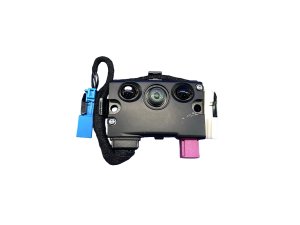
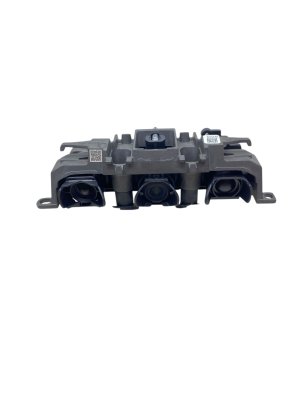
- Verify the Part Number: The 2024+ "Highland" Model 3 uses specific parts. Make sure the part number matches what is required for your vehicle. Known part numbers include 1588124-10-O and 1948005-00-A. Always confirm compatibility with the seller.
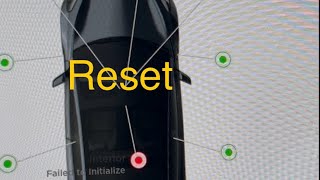
Warning: Replacement Requires Software Configuration. This is not a simple plug-and-play part. After the new camera is physically installed, it must be calibrated and configured using Tesla's Service Mode. This procedure involves running specific software routines like "Clear Camera Calibration" and "Update Camera" to make the vehicle recognize the new hardware. 🎬 Watch how to reset and recalibrate your camera in Service Mode If this step is not performed, the camera will not work. You will need access to Service Mode or have to take the vehicle to a Tesla Service Center or a qualified independent shop to complete the installation.
Cost of Replacement
The cost to fix a faulty cabin camera can vary significantly depending on the parts and labor source.
| Part/Service | Estimated Cost |
|---|---|
| New OEM Camera | $100 - $150 |
| Used OEM Camera | $65 - $100 |
| Shop Labor (Physical Install & Software Setup) | $100 - $250 |
Frequently Asked Questions (FAQ)
Can I still drive my car with a broken cabin camera?
Yes, the car is safe to drive. However, critical driver assistance features like Autopilot and Full Self-Driving (FSD) will be limited or completely disabled because the car cannot monitor your attentiveness.
Is replacing the cabin camera a difficult DIY job?
The physical replacement is relatively easy, requiring only basic tools like a trim removal tool and a T10 Torx screwdriver. The difficulty lies in the mandatory software configuration step that must be performed after installation using Tesla's Service Mode. Without the ability to complete this software step, the job is not fully DIY-feasible.
Can I just put tape over the camera for privacy?
You can, but doing so will produce the same result as a broken camera: Autopilot and FSD will be disabled because the system's view will be blocked. Tesla's privacy policy states that by default, camera images and video are not transmitted outside the vehicle unless you opt-in to data sharing for analytics or a safety-critical event occurs.
Why did my camera stop working at night but it's fine during the day?
This is the classic symptom of a failed infrared (IR) emitter. The camera relies on this invisible light source to see in the dark. When the emitter fails, the camera works fine in daylight but goes blind at night, triggering a "camera blocked" error and disabling Autopilot.
Helpful Videos
Technical Specifications
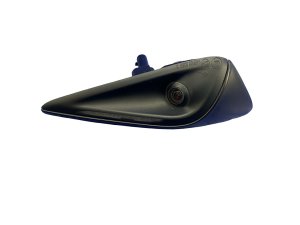
OEM Part Numbers: 1588124-10-O 1948005-00-A
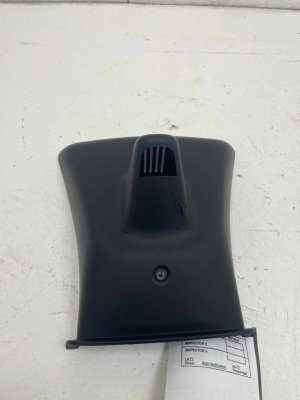
Located in the rearview mirror housing. Equipped with infrared (IR) emitters for night vision. Requires T10 Torx for removal.
We Have This Part in Stock

The information in this article is provided for general reference and educational purposes only. Vehicle specifications, procedures, and part compatibility can vary by production date, trim level, and region. Always consult your vehicle's factory service manual and verify part numbers before purchasing or performing repairs. Safety-critical components such as airbags, seat belts, and braking systems should be installed by a qualified professional.
- Tesla 3:
- 🎬 Helpful Videos
- 🛍️ Shop This Part
- Symptoms of a Failing Cabin Camera
- "Cabin Camera Unavailable" or "Covered/Blinded" Alerts
- Autopilot or FSD Disengages or is Unavailable
- Infrared (IR) Emitter Failure
- Diagnosing the Problem: Is It the Camera or Something Else?
- Known Issues for 2024-2025 Model 3
- Buying a Used 2024-2025 Model 3 Interior Camera
- Physical Inspection
- Cost of Replacement
- Frequently Asked Questions (FAQ)
- 🎟️ Get 5% Off