

2006-2009 Toyota Prius MFD: Solving the Blank Screen & Touchscreen Failures
This guide covers the common failures, replacement procedures, and critical part number matching needed for the Gen 2 Prius Multi-Function Display.
- This part is for the 2006-2009 (Gen 2) Prius ONLY and is not compatible with 2010+ (Gen 3) models.
- Failure is extremely common, usually causing a blank or unresponsive screen due to internal electronic faults.
- The MFD is plug-and-play and does NOT require dealer programming, making used units a great option.
- Matching the part number from your original unit is the most critical step to ensure compatibility with your car's options (Navigation, JBL audio, etc.).
Important: Is Your Prius a 2009 or 2010?

Warning: This guide applies ONLY to the second-generation (Gen 2) Toyota Prius, model years 2006, 2007, 2008, and 2009. The 2010 Prius is the first year of the third generation (Gen 3) and uses a completely different dashboard and MFD. Parts are NOT interchangeable between a 2009 and 2010 model. Before purchasing, confirm your vehicle's model year.
Common Symptoms of a Failing Prius MFD

Failure of the MFD in the Gen 2 Prius is a well-documented issue, often stemming from failing capacitors or cracked solder joints on the internal circuit boards. Symptoms can appear intermittently at first, often triggered by temperature changes, before becoming permanent.
- Blank or Black Screen: This is the most common symptom. The screen is completely dark and unresponsive, though you may still hear audio from the radio. You will lose control over climate, audio, and other settings.
- Unresponsive Touchscreen: The display may look normal, showing all information, but it does not respond to touch commands. This makes it impossible to change settings or use the navigation system.
- Intermittent Operation: The screen may work correctly for a while, then suddenly go blank or freeze. It might come back on after the car is turned off and on again, or it may remain off for days at a time.
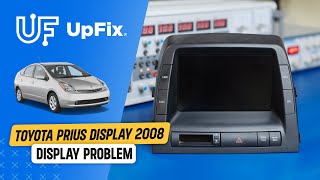
- Garbled or Lined Display: The screen may show distorted graphics, horizontal or vertical lines, or a frozen Toyota logo.
- Side Buttons Not Working: The physical buttons on the sides of the MFD may stop responding, even if the touchscreen itself still works.
Diagnosing the Problem: Is it the Screen or Something Else?

Before replacing the MFD, it's worth checking a few simple things:
- Check Fuses: A blown fuse can cause the MFD to go completely dead. Check the fuses labeled "ECU-B" and "RADIO No. 1" in the fuse box located inside the car, near the driver's left knee.
- Check the 12V Auxiliary Battery: A weak or failing 12-volt battery (located in the trunk) is a notorious cause of strange electrical problems in the Prius. If the battery's resting voltage is below 12.4 volts, it may be the source of your MFD issues. 🎬 Watch: How to troubleshoot a black screen
- Try a System Reboot: With the car on, press and hold the "DISPLAY" button for 5-10 seconds. This can sometimes force the system to restart and may temporarily resolve software glitches.
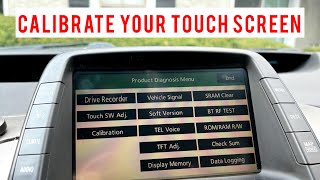
- Screen Calibration: If your screen is responsive but inaccurate (you have to press above or below the button you want), you can try to recalibrate it. There is a hidden diagnostic menu accessible by holding the "DISPLAY" button while turning the lights on and off three times. 🎬 Watch: How to access the hidden calibration menu
Buying a Used 2006-2009 Prius MFD: A Buyer's Guide

A used OEM MFD is often the most cost-effective solution. Because these units don't require programming, a compatible replacement is a simple plug-and-play swap. However, matching the part number is absolutely critical.
Step 1: Identify Your Car's Features
Prius MFDs vary based on the car's original options. You must know if your car has:
- Factory Navigation: Units with navigation have seven buttons flanking the screen (including "MAP/DEST").
- JBL Sound System: This was often paired with navigation.
- Backup Camera: Models with a backup camera have a higher-resolution screen.
Base models without these features have a lower-resolution screen and only four buttons. Installing a navigation unit in a base model car is not plug-and-play and requires significant wiring modifications.
Step 2: Match the Part Number EXACTLY
Warning: While some units may have compatible plugs, their internal data streams can be different, leading to non-functional controls. The safest approach is to match the part number on your original unit exactly.
Remove the upper dash trim to access the two 10mm bolts holding the MFD in place. Pull the unit out to find the manufacturer's label on the casing. Common part numbers for the MFD unit itself include:
- With Navigation / JBL / Backup Camera: 86110-47260, 86110-47220, 86110-47071
- Without Navigation (Base Model): 86110-47230, 86110-47081
Note that some later-year navigation units (like 86110-47260 from a 2009 model) have been shown to work in place of earlier units (like 86110-47220 from a 2007), but this is not guaranteed for all combinations.
🎬 See this test swapping a 47220 with a 47260Step 3: What to Inspect on a Used Unit
When buying a used MFD, ask the seller for clear photos of:
- The Screen Surface: Check for deep scratches, delamination (peeling), or "sunburst" discoloration, which can make the screen hard to read.
- The Part Number Sticker: Verify it matches what you need.
- All Connectors: Ensure none of the plastic sockets are cracked or have bent pins.
Given the known failure rate, buying from a reputable recycler with a warranty is highly recommended over a private seller.
Programming and Installation
Pro Tip: The Gen 2 Prius MFD is plug-and-play. It does not need to be programmed, flashed, or coded to the vehicle's VIN. There is no anti-theft system linked to the display. This makes DIY replacement very feasible.
Replacement involves removing several interlocking dash trim pieces and the main air vents above the unit. The MFD itself is held in by two 10mm bolts. The entire process can be done with basic hand tools in about 1-2 hours.
Known Issues and TSBs
Toyota issued Technical Service Bulletin (TSB) EL013-06 for MFDs that are blank or inoperative on 2006-2007 models. This bulletin acknowledged the problem and provided dealers with a diagnostic procedure, which typically resulted in replacing the unit. There have been no safety recalls issued by the NHTSA for MFD failure, though other recalls exist for the 2006-2009 Prius for issues like the steering shaft and electric water pump.
Cost Comparison for MFD Replacement
| Solution | Estimated Cost | Notes |
|---|---|---|
| New OEM | $3,000+ | Extremely expensive and may be discontinued. |
| Used OEM | $150 - $500 | Most popular option. Price depends on condition and seller. |
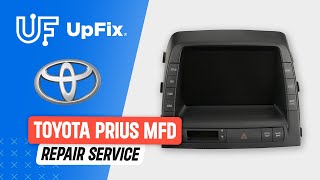
| Repair Service | $200 - $450 | You send your original unit to be repaired. This fixes the root cause (bad capacitors/solder) and you keep your original part. |
| DIY Digitizer Replacement | $20 - $80 | If only the touchscreen is unresponsive but the display is visible, you can replace just the outer glass layer (digitizer). This is a more involved repair. |
| Shop Labor | $150 - $300 | Typically 1-2 hours of labor for a straightforward swap. |
Frequently Asked Questions (FAQ)
Does a used Prius MFD need to be programmed by a dealer?
No. For the 2006-2009 Prius, the MFD is a plug-and-play component. As long as you install a compatible part number, no programming or dealer visit is required.
Can I upgrade my base model Prius with a navigation MFD?
This is not a simple swap. The wiring harnesses are different between navigation and non-navigation models. While it is possible, it requires significant electrical work to repin connectors and add the necessary components like the GPS antenna.
My screen is black, but the radio still plays and the steering wheel controls work. Is it the MFD?
Yes, this is a classic symptom of MFD failure. The internal circuit board that powers the screen has failed, but the audio and other vehicle systems that it controls are still functioning in the background.
What is the difference between the MFD and the Navigation ECU?
The MFD (e.g., part number 86110-47260) is the display and button unit in the dashboard. The Navigation ECU (e.g., part number 86841-47040) is a separate computer, often located under the driver's seat, that contains the map data on a DVD and performs the navigation calculations. A failure of the Nav ECU can cause map-related errors without affecting the climate or audio screens.
Helpful Videos


Technical Specifications
OEM Part Numbers: 86110-47260 86110-47220 86110-47230 86110-47081 86110-47071 86110-47080 86110-47210 E7022 (Faceplate ID)
7-inch diagonal screen size. Interface connections vary based on Navigation and JBL options.
We Have This Part in Stock



The information in this article is provided for general reference and educational purposes only. Vehicle specifications, procedures, and part compatibility can vary by production date, trim level, and region. Always consult your vehicle's factory service manual and verify part numbers before purchasing or performing repairs. Safety-critical components such as airbags, seat belts, and braking systems should be installed by a qualified professional.
- Toyota Prius:
- 🎬 Helpful Videos
- 🛍️ Shop This Part
- Important: Is Your Prius a 2009 or 2010?
- Common Symptoms of a Failing Prius MFD
- Diagnosing the Problem: Is it the Screen or Something Else?
- Buying a Used 2006-2009 Prius MFD: A Buyer's Guide
- Step 1: Identify Your Car's Features
- Step 2: Match the Part Number EXACTLY
- Step 3: What to Inspect on a Used Unit
- Programming and Installation
- Known Issues and TSBs
- Cost Comparison for MFD Replacement
- Frequently Asked Questions (FAQ)
- 🎟️ Get 5% Off