

2023 Nissan Z 9-Inch Infotainment Display: Programming, Part Numbers, and Common Problems
This guide covers the critical details for replacing the 9-inch touchscreen in your 2023 Nissan Z, including the all-important programming requirements and a key part number change.
- A replacement display MUST be programmed to the vehicle by a dealer using Nissan's CONSULT software; it is not plug-and-play.
- There was a part number change in June 2023. Verify your car's build date and match the part number exactly (pre-June '23: 25915-6GP0A, post-June '23: 25915-6GR0A).
- This 9-inch unit only fits Performance and Proto Spec trims. It will not work in a base Sport model equipped with the 8-inch screen.
- Common owner-reported issues are software-related, including random reboots, black screens, and CarPlay connectivity problems. Always check for a software update before replacing hardware.
Infotainment Variants in the 2023 Nissan Z
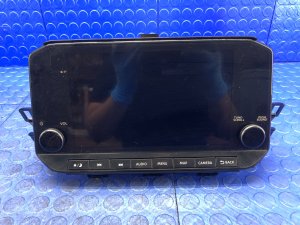
Nissan equipped the 2023 Z with two different infotainment systems. This specific guide covers the premium 9-inch touchscreen display found in the Performance and Proto Spec trim levels. This system includes factory navigation, a Wi-Fi hotspot, and wireless Apple CarPlay.
The base Sport trim comes with a smaller 8-inch display that lacks built-in navigation and wireless CarPlay. The parts are not interchangeable. If your Z has the 8-inch screen, this 9-inch unit is not a direct plug-and-play upgrade, as the wiring harnesses and features differ.
A Critical Production Date Change
A crucial detail for anyone buying this part is a mid-year change in production. The part number for the display unit changed for vehicles manufactured after June 2023. It is essential to match the part number to your vehicle's production date.
- For vehicles built up to June 2023: Use part number 25915-6GP0A or 2591A-6GP0A.
- For vehicles built from June 2023 onward: Use part number 25915-6GR0A or 2591A-6GR0A.
Warning: Installing a unit with the wrong part number for your vehicle's build date may result in compatibility issues or a complete failure to function, even after programming.
Symptoms of a Failing Infotainment Display
Owners on forums have reported several common issues with the 2023 Z's infotainment system. These symptoms can range from minor annoyances to a complete loss of function.
- Black or Blank Screen: The display may fail to turn on, or it might suddenly go black while driving. This is sometimes reported after shifting out of reverse.
- Random Reboots: The system may unexpectedly restart on its own, interrupting audio playback or navigation.
- Unresponsive Touchscreen: The screen may not register touches, or require very firm presses to respond.
- Freezing or Lagging: The system may freeze on a particular screen or become very slow and laggy when navigating menus.
- CarPlay/Android Auto Issues: Frequent disconnections, choppy audio when using navigation, or failure to connect are common complaints.
- Backup Camera Problems: The backup camera feed may freeze, flicker, or fail to display entirely when the vehicle is in reverse.
- Bluetooth Disconnect Messages: Some users report seeing persistent "Bluetooth has disconnected" messages even when the connection seems stable.
Pro Tip: Before assuming the hardware has failed, try rebooting the system. Press and hold the power/volume knob for about 15 seconds until the screen goes black and the system restarts. This can temporarily resolve many software-related glitches.
Known Issues, Recalls, and TSBs
As of mid-2024, there are no active safety recalls from the National Highway Traffic Safety Administration (NHTSA) specifically for the infotainment display in the 2023 Nissan Z.
There are two unrelated recalls for the 2023 Z concerning the pop-up engine hood's pedestrian detection sensors and fasteners. While these do not affect the display, it's wise to check if your vehicle is affected by entering your VIN on the NHTSA website.
Nissan frequently releases software updates via Technical Service Bulletins (TSBs) to fix bugs in infotainment systems. If you are experiencing issues like freezing or random reboots, check with a Nissan dealer to see if a software update is available for your vehicle. These can often be performed under warranty.
Buying a Used Infotainment Display
Purchasing a used OEM display can save you a significant amount of money, but it's vital to do it right. Given the high cost of a new unit, a recycled part is an excellent option, provided you follow these steps.
- Verify the Part Number: This is the most important step. Double-check if your Z was built before or after June 2023 and purchase the corresponding part number. Do not buy a unit without a clear photo of the part number sticker.
- Inspect for Physical Damage: Check photos carefully for deep scratches on the screen, cracks in the housing, or damage to the connectors on the back. A reputable seller will provide clear pictures of the unit's condition.
- Understand Programming is Required: A used display is NOT plug-and-play. You must factor in the cost and time for a dealer visit to have the unit programmed to your car. Do not install the unit until you have a plan for programming.
- Check the Donor Vehicle Information: If possible, get the mileage from the donor car. While screen life is generally long, a unit from a low-mileage vehicle is always preferable.
Programming and Installation Requirements
Warning: A replacement infotainment display, whether new or used, must be programmed to your vehicle's VIN. The unit will not function correctly without this step.
Modern infotainment systems are integrated with the car's other electronic modules. This programming, often called initialization or configuration, ensures all features work together correctly and is a form of component protection.
- Dealer Programming: The most reliable method is to have a Nissan dealer perform the programming. They use a proprietary software tool called CONSULT to link the new display to your car.
- Independent Shops: Some specialized independent shops may have the necessary J2534 pass-thru tools and a subscription to Nissan's technical information system (NERS) to perform programming, but this is not common. Always confirm they have specific experience with modern Nissan infotainment units before proceeding.
- DIY Feasibility: The physical installation is straightforward for a DIY mechanic, involving the removal of dash trim panels. However, the software programming is not a DIY task.
Cost Breakdown
The cost of replacing the 9-inch display can vary significantly. A used OEM part offers substantial savings over a new unit from the dealer.
| Part Type | Estimated Cost |
|---|---|
| New OEM | $1,700 - $2,600 (plus a potential $500 core charge) |
| New Aftermarket | Not commonly available |
| Used OEM | $700 - $1,000 |
| Shop Labor (Installation & Programming) | $200 - $400 |
Frequently Asked Questions (FAQ)
Does a replacement infotainment display need to be programmed?
Yes, absolutely. A replacement unit, new or used, must be programmed to your vehicle's VIN by a Nissan dealer or a qualified specialist with Nissan's CONSULT diagnostic tool. It will not work properly without this step.
Will this 9-inch display fit my base model Z with the 8-inch screen?
No, this is not a direct swap. The wiring harnesses, features, and associated modules are different between the 8-inch and 9-inch systems. Upgrading requires significant modification and is not a simple plug-and-play installation.
What's the difference between part numbers ending in 6GP0A and 6GR0A?
The difference relates to the vehicle's manufacturing date. Part numbers ending in 6GP0A are for vehicles built up to June 2023. Part numbers ending in 6GR0A are for vehicles built from June 2023 onward. You must use the correct part for your vehicle's build date.
Can I fix my glitching screen with a software update?
It's possible. Many issues like freezing, reboots, and CarPlay problems are software-related. Before replacing the hardware, contact a Nissan dealer to see if there are any available Technical Service Bulletins (TSBs) or software updates for your infotainment system.
Are there any recalls for the 2023 Nissan Z infotainment system?
No. As of mid-2024, there are no safety recalls issued by the NHTSA for the infotainment display on the 2023 Nissan Z.
Technical Specifications
OEM Part Numbers: 25915-6GP0A 2591A-6GP0A 25915-6GR0A 2591A-6GR0A
Screen Size: 9-inch Diagonal Compatibility: For models with Bose Premium Audio and Navigation Features: Wireless Apple CarPlay, Wi-Fi Hotspot, Built-in Navigation
We Have This Part in Stock

The information in this article is provided for general reference and educational purposes only. Vehicle specifications, procedures, and part compatibility can vary by production date, trim level, and region. Always consult your vehicle's factory service manual and verify part numbers before purchasing or performing repairs. Safety-critical components such as airbags, seat belts, and braking systems should be installed by a qualified professional.
- Nissan Z:
- 🛍️ Shop This Part
- Infotainment Variants in the 2023 Nissan Z
- A Critical Production Date Change
- Symptoms of a Failing Infotainment Display
- Known Issues, Recalls, and TSBs
- Buying a Used Infotainment Display
- Programming and Installation Requirements
- Cost Breakdown
- Frequently Asked Questions (FAQ)
- 🎟️ Get 5% Off