

2021 Jeep Gladiator 7-Inch Radio: Fixing Screen Failures and Handling the Anti-Theft Code
This guide covers the common black screen and delamination issues with the 7-inch Uconnect display and explains the critical anti-theft code process for replacement.
- A replacement radio WILL require a 4-digit anti-theft code to function; it is not plug-and-play.
- Obtain the radio's serial number from the seller before buying a used unit to get the anti-theft code from a dealer or online service.
- Common failures include black screens and screen bubbling (delamination), which can be fixed by specialized repair services without replacing the entire unit.
- The physical replacement is very easy for a DIYer and requires only a pry tool and a 7mm socket, typically taking less than an hour.
Symptoms of a Failing 7-Inch Infotainment Display
When the 7-inch Uconnect 4 display in a 2021 Jeep Gladiator begins to fail, the symptoms are usually obvious and disruptive. Understanding these signs can help you distinguish between a simple software glitch and a true hardware failure requiring replacement.
- Black or Blank Screen: The most common failure is a screen that goes completely black and becomes unresponsive. Audio may or may not continue to play in the background. Sometimes this happens intermittently, while other times it is permanent.
- Screen Delamination or Bubbling: Heat and UV exposure can cause the adhesive bonding the screen's layers to fail. This appears as bubbles, a peeling look, or an oily/rainbow-colored distortion, often starting at the edges. This is a physical defect that worsens over time.
- Phantom or Ghost Touches: The screen may start registering touches that you aren't making. This can cause menus to change, settings to be altered, or calls to be placed without any input from the user.
- Glitching or Distorted Video: The display might show flickering horizontal or vertical lines, a 'matrix' of green pixels, or a distorted image before failing completely.
- Unresponsive Touchscreen: Certain areas of the screen, or the entire display, may stop responding to touch commands, making it impossible to control radio functions.
- Backup Camera Issues: A related TSB (S2108000043) notes that a software issue can cause a black screen with a "Check Entire Surroundings" message when shifting into reverse.
Pro Tip: Before assuming the unit is bad, try a soft reset. With the vehicle in the 'RUN' position, press and hold the volume and tuner knobs simultaneously for 10-20 seconds until the screen restarts. If this temporarily fixes the issue, it may be a software glitch. If the problem returns quickly or is accompanied by physical screen bubbling, it's likely a hardware failure.
Known Issues, TSBs, and Recalls
While no major recalls target this specific radio for replacement, Jeep has issued several Technical Service Bulletins (TSBs) related to its software and associated functions for the 2021 Gladiator.
- TSB S2208000068: Addresses a "Device Not Supported" message appearing on the radio screen.
- TSB S2108000043: Pertains to the backup camera displaying a black screen, which may be resolved with a software update.
- TSB 9003637: Advises technicians not to replace the media hub for Android Auto or Apple CarPlay issues, but to first verify that a high-quality OEM phone cable is being used, as aftermarket cables can cause connectivity problems.
Buying a Used 2021 Gladiator Infotainment Display
Buying a used OEM radio is an excellent way to save money, but it comes with one major hurdle: the anti-theft system. Unlike other parts, you cannot simply swap in a used radio. Follow these steps to ensure a successful installation.
The Anti-Theft Code is NOT Optional
Warning: When a Uconnect radio is installed in a new vehicle, it detects a different Vehicle Identification Number (VIN) and immediately enters an anti-theft mode, locking the unit until a 4-digit PIN is entered. Without this code, the radio is a useless brick.
Here’s how to handle the anti-theft code:
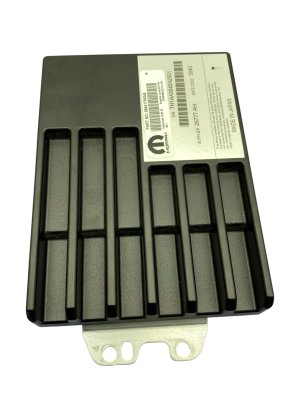
- Get the Radio's Serial Number BEFORE You Buy: The 4-digit PIN is tied directly to the radio's unique serial number. Ask the seller to provide a clear photo of the white label on the top or back of the radio chassis. The serial number is essential.
- Obtain the 4-Digit Code: You have two primary options for getting the code once you have the serial number:
- Jeep Dealership: A dealer's parts or service department can look up the code using their internal 'DealerCONNECT' system. They will need the radio's serial number and your vehicle's VIN. Some dealers provide this for free as a courtesy, while others may charge a small fee or be reluctant if you didn't buy the part from them.
- Online Code Services: Numerous vendors on sites like eBay offer Jeep radio code retrieval services for a small fee (typically $15-$35). You provide them with the radio's serial number, and they send you the code, often within minutes. This is often the easiest path for a used part.
- Physical Inspection: When the part arrives, inspect the screen carefully under a bright light for any signs of bubbling or delamination, especially around the edges. Check that all connectors on the back are intact and not damaged.
Is Programming Required?
Beyond the anti-theft code, no special programming or flashing is required. Once the correct code is entered, the radio will function normally and communicate with the vehicle's existing systems like the backup camera and steering wheel controls. Some sellers of pre-configured upgrade kits may ask for your VIN to set certain features, but for a like-for-like 7-inch swap, this is not necessary.
Cost Breakdown for Replacement
The cost to replace a 2021 Gladiator 7-inch display can vary significantly depending on the route you take.
| Part Source | Estimated Cost | Notes |
|---|---|---|
| New OEM (Dealer) | $750 - $1,300+ | Highest cost, but comes with a Mopar parts warranty. |
| Used OEM | $300 - $550 | Good value, but requires obtaining the anti-theft code separately. |
| Remanufactured / Repaired | $250 - $450 | Your original unit is sent out to have the screen or internal components fixed. |
| New Aftermarket | $400 - $1,200+ | Options range from basic units to large 'Tesla-style' screens with more features. |
| Shop Labor | $100 - $200 | The job is simple and takes a professional less than an hour. |
DIY Replacement Walkthrough
Replacing the radio is a surprisingly easy job that most DIYers can complete in under an hour with basic tools. The process is identical for the Jeep Wrangler (JL) and Gladiator (JT).
- Tools Needed: Plastic pry tool, 7mm socket with an extension.
- Disconnect Battery: As a precaution, disconnect the negative battery terminal.
- Remove Lower Dash Panel: The panel below the steering column and to the left of the climate controls simply pops off. Pull it straight out.
- Remove Climate Control Bezel: Open the cubby at the bottom of the center stack and get your fingers behind the climate control panel. Pull firmly to release the clips holding it in place. Disconnect the electrical connectors on the back and set it aside.
- Remove Radio Trim Bezel: With the climate controls gone, you'll see two 7mm screws at the bottom of the main radio trim. Remove them. The rest of the bezel is held by clips. Gently pry or pull it away from the dash.
- Remove the Radio: Four 7mm screws hold the radio chassis in its bracket. Remove these screws.
- Disconnect and Swap: Slide the old radio out. Carefully press the release tabs on the large main connector and smaller antenna connectors and unplug them. Plug the connectors into your new radio, slide it into place, and reinstall the four 7mm screws.
- Enter Code and Test: Reassemble the dash in reverse order. Reconnect the battery. When you start the vehicle, the radio will prompt you to 'Enter Anti-Theft Code'. Type in the 4-digit code you obtained. The radio should unlock and function normally.
Frequently Asked Questions (FAQ)
Do I have to go to a dealer to get my replacement radio to work?
No. While a dealer can provide the required 4-digit anti-theft code, you can also buy the code from various online services using the radio's serial number. Once the code is entered, no further dealer programming is needed for a direct replacement.
Can I upgrade my 7-inch screen to the factory 8.4-inch screen?
Yes, this is a popular upgrade, but it is not a direct swap. You will need the 8.4-inch radio, the corresponding dash bezel, and potentially a new media hub and antenna adapters. Several companies sell complete plug-and-play kits for this conversion.
My screen is just bubbling. Do I need to replace the whole radio?
No. If the radio still functions but the screen is delaminating or bubbling, you can send it to a specialized repair service. They will replace the faulty screen and digitizer assembly for less than the cost of a new or used unit. This is a permanent fix for the bubbling issue.
What OBD-II codes are related to a bad radio?
A failing radio typically does not trigger the main Check Engine Light or standard 'P' (powertrain) codes. Instead, it may store 'U' (network) codes like U0140 (Lost Communication with Body Control Module) or 'B' (body) codes like B1429 (Radio Display High Temperature) or codes related to speaker circuit faults. These require a more advanced scanner to read.
Technical Specifications
OEM Part Numbers: 68467717AD 68467717AE 68575681AA
Uconnect 4 with 7-Inch Display (Sales Code UAG)
We Have This Part in Stock




The information in this article is provided for general reference and educational purposes only. Vehicle specifications, procedures, and part compatibility can vary by production date, trim level, and region. Always consult your vehicle's factory service manual and verify part numbers before purchasing or performing repairs. Safety-critical components such as airbags, seat belts, and braking systems should be installed by a qualified professional.
- Jeep Gladiator:
- 🛍️ Shop This Part
- Symptoms of a Failing 7-Inch Infotainment Display
- Known Issues, TSBs, and Recalls
- Buying a Used 2021 Gladiator Infotainment Display
- The Anti-Theft Code is NOT Optional
- Is Programming Required?
- Cost Breakdown for Replacement
- DIY Replacement Walkthrough
- Frequently Asked Questions (FAQ)
- 🎟️ Get 5% Off