

2019-2022 Hyundai Veloster N Infotainment Switch: A Guide to Buttons, Compatibility, and Fixes
This guide covers the specific infotainment control switch for the Veloster N, detailing common issues, part numbers, and why a software update might be the real solution to your problem.
- This switch is ONLY for the 2019-2022 Hyundai Veloster N model and will not fit other trims.
- The part number 96540-J3000-MPP is for vehicles with push-button start and without factory navigation.
- This part is plug-and-play and does NOT require dealer programming or calibration.
- Many infotainment issues like freezing or 'ghost inputs' are caused by software glitches, not this switch. Always check for available software updates first.
Symptoms of a Failing Infotainment Control Switch
When this control panel begins to fail, the symptoms are usually straightforward and related to the physical buttons. However, some symptoms can be confused with problems in the main infotainment head unit.
- Unresponsive Buttons: One or more buttons (like Radio, Media, or the N button) do nothing when pressed.
- Sticky or Jammed Buttons: Buttons may feel sticky, fail to spring back after being pressed, or be physically stuck in the down position due to spills or debris.
- Inconsistent Function: A button may work only when pressed hard or repeatedly. The volume or tuning knobs might skip or jump inconsistently when turned.
- Worn Finish: The lettering on the buttons may wear off, or the piano black finish on the knobs and surround can become heavily scratched or faded.
Warning: Issues like a blank screen, the system freezing, 'ghost' inputs where the system acts on its own, or the radio changing stations randomly are typically NOT caused by this switch panel. These are more often symptoms of a software glitch in the main infotainment unit or a failing touchscreen. Before replacing hardware, check with a Hyundai dealer for available software updates.
Known Issues, TSBs, and Recalls
As of mid-2024, there are no specific recalls or Technical Service Bulletins (TSBs) for the infotainment control switch panel itself. However, the infotainment system it controls has been the subject of several software updates and at least one recall.
- Recall 258 (NHTSA 24V-246): This recall addresses a software issue where a 'Trailer Parking Assist' message could block the rearview camera image. The fix is a software update performed by the dealer or over-the-air (OTA).
- TSB 24-01-045H-1: This service bulletin provides a software update for the main audio/navigation unit to fix various bugs and, on some models, update the graphical interface.
- Recall 262 (NHTSA 24V-528): This important safety recall is for the High-Pressure Fuel Pump (HPFP) on 2019-2022 Veloster N models and is unrelated to the infotainment system.
Many owners report that applying the latest software updates can resolve a variety of infotainment glitches. Some updates for 2021-2022 models even changed the N performance page gauges to a more modern design.
Programming and Installation Requirements
Pro Tip: This Infotainment Display Control Switch is a plug-and-play part. It does not require any programming, flashing, or dealer calibration after installation. It is a simple set of switches that sends commands to the main head unit. Any 'programming' discussed for this system refers to software updates for the separate infotainment computer, not this control panel.
Replacement is a straightforward process for a DIY mechanic with basic tools.
- Disconnect the negative battery terminal.
- Using plastic trim removal tools, carefully pry away the dashboard trim surrounding the infotainment screen and control panel.
- Unscrew the fasteners (typically Phillips head screws) holding the control switch assembly in place.
- Gently pull the unit out and disconnect the electrical connectors from the back.
- Connect the new unit, reinstall the screws and trim, and reconnect the battery.
Buying a Used Infotainment Display Control Switch
A used OEM switch is an excellent, cost-effective option, especially since quality aftermarket versions are not available. When buying a recycled part, pay close attention to the following:
- Part Number is Critical: You must match the OEM part number exactly. The primary part number is 96540-J3000-MPP. This ensures compatibility with your vehicle's wiring and features.
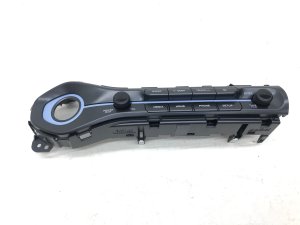
- Veloster N Specificity: This part is unique to the Veloster N model. The easiest way to identify it is by the light blue accents and the dedicated 'N' button for drive modes. A switch from a standard Veloster will not fit or function correctly.
- Check for Options: This switch is for Veloster N models that came standard with push-button start but without the optional factory navigation system.
- Physical Inspection: Look at high-resolution photos. Check for deep scratches on the piano black surfaces and ensure the white lettering on the buttons is not worn away. Ask the seller to confirm that all buttons have a solid, tactile 'click' and are not sticky.
Cost Comparison
Prices can vary based on condition and supplier, but here is a general breakdown of what to expect:
| Part Type | Estimated Price Range |
|---|---|
| New OEM | $320 - $460 |
| Used OEM | $75 - $150 |
| New Aftermarket | Not Available |
| Shop Labor Cost | $100 - $180 |
Frequently Asked Questions (FAQ)
Does this part need to be programmed by a dealer?
No. The control switch panel itself is a plug-and-play component and does not require any programming or calibration. You can install it yourself without needing a trip to the dealer.
Will replacing this switch fix my blank or frozen infotainment screen?
It is highly unlikely. A blank, frozen, or glitching screen is almost always a problem with the main infotainment head unit (the computer) or its software. Before replacing any hardware for a screen issue, you should ask a Hyundai dealer to perform any available software updates.
Will this switch fit my 2020 Veloster Turbo or base model?
No. This part is specifically for the Veloster N. It has a unique shape and includes the 'N' mode button which is not present on other trims. You must source the correct part for your specific trim level.
Can I upgrade my 2019 Veloster N to the newer 2021+ infotainment graphics by just changing this switch?
No. The graphical updates are part of the software and, in some cases, different internal hardware in the main infotainment unit itself. This switch only provides the button inputs and has no effect on the system's software or display graphics.
Technical Specifications
OEM Part Numbers: 96540-J3000-MPP 96540J3000MPP
Also known as: Keyboard Assembly. Includes buttons for Radio, Media, Seek/Track, Setup, N Mode, and engine Start/Stop, plus Volume and Tune knobs.
We Have This Part in Stock


The information in this article is provided for general reference and educational purposes only. Vehicle specifications, procedures, and part compatibility can vary by production date, trim level, and region. Always consult your vehicle's factory service manual and verify part numbers before purchasing or performing repairs. Safety-critical components such as airbags, seat belts, and braking systems should be installed by a qualified professional.
- Hyundai Veloster: