

2021-2025 BMW M3 & M4 iDrive Controller: Failure Symptoms, Replacement, and Trim Level Compatibility
This guide covers common iDrive controller problems, part number variations for Competition models, and whether programming is required after replacement.
- The #1 rule is to match the part number from your original controller exactly to ensure compatibility and avoid coding issues.
- A like-for-like replacement is plug-and-play for functionality, but will store a 'shadow code' that requires specialist tools to clear.
- The 'Competition' vs. 'non-Competition' difference is mainly about materials (optional ceramic vs. standard plastic), not core function.
- System-wide issues like screen reboots or freezing are almost never caused by the controller; look to the head unit or software first.
Symptoms of a Failing iDrive Controller
When the iDrive controller begins to fail, the symptoms are usually direct and related to your physical inputs. It's important to distinguish between a faulty controller and a problem with the iDrive head unit or software, which typically causes system-wide issues.
- Unresponsive Controls: The most common symptom is when the rotary knob spins freely but doesn't move the cursor on the screen, or when pressing the knob down does not select an item. Likewise, the shortcut buttons (MEDIA, NAV, HOME, etc.) may stop responding when pressed.
- Intermittent Functionality: The controller might work correctly when the car is cold but become unresponsive as the interior warms up. This can point to failing electronic components or cracked solder joints inside the unit.
- Sticky or Physically Broken Buttons: Spilled drinks or simple wear and tear can cause buttons to become sticky, hard to press, or physically break. While cleaning is possible, it requires careful disassembly which can lead to further damage.
- Incorrect or "Ghost" Inputs: The controller might send incorrect signals, causing the on-screen selection to jump around unpredictably or select the wrong item.
Pro Tip: If your entire iDrive screen is black, freezing, or constantly rebooting, the problem is more likely the head unit, a software glitch, or a wiring issue—not the controller itself. Before replacing any hardware, try a soft reset by pressing and holding the volume button for 30-70 seconds until the screen turns off and reboots.
Known Issues, TSBs, and Recalls
As of mid-2024, there are no specific recalls or Technical Service Bulletins (TSBs) from BMW or the NHTSA for a widespread failure of the iDrive controller switch itself on the 2021-2025 BMW M3 and M4.
However, owners have reported related issues. A notable problem involves the iDrive screen randomly going black and rebooting. A BMW TSB addresses this, identifying the cause as a faulty wiring harness behind the main display, not the controller in the center console. Other issues like system freezes are typically resolved with a software update from a dealer or by performing a system reset.
Variant Differences: Standard vs. Competition & Ceramic Controls
One of the most confusing aspects for buyers is the compatibility warning often seen on part listings, such as "without competition". This distinction is primarily about the material and finish of the controller, not a fundamental difference in electronic function.
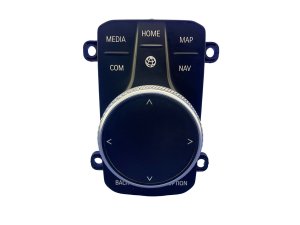
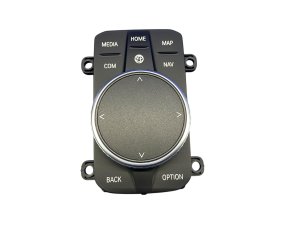
- Standard Controller: The base controller is made of a high-quality black plastic with a matte or slightly textured finish on the knob.
- Competition / Optional Ceramic Controller: Competition models and other high-trim vehicles could be equipped with "Ceramic Controls" (BMW option code S4U1A). These controllers have a glossy, dark ceramic finish on the iDrive knob and often on the shifter and volume knob as well. They feel heavier and more premium to the touch. Some models may also feature a "Crafted Clarity" glass controller, which is a similar premium option.
While the underlying electronic function is the same, the part numbers differ. It is critical to match your vehicle's original part to ensure a perfect fit and finish. While a ceramic controller can often be retrofitted to a car with a standard controller, it may require coding to avoid fault codes.
Warning: The single most important step before buying a used controller is to verify the part number on your original unit. The button layout and internal electronics must match.
Programming, Coding, and Installation
This is the number one question for buyers of any modern BMW electronic module.
Does a replacement iDrive controller need to be programmed?
For a direct, like-for-like replacement using a part with the exact same part number, the answer is generally no. The controller should be plug-and-play, and all buttons and the rotary knob will function immediately.
However, the vehicle's system will likely detect that a new component has been installed and store a non-critical "shadow code" in the iDrive module's memory. This code is not visible on the dashboard and does not affect performance, but it will show up during a diagnostic scan. Removing this code requires a programming session by a dealer or an independent specialist using software like E-Sys.
If you are upgrading from a standard controller to a ceramic or touch-enabled version, coding is highly recommended to enable all features and prevent compatibility errors.
Who can program the controller?
- BMW Dealer: A dealer can perform the programming. However, they will often update the vehicle's entire software suite (i-Step) as part of the process, which may not be desirable for all owners.
- Independent Specialist / Remote Coder: Many independent shops and remote coding specialists can program just the specific module (known as the ZBE module) to clear the fault code without updating the entire car. This is often a faster and more targeted solution.
- DIY: Advanced users with an ENET cable and software like E-Sys can perform the coding themselves, but this carries the risk of causing issues if done incorrectly.
Buying a Used Infotainment Display Control Switch
A used OEM controller is an excellent, cost-effective solution for a faulty switch. Because aftermarket replacements are not common, a recycled original part is often the best option outside of a new dealer part. Here’s what to look for:
- Verify the Part Number: Before you buy, you must remove your center console trim to read the part number on the sticker of your original controller. This is the only way to guarantee compatibility. Part numbers like 5A371A9, 65825A32A39, and 65825A371A9 are common for standard controllers.
- Physical Inspection: Check photos carefully for deep scratches, cracks, or signs of liquid damage. Ask the seller to confirm that all buttons click properly and that the rotary knob turns and presses down without sticking.
- Check for Trim Level: Ask the seller if the part came from a standard or Competition model. This will help you know if you're getting a standard plastic or an upgraded ceramic controller.
- Why Used OEM is Smart: For an electronic interface like this, OEM engineering ensures the correct tactile feedback, button response, and electrical communication. A used OEM part provides this quality at a significant discount compared to a new unit.
Replacement Cost & Procedure
Replacing the iDrive controller is a feasible DIY project for those comfortable with removing interior trim panels.
Cost Breakdown
| Part / Service | Estimated Cost |
|---|---|
| New OEM Controller | $450 - $600 |
| Used OEM Controller | $150 - $300 |
| New Aftermarket | Not Available |
| Shop Labor | $100 - $200 |
Replacement Overview
The basic process involves removing the center console trim to access the controller. The job typically takes 30-60 minutes.
- Disconnect the Battery (Recommended): To be safe, disconnect the negative battery terminal.
- Protect Surrounding Trim: Use masking tape on the edges of the console to prevent scratches.
- Pry Up the Center Console Trim: Using plastic trim removal tools, carefully start prying the main center console trim piece up from the rear edge, near the armrest.
- Work Your Way Forward: Slowly release the clips holding the trim in place. The front clips can be particularly tight and require patience.
- Disconnect and Remove: Once the trim is loose, lift it enough to access the electrical connector on the underside of the iDrive controller. Unplug it, and the trim piece with the controller attached can be removed from the vehicle.
- Swap the Controller: The controller is held into the trim piece with several small Torx screws. Remove them, swap the new controller in, and reassemble.
Frequently Asked Questions (FAQ)
Do I have to program a used iDrive controller?
No, if you replace your old controller with a used one that has the exact same part number, it should work immediately without programming. However, a fault code will be stored in the car's computer, which can only be cleared by a dealer or specialist with coding tools.
What's the real difference between the 'Competition' and 'non-Competition' controller?
The main difference is the material. Non-Competition models typically have a standard black plastic controller. Competition models were often equipped with optional, premium-feel ceramic controls, which have a glossy black finish and a different part number. Functionally, they are interchangeable, but swapping types may require coding to avoid error codes.
My iDrive screen keeps rebooting. Is the controller bad?
It is very unlikely. System-wide problems like freezing, blank screens, or constant rebooting are almost always caused by the iDrive head unit, a software bug, or other wiring issues. A faulty controller typically only affects the functions of the knob and its buttons.
Can I just clean my sticky iDrive buttons instead of replacing the unit?
It is possible, but it requires carefully disassembling the controller unit. The internal components, including small ribbon cables and plastic clips, are fragile and can be easily broken. If the spill was significant, replacement is often a safer and more reliable solution.
Technical Specifications
OEM Part Numbers: 65825A371A9 65825A32A39 5A371A9 65825A371B3
The controller connects to the vehicle's CAN bus system to communicate with the iDrive head unit. Variants include standard plastic, optional ceramic, and optional 'Crafted Clarity' glass finishes.
We Have This Part in Stock



The information in this article is provided for general reference and educational purposes only. Vehicle specifications, procedures, and part compatibility can vary by production date, trim level, and region. Always consult your vehicle's factory service manual and verify part numbers before purchasing or performing repairs. Safety-critical components such as airbags, seat belts, and braking systems should be installed by a qualified professional.
- BMW M3:
- BMW M4:
- 🛍️ Shop This Part
- Symptoms of a Failing iDrive Controller
- Known Issues, TSBs, and Recalls
- Variant Differences: Standard vs. Competition & Ceramic Controls
- Programming, Coding, and Installation
- Does a replacement iDrive controller need to be programmed?
- Who can program the controller?
- Buying a Used Infotainment Display Control Switch
- Replacement Cost & Procedure
- Cost Breakdown
- Replacement Overview
- Frequently Asked Questions (FAQ)
- 🎟️ Get 5% Off