

2019-2021 Mazda CX-5 Infotainment Controller: Fixing Unresponsive Knobs and System Freezes
This guide covers the diagnosis, replacement, and compatibility of the Infotainment Display Control Module, also known as the Commander Switch, for the 2019-2021 Mazda CX-5 with the 8-inch screen.
- This control module is only compatible with 2019-2021 Mazda CX-5 models that have the 8-inch infotainment screen.
- The latest and most reliable OEM part number is KN3L-66-CM0C, which replaces older versions.
- While you can physically install the part yourself, programming by a Mazda dealer is often required for full functionality.
- Before replacing the module for rebooting issues, first try a system reset and remove the navigation SD card, as these are more common causes.
Symptoms of a Failing Infotainment Control Module

When the infotainment controller begins to fail, it can cause a range of frustrating issues. While some problems like a system reboot can have multiple causes, symptoms directly related to the physical controls are a strong indicator that the module itself is the culprit.
- Unresponsive Buttons or Knob: The most common failure is when one or more buttons (Home, Nav, Music) or the main rotary knob stop working. You might press a button and get no response, or turning the knob doesn't scroll through menus.
- Sticky or Stuck Buttons: Due to its location near the cupholders, liquid spills are a frequent cause of failure. Sugar from drinks can make the buttons sticky, hard to press, or completely seize up.
- Erratic Scrolling: Instead of smoothly scrolling through a list, a failing knob might cause the on-screen selection to jump back and forth between two items.
- System Freezing or Crashing: While less common, a malfunctioning controller can send erratic signals that cause the entire Mazda Connect system to freeze or become unresponsive.
- Infotainment System Reboots: A continuous reboot or "boot loop" can sometimes be traced back to a faulty controller, although it's more often caused by software glitches or a corrupted navigation SD card. Before replacing the controller, it's wise to first try removing the SD card to see if the problem resolves.
Known Issues, TSBs, and Recalls

As of mid-2024, there are no active recalls from the National Highway Traffic Safety Administration (NHTSA) for the infotainment control module itself on the 2019-2021 Mazda CX-5. However, it's important to be aware of related issues and software updates.
Software Updates vs. Hardware Failure
Mazda has released several Technical Service Bulletins (TSBs) to address software-related infotainment problems, such as unexpected reboots, frozen screens, and issues with SiriusXM. TSB SSKE3A (and its updates) specifically mentions updating the Mazda Connect software to version 74.00.230 or later to fix many of these glitches. Before assuming your control module is bad, it's recommended to have a dealer check if your vehicle has the latest software, as this is a less expensive potential fix.
Distinguishing from "Ghost Touch"
Many Mazda owners report issues with "ghost touch," where the screen acts as if it's being touched randomly. This is a separate issue related to a failing touchscreen digitizer, not the commander control module. Mazda has a TSB (09-003/22) that addresses this screen-specific problem. If your issues happen without you touching the commander knob, the screen is the more likely culprit.
Pro Tip: Before replacing any hardware, perform a soft reset of the infotainment system. Press and hold the Mute, Nav, and Back buttons simultaneously for about 10 seconds until the screen reboots. This can often clear temporary software bugs that mimic hardware failure.
Buying a Used Infotainment Display Control Module

A used OEM controller is often an excellent, cost-effective solution. Since aftermarket versions are not widely available for this part, a reliable used unit provides the same factory performance and feel as a new one. Here’s what to look for:
- Verify Compatibility: This is the most critical step. This controller is ONLY for 2019-2021 Mazda CX-5 models equipped with the 8.00-inch infotainment screen. It will not work with other screen sizes or different Mazda models.
- Check the Part Number: The primary OEM part number is KN3L-66-CM0C. This is the latest version and supersedes older parts ending in 'B' or with no suffix (KN3L-66-CM0, KN3L-66-CM0B). If possible, always purchase the newest 'C' revision for the most updated hardware.
- Physical Inspection: When buying a used module, inspect it carefully for signs of liquid damage. Look for sticky residue around the buttons or corrosion on the electronic connector pins. Test the knob to ensure it rotates smoothly with a distinct click for each detent. Check that all buttons press and return without sticking.
- Source and Warranty: Purchase from a reputable seller that offers a warranty. This protects you in case the unit is defective.
Programming and Installation

Warning: While the physical installation is straightforward for a DIYer, this module may require programming by a Mazda dealer or a qualified technician with access to the Mazda Diagnostic and Repair Software (MDARS) to ensure full functionality.
Failure to program the module may result in some features not working correctly or communication errors with other vehicle systems. While some basic functions might work immediately, programming is often necessary to integrate the new module with your vehicle's specific configuration.
DIY Replacement Steps
Physically replacing the commander switch is a relatively simple process that involves removing center console trim pieces.
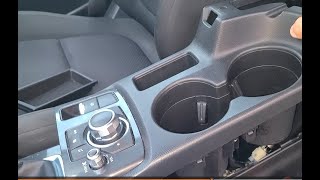
🎬 Watch: How to remove the center console and media switch- Begin by lifting the center armrest.
- Using plastic trim removal tools, carefully pry up the side panels of the center console.
- Once the side panels are loose, the main switch panel that holds the commander module can be unclipped and lifted up.
- Disconnect the electrical harness connected to the bottom of the switch assembly.
- With the panel removed, flip it over and unscrew the four Phillips head screws holding the commander module in place.
- Install the new module and reassemble everything in reverse order.
Cost Comparison
Prices can vary based on location and supplier. The following is an estimate of what you can expect to pay.
| Part Type | Estimated Cost |
|---|---|
| New OEM | $430 - $510 |
| New Aftermarket | Not commonly available |
| Used OEM | $100 - $250 |
| Shop Labor (Replacement & Programming) | $150 - $300 |
Frequently Asked Questions (FAQ)
Will replacing this module fix my infotainment screen from constantly rebooting?
It might, but it's not the most common cause. Rebooting issues are frequently linked to software glitches or a corrupted navigation SD card. Try performing a soft reset and removing the SD card before replacing the control module.
Do I have to take my CX-5 to a Mazda dealer for programming?
It is highly recommended. While the part may have some basic functionality after a plug-and-play installation, full integration with all vehicle systems typically requires programming with Mazda's proprietary MDARS software, which is most reliably done at a dealership.
What's the difference between part numbers KN3L-66-CM0B and KN3L-66-CM0C?
KN3L-66-CM0C is a newer, updated version of the part that supersedes the older KN3L-66-CM0B. When buying a replacement, you should always try to get the 'C' version as it may contain internal revisions to improve reliability.
Can I clean my sticky buttons instead of replacing the whole unit?
Sometimes, yes. If the issue is from a minor spill, you can try spraying electrical contact cleaner into the gaps around the affected buttons and pressing them repeatedly to work the cleaner in. For a more thorough cleaning, you can disassemble the unit, but this is more complex and risks breaking plastic tabs. If the internal electronics are damaged by the liquid, cleaning will not solve the problem.
Helpful Videos
Technical Specifications
OEM Part Numbers: KN3L-66-CM0C KN3L-66-CM0B KN3L-66-CM0 KN3L66CM0
Fits vehicles with 8-inch display. Also known as Commander Switch or Radio Control Switch.
We Have This Part in Stock



The information in this article is provided for general reference and educational purposes only. Vehicle specifications, procedures, and part compatibility can vary by production date, trim level, and region. Always consult your vehicle's factory service manual and verify part numbers before purchasing or performing repairs. Safety-critical components such as airbags, seat belts, and braking systems should be installed by a qualified professional.
- Mazda CX-5:
- 🎬 Helpful Videos
- 🛍️ Shop This Part
- Symptoms of a Failing Infotainment Control Module
- Known Issues, TSBs, and Recalls
- Software Updates vs. Hardware Failure
- Distinguishing from "Ghost Touch"
- Buying a Used Infotainment Display Control Module
- Programming and Installation
- DIY Replacement Steps
- Cost Comparison
- Frequently Asked Questions (FAQ)
- 🎟️ Get 5% Off