

2017-2018 Audi A6, S6, S7, RS7 & A7 Infotainment Module: Black Screen & Component Protection Guide
This guide covers the common failures of the MMI control module in 2017-2018 Audi A6, S6, S7, RS7, and A7 models, and explains the critical programming required after replacement.
- A replacement module ALWAYS requires programming by an Audi dealer or specialist to remove 'Component Protection' and restore full functionality.
- Common failure symptoms include a black screen, constant rebooting, and loss of entertainment audio.
- Before replacing the module, perform a soft reset by holding the volume knob for 15 seconds, as this can fix software glitches.
- A used OEM module is a cost-effective option, but you must factor in the additional cost of professional programming.
- If your screen is black but you still hear radio audio, the problem is likely the screen's internal wiring, not the control module.
Symptoms of a Failing Infotainment Control Module
When the MMI control module begins to fail in a 2017-2018 Audi A6, S6, S7, RS7, or A7, the symptoms are usually obvious and disruptive. Because this module is the hub for the entire system, its failure can take down multiple functions at once.
- Black or Blank Screen: The most common symptom is a screen that remains black and does not turn on or retract. Sometimes it may flicker or turn on briefly before going dark.
- Constant Rebooting: The MMI system may get stuck in a boot loop, where the Audi logo appears on the screen, disappears, and then reappears repeatedly without ever fully starting.
- Unresponsive Controls: The MMI control knob, surrounding buttons, and steering wheel controls may become completely unresponsive, preventing you from navigating menus or changing settings.
- No Audio from Entertainment: You may lose all sound from the radio, SD cards, or Bluetooth media. In many cases, audio for navigation guidance and telephone calls may still work, as they are handled differently by the system.
Initial Diagnostic Steps
Before assuming the module is dead, perform these simple resets. They can often resolve temporary software glitches.
- MMI System Reset: Press and hold the MMI control knob (the volume button) for about 10-15 seconds until the screen goes black and the system reboots. This is a soft reset and is the first thing you should always try.
- Disconnect External Devices: Unplug all USB drives, phones, and aftermarket CarPlay/Android Auto adapters. A faulty or incompatible device can sometimes cause the MMI system to freeze or get stuck in a boot loop.
- Check Fuses: A blown fuse for the MMI system can cause it to lose power completely. Check the fuse panel (locations can be found in your owner's manual) for any fuses related to the infotainment or MMI system.
Pro Tip: If you have a black screen but can still hear the radio, the problem might not be the control module. The retractable screens on these models are known to have issues with the internal power and data cable, which can break from the repeated open/close cycles.
CRITICAL: Component Protection and Programming
This is the single most important factor to understand when replacing the MMI control module in these Audis. You cannot simply swap the part and expect it to work.
All 2017-2018 A6, S6, S7, RS7, and A7 models are equipped with an anti-theft system called Component Protection (CP). This system electronically links the MMI control module to your vehicle's unique VIN. When you install a different module (either new or used), the Component Protection feature will activate.
When Component Protection is active:
- A message may appear on the MMI display.
- Most audio functions (Radio, Media) will be muted.
- Other features may be limited.
To remove Component Protection, the replacement module must be 'adapted' or 'married' to your vehicle. This process requires an online connection to Audi's servers using their proprietary diagnostic tool, ODIS. This means the programming must be performed by an Audi dealership or a qualified independent specialist shop that has a legitimate subscription to Audi's online system. The average DIY mechanic or local shop without this specific equipment cannot complete the job.
Buying a Used Infotainment Control Module
A used OEM module is a great way to save a significant amount of money, but you must buy wisely and be prepared for the required programming.
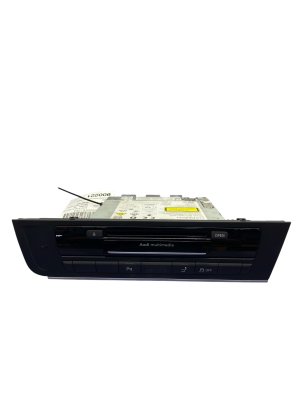
- Verify the Part Number: Match the part number exactly. The primary numbers for this range are 4G1035025G and 4G1035027G. The '027' variant is often associated with vehicles equipped with the Bang & Olufsen premium audio system. Using the wrong hardware version can cause compatibility issues.
- Inspect for Damage: When you receive the part, check for any signs of physical damage, especially to the connectors. Avoid any units with signs of water intrusion or corrosion.
- Factor in Programming Costs: Remember that the price of the used part is not the final cost. You must budget for 1-2 hours of labor at a dealership or specialist shop for Component Protection removal. Call ahead to get a quote for this specific service.
- Why Used OEM is a Good Choice: Unlike cheap aftermarket electronics, a used genuine Audi module is designed to integrate perfectly with your vehicle's systems once programmed. It has the correct hardware and firmware to work with all of your car's specific options. Repairing your original unit is also a good option, as it avoids the Component Protection issue entirely.
Warning: Do not purchase a used module from a seller who cannot guarantee it is a legitimate, non-stolen part. An Audi dealer may refuse to program a module if they suspect it is from a stolen vehicle.
Replacement Overview
The physical replacement of the MMI control module is relatively easy for a DIYer. The module is located inside the glove box.
- Open the glove box.
- Use radio removal keys (available online) to slide into the slots on the face of the MMI unit. This will release the locking tabs.
- Carefully slide the module out of its housing.
- Disconnect the large main connector (Quadlock) and the other smaller connectors from the back of the unit. Pay attention to the locking tabs on each connector to avoid damage.
- Installation is the reverse of removal. Slide the new unit in until it clicks, after connecting all wiring.
Remember, after physical installation, the car is drivable, but the MMI system will be in Component Protection mode until it is professionally programmed.
Cost Comparison
The cost to fix a failed MMI module can vary dramatically depending on the route you take. Prices are estimates and can change based on location and supplier.
| Repair Option | Estimated Part Cost | Estimated Labor/Programming Cost | Total Estimated Cost |
|---|---|---|---|
| New OEM (Dealer) | $2,500 - $3,500+ | Included | $2,500 - $3,500+ |
| Used OEM | $125 - $350 | $200 - $400 | $325 - $750 |
| Remanufactured (Repair & Return) | $400 - $600 | $0 (Plug-and-Play) | $400 - $600 |
| Shop Labor Only (Install & Program) | N/A | $300 - $550 | $300 - $550 |
Frequently Asked Questions (FAQ)
Does a replacement MMI module absolutely have to be programmed?
Yes. Due to Audi's Component Protection anti-theft system, any replacement module—new or used—must be electronically programmed to your car's VIN by a dealer or a qualified specialist with online access to Audi's servers. Without this step, most audio and media functions will be disabled.
Can I program the module myself with a tool like VCDS?
No. Standard diagnostic tools like VCDS can perform coding and adaptations, but they cannot remove Component Protection. This specific task requires a security connection to Audi's main servers, which is only possible with dealer-level tools like ODIS.
My screen is black but the radio still plays. Is the MMI module bad?
It's less likely. If you can still hear audio and control volume, the MMI module is likely working. The problem is more likely the screen itself or, most commonly, the flexible ribbon cable that connects to the screen. This cable can wear out and break from the screen retracting, causing a loss of video signal.
Is it better to repair my original module or buy a used one?
Repairing your original module can be an excellent choice. Companies that offer this service fix the internal components and send your exact unit back to you. The main advantage is that since it's your original module, it does not trigger Component Protection, making the re-installation truly plug-and-play with no programming needed. This can save you the time and expense of a dealer visit.
Technical Specifications
OEM Part Numbers: 4G1035025G 4G1035027G
Also known as Audi MMI 3G+ Main Unit or J794 Control Module. Located in the glove compartment. Communicates with other vehicle systems via MOST bus (optical) and CAN bus networks.
We Have This Part in Stock


The information in this article is provided for general reference and educational purposes only. Vehicle specifications, procedures, and part compatibility can vary by production date, trim level, and region. Always consult your vehicle's factory service manual and verify part numbers before purchasing or performing repairs. Safety-critical components such as airbags, seat belts, and braking systems should be installed by a qualified professional.
- Audi A6:
- Audi S6:
- Audi S7:
- Audi RS7:
- Audi A7: