

2022-2023 Acura TLX Infotainment Module: Blank Screens, Reboots, and Type S Compatibility
This guide covers common infotainment system glitches, a critical part number warning for Type S owners, and what to know before buying a replacement display module.
- Many infotainment problems (blank screen, freezing) are software glitches that can be fixed with a system reboot.
- Acura has a warranty extension (24-046) for issues involving a blank screen and popping audio; check with a dealer first.
- The correct part is 39540-TGZ-A23, which fits Type S models ONLY, and specifically excludes those with the High Performance Tire Option.
- A replacement module, especially a used one, will require programming by a dealer or specialist to match your car's VIN and options.
Symptoms of a Failing or Glitching Infotainment System
Problems with the infotainment system in the 2022-2023 Acura TLX are common, but they don't always mean the control module has failed. Many issues are software-related and can be temporarily fixed with a system reboot.
- Blank or Black Screen: The screen fails to turn on at startup or goes black intermittently while driving. In some cases, audio may still play. This is one of the most frequently reported issues.
- System Freezing or Unresponsive: The display is stuck on a single screen, and inputs from the touchpad do not register.
- Constant Rebooting: The system continuously restarts on its own, often showing the Acura logo repeatedly.
- Apple CarPlay / Android Auto Issues: The system fails to recognize a connected phone, frequently disconnects, or freezes when using CarPlay or Android Auto.
- Popping or Crackling from Speakers: Audio is distorted by popping or crackling sounds, which may occur alongside the screen going blank.
- System Won't Turn Off: The screen's backlight remains on even after the car is turned off and locked, potentially draining the battery.
First Step: Try a System Reboot
Before assuming the hardware is bad, a system reboot can often resolve temporary software glitches. There are two main ways to do this:
- Soft Reboot (While Driving): Press and hold the three buttons at the top of the touchpad (Back, Home, and Card) simultaneously for a few seconds. This will bring up a dealer diagnostic screen. Select 'Detail Information & Setting', then 'Hardware Auto Detect'. Without changing any settings, press 'Apply' and confirm the restart. This reboots the system without clearing your settings.
- Hard Reboot: The simplest way to perform a hard reboot is to turn the car off, open and close the driver's door, and then restart the car. For a more thorough reset, you can disconnect the negative terminal of the vehicle's battery for about 10 minutes. This will force a complete power cycle of all vehicle electronics.
Known Issues, TSBs, and Warranty Extensions
Acura has acknowledged several issues related to the infotainment system and its components through Technical Service Bulletins (TSBs) and warranty extensions.
TSB 23-030 / Warranty Extension 24-046: Popping/Crackling Speakers and Blank Display
Acura initially released TSB 23-030 to address complaints of popping/crackling audio and the display going blank on 2021-2023 TLX models. This bulletin was later superseded by Warranty Extension 24-046, which extends the warranty coverage for this specific issue. The problem is often traced to faulty FAKRA service cables connecting the components. If your vehicle exhibits these exact symptoms, contact an Acura dealer to check for eligibility under this warranty extension, as the repair may be covered at no cost.
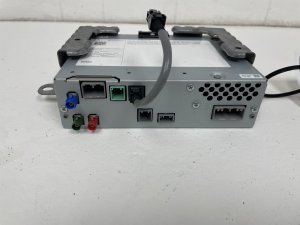
Warning: The Infotainment Display Control Module is part number 39540-TGZ-A23. This unit is specifically for Acura TLX Type S models. Crucially, it will NOT fit Type S vehicles that were factory-equipped with the High Performance Tire Option. You must verify the part number and vehicle options before purchasing a replacement.
Buying a Used 2022-2023 TLX Infotainment Module
If a system reboot or TSB-related repair doesn't solve your problem, you may need to replace the control module. Buying a used OEM unit can offer significant savings over a new part from the dealer.
- Verify the Part Number: The only verified OEM part number for the 2022-2023 TLX Type S is 39540-TGZ-A23 (or 39540TGZA23). Do not purchase a module with a different part number, as it will not be compatible.
- Heed the Compatibility Warning: Double-check that the donor vehicle was a Type S model and did not have the High Performance Tire Option. This is a specific and critical compatibility requirement. The reason for this is likely due to different software needed to support features bundled with that option.
- Physical Inspection: When buying a used module, inspect it for any signs of physical damage, especially to the connectors. Ensure all connector pins are straight and free of corrosion.
- Source from a Reputable Seller: Purchase from a dismantler or seller who offers a warranty and can provide information about the donor vehicle. A 1-year warranty is a good sign of a quality part.
Programming and Installation Requirements
Replacing electronic modules in modern vehicles is rarely a simple plug-and-play process.
A dealer visit or a visit to a specialized shop is almost certainly required after installing a used infotainment module. While new Honda/Acura modules often come pre-programmed, a used unit is programmed to the VIN and option list of its original vehicle. To function correctly in a new vehicle, it needs to be initialized and configured using Acura's diagnostic software (the i-HDS). This procedure ensures that features like navigation, the correct trim-level splash screen, and integration with other vehicle systems work properly. An independent shop with an up-to-date J2534 pass-thru device and a subscription to Acura's software may be able to perform the programming, but you should confirm this with them beforehand.
Cost Comparison: New vs. Used
| Part Type | Estimated Cost |
|---|---|
| New OEM (Dealer) | $1,880 - $2,825 |
| Used OEM (Recycled) | $350 - $500 |
| Shop Labor (Installation & Programming) | $200 - $400 |
Frequently Asked Questions (FAQ)
Does a used infotainment module need to be programmed?
Yes, it is highly likely that a used module will need to be programmed or initialized by an Acura dealer or a qualified independent shop. The module needs to be configured to your vehicle's specific VIN and options to ensure all features work correctly.
My screen is black. Do I need to replace the whole unit?
Not necessarily. First, try a soft reboot and then a hard reboot by disconnecting the battery. Also, check with an Acura dealer to see if your vehicle is covered by Warranty Extension 24-046, which addresses blank screens caused by faulty wiring. Hardware replacement should be the last resort.
Can I install this module myself?
While the physical installation may be possible for an experienced DIY mechanic, the unit will not function correctly without post-installation programming. You will still need to take the vehicle to a dealer or specialized shop to have the module configured with the proper software.
Why does the 'High Performance Tire Option' matter for compatibility?
The exact reason is not publicly documented, but it is likely because the High Performance Tire Option is bundled with other vehicle features or software calibrations. The infotainment module's software may be different to support these unique features, making the modules incompatible. It is critical to buy the correct part number for your specific vehicle configuration.
Technical Specifications
OEM Part Numbers: 39540-TGZ-A23 39540TGZA23
Controls 10.2-inch center display, integrates with True Touchpad Interface.
We Have This Part in Stock

The information in this article is provided for general reference and educational purposes only. Vehicle specifications, procedures, and part compatibility can vary by production date, trim level, and region. Always consult your vehicle's factory service manual and verify part numbers before purchasing or performing repairs. Safety-critical components such as airbags, seat belts, and braking systems should be installed by a qualified professional.
- Acura TLX:
- 🛍️ Shop This Part
- Symptoms of a Failing or Glitching Infotainment System
- First Step: Try a System Reboot
- Known Issues, TSBs, and Warranty Extensions
- TSB 23-030 / Warranty Extension 24-046: Popping/Crackling Speakers and Blank Display
- Buying a Used 2022-2023 TLX Infotainment Module
- Programming and Installation Requirements
- Cost Comparison: New vs. Used
- Frequently Asked Questions (FAQ)
- 🎟️ Get 5% Off