

2018-2021 Camaro Infotainment Display: Fixing Black Screens, Bubbling, and Programming a Used Unit
This guide covers the common failures of the 8-inch MyLink display, including screen delamination and HMI module failure, and explains the critical programming steps required for replacement.
- A used HMI module MUST be programmed to your car's VIN to function; it is not plug-and-play due to anti-theft locks.
- If the screen is black but audio still works, the problem is the screen itself, not the more expensive HMI module.
- Screen bubbling and delamination are common hardware failures caused by heat; this can be fixed by replacing only the screen/digitizer without programming.
- Verify your car has the IO6 RPO code (8-inch screen with navigation) by checking the sticker in the glove box before buying this part.
Symptoms of a Failing Infotainment Display
Problems with the 2018-2021 Camaro's 8-inch infotainment system can be traced to several different components. Failures typically fall into three categories: the screen itself, the HMI module (the computer behind the screen), or software glitches. Pinpointing the symptom is the first step to a correct diagnosis.
1. Screen Delamination: Bubbling or 'Spider Webs'
One of the most common physical failures is screen delamination. The factory screen uses a gel-based adhesive to bond the outer touch layer (digitizer) to the LCD panel. Over time, heat and UV exposure cause this gel to break down. This leads to visible defects:
- Bubbles forming around the edges of the screen.
- A cloudy, milky, or hazy appearance that spreads across the display.
- Cracks that look like spider webs under the glass surface.
- In some cases, the screen may become sticky to the touch or leak an oily residue.
Initially, this is a cosmetic issue, but as it worsens, it can lead to unresponsive areas of the touchscreen or 'ghost touches,' where the system acts like it's being pressed on its own.
2. Black or Blank Screen
A screen that goes black is a very common complaint, but the cause depends on other symptoms. The key is to check if you still have audio.
- Black Screen WITH Audio: If the screen is black but you can still hear the radio, Bluetooth audio, or system alerts, the HMI module is likely working correctly. The problem is with the screen assembly itself (the LCD or its backlight).
- Black Screen with NO Audio: If both the display and all sound are gone, the HMI module is the most likely culprit. It has likely failed to boot up. This can also be caused by a wiring issue or a problem on the vehicle's data network.
In some cases, a faint image of Apple CarPlay might be visible on a black screen, or the screen may flash to full brightness for a second when shifting gears before going black again. These symptoms also point toward a hardware failure in the screen or HMI module.
3. HMI Module Failure
The HMI module is the computer for the infotainment system. When it fails, the entire system goes down. Telltale signs of HMI failure include:
- "Waiting for Update Media" Message: This message on the screen is a definitive sign that the HMI module's internal memory has failed.
- System Freezing or Random Reboots: The display may freeze, become unresponsive to touch, and then restart on its own.
- Whirring Fan Noise: A constant whirring or fan sound from behind the dashboard, even when the system appears off, can indicate an overheating and failed HMI module.
- Loss of Functions: Bluetooth, navigation, or Apple CarPlay/Android Auto may disappear or fail to launch.
4. Associated OBD-II Trouble Codes
Infotainment system failures often log communication-related trouble codes, which start with a 'U'. The most common code associated with a dead HMI module is:
- U0184 - Lost Communication With Radio. This code is set when other computers in the car, like the Body Control Module (BCM), can no longer receive a signal from the HMI module, indicating it's offline or has failed.
Other codes like U0159 (Lost Communication With Parking Assist Control Module) may also appear, as the infotainment screen is needed to display park-assist information.
Known Issues, TSBs, and Recalls
As of mid-2026, there are no active recalls specifically for the infotainment display or HMI module on the 2018-2021 Chevrolet Camaro. A recall was issued for some Camaros for a steering wheel emblem that could become a projectile during airbag deployment, but this is unrelated to the infotainment system.
General Motors has issued technical service bulletins (TSBs) for software updates on similar infotainment systems, but these often apply to different RPO codes (like IOS, IOT, or IOU) and may not address the hardware failures common in the IO6 unit. While software glitches can cause freezing or lag, issues like delamination or a completely dead HMI module are hardware problems that a software update cannot fix.
Important: This infotainment display (part number 84229267) is specifically for vehicles originally equipped with the 8-inch touchscreen with factory navigation, designated by the RPO code IO6. You can find your vehicle's RPO codes on the silver Service Parts Identification sticker, which is located in the glove box on the Camaro. Installing this in a car that came with a different system (like the 7-inch IOR or 8-inch IO5 without navigation) will not work without significant additional parts and complex programming.
Buying a Used 2018-2021 Camaro Infotainment Display
Buying a used infotainment display can save you hundreds of dollars, but it's critical to know what you're buying and what's required for installation. This is not a simple plug-and-play part.
1. Programming is NOT Optional
This is the most important factor. GM infotainment HMI modules are VIN-locked for theft prevention. If you install a used HMI module from another Camaro into your car, it will power on to a "Theft Lock" or "Locked" screen, and will be completely unusable. The module MUST be programmed to accept your car's Vehicle Identification Number (VIN).
You have several options for programming:
- Mail-In Programming Service: You can buy a used module and send it to a specialized service. They will program it to your VIN on a test bench and mail it back to you, ready for installation. This service typically costs around $150.
- Pre-Programmed Unit: Some retailers sell used HMI modules that are already programmed to your VIN before they ship it to you. This is often the most straightforward option.
- Independent Repair Shop: A well-equipped independent shop that services GM vehicles can program the module for you. They need a J2534 Pass-Thru device and an active subscription to GM's Service Programming System (SPS2) software.
- DIY Programming: Advanced DIYers can purchase a J2534 device and a short-term subscription to GM's SPS2 software (around $45 for 2 days) to perform the programming themselves. There are also some dedicated DIY programming tools available.
- GM Dealer: A dealer can always perform the programming, but this is usually the most expensive option.
2. What to Inspect on a Used Unit
- Verify the Part Number: Ensure the part is OEM number 84229267. This part number supersedes the older 84131980.
- Check the Screen Condition: Look closely for any signs of delamination (bubbling, cloudiness). Ask the seller for pictures of the screen while it is powered on if possible.
- Inspect Connectors: Check for any bent pins or damage to the plastic connector housings on the back of the unit.
Pro Tip: If your HMI module works but the screen is bubbling, you don't need to replace the whole unit. You can buy a replacement touchscreen and digitizer assembly for around $200. This is a more involved repair that requires disassembling the unit, but it fixes the delamination problem permanently with improved gel-free designs and does NOT require any programming.
Cost Comparison for Replacement
The cost to fix a failing infotainment display varies widely depending on the problem and the solution you choose.
| Part/Service | Estimated Cost | Notes |
|---|---|---|
| New OEM HMI Module (84229267) | $685 - $1,022 | Part only. Still requires programming. |
| Used OEM HMI Module | $250 - $500 | Part only. Requires programming. |
| Aftermarket Screen/Digitizer Only | $199 - $250 | Fixes delamination/bubbling. Does not require programming. |
| Shop Labor (Installation) | $75 - $150 | Estimated 0.5-1.0 hour for physical replacement. |
| Shop Labor (Programming) | $100 - $150 | Typically 1.0 hour of labor for VIN programming. |
| Mail-In Programming Service | ~$150 | A cost-effective option if you are doing the installation yourself. |
Frequently Asked Questions (FAQ)
Do I have to get a used infotainment display programmed?
Yes, absolutely. The Human Machine Interface (HMI) module is VIN-locked as an anti-theft measure. If you install a used module without programming it to your car's VIN, it will display a "Theft Lock" message and will not function.
My screen is black but the radio still plays. What's broken?
This is a classic symptom of screen failure, not HMI module failure. If you can hear audio, it means the HMI 'brain' is working, but the display panel or its connections have failed. You likely only need to replace the screen assembly, not the entire expensive HMI module.
Can I upgrade my 7-inch screen to this 8-inch navigation screen?
This is a complex and expensive conversion. It involves more than just swapping the screen and HMI module. You may need a different radio receiver module, new wiring harnesses, and custom programming. While possible, it is not a simple plug-and-play upgrade and should be undertaken with caution after extensive research.
What is the RPO code IO6 and how do I check if I have it?
RPO stands for Regular Production Option. IO6 is the specific code for the 8-inch MyLink system that includes factory navigation. To check which system your car has, open the glove box and look for a silver sticker with a list of three-character codes. If 'IO6' is on that list, this is the correct part for your vehicle.
Is it difficult to replace the infotainment display myself?
For someone with basic tools and experience working on car interiors, the replacement is very feasible. It involves carefully prying off several trim pieces and removing a few 7mm screws. The entire process can typically be done in under an hour. However, remember that physical installation is only half the battle; the unit will not work until it is programmed.
Technical Specifications
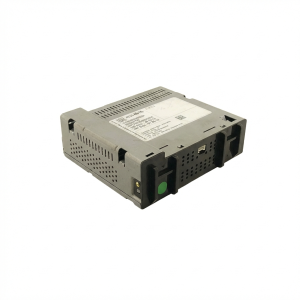
OEM Part Numbers: 84229267 84131980
8-inch diagonal touchscreen, for use with Chevrolet MyLink systems with factory navigation (RPO IO6).
We Have This Part in Stock





The information in this article is provided for general reference and educational purposes only. Vehicle specifications, procedures, and part compatibility can vary by production date, trim level, and region. Always consult your vehicle's factory service manual and verify part numbers before purchasing or performing repairs. Safety-critical components such as airbags, seat belts, and braking systems should be installed by a qualified professional.
- Chevrolet Camaro:
- 🛍️ Shop This Part
- Symptoms of a Failing Infotainment Display
- 1. Screen Delamination: Bubbling or 'Spider Webs'
- 2. Black or Blank Screen
- 3. HMI Module Failure
- 4. Associated OBD-II Trouble Codes
- Known Issues, TSBs, and Recalls
- Buying a Used 2018-2021 Camaro Infotainment Display
- 1. Programming is NOT Optional
- 2. What to Inspect on a Used Unit
- Cost Comparison for Replacement
- Frequently Asked Questions (FAQ)
- 🎟️ Get 5% Off